
Уводзіны
The Logitech K830 Illuminated Living-Room Wireless Keyboard and Touchpad is designed to simplify text entry and entertainment control for your Internet-connected TV or PC. Featuring bright, backlit keys and an integrated touchpad, it offers a convenient and comfortable experience from your couch. This manual provides essential information for setting up, operating, maintaining, and troubleshooting your device.
Што ў скрынцы
- Logitech K830 Illuminated Living-Room Wireless Keyboard
- Logitech Unifying Receiver (USB dongle)
- USB-кабель для зарадкі
Настройка
1. Зарадка клавіятуры
Before initial use, fully charge your Logitech K830 keyboard. Connect the supplied USB charging cable to the micro-USB port on the side of the keyboard and the other end to a USB power source, such as a computer's USB port, a USB wall adapter, or a PlayStation 4 console.
2. Падключэнне прыёмніка Unifying
Locate the Logitech Unifying Receiver (USB dongle) included in the package. Plug this receiver into an available USB port on your Internet-connected TV, PC, or PlayStation 4. The keyboard uses a 2.4 GHz wireless connection via this receiver.
3. Уключэнне / выключэнне харчавання
Slide the power switch located on the side of the keyboard to the 'On' position to begin using the device. Slide it to the 'Off' position to conserve battery life when not in use.
Інструкцыя па эксплуатацыі
Typing and Navigation
The K830 features a standard QWERTY keyboard layout with well-spaced keys for comfortable and efficient typing. Use the keys for text input in search bars, web browsers, and messaging applications.
Убудаваная сэнсарная панэль
The large, responsive touchpad on the right side of the keyboard provides precise cursor control. It supports multi-touch gestures such as swiping, scrolling, and zooming, similar to a laptop touchpad. Заўвага: Touchpad functionality may vary depending on the operating system or application you are using. For example, some PlayStation 4 applications may not fully utilize the touchpad for navigation.
Ключы з падсветкай
The keys are backlit, allowing for easy visibility and typing in dark or dimly lit environments. The backlighting automatically adjusts based on ambient light and illuminates when you touch the keys, dimming after a few seconds of inactivity to conserve battery. You can also manually adjust the brightness levels.
Медыя-ключы
Dedicated media keys (often integrated into the F-keys) provide quick access to volume control, playback functions, and other common media actions.
Сумяшчальнасць з PlayStation 4
The Logitech K830 keyboard is compatible with PlayStation 4 for text input. This is particularly useful for typing messages, entering search queries, and adding descriptions when sharing gameplay videos or screenshots. While native PS4 applications generally support keyboard input, third-party streaming apps like Netflix or Amazon Video may not fully recognize the keyboard for search functions.
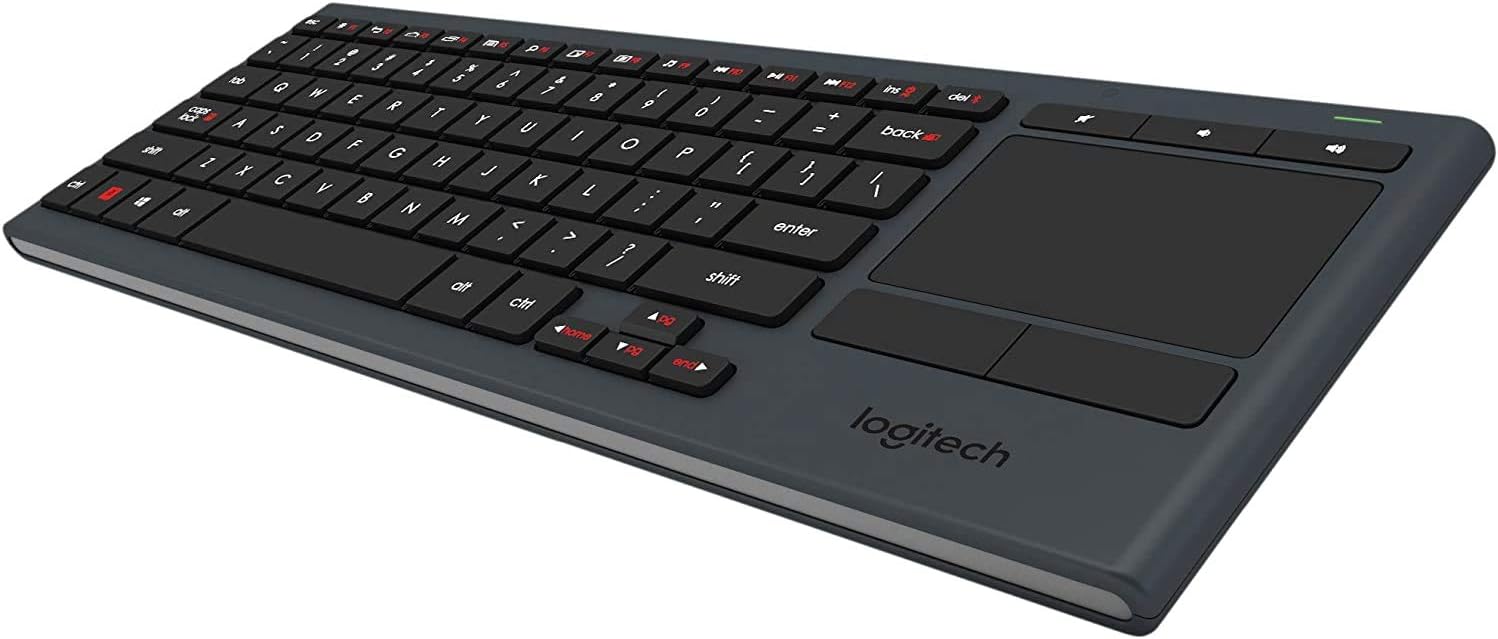
Пад вуглом view клавіятуры Logitech K830, дэманстрацыяasing its compact design, full QWERTY layout, and integrated touchpad on the right side.

A person comfortably holding the Logitech K830 keyboard on their lap, demonstrating its suitability for living room use with an internet-connected TV.
Тэхнічнае абслугоўванне
Чыстка клавіятуры
To clean your keyboard, first ensure it is powered off using the side switch. Use a soft, lint-free cloth, lightly dampened with a screen cleaner or mild cleaning solution. Gently wipe the keys and surfaces. Avoid harsh chemicals or abrasive materials. The keys are designed to be durable and resist falling out during cleaning.
Сыход за батарэяй
The Logitech K830 features a long-lasting rechargeable battery. To maximize battery life, power off the keyboard when not in use. Recharge the keyboard when the battery indicator light signals low power. Charging is quick and convenient via the included USB cable.
Ліквідацыю непаладак
Клавіятура не адказвае
- Ensure the keyboard's power switch is in the 'On' position.
- Verify that the Logitech Unifying Receiver is securely plugged into a working USB port on your device.
- Check the keyboard's battery level and recharge if necessary.
- Try plugging the Unifying Receiver into a different USB port.
Touchpad Not Working or Inconsistent
- Confirm that the application or operating system you are using supports touchpad input.
- Пераканайцеся, што клавіятура цалкам зараджана.
- Clean the touchpad surface to remove any dirt or debris that might interfere with tracking.
Keys Not Illuminating
- Check the keyboard's battery level; low battery can affect backlighting.
- Пераканайцеся, што датчык навакольнага асвятлення не перакрыты.
- Manually adjust the brightness settings to ensure they are not set to the lowest level.
Тэхнічныя характарыстыкі
| Марка | Logitech |
| Назва мадэлі | К830 |
| Нумар мадэлі | 920-006081 |
| Тэхналогія падлучэння | RF Wireless (2.4 GHz) |
| Сумяшчальныя прылады | PC, Internet-Connected TVs, PlayStation 4 |
| Раскладка клавіятуры | QWERTY |
| Колькасць ключоў | 85 |
| Падсвятленне клавіятуры | Single Color, Adjustable Brightness |
| Крыніца харчавання | Працуе ад батарэі (акумулятарная) |
| Матэрыял | Пластыкавыя |
| Вага прадмета | 1.1 фунта |
Гарантыя і падтрымка
Каб атрымаць падрабязную інфармацыю аб гарантыі, тэхнічнай падтрымцы і дадатковыя рэсурсы, наведайце афіцыйны сайт падтрымкі Logitech. webсайт. Там вы можаце знайсці інфармацыю пра рэгістрацыю прадукту, часта задаваныя пытанні і кантактную інфармацыю службы падтрымкі кліентаў.
Афіцыйны прадстаўнік Logitech Webсайт: www.logitech.com