
Важная інфармацыя па бяспецы
ПАПЯРЭДЖАННЕ: This product contains chemicals known to the State of California to cause cancer and reproductive harm. For more information, please visit www.P65Warnings.ca.gov. It is the responsibility of the seller to provide this information to any online or other retailer, and to require them to provide the internet warning as set forth above.
Прадукт скончаныview
The QFX PBX-61120BT is a portable Bluetooth speaker designed for versatile audio playback. It features a 12-inch woofer, multiple input options, and a rechargeable battery for extended use.
Асноўныя характарыстыкі:
- FM radio, USB/SD player, and remote control for diverse playback options.
- 12-inch woofer with two 1/4 inch TRS Microphone inputs for vocal or instrument connection.
- Integrated 36mm pole mount socket for stand mounting (requires a large footprint tripod stand).
- Durable metal grill-covered speaker, handlebar, and wheels for easy transport.
- Rechargeable battery providing approximately 6 hours of playback at half volume.
Кампаненты дынаміка:
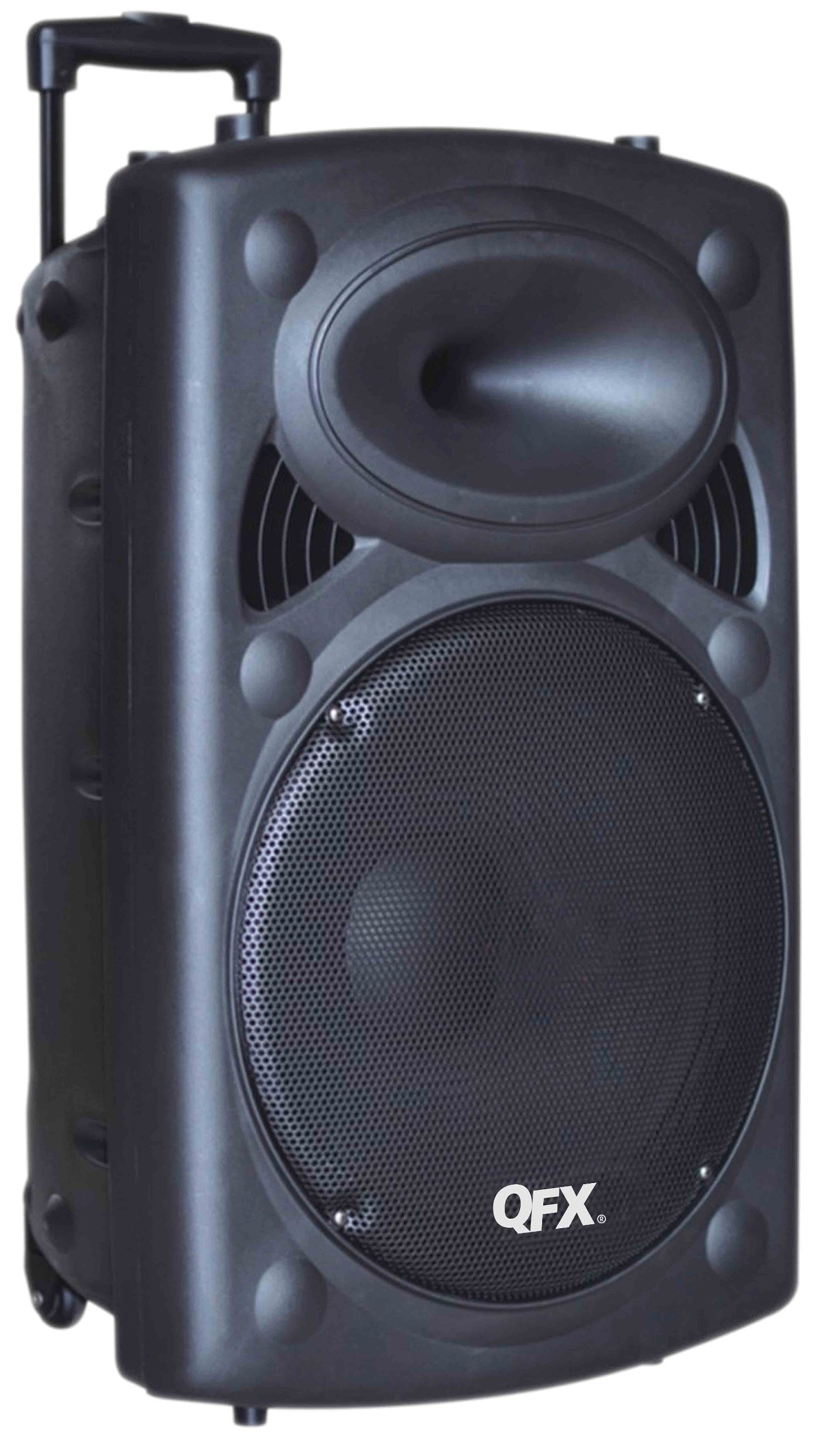
Малюнак 1: Фронт view of the QFX PBX-61120BT Portable Bluetooth Speaker. This image displays the main 12-inch woofer behind a protective metal grill, the control panel typically located on the top or side, and the integrated wheels and extendable handle for portability.
The speaker unit includes a main control panel, typically located on the top or rear, which houses buttons for power, mode selection, volume control, and input ports. The rear or side features an extendable handle and wheels for convenient transportation.
Настройка
- Распакаванне: Асцярожна дастаньце дынамік з упакоўкі. Захавайце ўсе ўпаковачныя матэрыялы для будучай транспарціроўкі або захоўвання.
- Першапачатковая зарадка: Before first use, fully charge the speaker's internal battery. Connect the provided AC power cable to the speaker's power input and then to a standard electrical outlet. The charging indicator light (if present) will typically change color or turn off when fully charged.
- Размяшчэнне: Place the speaker on a stable, flat surface. For optimal sound projection, ensure no obstructions are directly in front of the speaker. If using a pole mount, ensure the tripod stand is rated for the speaker's weight (approximately 27 pounds) and has a sufficiently large footprint for stability.
- Уключэнне: Press and hold the Power button (usually located on the control panel) to turn on the speaker.
Інструкцыя па эксплуатацыі
1. Злучэнне Bluetooth
- Enable Bluetooth Mode: Turn on the speaker. Press the "Mode" button on the control panel until "Bluetooth" or "BT" appears on the display (if available), or a voice prompt indicates Bluetooth mode. The speaker will enter pairing mode, indicated by a flashing Bluetooth indicator light.
- Спалучэнне з прыладай: On your mobile device (smartphone, tablet, etc.), go to the Bluetooth settings and enable Bluetooth. Пошук available devices. You should see "PBX-61120BT" or a similar name in the list. Select it to pair.
- Пацверджанне: Once successfully paired, the speaker will usually emit a confirmation sound, and the Bluetooth indicator light will stop flashing and remain solid.
- Прайграванне: Start playing audio from your device. Adjust volume using both your device's volume controls and the speaker's master volume knob.
Note: A faint hissing sound may be audible when Bluetooth is connected but no music is playing. This is normal and typically disappears once audio playback begins.
2. Прайграванне з USB/SD-карты
- Уставіць медыяфайл: Устаўце флэш-назапашвальнік USB або SD-карту (з сумяшчальным аўдыё files) у адпаведны порт на панэлі кіравання дынамікам.
- Выберыце рэжым: Press the "Mode" button until "USB" or "SD" is selected. The speaker should automatically begin playing audio fileз устаўленага носьбіта.
- элементы кіравання: Use the playback controls (Play/Pause, Next/Previous Track) on the speaker or the remote control to manage your music.
3. Работа FM-радыё
- Выберыце рэжым FM: Press the "Mode" button until "FM" is selected.
- Аўтаматычнае сканаванне: Press and hold the Play/Pause button to initiate an automatic scan for available FM radio stations. The speaker will scan and save stations with strong signals.
- Наладзьце станцыі: Use the Next/Previous Track buttons to navigate through the saved FM stations.
Note: FM tuning can sometimes be challenging. Ensure the speaker is in an area with good signal reception for best results.
4. Microphone Inputs
- Падключэнне мікрафона: Plug a 1/4 inch TRS microphone into one of the two microphone input jacks on the control panel.
- Наладзіць гучнасць: Use the dedicated microphone volume knob (if available) to adjust the microphone's output level. Ensure the master volume is also set appropriately.
Тэхнічнае абслугоўванне
- Уборка: Для чысткі вонкавай паверхні дынаміка выкарыстоўвайце мяккую сухую тканіну. Не выкарыстоўвайце абразіўныя ачышчальнікі, воск або растваральнікі. Пазбягайце траплення вільгаці ў любыя адтуліны.
- Сыход за батарэяй: To prolong battery life, avoid fully discharging the battery frequently. Recharge the speaker regularly, especially if it will be stored for an extended period. Store in a cool, dry place.
- захоўванне: When not in use, store the speaker in a dry environment, away from extreme temperatures and direct sunlight.
- Транспарт: Utilize the integrated handlebar and wheels for moving the speaker to prevent damage.
Ліквідацыю непаладак
| праблема | Магчымая прычына | Рашэнне |
|---|---|---|
| Няма ўлады | Battery discharged; AC cable not connected or faulty. | Connect to AC power and charge the battery. Check AC cable connection. |
| Няма гуку | Volume too low; incorrect input mode selected; device not paired (Bluetooth); media not recognized (USB/SD). | Increase master volume and device volume. Select correct input mode. Re-pair Bluetooth device. Ensure USB/SD media is formatted correctly and contains compatible files. |
| Bluetooth не падключаецца | Дынамік не ў рэжыме спалучэння; Bluetooth прылады выключаны; занадта далёка ад дынаміка; перашкоды. | Ensure speaker is in Bluetooth pairing mode. Turn device Bluetooth off/on. Move device closer to speaker. Avoid sources of interference. |
| Дрэнны прыём FM-радыё | Слабы сігнал; перашкоды ад навакольнага асяроддзя. | Relocate the speaker to an area with better signal reception. Perform an auto-scan again. |
| Intermittent sound or lights | Loose internal connection or faulty component. | If issues persist after basic troubleshooting, contact customer support. |
Тэхнічныя характарыстыкі
| Асаблівасць | Дэталь |
|---|---|
| Марка | QFX |
| Нумар мадэлі | PBX-61120BT |
| Тэхналогія падлучэння | Bluetooth, USB |
| Сумяшчальныя прылады | All devices that connect with Bluetooth or AUX in / USB |
| Тып мацавання | Freestanding, Pole Mount |
| Крыніца харчавання | AC, Battery (Rechargeable) |
| Імпеданс | 3 Ом |
| Выхад ватtage | 150 ват |
| Памеры прадмета (Д х Ш х У) | 15.5 х 14.8 х 24.4 цалі |
| Вага прадмета | 27 фунта |
| Матэрыял корпуса | Metal (Grill), Plastic (Cabinet) |
| Тэрмін службы батарэі (прыбл.) | 6 гадзін на паловай гучнасці |
Гарантыя і падтрымка
Каб атрымаць інфармацыю аб гарантыі і падтрымцы кліентаў, звярніцеся да дакументацыі, якая прыкладаецца да пакупкі, або наведайце афіцыйны сайт QFX. webсайт. Захоўвайце чэк аб куплі як пацвярджэнне пакупкі ў выпадку любых гарантыйных прэтэнзій.
If you experience issues not covered in the troubleshooting section, please contact QFX customer service for assistance.