
APEX AL-A300ATX
Блок харчавання APEX AL-A300ATX 300 Вт ATX12V Кіраўніцтва карыстальніка
Model: AL-A300ATX
1. Уводзіны
This manual provides essential information for the safe and efficient installation, operation, and maintenance of your APEX AL-A300ATX 300W ATX12V Power Supply. Please read this manual thoroughly before installation and retain it for future reference.
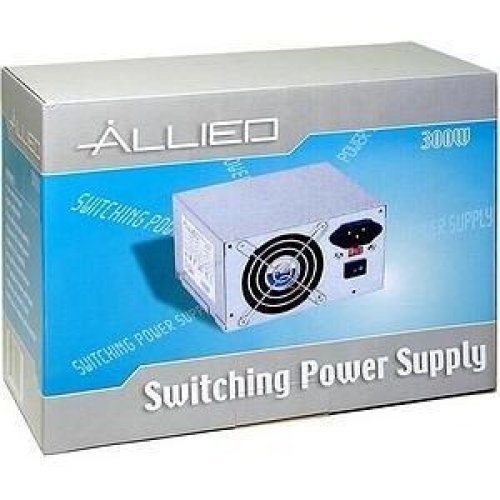
Image: The AL-A300ATX 300W ATX12V Power Supply shown in its retail packaging, indicating it is a "Switching Power Supply" from "ALLIED".
2. Інфармацыя па бяспецы
Always observe the following safety precautions to prevent injury or damage to the power supply or other components:
- Ensure the power supply is disconnected from the AC outlet before installation or removal.
- Не адкрывайце блок харчавання casinг. Высокі аб'ёмtages are present inside, even when disconnected. There are no user-serviceable parts.
- Install the power supply in a well-ventilated area. Do not block ventilation openings.
- Avoid exposing the power supply to moisture or extreme temperatures.
- Use only the cables provided or approved for use with this power supply.
- If the power supply is damaged or malfunctioning, discontinue use immediately and contact support.
3. Змесціва ўпакоўкі
Праверце наяўнасць усіх прадметаў у камплекце:
- APEX AL-A300ATX 300W ATX12V Power Supply Unit
- AC Power Cord (may vary by region)
- Крапежныя шрубы
- Кіраўніцтва карыстальніка (гэты дакумент)
4. Настройка і ўстаноўка
Follow these steps to install the power supply into your computer system:
- Падрыхтоўка:
- Выключыце камп'ютар і адключыце шнур харчавання ад разеткі.
- Open your computer case. Refer to your computer case manual for specific instructions.
- Калі вы замяняеце існуючы блок харчавання, адлучыце ўсе кабелі ад старога блока харчавання і выміце яго з корпуса.
- Мантаж блока харчавання:
- Carefully slide the AL-A300ATX power supply into the designated PSU bay in your computer case.
- Сумясціце адтуліны для шруб на блоку харчавання з адтулінамі на корпусе.
- Замацуеце блок сілкавання з дапамогай прыкладаемых мантажных шруб.
- Злучальныя кабелі:
- 24-Pin ATX Main Power Connector: Падключыце гэты вялікі раз'ём да адпаведнага порта на матчынай плаце. Пераканайцеся, што ён зашчапіўся.
- CPU Power Connector (4-pin or 8-pin): Connect the appropriate CPU power cable to the CPU power port on your motherboard.
- Раздымы харчавання SATA: Connect these flat connectors to your SATA hard drives, SSDs, and optical drives.
- Molex (Peripheral) Connectors: Connect these 4-pin connectors to older drives or case fans if needed.
- PCI-E Power Connectors (if applicable): If your graphics card requires additional power, connect the appropriate PCI-E power cable from the PSU to the graphics card. This model is listed with a "24 Pin" PCI-Express Connector Configuration, implying the main ATX connector.
- Кабельнае кіраванне: Акуратна пракладзеце кабелі, каб палепшыць паветраабмен і эстэтыку ўнутры вашага корпуса.
- Канчатковая праверка: Яшчэ раз праверце ўсе злучэнні, каб пераканацца, што яны надзейныя.
- Закрыць справу: Close your computer case and secure it.
5. Інструкцыя па эксплуатацыі
After successful installation, follow these steps to power on your system:
- Падключыце сетку пераменнага току: Plug the AC power cord into the power supply's inlet and then into a grounded wall outlet or surge protector.
- Выключальнік сілкавання: Locate the power switch on the back of the power supply (usually a rocker switch labeled "I" for ON and "O" for OFF). Ensure it is in the "ON" (I) position.
- Уключэнне кампутара: Press the power button on your computer case. The system should now power on.
To turn off your computer, always use the operating system's shutdown procedure. Do not use the power supply's switch for regular shutdowns, as this can lead to data loss or system instability.
6. Тэхнічнае абслугоўванне
Правільнае абслугоўванне дапамагае забяспечыць даўгавечнасць і аптымальную прадукцыйнасць вашай крыніцы харчавання:
- Ачыстка ад пылу: Periodically (every 3-6 months, depending on environment) clean dust from the power supply's fan and ventilation grilles using compressed air. Ensure the computer is powered off and unplugged before cleaning.
- Паток паветра: Ensure that the computer case has adequate airflow and that the power supply's fan is not obstructed.
- Кабельнае кіраванне: Падтрымлівайце акуратную пракладку кабеляў, каб прадухіліць перашкоды для паветранага патоку.
7. Выпраўленне непаладак
Калі ў вас узніклі праблемы з блокам харчавання, звярніцеся да наступных распаўсюджаных праблем і іх рашэнняў:
| праблема | Магчымая прычына | Рашэнне |
|---|---|---|
| Кампутар не ўключаецца. |
|
|
| Сістэма ўключаецца, але адразу ж выключаецца. |
|
|
| Вентылятар шуміць або не круціцца. |
|
|
If the problem persists after attempting these solutions, contact APEX customer support or a qualified technician.
8. Тэхнічныя характарыстыкі
| Асаблівасць | Дэталь |
|---|---|
| Назва мадэлі | AL-A300ATX |
| Марка | APEX |
| Выхад ватtage | 300 ват |
| Формаў-фактар | ATX12V |
| Сумяшчальныя прылады | Персанальны кампутар |
| Тып раздыма | ATX (24 Pin PCI-Express Connector Configuration) |
| Спосаб астуджэння | паветра |
| Мінімальны ўваходны аб'ёмtage | 110 вольт (пераменны ток) |
| Вага прадмета | 3.64 фунта |
| Памеры ўпакоўкі | 9.6 х 7.2 х 4.1 цалі |
| Дата першай даступнасці | 22 красавіка 2014 г |
9. Гарантыя і падтрымка
For information regarding warranty coverage, technical support, or service, please refer to the official APEX webсайт або звярніцеся непасрэдна ў службу падтрымкі кліентаў. Захоўвайце чэк аб куплі як пацверджанне пакупкі.
APEX Contact Information: Please visit the official APEX webсайт, каб знайсці найбольш актуальную кантактную інфармацыю і рэсурсы падтрымкі.