
1. Уводзіны
This manual provides comprehensive instructions for the Adesso AKB-132UY Luminous Large Print Multimedia Desktop USB Keyboard. This keyboard is designed with large, high-contrast keys to enhance readability, particularly for users with visual impairments. It also integrates multimedia controls for convenience.

Figure 1: Adesso AKB-132UY Luminous Large Print Multimedia Desktop USB Keyboard. This image displays the full keyboard with its black frame and bright yellow keys, featuring large black characters.
2. Змесціва ўпакоўкі
Праверце наяўнасць усіх прадметаў у камплекце:
- Adesso EasyTouch 132 - Florescent Yellow Multimedia Desktop Keyboard
- Кароткае кіраўніцтва
3. Інструкцыі па ўсталёўцы
3.1 Падключэнне клавіятуры
- Знайдзіце даступны USB-порт на вашым кампутары.
- Plug the USB connector of the Adesso AKB-132UY keyboard into the USB port.
- The operating system will automatically detect and install the necessary drivers. No additional software installation is typically required.
The keyboard is powered via the USB connection.
4. Кіраванне клавіятурай
4.1 Асноўныя магчымасці
- Fluorescent 4X Large Print Keys: The keyboard features black characters printed in a large 4X size on bright fluorescent yellow keys. This design provides high contrast for improved visibility and readability, particularly beneficial for users with visual impairments.

Малюнак 2: Буйны план view of the keyboard's QWERTY section, highlighting the large black characters on fluorescent yellow keys.
- Элементы кіравання мультымедыя: Dedicated hotkeys allow for one-touch control of media functions. These include:
- Медыяплэер
- Памяншэнне гучнасці
- Павялічыць гучнасць
- Адключыць гук
- Прайграванне/Паўза
- Папярэдні трэк
- Наступны трэк
- Стоп

Малюнак 3: Буйны план view of the numeric keypad and dedicated multimedia control keys located on the upper right side of the keyboard.
- Windows One-Touch Controls: Access common Windows applications directly with dedicated hotkeys:
- Мой кампутар
- пошук
- Калькулятар
- Пошта
- Home (Browser)
- Favorites (Browser)
- Quiet Membrane Key Switches: The keyboard utilizes membrane key switches designed to provide a responsive and quiet typing experience. These switches are rated for a lifespan of up to five million keystrokes.
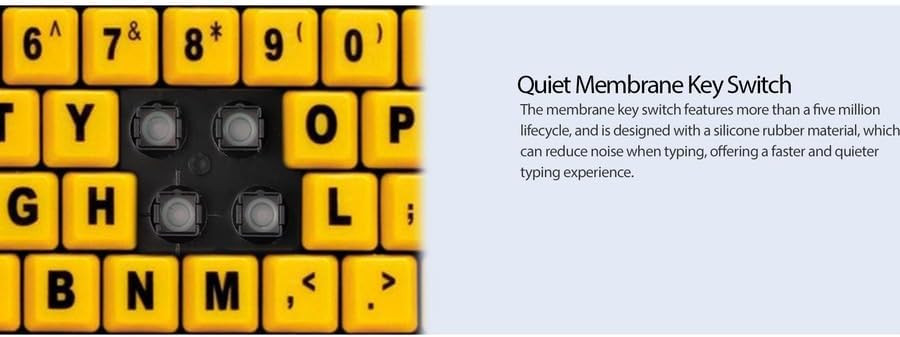
Малюнак 4: падрабязна view showing the internal membrane key switch mechanism beneath a keycap.
- 104-Key US Layout: The keyboard features a standard 104-key US layout, providing a familiar typing experience.
5. Тэхнічнае абслугоўванне
5.1 Чыстка клавіятуры
Каб захаваць знешні выгляд і функцыянальнасць клавіятуры:
- Адключыце клавіятуру ад кампутара перад чысткай.
- Выкарыстоўвайце мяккую, злёгку damp cloth to wipe the surface of the keys and the keyboard body.
- For stubborn dirt or debris between keys, use compressed air or a soft brush.
- Avoid using harsh chemicals, abrasive cleaners, or excessive moisture, as these can damage the keyboard's finish or internal components.
6. Выпраўленне непаладак
If you encounter issues with your Adesso AKB-132UY keyboard, refer to the following troubleshooting steps:
6.1 Клавіятура не рэагуе
- Праверце падключэнне USB: Ensure the keyboard's USB cable is securely plugged into a functioning USB port on your computer. Try unplugging and re-plugging the cable.
- Паспрабуйце іншы USB-порт: Connect the keyboard to another USB port on your computer to rule out a faulty port.
- Перазагрузіце кампутар: Часам просты перазапуск сістэмы можа вырашыць праблемы з падключэннем.
- Тэст на іншым кампутары: If possible, test the keyboard on a different computer to determine if the issue is with the keyboard or your computer's setup.
6.2 Keys Sticking or Not Registering
- Чысціня пад клавішамі: Dust, crumbs, or debris can get lodged under keys. Use compressed air to clear any obstructions.
- Пазбягайце разліваў: Liquid spills can cause keys to stick or malfunction. If a spill occurs, disconnect the keyboard immediately and allow it to dry completely before reconnecting.
7. Тэхнічныя характарыстыкі
| Асаблівасць | Апісанне |
|---|---|
| Марка | Адэса |
| Нумар мадэлі | АКБ-132УЙ |
| Назва мадэлі | EasyTouch 132 |
| Тэхналогія падлучэння | USB |
| Апісанне клавіятуры | Мембрана |
| Асаблівасць | Large Print Keys |
| Колер | Чорна-жоўты |
| Матэрыял | Пластыкавыя |
| Колькасць ключоў | 104 |
| Раскладка клавіятуры | QWERTY (амерыканская раскладка) |
| Крыніца харчавання | USB харчаванне |
| Вага прадмета | 1.5 фунта |
| Сумяшчальныя прылады | PC |
8. Інфармацыя аб гарантыі
The Adesso AKB-132UY keyboard comes with a 1-гадовая абмежаваная гарантыя from the date of purchase. This warranty covers defects in materials and workmanship under normal use. For specific terms and conditions, please refer to the warranty card included in your package or visit the official Adesso webсайт.
9. Падтрымка
For technical support, product registration, or additional information, please visit the official Adesso webсайт на www.adesso.com. You may also find FAQs and driver downloads on their support pages.