
Уводзіны
Дзякуй за пакупкуasing the Marantz CD5005 CD Player. This manual provides detailed instructions for the proper setup, operation, and maintenance of your new audio component. The CD5005 is designed to deliver high-quality audio playback from various disc formats, including CD, CD-R, CD-RW, MP3, and WMA files. It features high-quality audio components such as the CS4398 DAC and Marantz HDAM SA2, ensuring exceptional sound reproduction. Please read this manual thoroughly before using the unit to ensure optimal performance and longevity.
Інструкцыі па тэхніцы бяспекі
Always follow these basic safety precautions when operating the CD5005 CD Player:
- Крыніца харчавання: Падключайце прыладу толькі да разеткі пераменнага токуtage паказана на задняй панэлі.
- Вентыляцыя: Ensure adequate ventilation. Do not block ventilation openings. Avoid installing in confined spaces.
- Вада і вільгаць: Do not expose the unit to rain, moisture, or excessive humidity. Do not place objects filled with liquids on the unit.
- Цяпло: Трымайце прыладу далей ад крыніц цяпла, такіх як радыятары, абагравальнікі, пліты або іншыя прыборы, якія выпрацоўваюць цяпло.
- Уборка: Перад чысткай адключыце прыладу ад разеткі. Выкарыстоўвайце толькі сухую тканіну.
- Абслугоўванне: Не спрабуйце абслугоўваць прыладу самастойна. Звяртайцеся па любыя паслугі па абслугоўванні да кваліфікаванага персаналу.
- Апрацоўка дыска: Handle discs by their edges. Avoid touching the shiny surface. Keep discs clean and free from scratches.
Змест пакета
Пераканайцеся, што ваш пакет змяшчае наступныя элементы:
- Marantz CD5005 CD Player
- Раздымны шнур харчавання
- Audio Cables (L/R Analog)
- Digital Audio Cable (Coaxial)
- Пульт дыстанцыйнага кіравання
- AA Batteries for Remote Control (x2)
- Quick Setup Guide (Printed)
- Interactive CD-ROM Manual (except Japan)
Прадукт скончаныview
Пярэдняя панэль

Малюнак 1: Спераду view of the Marantz CD5005 CD Player. This image shows the disc tray, display, control buttons, and headphone jack on the front panel.
The front panel of the CD5005 features the disc tray, a clear dual-line display, essential playback control buttons (Play, Pause, Stop, Skip), and a headphone output with a dedicated volume control. The power button is located on the left side.
Задняя панэль

Малюнак 2: Задняя частка view of the Marantz CD5005 CD Player. This image displays the various input and output terminals, including analog audio outputs, digital coaxial and optical outputs, and the AC power inlet.
The rear panel provides connectivity options including gold-plated analog audio outputs, digital coaxial output, and digital optical output for connecting to an amplifier or receiver. A remote control input/output terminal is also present for system integration, along with the detachable AC power inlet.
Пульт дыстанцыйнага кіравання
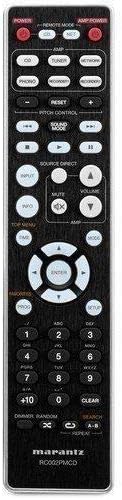
Figure 3: The remote control unit for the Marantz CD5005 CD Player. This remote allows for comprehensive control of the CD player's functions, including playback, track selection, pitch control, and display dimmer.
The included remote control unit provides full functionality for the CD5005, including features not available on the front panel such as pitch control, display dimmer, track randomization, and various repeat functions. It also allows for control of other compatible Marantz components.
Настройка
1. размяшчэнне
Place the CD5005 on a stable, level surface away from direct sunlight, heat sources, and excessive vibration. Ensure there is adequate space around the unit for proper ventilation.
2. Падключэнне аўдыёкабеляў
Choose one of the following methods to connect the CD5005 to your amplifier or receiver:
- Аналагавае злучэнне: Use the supplied L/R analog audio cables to connect the AUDIO OUT jacks on the CD5005 to the corresponding CD input jacks on your amplifier. Ensure red plugs connect to red jacks (right channel) and white plugs to white jacks (left channel).
- Лічбавае кааксіяльнае злучэнне: Use the supplied digital coaxial cable to connect the COAXIAL DIGITAL AUDIO OUT jack on the CD5005 to a digital coaxial input on your ampLifier або прыёмнік.
- Лічбавае аптычнае злучэнне: Use an optical digital audio cable (not supplied) to connect the OPTICAL DIGITAL AUDIO OUT jack on the CD5005 to a digital optical input on your ampLifier або прыёмнік.
Заўвага: Do not connect both analog and digital outputs to the same input on your amplifier simultaneously, as this may cause interference or unexpected behavior. Select the appropriate input on your amplifier after connecting.
3. Падключэнне шнура харчавання
Connect the detachable power cord to the AC inlet on the rear panel of the CD5005, then plug the other end into a suitable AC wall outlet.
4. Устаноўка батарэек пульта дыстанцыйнага кіравання
Open the battery compartment on the back of the remote control unit. Insert two AA batteries, ensuring correct polarity (+/-) as indicated inside the compartment. Close the cover securely.
Інструкцыя па эксплуатацыі
Basic CD Playback
- Націсніце УЛАДА button on the front panel or remote control to turn on the unit.
- Націсніце АДКРЫЦЬ/ЗАКРЫЦЬ кнопку, каб адкрыць латок для дыска.
- Place a CD, CD-R, CD-RW, MP3, or WMA disc onto the disc tray with the label side facing up.
- Націсніце АДКРЫЦЬ/ЗАКРЫЦЬ button again to close the disc tray. The unit will read the disc.
- Націсніце ГУЛЬНЯ кнопку, каб пачаць прайграванне.
- Каб прыпыніць прайграванне, націсніце Паўза кнопку. Націсніце яшчэ раз, каб аднавіць.
- Каб спыніць прайграванне, націсніце СТОП кнопка.
- Выкарыстоўвайце ПРАПУСЦІЦЬ кнопкі для перамяшчэння паміж трэкамі.
Advanced Features (Remote Control)
- Кантроль вышыні: Выкарыстоўвайце КАНТРОЛЬ ПІТЧ buttons on the remote to adjust the playback speed and pitch.
- CD Text Display: If a disc supports CD Text, the display will show track and artist information. Use the ДЫСПЛЕЙ button on the remote to cycle through display modes.
- Паўтарыць прайграванне: Націсніце Паўтор button on the remote to select repeat modes (e.g., repeat one track, repeat all tracks, repeat A-B segment).
- Выпадковае прайграванне: Націсніце ВЫПАДКОВАЯ button on the remote to play tracks in a random order.
- Выхад для навушнікаў: Connect headphones to the front panel headphone jack. Adjust the УЗРОВЕНЬ knob next to the jack to control headphone volume independently. Note that plugging in headphones does not mute the main analog or digital outputs.
- Кіраванне праграмамі: The CD5005 supports app control via RC-5 with a compatible Marantz network player. Refer to the network player's manual for details on this integration.
Тэхнічнае абслугоўванне
Ачыстка прылады
Wipe the exterior surfaces of the CD5005 with a soft, dry cloth. Do not use abrasive cleaners, waxes, or solvents, as these can damage the finish. Avoid spraying liquids directly onto the unit.
Disc Handling and Care
- Always hold discs by their edges to prevent fingerprints and scratches on the playing surface.
- If a disc is dirty, wipe it gently from the center outwards with a soft, lint-free cloth. Do not use circular motions.
- Do not use solvents such as benzene, thinner, or commercially available record cleaners, as they may damage the disc.
- Захоўвайце дыскі ў футлярах, калі яны не выкарыстоўваюцца, каб абараніць іх ад пылу і драпін.
- Avoid exposing discs to direct sunlight or high temperatures for extended periods.
Ліквідацыю непаладак
If you experience issues with your Marantz CD5005, refer to the following common problems and solutions:
| праблема | Магчымая прычына | Рашэнне |
|---|---|---|
| Няма ўлады | Шнур харчавання ненадзейна падключаны. | Праверце падключэнне шнура харчавання да прылады і разеткі. |
| Няма выхаду гуку | Няправільнае падключэнне аўдыёкабеля; выбраны няправільны ўваход ampлиффер; ampаб'ём напаўняльніка занадта нізкі. | Праверце падключэнне аўдыёкабеля. Выберыце правільны ўваход на вашым ampвыратавальнік. Павелічэнне ampаб'ём ліфікатара. |
| Дыск не прайграваецца / памылка «Няма дыска» | Disc inserted incorrectly; disc is dirty or scratched; disc format not supported. | Insert disc with label side up. Clean the disc. Try a different disc. Ensure disc format (CD, CD-R/RW, MP3, WMA) is supported. |
| Skipping or intermittent playback | Disc is dirty or scratched; unit is subject to vibration. | Clean the disc. Place the unit on a stable surface away from vibrations. |
| Пульт дыстанцыйнага кіравання не працуе | Batteries are depleted or inserted incorrectly; obstacle between remote and unit; remote sensor blocked. | Replace batteries, ensuring correct polarity. Remove any obstacles. Ensure the remote sensor on the unit is clear. |
Калі праблема не знікне пасля спробы гэтых рашэнняў, звярніцеся ў службу падтрымкі кліентаў Marantz.
Тэхнічныя характарыстыкі
| Асаблівасць | Дэталь |
|---|---|
| Нумар мадэлі | CD5005 |
| Сумяшчальнасць дыскаў | CD, CD-R/RW, MP3, WMA |
| Digital-to-Analog Converter (DAC) | CS4398 |
| Analog Output Circuit | Marantz HDAM SA2 |
| Выхады | Analog L/R (Gold-plated), Digital Coaxial, Digital Optical, Headphone |
| Асаблівасці | Pitch Control, CD Text Display, App Control (via RC-5 with Marantz network player), Auto Standby |
| Энергаспажыванне (у рэжыме чакання) | Нізкі |
| Памеры прадукту (Ш x Г x В) | 17.3 х 14.6 х 4.1 цалі (43.9 х 37.1 х 10.4 см) |
| Вага прадмета | 11.02 фунта (5.0 кг) |
| Вытворца | Маранц |
| Колер | Чорны |
Гарантыя і падтрымка
For warranty information and customer support, please refer to the warranty card included with your product or visit the official Marantz webсайт. Захоўвайце пацвярджэнне пакупкі для прэтэнзій па гарантыі.
Афіцыйны прадстаўнік Marantz Webсайт: www.marantz.com