
Уводзіны
The ioSafe Solo G3 is a high-performance 4TB external hard drive designed to provide robust data protection against environmental hazards. Featuring fireproof and waterproof capabilities, along with a Data Recovery Service (DRS), this device ensures the safety of your critical digital assets. Its fanless design ensures quiet operation, making it suitable for various environments.
Змест пакета
Праверце, ці ўсе пералічаныя ніжэй прадметы ўваходзяць у вашу ўпакоўку:
- ioSafe Solo G3 External Hard Drive
- USB кабель 3.0
- Электразабеспячэнне
- Solo G3 Quick Start Guide
Інструкцыя па наладзе
Follow these steps to set up your ioSafe Solo G3 external hard drive:
- Падключыце крыніцу харчавання: Plug the power supply into the power input port on the back of the ioSafe Solo G3. Connect the other end of the power supply to a wall outlet.
- Connect the USB 3.0 Cable: Connect one end of the included USB 3.0 cable to the USB 3.0 port on the back of the ioSafe Solo G3. Connect the other end of the USB 3.0 cable to an available USB 3.0 port on your computer (PC or Mac).
- Уключыце прыладу: Locate the power switch on the back of the ioSafe Solo G3 and switch it to the 'ON' position. The device will power on, and your computer should detect it automatically.
- Першапачатковае прызнанне: Your operating system (Windows or macOS) will recognize the new hard drive. Follow any on-screen prompts for initial setup or formatting if necessary. For optimal performance, ensure your computer's USB 3.0 drivers are up to date.
- Optional Theft Protection: For enhanced security, the ioSafe Solo G3 includes a provision for bolting the device down to a surface. Refer to the Quick Start Guide for detailed instructions on utilizing this feature.
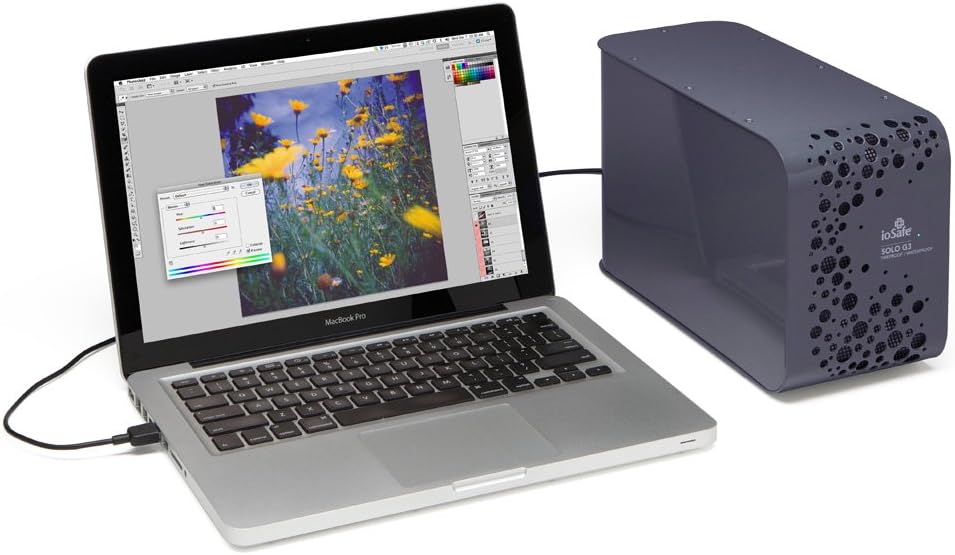
Image: The ioSafe Solo G3 external hard drive connected to a MacBook Pro laptop, demonstrating a typical setup for data backup and storage.

Выява: Падрабязны view of the rear panel of the ioSafe Solo G3, highlighting the power input, USB 3.0 port, and power switch for easy connection.
Інструкцыя па эксплуатацыі
Once connected and recognized by your computer, the ioSafe Solo G3 functions like any standard external hard drive. You can drag and drop files, use backup software, or configure it for continuous data synchronization.
- Перадача дадзеных: Utilize the USB 3.0 connection for high-speed data transfer. The drive operates at 7200 RPM for efficient read/write operations.
- Сумяшчальнасць: The Solo G3 is compatible with both PC and Mac operating systems.
- Ціхая праца: The fanless design, incorporating FloSafe Vent Technology, ensures silent operation, making it ideal for noise-sensitive environments.
Відэа: Оверview of the ioSafe Solo G3, demonstrating its features and typical usage scenarios. (Duration: 2:37)
Video: A detailed presentation of the ioSafe Solo G3's protective capabilities and design. (Duration: 6:38)
Асноўныя характарыстыкі
The ioSafe Solo G3 is engineered with advanced features to safeguard your data:
- Вогнеўстойлівая абарона: Protects data from loss in temperatures up to 1550°F (843°C) for 30 minutes, as per ASTM E119 standards.
- Воданепранікальная абарона: Safeguards data from flood damage, capable of full submersion in fresh or salt water up to 10 feet (3 meters) deep for 72 hours.
- Data Recovery Service (DRS): Includes a comprehensive Data Recovery Service for any reason, providing an additional layer of security for your valuable data.
- Абарона ад крадзяжу: Designed with a bolt-down feature to secure the drive to any surface, deterring physical theft.
- Падключэнне USB 3.0: Ensures fast and reliable data transfer speeds.

Image: A visual representation of the ioSafe Solo G3's fireproof and waterproof capabilities, with fire on one side and water on the other, emphasizing its protective design.
Тэхнічнае абслугоўванне
To ensure the longevity and optimal performance of your ioSafe Solo G3, consider the following maintenance guidelines:
- Уборка: Для чысткі вонкавай паверхні прылады выкарыстоўвайце мяккую сухую тканіну. Пазбягайце выкарыстання вадкіх ачышчальнікаў або абразіўных матэрыялаў.
- Вентыляцыя: Ensure the device's vents are not obstructed to allow for proper airflow, despite its fanless design.
- Абнаўленні прашыўкі: Periodically check the ioSafe official website for any available firmware updates for your model to ensure continued compatibility and performance.
Ліквідацыю непаладак
If you encounter issues with your ioSafe Solo G3, refer to the following common troubleshooting steps:
- Прылада не выяўлена:
- Ensure the power supply is securely connected and the device is powered on.
- Verify the USB 3.0 cable is properly connected to both the drive and your computer.
- Паспрабуйце падключыць дыск да іншага USB-порта на вашым кампутары.
- Test with a different USB 3.0 cable if available.
- Check your computer's Disk Management (Windows) or Disk Utility (macOS) to see if the drive is recognized but unformatted.
- Павольная перадача дадзеных:
- Ensure you are using a USB 3.0 port on your computer and the provided USB 3.0 cable. USB 2.0 ports will result in significantly slower speeds.
- Зачыніце ўсе непатрэбныя праграмы, якія працуюць у фонавым рэжыме і могуць спажываць сістэмныя рэсурсы.
- Check for conflicting software, such as antivirus programs, that might be scanning files during transfer.
- Незвычайныя шумы:
- While the Solo G3 is fanless, some minimal operational sounds from the hard drive itself are normal. However, loud clicking or grinding noises may indicate a potential issue. Back up your data immediately and contact ioSafe support if such noises occur.
If these steps do not resolve your issue, please contact ioSafe customer support for further assistance.
Тэхнічныя характарыстыкі
| Нумар мадэлі | SK4TB |
| Ёмістасць лічбавай памяці | 4 ТБ (4000 ГБ) |
| Інтэрфейс жорсткага дыска | USB 3.0 |
| Тэхналогія падлучэння | USB, eSATA |
| Хуткасць кручэння жорсткага дыска | 7200 XNUMX абаротаў у хвіліну |
| Апаратная платформа | ПК; Mac |
| Аперацыйная сістэма | ПК; Mac |
| Памеры прадукту (ДxШxВ) | 11 х 5 х 7.1 цалі (27.9 х 12.7 х 18 см) |
| Вага прадмета | 15 фунта (6.8 кг) |
| Колер | П'ютэр Грэй |
| Крыніца харчавання | 80 ~ 264 VAC at 50/60 HZ |
| Асаблівасці | Fireproof, Waterproof, Data Recovery Service, Theft-proof |
Гарантыя і падтрымка
The ioSafe Solo G3 includes a Data Recovery Service (DRS) which provides professional data recovery in the event of data loss due to fire, flood, or other covered incidents. For specific terms and conditions of the DRS and product warranty, please refer to the documentation included with your product or visit the official ioSafe webсайт.
For technical support, troubleshooting assistance, or inquiries regarding your Data Recovery Service, please contact ioSafe customer support through their official channels.