
SKYLINK SK-200
SK-200 SkylinkNet Connected Wireless Alarm System
Кіраўніцтва карыстальніка
Model: SK-200 | Brand: SKYLINK
1. Уводзіны
The SK-200 SkylinkNet Connected Wireless Alarm System is an all-in-one solution designed to protect your home with alarm, home control, and video monitoring functions. This system allows you to control and monitor your home remotely via a smartphone application without monthly fees or contracts. It is expandable, supporting over 100 devices, and features easy plug-and-play installation.

Малюнак 1.1: Скончанаview of the SkylinkNet SK-200 system, including the Internet Hub, sensors, keychain remote, and the smartphone application interface.
2. Змесціва ўпакоўкі
Verify that all components are present in your SK-200 SkylinkNet kit:
- Internet Hub (1 unit)
- Door/Window Sensors (2 units)
- Motion Sensor (1 unit)
- Keychain Remote (1 unit)
- Адаптар сілкавання
- Кабель Ethernet
- Мантажныя аксэсуары

Малюнак 2.1: Visual representation of the components included in the SkylinkNet SK-200 starter kit.
3. Настройка і ўстаноўка
3.1 Initial Hub Connection
Follow these steps for the initial setup of your Internet Hub:
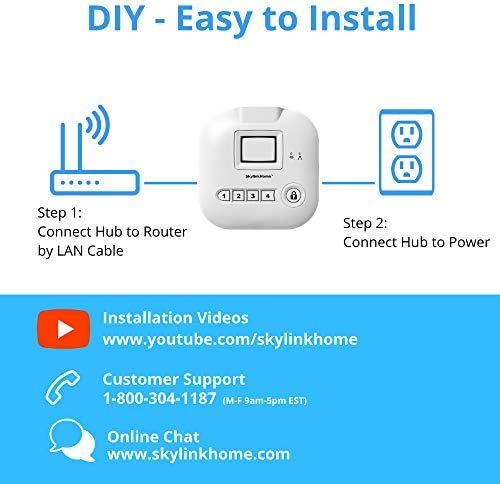
- Падключыцеся да маршрутызатара: Use the provided Ethernet cable to connect the Internet Hub to your home router.
- Падключэнне да сілкавання: Plug the power adapter into the Internet Hub and then into a standard wall outlet.

Малюнак 3.1: Diagram illustrating the two simple steps for connecting the SkylinkNet Internet Hub to your router and power source.
3.2 Smartphone App Installation
The SkylinkNet system is controlled via a dedicated smartphone application. Download the app for your device:
- For iOS devices (iPhone, iPad): Пошук "SkylinkNet" in the Apple App Store.
- Для прылад Android: Пошук "SkylinkNet" in the Google Play Store.
Once downloaded, open the app and follow the on-screen instructions to create an account and link it to your Internet Hub.

Малюнак 3.2: A smartphone displaying the SkylinkNet app interface, indicating its availability on the App Store.
3.3 Спалучэнне прылад
After setting up the Internet Hub and the app, you can pair the included sensors and remote. Refer to the specific instructions provided with each sensor for detailed pairing procedures. Generally, this involves activating a pairing mode on the sensor and then adding it through the SkylinkNet app.
4. Кіраванне сістэмай
4.1 Using the SkylinkNet App
The SkylinkNet app provides comprehensive control and monitoring capabilities:
- Пастаноўка/зняцце з аховы: Easily arm or disarm your system from anywhere.
- Стан датчыка: View the real-time status of all connected sensors (door/window, motion, etc.).
- Апавяшчэнні: Receive push notifications for any activity detected by your sensors.
- Home Control: Manage connected smart home devices (lights, appliances, garage door, etc.).
- Відэаманіторынг: Access live camera feeds and recorded images if compatible cameras are integrated.

Малюнак 4.1: Screenshots of the SkylinkNet app, showing the Home Screen with device status, Camera Screen for live feeds, and Alarm Screen for system control.
4.2 Keychain Remote Functions
The included keychain remote provides quick access to essential system functions:
- Кнопка блакіроўкі: Arms the system.
- Кнопка разблакіроўкі: Disarms the system.
- Кнопка дадому: Arms the system in 'Home' mode (e.g., perimeter protection only).
- Трывожная кнопка: Activates an immediate alarm.
Малюнак 4.2: The SkylinkNet keychain remote, showing its four primary function buttons.
4.3 Інтэграцыя з разумным домам (Alexa)
The SkylinkNet system is IFTTT compatible, allowing integration with various smart home devices, including Amazon Alexa. You can use voice commands to control your system:
- Enable the SkylinkNet skill in your Alexa app.
- Use commands like "Alexa, ask SkylinkNet to Arm Away" or "Alexa, ask SkylinkNet to turn on kitchen light."

Малюнак 4.3: An illustration demonstrating how the SkylinkNet Internet Hub integrates with Amazon Alexa for voice control of the system and connected devices.
5. Тэхнічнае абслугоўванне
5.1 Замена батарэі
Sensors in the SK-200 system typically require 3 AAA batteries. When a sensor's battery is low, you will receive a notification via the SkylinkNet app. To replace batteries:
- Асцярожна адкрыйце датчык casing.
- Выміце старыя батарэі і ўтылізуйце іх належным чынам.
- Insert new AAA batteries, ensuring correct polarity.
- Зачыніце датчык casinг надзейна.
5.2 Сыход за датчыкам
To ensure optimal performance, keep sensors clean and free from dust. Avoid placing sensors in direct sunlight or areas with extreme temperature fluctuations, as this can affect their operation and battery life.
6. Выпраўленне непаладак
If you encounter issues with your SkylinkNet system, consider the following common solutions:
- No App Connection: Ensure your Internet Hub is properly connected to your router and power. Check your home internet connection.
- Датчык не рэагуе: Verify the sensor's battery level. Re-pair the sensor with the Internet Hub if necessary. Ensure the sensor is within range of the hub.
- Ілжывыя трывогі: Check sensor placement to avoid accidental triggers (e.g., motion sensor facing a window with moving curtains). Adjust sensitivity settings if available.
- Апавяшчэнні не атрыманы: Check your smartphone's notification settings for the SkylinkNet app. Ensure the app is running in the background or has necessary permissions.
- Сістэма не ўключана/выключана з аховы: Confirm the command is registered by the app or remote. Check the system status in the app for any error messages.
For persistent issues, refer to the customer support section.
7. Тэхнічныя характарыстыкі
| Асаблівасць | Дэталь |
|---|---|
| Нумар мадэлі | СК-200 |
| Марка | СКАЙЛІНК |
| Тэхналогія падлучэння | Бесправадная сувязь |
| Сумяшчальныя прылады | Смартфон (iOS, Android) |
| Крыніца харчавання | Battery Powered (Sensors), AC Adapter (Hub) |
| Памеры прадмета (Д х Ш х У) | 4.2 х 5 х 4.8 цалі |
| Вага прадмета | 16 унцый (1 фунт) |
| Тып батарэі (датчыкі) | Патрабуецца 3 батарэйкі ААА |
| Тэрмін службы батарэі | Up to 4320 Hours (Sensors) |
| Максімальны дыяпазон | 300 футаў |
| Тып ўстаноўкі | Самаклейная |
| Метад кантролю | App, Keychain Remote |
| Атэстацыя | У спісе UL |
8. Інфармацыя аб гарантыі
The SK-200 SkylinkNet Connected Wireless Alarm System comes with a 1-гадовая абмежаваная гарантыя from the date of purchase. This warranty covers defects in materials and workmanship under normal use. Please retain your proof of purchase for warranty claims. For full details regarding warranty terms and conditions, please contact Skylink customer support.
9. Падтрымка кліентаў
For technical assistance, troubleshooting, or general inquiries regarding your SkylinkNet system, please use the following contact methods:
- Падтрымка па тэлефоне: 1-800-304-1187 (Monday - Friday, 9 AM - 5 PM EST)
- Інтэрнэт-чат: Наведайце www.skylinkhome.com
- Відэа ўстаноўкі: Find helpful guides on www.youtube.com/skylinkhome
Ask a question about this manual
Ask about setup, troubleshooting, compatibility, parts, safety, or missing instructions. Manuals+ will review the question and use this page’s manual context to help answer it.