
1. Уводзіны
The Timex T231W2 is an AM/FM dual alarm clock radio designed for convenience and reliability. It features a large 1.2-inch green LED display for clear visibility, dual alarms that can be set independently, and a programmable sleep timer. An auxiliary input allows connection of external audio devices. A battery backup system maintains time and alarm settings during power interruptions.
2. Асноўныя магчымасці
- Wake to AM/FM radio or buzzer
- 20 Station preset memory (10 AM, 10 FM)
- Large, easy-to-read 1.2-inch green LED display
- Line-in jack to connect auxiliary audio sources
- 2-inch dynamic speaker for clear sound
- Programmable 90-minute Sleep Timer
- Battery backup for time and alarm settings
3. Змесціва ўпакоўкі
- Timex T231W2 AM/FM Dual Alarm Clock Radio (White)
4. Элементы кіравання і індыкатары
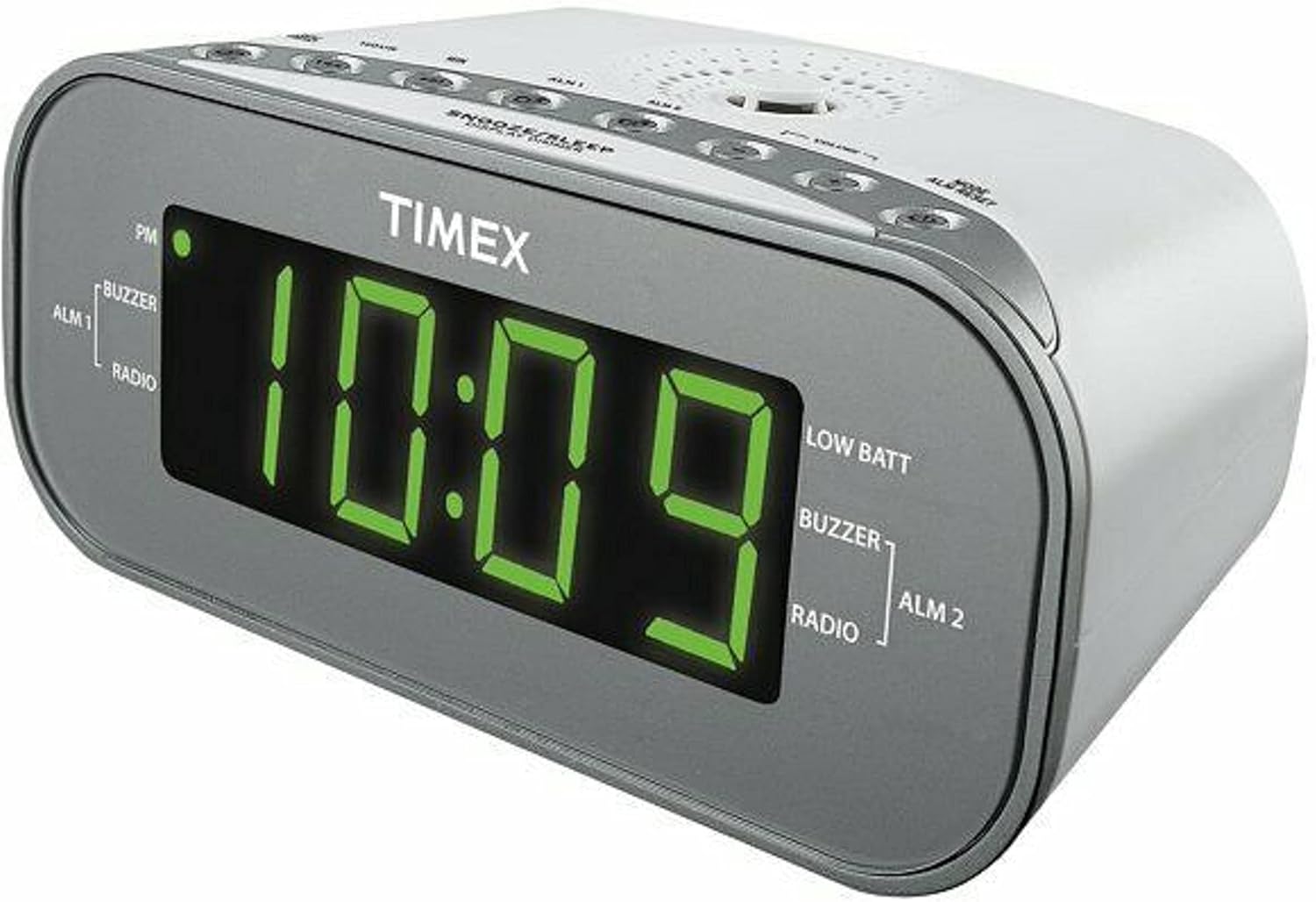
Малюнак 1: Спераду View of the Timex T231W2. This image displays the clock radio from a slight angle, highlighting the large green LED display showing the time '10:09'. Indicators for PM, ALM1 (Buzzer/Radio), ALM2 (Buzzer/Radio), and LOW BATT are visible on the display. The top panel shows several control buttons.

Малюнак 2: Верх View of the Timex T231W2 Controls. Гэта выява дае выразнае ўяўленне view of the control buttons located on the top panel of the clock radio. Buttons include HOUR, MIN, ALM1, ALM2, VOLUME, MODE, ALM RESET, SNOOZE/SLEEP/DISPLAY DIMMER, PRESET, and TUNING controls.
4.1. Індыкатары дысплея
- Дысплей часу: Large green LED digits show current time.
- Індыкатар PM: Lights up when the time is in the PM hours.
- ALM 1 / ALM 2: Indicates which alarm is active.
- BUZZER / RADIO: Indicates if the active alarm is set to buzzer or radio.
- НІЗКІ БАТ: Lights up when backup batteries are low and need replacement.
4.2. Control Buttons (Top Panel)
- ГАДЗІНА / ХВІЛІНА: Used to set time and alarm hours/minutes.
- ALM 1 / ALM 2: Used to set and activate Alarm 1 and Alarm 2.
- ГУЧНАСЦЬ +/-: Adjusts the radio volume.
- MODE / ALM RESET: Switches between functions (e.g., radio, AUX) and resets active alarms.
- SNOOZE / SLEEP / DISPLAY DIMMER: Актывуе паўтор будзільніка, усталёўвае таймер сну або рэгулюе яркасць дысплея.
- PRESET / TUNING: Used for saving and recalling radio presets, and manually tuning radio frequencies.
5. Настройка
5.1. Падключэнне сілкавання
- Падключыце шнур сілкавання да стандартнай разеткі.
- The display will flash, indicating the unit is powered on but the time is not yet set.
5.2. Устаноўка рэзервовага акумулятара
The unit requires 2 AAA batteries (not included) for backup power. These batteries maintain time and alarm settings during a power outage.
- Адкрыйце вечка адсека для батарэй, размешчаную ў ніжняй частцы прыбора.
- Insert 2 new AAA batteries, observing the correct polarity (+ and -) as indicated inside the compartment.
- Надзейна зачыніце крышку батарэйнага адсека.
- If the 'LOW BATT' indicator lights up, replace the batteries.
5.3. Устаноўка бягучага часу
- Націсніце і ўтрымлівайце РЭЖЫМ кнопку, пакуль не пачне міргаць індыкатар часу.
- Націсніце ГАДЗІНА button repeatedly to set the hour. Observe the PM indicator for correct AM/PM setting.
- Націсніце МІН некалькі разоў націсніце кнопку, каб усталяваць хвіліны.
- Націсніце РЭЖЫМ зноў націсніце кнопку, каб пацвердзіць і выйсці з рэжыму налады часу.
6. Інструкцыя па эксплуатацыі
6.1. Праца з радыё (AM/FM)
- Націсніце РЭЖЫМ некалькі разоў кнопку, пакуль на дысплеі не з'явіцца «FM» або «AM».
- Націсніце ЦЮНІНГ buttons (up/down arrows) to manually tune to a desired station. Press and hold to auto-scan for the next available station.
- Адрэгулюйце гучнасць, выкарыстоўваючы ГУЧКА +/- кнопкі.
6.1.1. Setting and Recalling Radio Presets
The unit can store up to 20 radio stations (10 AM, 10 FM).
- Настройцеся на патрэбную радыёстанцыю.
- Націсніце і ўтрымлівайце ПРАДУСТАЎКА кнопку, пакуль на дысплеі не пачне міргаць нумар прадусталяванай праграмы.
- Выкарыстоўвайце ЦЮНІНГ buttons to select the desired preset number (P01-P10 for AM/FM).
- Націсніце ПРАДУСТАЎКА зноў націсніце кнопку, каб захаваць станцыю.
- Каб выклікаць папярэднюю наладу, націсніце кнопку ПРАДУСТАЎКА некалькі разоў націскайце кнопку, каб пераключацца паміж захаванымі станцыямі.
6.2. Setting and Using Alarms (Alarm 1 & Alarm 2)
Радыёгадзіннік мае два незалежныя будзільнікі.
- Націсніце і ўтрымлівайце АЛМ 1 or АЛМ 2 кнопку, пакуль не пачне міргаць час будзільніка.
- Націсніце ГАДЗІНА і МІН кнопкі, каб усталяваць патрэбны час будзільніка.
- Націсніце АЛМ 1 or АЛМ 2 зноў націсніце кнопку, каб выбраць крыніцу абуджэння: ЗУМЕР or РАДЫЁЗагарыцца адпаведны індыкатар.
- Націсніце АЛМ 1 or АЛМ 2 button a third time to confirm and activate the alarm. The alarm indicator (ALM 1 or ALM 2) will remain lit.
- Каб адключыць гукавы сігнал, націсніце кнопку Скід аларма button. The alarm will reset for the next day.
- To deactivate an alarm completely, press the corresponding АЛМ 1 or АЛМ 2 button until its indicator light turns off.
6.3. Функцыя паўтору будзільніка
Калі гучыць будзільнік, націсніце кнопку SNOOZE/SLEEP/DISPLAY DIMMER кнопку, каб часова адключыць будзільнік прыблізна на 9 хвілін. Пасля перыяду паўторнага сігналу будзільнік зноў загучыць.
6.4. Таймер сну
The sleep timer allows you to fall asleep to the radio, which will automatically turn off after a set period (up to 90 minutes).
- Пакуль гучыць радыё, націсніце кнопку SNOOZE/SLEEP/DISPLAY DIMMER некалькі разоў націскайце кнопку, каб пераключацца паміж варыянтамі таймера сну (напрыклад, 90, 60, 30, 15 хвілін, ВЫКЛ.).
- Радыё будзе прайгравацца на працягу выбранага часу, а затым аўтаматычна выключыцца.
6.5. Рэгулятар яркасці дысплея
To adjust the brightness of the display, press and hold the SNOOZE/SLEEP/DISPLAY DIMMER button. The display brightness will cycle through different levels. Release the button when the desired brightness is reached.
6.6. Using the Line-in Jack (AUX)
Connect an external audio device (e.g., smartphone, MP3 player) to the unit using a 3.5mm audio cable (not included).
- Plug one end of the 3.5mm audio cable into the Line-in jack on the back of the clock radio.
- Падключыце другі канец да раздыма для навушнікаў або аўдыёвыхаду вашай знешняй прылады.
- Націсніце РЭЖЫМ button repeatedly until 'AUX' appears on the display.
- Пачніце прайграванне на знешняй прыладзе.
- Адрэгулюйце гучнасць, выкарыстоўваючы ГУЧКА +/- buttons on the clock radio and/or your external device.
7. Тэхнічнае абслугоўванне
7.1. Уборка
- Перад чысткай адключыце прыладу ад разеткі.
- Выкарыстоўвайце мяккую, сухую тканіну для працірання вонкавых паверхняў.
- Do not use liquid cleaners, abrasive cleaners, or sprays, as these may damage the finish.
7.2. Агульны догляд
- Пазбягайце размяшчэння прылады пад прамымі сонечнымі прамянямі, побач з крыніцамі цяпла або ў месцах з высокай вільготнасцю або пылам.
- Не перакрывайце вентыляцыйныя адтуліны.
- Калі прылада не будзе выкарыстоўвацца працяглы час, выміце рэзервовыя батарэі, каб прадухіліць уцечку.
8. Выпраўленне непаладак
| праблема | Магчымая прычына | Рашэнне |
|---|---|---|
| Прылада не ўключаецца. | Шнур харчавання ненадзейна падключаны. | Ensure the AC power cord is firmly connected to both the unit and a working wall outlet. |
| Дысплей цьмяны або выключаны. | Display dimmer setting is too low. | Націсніце і ўтрымлівайце SNOOZE/SLEEP/DISPLAY DIMMER button to adjust brightness. |
| Сігналізацыя не гучыць. | Сігналізацыя не ўключана або настроена няправільна. | Ensure the ALM 1/ALM 2 indicator is lit and the alarm time/source is correctly set. |
| Дрэнны прыём радыё. | Antenna not extended or unit's position. | Extend the FM wire antenna fully. For AM, rotate the unit for best reception. Avoid placing near electronic devices that may cause interference. |
| Няма гуку з AUX-уваходу. | Incorrect mode or volume settings. | Ensure the unit is in AUX mode. Check volume levels on both the clock radio and the external device. Verify cable connection. |
| 'LOW BATT' indicator is on. | Backup batteries are low. | Replace the 2 AAA backup batteries. |
9. Тэхнічныя характарыстыкі
| Асаблівасць | Спецыфікацыя |
|---|---|
| Марка | Timex |
| Нумар мадэлі | T231WY2 |
| Колер | Белы |
| Тып дысплея | Святлодыёд (зялёны) |
| Асаблівасці | Alarm, Auto Dimmable, Programmable Sleep Timer, Radio |
| Памеры прадукту | 6.9"Ш х 2.96"В |
| Крыніца харчавання | AC Power, Battery Powered (Backup) |
| Рэзервовыя батарэі | Патрабуецца 2 батарэйкі ААА (не ўваходзяць у камплект) |
| Вага прадмета | 1.4 фунта |
| Сувязь | Line-in Jack (AUX) |
| Радыёгрупы | AM/FM |
| Прасэты | 20 (10 раніцы, 10 паўдня) |
10. Гарантыя і падтрымка
Каб атрымаць інфармацыю аб гарантыі або тэхнічнай падтрымцы, звярніцеся да дакументацыі, якая прыкладаецца да вашай пакупкі, або звярніцеся непасрэдна да вытворцы. Захоўвайце пацвярджэнне пакупкі для прэтэнзій па гарантыі.
11. Інфармацыя па бяспецы
ПАПЯРЭДЖАННЕ: Гэты прадукт можа падвергнуць вас уздзеянню хімічных рэчываў, у тым ліку свінцу, які, як вядома ў штаце Каліфорнія, можа выклікаць рак і прыроджаныя дэфекты або іншыя рэпрадуктыўныя парушэнні. Для атрымання дадатковай інфармацыі перайдзіце да www.P65Warnings.ca.gov.
Заўсёды выконвайце асноўныя меры бяспекі пры выкарыстанні электрапрыбораў, каб знізіць рызыку пажару, паражэння электрычным токам і траўмаў.