
Уводзіны
This manual provides comprehensive instructions for the installation, operation, maintenance, and troubleshooting of your Orbit 94906 Easy-Set Logic 6-Station Automatic Outdoor Irrigation Programmer with Remote Control. Please read this manual thoroughly before operating the device to ensure proper function and longevity.
The Orbit 94906 is designed to manage up to 6 independent watering zones, offering flexible programming options and convenient remote control functionality for efficient outdoor irrigation.
Прадукт скончаныview
The Orbit 94906 irrigation programmer features a digital display, large buttons, and a rotary dial for intuitive programming. It includes a protective cover with a key lock, making it suitable for both indoor and outdoor installations. A wireless remote control is provided for convenient manual operation and system adjustments from a distance.

Image: The Orbit 94906 irrigation programmer (main unit) and its accompanying wireless remote control. The main unit is shown with its protective cover open, revealing the control panel and wiring compartment.

Выява: буйны план view of the Orbit 94906 control panel, showing the LCD screen, rotary dial with settings like SET CLOCK, SET DATE, START TIME, RUN TIME, HOW OFTEN, BUDGET, AUTO, and OFF, along with CLEAR, ENTER MANUAL, PROGRAM, RAIN DELAY buttons, and plus/minus buttons.
Настройка і ўстаноўка
1. Mounting the Programmer
Select a suitable location for mounting the programmer. It should be protected from direct sunlight and extreme weather conditions, although the unit is designed for outdoor use with its protective cover. Ensure the location allows for easy access to electrical power and irrigation valve wiring.
- Use appropriate screws and anchors to securely mount the unit to a wall or sturdy surface.
- Ensure the unit is level to prevent moisture accumulation.

Image: The Orbit 94906 irrigation programmer mounted on a brick wall, demonstrating a typical outdoor installation.
2. Электрычнае падключэнне
The programmer includes an integrated 240V to 24V transformer. Connect the power cord to a standard electrical outlet. Ensure the outlet is protected by a Ground Fault Circuit Interrupter (GFCI) if installed outdoors.
- The unit has an internal button battery to retain programming during power outagэс.
3. Wiring to Valves
Connect the wires from your irrigation valves to the corresponding terminals inside the programmer. Each zone (1-6) requires a separate wire. A common wire is also required for all valves.

Выява: Адкрытая view of the Orbit 94906's wiring compartment, showing the terminal block for connecting irrigation valve wires.
- Refer to your valve manufacturer's instructions for specific wiring details.
- Ensure all connections are secure and waterproof, especially for outdoor installations.
4. Rain Sensor Connection (Optional)
The programmer includes a connection for a rain sensor. Installing a rain sensor can help conserve water by automatically suspending watering cycles during rainfall.
- Connect the rain sensor wires to the designated terminals as per the sensor's instructions.
Інструкцыя па эксплуатацыі
1. Initial Setup: Setting Clock and Date
- Павярніце паваротны дыск у становішча УСТАНОВІЦЬ ГАДЗІННІК.
- Выкарыстоўвайце + і - кнопкі для рэгулявання бягучага часу.
- Прэса УВЕДЗІЦЕ КІРАЎНІЦТВА каб пацвердзіць.
- Павярніце паваротны дыск у становішча УСТАВІЦЬ ДАТУ.
- Выкарыстоўвайце + і - buttons to adjust the current date (month, day, year).
- Прэса УВЕДЗІЦЕ КІРАЎНІЦТВА каб пацвердзіць.
2. Праграмаванне графікаў паліву
The programmer supports 3 independent programs (A, B, C) with up to 4 start times each, allowing for a total of 12 watering cycles per day across 6 zones.
- Павярніце паваротны дыск у становішча ПРАГРАМА.
- Выкарыстоўвайце ПРАГРАМА button to select Program A, B, or C.
- Павярніце цыферблат у ЧАС ПАЧАТКУ. Выкарыстоўвайце + і - to set the desired start time for the first cycle. Repeat for up to 4 start times per program.
- Павярніце цыферблат у Час запуску. Select the zone (1-6) using the + і - buttons, then set the watering duration from 1 to 99 minutes for each zone.
- Павярніце цыферблат у ЯК ЧАСТА. Select the watering frequency (e.g., specific days of the week, odd/even days, or interval days).
- Once programming is complete, turn the dial to АЎТА для аўтаматычнай працы.
3. Using the Rain Delay Function
The Rain Delay function allows you to temporarily suspend watering for a set period, conserving water after rainfall.
- Націсніце ЗАТРЫМКА ДАЖЖДУ кнопка.
- Выкарыстоўвайце + or - buttons to select a delay of 24, 48, or 72 hours.
- The system will automatically resume its programmed schedule after the delay period.
4. Ручны паліў
You can manually water specific zones or all zones without affecting the programmed schedule.
- Націсніце УВЕДЗІЦЕ КІРАЎНІЦТВА кнопка.
- Выкарыстоўвайце + or - buttons to select the desired zone(s) or "ALL" for all zones.
- Усталюйце патрэбную працягласць паліву.
- Прэса УВЕДЗІЦЕ КІРАЎНІЦТВА again to start manual watering.
- To stop manual watering, turn the dial to ВЫКЛ або націсніце ЯСНА.
5. Выкарыстанне бесправаднога пульта дыстанцыйнага кіравання
The wireless remote control allows you to operate the irrigation system from up to 90 meters away, useful for testing sprinklers or performing quick manual watering.

Image: The Orbit 94906 irrigation programmer and its remote control placed on a lawn, illustrating outdoor use.
- Кнопкі ON/OFF: Activate or deactivate the remote.
- ДАЛЕЙ: Cycles through zones.
- УСЕ: Activates all zones.
- Numbered buttons (1-6): Activate specific zones.
- ЗАтрымка дажджу: Activates the rain delay function.
- The remote allows manual watering for one or more zones without interrupting the main programmer's schedule.

Image: A person kneeling to adjust a sprinkler head, demonstrating a scenario where the remote control would be useful for testing.
Тэхнічнае абслугоўванне
- Keep Cover Closed: Always ensure the protective cover is closed and latched to prevent weather damage, especially during rain or extreme temperatures.
- Замена батарэі: The internal button battery retains programming during power outages. If the programmer loses its settings frequently after power interruptions, the battery may need replacement. Refer to the internal compartment for battery type and replacement instructions.
- Уборка: Працярыце прыладу рэкламайamp тканінай па меры неабходнасці. Не выкарыстоўвайце абразіўныя ачышчальнікі або растваральнікі.
- Зімоўка: In colder climates, it is recommended to disconnect the programmer and drain the irrigation system to prevent freezing damage.
Ліквідацыю непаладак
| праблема | Магчымая прычына | Рашэнне |
|---|---|---|
| Programmer display is blank. | No power, faulty transformer, or dead internal battery. | Check power connection. Ensure outlet is functional. Replace internal battery if necessary. |
| Zones do not water. | Programmer is OFF, Rain Delay is active, faulty wiring, or valve issues. | Ensure dial is set to AUTO. Check if Rain Delay is active and cancel if needed. Inspect wiring connections to valves. Check individual valves for proper function. |
| Watering occurs at incorrect times. | Incorrect clock/date setting or programming error. | Verify current time and date settings. Review and correct watering program start times and frequencies. |
| Не працуе пульт дыстанцыйнага кіравання. | Dead remote battery, out of range, or interference. | Replace remote control battery. Move closer to the main unit. Ensure no obstructions are blocking the signal. |
| Watering continues after cycle. | Valve stuck open or programming error. | Check individual valves for debris or damage. Review programming to ensure no overlapping cycles or incorrect durations. |
Тэхнічныя характарыстыкі
| Нумар мадэлі | 94906 |
| Колькасць зон | 6 незалежных зон |
| Працягласць паліву | 1 to 99 minutes per zone |
| Праграмы | 3 independent programs (A, B, C) |
| Пачатак часоў | Up to 4 start times per program (max 12 per day) |
| Затрымка дажджу | 24, 48 або 72 гадзін |
| Дыяпазон дыстанцыйнага кіравання | Up to 90 meters (wireless) |
| Уваходны кнtage | 240V AC (integrated transformer) |
| Выхад Voltage | 24 В пераменнага току |
| Матэрыял | Пластыкавыя |
| Тып дысплея | ВК |
| Памеры (Д х Ш х У) | 11 х 20.5 х 27.5 см |
| Вага | 390 грамаў |
| UPC | 046878949065 |
| Краіна паходжання | Іспанія |
Гарантыя і падтрымка
Інфармацыя аб гарантыі
This Orbit product typically comes with a 3-year warranty. Please refer to the product packaging or Orbit's official webсайт, каб азнаёміцца з найбольш актуальнымі і падрабязнымі гарантыйнымі ўмовамі.
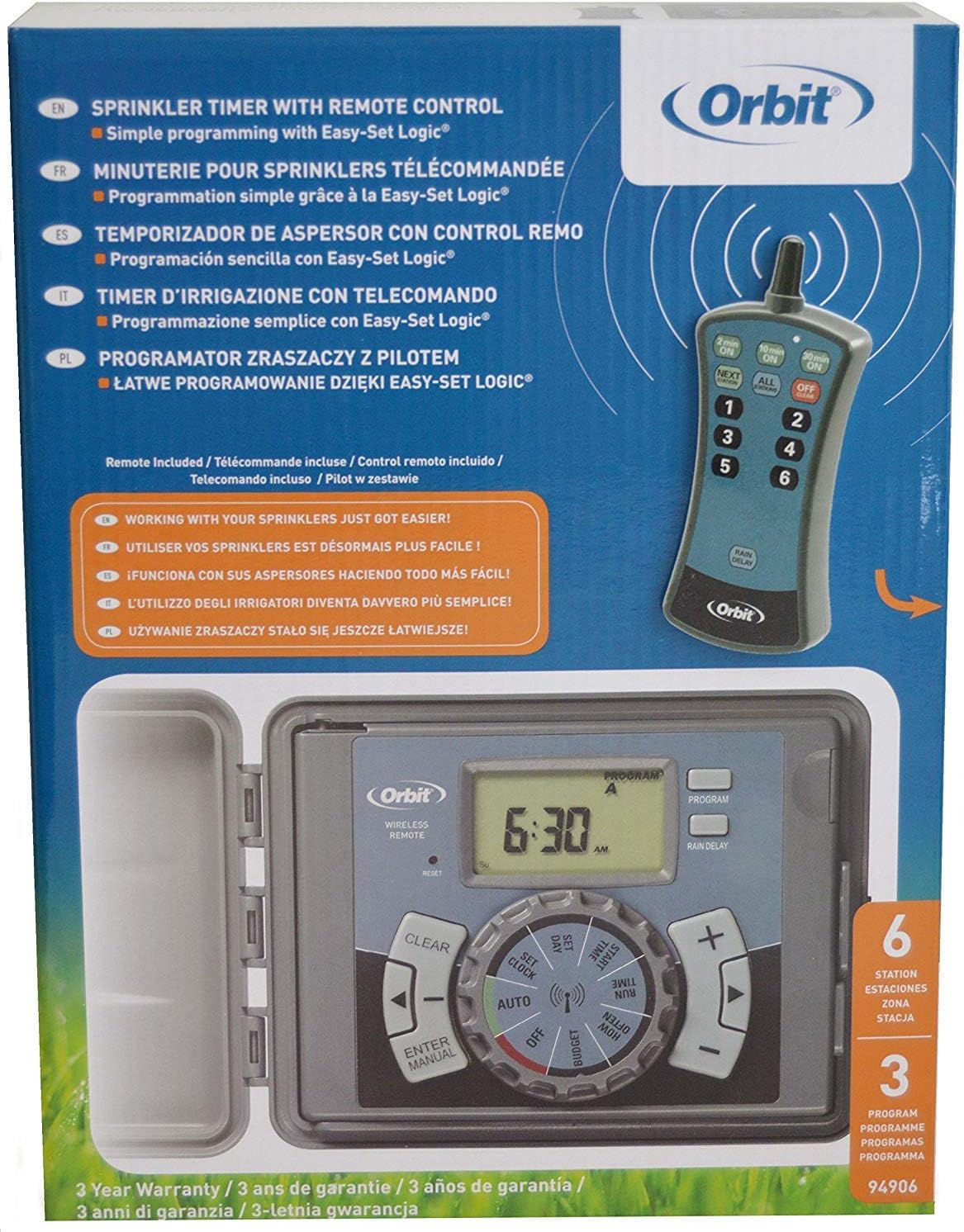
Image: The product packaging for the Orbit 94906, indicating a 3-year warranty.
Падтрымка кліентаў
For technical assistance, troubleshooting, or warranty claims, please contact Orbit Customer Service:
- тэлефон: 1-800-298-5555
- Webсайт: www.orbitonline.com
When contacting support, please have your product model number (94906) and purchase information available.