
Logitech M280
Кіраўніцтва па эксплуатацыі бесправадной мышы Logitech M280
Мадэль: M280 (910-004287)
1. Прадукт скончыўсяview
The Logitech M280 Wireless Mouse is designed for comfort and efficiency, featuring contoured grips made of soft rubber for extended use. Its energy-efficient engineering provides an impressive 18-month battery life, with an automatic sleep function when not in use. Experience ultra-precise and responsive tracking with Logitech Advanced Optical Tracking. The included Nano receiver offers convenient and reliable wireless connectivity.

Figure 1: Logitech M280 Wireless Mouse
2. Што ў скрынцы
- Бесправадная мыш Logitech M280
- Нанапрыёмнік
- 1 батарэйка тыпу АА (папярэдне ўсталяваная або ў камплекце)
3. Кіраўніцтва па наладцы
3.1. Устаноўка акумулятара
- Знайдзіце вечка адсека для батарэй на ніжняй частцы мышы.
- Зрушыце вечка, каб адкрыць адсек.
- Устаўце батарэйку тыпу АА, якая пастаўляецца ў камплекце, сачыце за правільнай палярнасцю (+/-).
- Зачыніце вечка батарэйнага адсека, пакуль яна надзейна не зашчоўкнецца.
3.2. Падключэнне нанапрыёмніка
- Remove the Nano receiver from its storage slot inside the battery compartment (if applicable).
- Plug the Nano receiver into an available USB port on your computer.
- Turn on the mouse using the On/Off switch located on the underside. The mouse should automatically connect to the receiver.

Figure 2: Mouse features and receiver storage
4. Кіраванне мышшу
4.1. Асноўныя функцыі
- Пстрычка левай кнопкай мышы: Першасны выбар і актывацыя.
- Пстрыкніце правай кнопкай мышы: Доступ да кантэкстных меню.
- Кола пракруткі: Пракручвайце дакументы ўверх або ўніз і web pages. The scroll wheel is designed for precise, quiet operation.

Figure 3: Precise Scrolling with the M280
4.2. Advanced Optical Tracking
The Logitech M280 utilizes advanced optical tracking technology, providing smooth and precise cursor control on a variety of surfaces. This technology ensures high responsiveness and accuracy for daily tasks.

Figure 4: Smooth Navigation and Precise Scrolling on Most Operating Systems
4.3. Эрганамічны дызайн
The mouse features a contoured shape with soft rubber grips, specifically crafted for the right hand to provide enhanced comfort during prolonged use. This ergonomic design helps reduce strain and fatigue.

Figure 5: Contoured Shape & Grips for Enhanced Comfort
5. Тэхнічнае абслугоўванне
5.1. Замена батарэі
When the mouse's performance degrades or the indicator light (if present) signals low battery, replace the AA battery by following the steps in Section 3.1. The M280 is designed for energy efficiency, offering up to 18 months of battery life.
5.2. Уборка
To maintain optimal performance, regularly clean the mouse's optical sensor and the surface of the mouse with a soft, dry cloth. Avoid using harsh chemicals or abrasive materials.
6. Выпраўленне непаладак
6.1. No Cursor Movement or Unresponsive Mouse
- Ensure the mouse is turned ON using the switch on the underside.
- Праверце батарэю. Заменіце яе, калі яна разраджаная або разраджаная.
- Ensure the Nano receiver is securely plugged into a working USB port on your computer. Try a different USB port.
- Перазагрузіце кампутар.
6.2. Lag or Intermittent Connectivity
- Move the mouse closer to the Nano receiver. The wireless range is approximately 10 meters (33 feet).
- Avoid using the mouse on metallic surfaces, which can interfere with the wireless signal.
- Remove any large metal objects between the mouse and the receiver.
- If using a USB hub, try plugging the receiver directly into the computer.
7. Тэхнічныя характарыстыкі
| Асаблівасць | Спецыфікацыя |
|---|---|
| мадэль | М280 (910-004287) |
| Сувязь | Wireless (RF 2.4 GHz) via Nano USB Receiver |
| Тэхналогія выяўлення руху | Пашыранае аптычнае адсочванне |
| Тып батарэі | 1 х АА батарэя |
| Тэрмін службы батарэі | Да 18 месяцаў |
| Далёкасць бесправадной сувязі | Да 10 метраў (33 футаў) |
| Памеры (ДхШхВ) | 105.4 мм x 67.9 мм x 38.4 мм (4.15 x 2.67 x 1.51 цалі) |
| Вага | 91 г (3.21 унцыі) |
| Сумяшчальнасць аперацыйнай сістэмы | Windows, macOS, ChromeOS, Linux |
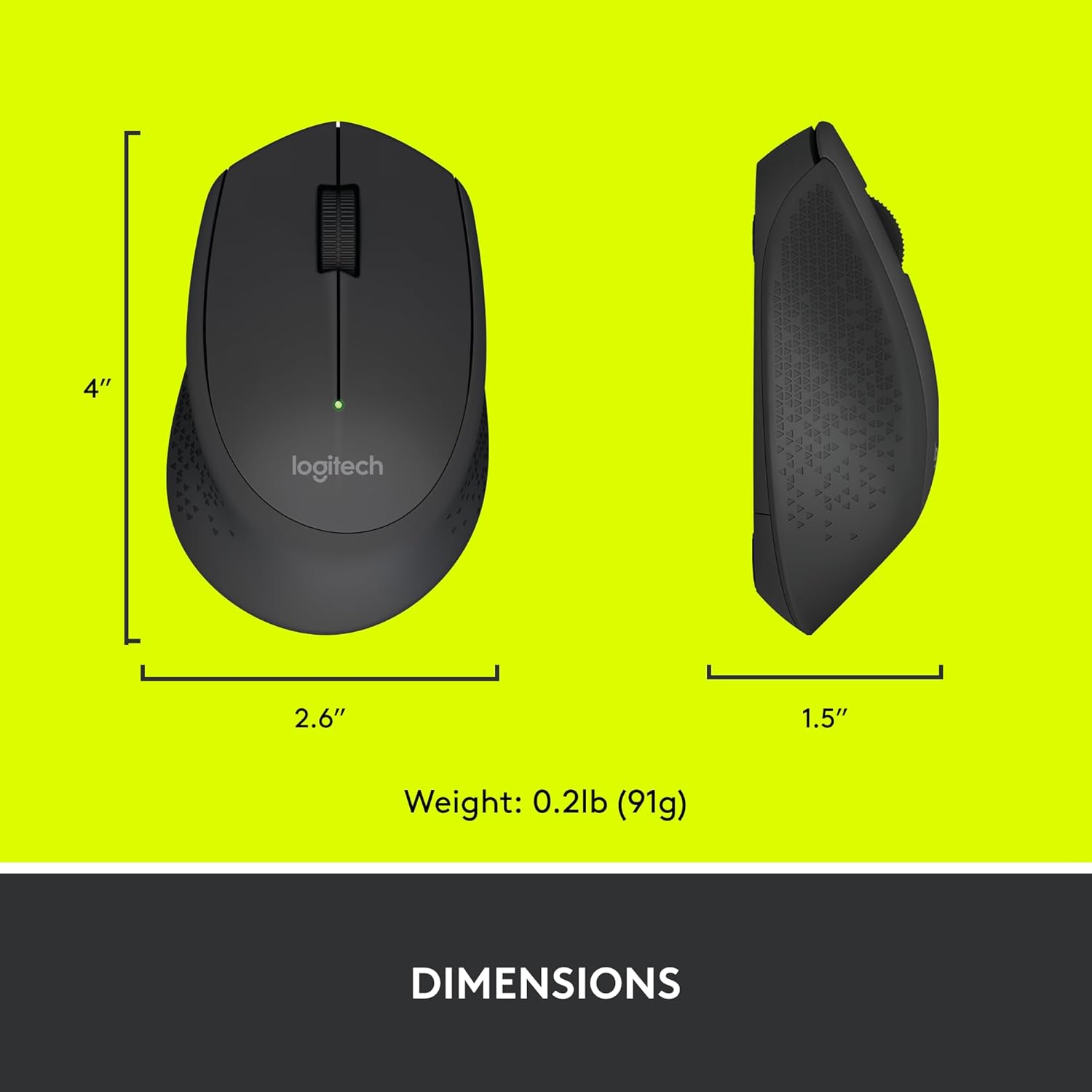
Figure 6: Logitech M280 Dimensions
8. Гарантыя і падтрымка
Каб атрымаць інфармацыю аб гарантыі і тэхнічнай падтрымцы, наведайце афіцыйны сайт падтрымкі Logitech. website or refer to the warranty card included with your product. You can also find frequently asked questions and troubleshooting tips online.
Каб атрымаць дадатковыя рэсурсы, наведайце Крама Logitech на Amazon.
Ask a question about this manual
Ask about setup, troubleshooting, compatibility, parts, safety, or missing instructions. Manuals+ will review the question and use this page’s manual context to help answer it.