
1. Уводзіны
This user manual provides essential information for the safe and efficient installation, operation, and maintenance of your Supermicro YM-5201D ATX & EPS12V Power Supply. Please read this manual thoroughly before using the product to ensure proper functionality and to prevent damage.

Figure 1: Supermicro YM-5201D ATX & EPS12V Power Supply, showing the main unit and attached power cables.
2. Інфармацыя па бяспецы
Always observe the following safety precautions to prevent injury or damage to the power supply and connected components:
- Ensure the power supply is disconnected from the AC outlet before installation or removal.
- Не адкрывайце блок харчавання casing. There are no user-serviceable parts inside, and opening it voids the warranty and exposes you to dangerous voltagэс.
- Усталюйце блок харчавання ў добра вентыляваным памяшканні, каб пазбегнуць перагрэву.
- Use only the cables provided or approved by Supermicro for this power supply.
- Avoid exposing the power supply to moisture or extreme temperatures.
- Ensure proper grounding of the computer system.
3. Змесціва ўпакоўкі
Праверце наяўнасць усіх прадметаў у камплекце:
- Supermicro YM-5201D ATX & EPS12V Power Supply
- Шнур харчавання пераменнага току (залежна ад рэгіёна)
- Крапежныя шрубы
- Кіраўніцтва карыстальніка (гэты дакумент)
4. Настройка і ўстаноўка
Follow these steps to install the power supply into your computer chassis:
- Падрыхтуйце сістэму: Disconnect the computer from the AC power outlet. Open the computer case according to its manufacturer's instructions.
- Выдаліце стары блок харчавання (калі ёсць): Unscrew and remove the existing power supply. Disconnect all power cables from the motherboard, graphics card, drives, and other components.
- Усталюйце новы блок харчавання: Carefully slide the Supermicro YM-5201D power supply into the designated power supply bay in your chassis. Ensure the fan is oriented correctly for optimal airflow (typically facing downwards or towards the rear vent).
- Замацуйце блок харчавання: Align the screw holes on the power supply with those on the chassis. Secure the power supply using the provided mounting screws.
- Падключыце кабелі:
- 24-кантактны раз'ём матчынай платы ATX: Connect the large 24-pin connector to the corresponding port on your motherboard. Ensure it clicks into place.
- 8-pin (4+4) EPS12V CPU Connector: Connect the 8-pin or split 4+4-pin connector to the CPU power port on your motherboard.
- PCIe Connectors (if applicable): If your graphics card requires additional power, connect the appropriate 6-pin or 8-pin PCIe power connectors.
- Раздымы харчавання SATA: Падключыце кабелі харчавання SATA да жорсткіх дыскаў, SSD-назапашвальнікаў і аптычных прывадаў.
- Molex Connectors (if applicable): Connect Molex power cables to any legacy devices or case fans that require them.
- Кабельнае кіраванне: Акуратна пракладвайце кабелі, каб палепшыць цыркуляцыю паветра і эстэтыку ўнутры корпуса.
- Закрыць шасі: Once all connections are secure, close the computer case.
- Падключыце сетку пераменнага току: Connect the AC power cord to the power supply's inlet and then to a grounded wall outlet or surge protector.
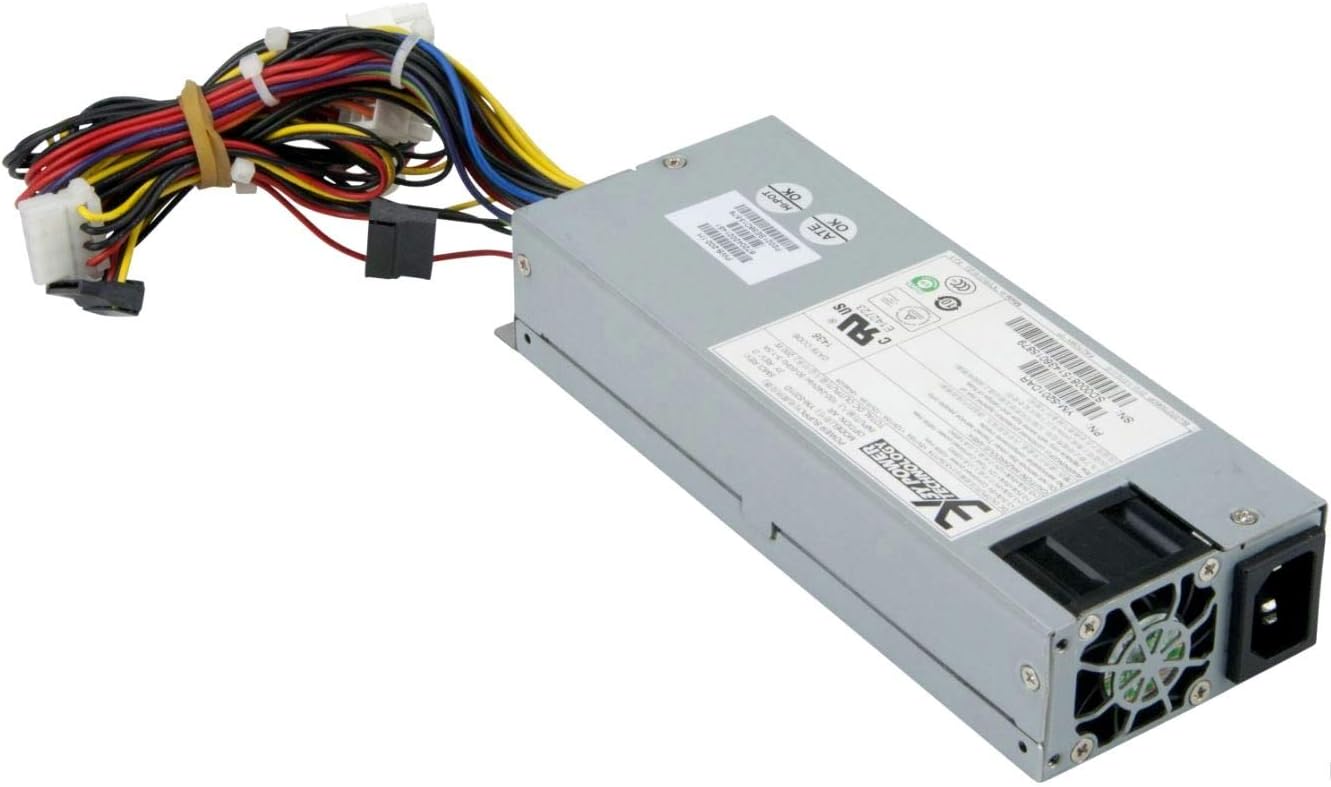
Малюнак 2: Задняя частка view of the Supermicro YM-5201D Power Supply, highlighting the cooling fan and AC power input.
5. Інструкцыя па эксплуатацыі
After successful installation, operating the power supply is straightforward:
- Уключэнне: Ensure the power switch on the rear of the power supply (if present) is in the 'ON' (I) position. Then, press the power button on your computer case.
- Выключэнне: Shut down your computer through the operating system. Once the system is off, you can flip the power switch on the power supply to the 'OFF' (O) position for complete power disconnection.
- Нармальны рэжым працы: The power supply will automatically regulate power delivery to your components based on demand. Ensure adequate ventilation around your computer to prevent heat buildup.
6. Тэхнічнае абслугоўванне
Regular maintenance helps prolong the life of your power supply:
- Выдаленне пылу: Periodically (e.g., every 3-6 months), disconnect the power supply from the AC outlet and use compressed air to gently blow dust out of the power supply's fan and vents. Do not open the casing.
- Праверка кабеля: Occasionally check all power cables for any signs of wear, fraying, or loose connections.
- Вентыляцыя: Ensure that the computer case's ventilation openings are not obstructed.
7. Выпраўленне непаладак
Калі ў вас узнікнуць праблемы, звярніцеся да наступных распаўсюджаных праблем і рашэнняў:
| праблема | Магчымая прычына | Рашэнне |
|---|---|---|
| Кампутар не ўключаецца. | Power cable loose; Power switch off; Faulty component; Insufficient power. | Check AC power cord connection. Ensure power supply switch is ON. Verify all internal power connections (24-pin, 8-pin CPU). Test with minimal components. |
| Сістэма ўключаецца, але адразу ж выключаецца. | Overload; Overheating; Short circuit. | Забяспечце агульную ватtage draw is within PSU limits. Check for proper ventilation. Inspect for any loose screws or components that might be causing a short. |
| Loud fan noise from PSU. | Dust buildup; Fan bearing issue; High load. | Clean dust from fan and vents using compressed air. If noise persists and is excessive, consider professional inspection. |
If troubleshooting steps do not resolve the issue, contact Supermicro technical support.
8. Тэхнічныя характарыстыкі
Key technical specifications for the Supermicro YM-5201D Power Supply:
| Асаблівасць | Дэталь |
|---|---|
| Назва мадэлі | YM-5201D |
| Нумар мадэлі тавару | PWS-202-1H |
| Марка | Супермікра |
| Формаў-фактар | 1U |
| Выхад ватtage | 200 ват |
| Тып раздыма | ATX |
| Сумяшчальныя прылады | Desktop Computers, Servers, Desktop Components |
| Спосаб астуджэння | паветра |
| Памеры прадукту (Д х Ш х У) | 1.1 х 9.7 х 6.5 цалі |
| Вага прадмета | 6.6 фунта |
| Дата першай даступнасці | 14 лістапада 2012 г |
9. Гарантыя і падтрымка
Каб атрымаць інфармацыю аб гарантыі і тэхнічнай падтрымцы, звярніцеся да афіцыйнага пастаўшчыка Supermicro. webсайт або звярніцеся непасрэдна ў службу падтрымкі кліентаў. Захоўвайце пацвярджэнне пакупкі для прэтэнзій па гарантыі.
Афіцыйны прадстаўнік Supermicro Webсайт: www.supermicro.com