
Уводзіны
This manual provides comprehensive instructions for the setup, operation, and maintenance of your Genius SW-2.1 355 Speaker System. Please read this manual thoroughly before using the product to ensure proper functionality and to maximize your listening experience.
Інфармацыя па бяспецы
Выконвайце наступныя меры бяспекі, каб пазбегнуць пашкоджання прылады або траўмаў:
- Не падвяргайце дынамікі ўздзеянню вады або вільгаці.
- Пазбягайце размяшчэння дынамікаў побач з крыніцамі цяпла або пад прамымі сонечнымі прамянямі.
- Забяспечце належную вентыляцыю вакол сабвуфера, каб прадухіліць перагрэў.
- Выкарыстоўвайце толькі адаптар сілкавання, які пастаўляецца з прыладай.
- Не спрабуйце адкрываць або рамантаваць прыладу самастойна. Звяртайцеся па любыя паслугі па абслугоўванні да кваліфікаванага персаналу.
- Захоўваць у месцах, недаступных дзецям.
Змест пакета
Праверце наяўнасць усіх прадметаў у камплекце:
- 1 x Subwoofer unit
- 2 х спадарожнікавыя калонкі
- 1 x Audio input cable (3.5mm stereo jack)
- 1 х адаптар сілкавання
- 1 х Кіраўніцтва карыстальніка (гэты дакумент)
Прадукт скончаныview
The Genius SW-2.1 355 Speaker System consists of a subwoofer and two satellite speakers designed to deliver clear audio and powerful bass for your multimedia needs.
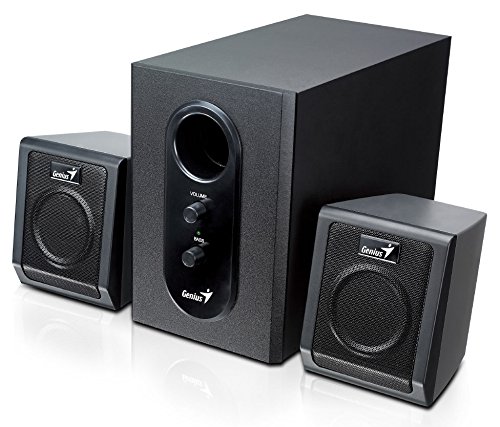
This image displays the Genius SW-2.1 355 Speaker System. It features a central, larger subwoofer unit with volume and bass control knobs on its front panel, and two smaller satellite speakers positioned on either side. All components are black.
Кампаненты:
- сабвуфер: The main unit housing the bass driver and control panel.
- Сатэлітныя дынамікі: Два кампактныя дынамікі для прайгравання гуку сярэдняга і высокага частот.
- Панэль кіравання: Located on the subwoofer, featuring Volume and Bass adjustment knobs.
Настройка
- Размяшчэнне дынамікаў: Place the subwoofer on the floor or a sturdy surface. Position the satellite speakers on either side of your listening area, facing towards you for optimal stereo separation.
- Падключэнне сатэлітных дынамікаў: Connect the cables from the two satellite speakers to the corresponding output jacks on the rear of the subwoofer unit. Ensure a secure connection.
- Connecting Audio Source: Connect one end of the 3.5mm audio input cable to the "Audio In" jack on the subwoofer. Connect the other end to the audio output jack (e.g., headphone jack) of your computer, MP3 player, smartphone, or other audio source.
- Падключэнне магутнасці: Plug the power adapter into the DC input jack on the subwoofer. Then, plug the power adapter into a standard electrical outlet.
- Уключэнне: Turn on the speaker system using the power switch, usually integrated with the volume knob.
Аперацыя
- Уключэнне/выключэнне харчавання і рэгуляванне гучнасці: The main knob on the subwoofer controls both power and overall volume. Rotate clockwise to turn on and increase volume; rotate counter-clockwise to decrease volume and turn off.
- Рэгуляванне нізкіх частот: Use the "Bass" knob on the subwoofer to adjust the level of low-frequency sound. Rotate clockwise to increase bass, and counter-clockwise to decrease it, according to your preference.
- Гучнасць крыніцы гуку: For optimal sound quality, set the volume on your audio source (computer, phone, etc.) to about 75% and then use the speaker system's volume control for fine adjustments.
Тэхнічнае абслугоўванне
- Уборка: Use a soft, dry cloth to clean the surfaces of the speakers. Do not use liquid cleaners or abrasive materials.
- захоўванне: Калі вы збіраецеся захоўваць дынамікі працяглы час, адключыце іх ад сілкавання і захоўвайце ў прахалодным, сухім месцы.
- Кабельнае кіраванне: Ensure cables are not tangled or pinched to prevent damage.
Ліквідацыю непаладак
| праблема | Магчымая прычына | Рашэнне |
|---|---|---|
| Няма гуку |
|
|
| Скажоны гук |
|
|
| Слабы бас |
|
|
Тэхнічныя характарыстыкі
| Асаблівасць | Дэталь |
|---|---|
| Назва мадэлі | SW-2.1 355 |
| Тып дынаміка | 2.1 Channel Multimedia Speaker System (Bookshelf, Satellite, Subwoofer) |
| Агульная выхадная магутнасць | 10 Watts RMS (5W Subwoofer + 2.5W x 2 Satellites) |
| Матэрыял | Wood (Subwoofer) |
| Тэхналогія падлучэння | Wired (3.5mm audio input) |
| Сумяшчальныя прылады | MP3 Player, Personal Computer, Smartphones, Tablets, Televisions |
| Элементы кіравання | Гучнасць, бас |
| Крыніца харчавання | DC |
| Вага прадмета | 2.78 кг |
| Памеры ўпакоўкі | 39.6 х 25 х 18.4 см |
Гарантыя і падтрымка
Genius products are designed for reliability and performance. For information regarding warranty coverage, technical support, or service inquiries, please refer to the warranty card included with your product or visit the official Genius webсайт. Захоўвайце чэк аб куплі як пацверджанне пакупкі.


