
1. Уводзіны
This manual provides detailed instructions for the proper use, setup, and maintenance of your Genius HS-920BT Bluetooth Headset. Please read this manual thoroughly before using the device to ensure optimal performance and longevity.
The Genius HS-920BT is a versatile Bluetooth headset designed for wireless audio streaming and hands-free communication with compatible devices such as smartphones, tablets, and PCs.
2. Змесціва ўпакоўкі
Праверце, ці ёсць усе прадметы ў вашай упакоўцы:
- Genius HS-920BT Bluetooth Headset
- USB-кабель для зарадкі
- Multi-language User Manual (this document)
3. Прадукт скончыўсяview
The HS-920BT headset features an adjustable headband and comfortable earcups, integrating controls for audio playback and call management.
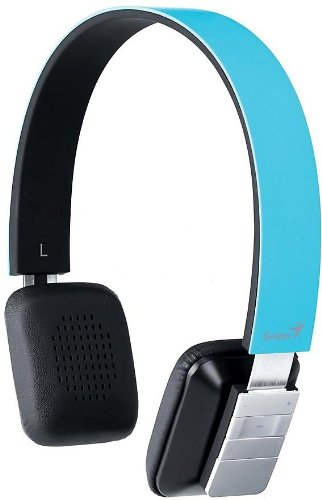
Figure 1: Genius HS-920BT Bluetooth Headset (Blue)
This image displays the Genius HS-920BT Bluetooth Headset in blue, viewed from an angle, highlighting its adjustable headband and earcup design.
Асноўныя характарыстыкі:
- Wireless Bluetooth connectivity for audio and calls (A2DP support)
- Integrated rechargeable Lithium-Ion battery
- Убудаваны мікрафон для гучнай сувязі
- On-ear controls for volume adjustment, track skipping (AVRCP support)
- Рэгуляваная павязка для зручнай пасадкі
- 40 mm driver units for clear sound
4. Настройка
4.1 Зарадка гарнітуры
Before initial use, fully charge the headset. Use the provided USB charging cable.
- Падключыце меншы канец USB-кабеля для зарадкі да порта зарадкі на гарнітуры.
- Падключыце большы канец USB-кабеля да USB-порта з харчаваннем (напрыклад, камп'ютара, насценнага USB-адаптара).
- The LED indicator on the headset will illuminate during charging and change color or turn off when fully charged. Refer to the headset's LED behavior for specific indications.
Поўная зарадка звычайна займае каля 2-3 гадзін.
4.2 Спалучэнне з прыладай Bluetooth
To use the HS-920BT wirelessly, you must pair it with your Bluetooth-enabled device.
- Уключэнне: Press and hold the Power button on the headset until the LED indicator flashes, usually alternating blue and red, indicating pairing mode.
- Актываваць Bluetooth: On your smartphone, tablet, or PC, enable Bluetooth functionality.
- Пошук прылады: In your device's Bluetooth settings, search for available devices. The headset should appear as "HS-920BT".
- Выберыце і падключыце: Select "HS-920BT" from the list. If prompted for a passcode, enter "0000" (four zeros).
- Пацверджанне: Once paired, the headset's LED indicator will typically flash blue slowly, and your device will confirm the connection.
Пры ўключэнні гарнітура аўтаматычна паспрабуе падключыцца да апошняй спалучанай прылады, калі Bluetooth гэтай прылады актыўны і знаходзіцца ў зоне дзеяння.
5. Інструкцыя па эксплуатацыі
The HS-920BT features intuitive controls located on the earcup.

Figure 2: Earcup Controls of HS-920BT
This image shows a close-up of the right earcup of the Genius HS-920BT Bluetooth Headset, detailing the control buttons for power, volume, and track navigation.
5.1 Уключэнне/выключэнне сілкавання
- Уключэнне: Націсніце і ўтрымлівайце кнопку харчавання прыблізна 3 секунды, пакуль святлодыёдны індыкатар не пачне міргаць сінім колерам.
- Выключэнне: Націсніце і ўтрымлівайце кнопку харчавання прыблізна 3 секунды, пакуль не пагасне святлодыёдны індыкатар.
5.2 Прайграванне музыкі
- Прайграванне/Паўза: Націсніце кнопку Play/Pause адзін раз.
- Наступны трэк: Press the "Next Track" button (usually marked with a forward arrow).
- Папярэдні трэк: Press the "Previous Track" button (usually marked with a backward arrow).
5.3 Кіраванне выклікамі
- Адказ/завяршэнне выкліку: Press the Multi-function button (often the same as Play/Pause) once during an incoming call to answer, or once during a call to end it.
- Адхіліць выклік: Падчас уваходнага званка націсніце і ўтрымлівайце шматфункцыянальную кнопку прыблізна 2 секунды.
- Паўторны набор апошняга нумара: Двойчы націсніце шматфункцыянальную кнопку, калі не размаўляеце па тэлефоне.
5.4 Рэгулятар гучнасці
- Павялічыць гучнасць: Націсніце кнопку павелічэння гучнасці (+).
- Паменшыць гучнасць: Націсніце кнопку памяншэння гучнасці (-).
6. Тэхнічнае абслугоўванне
Правільны догляд гарантуе даўгавечнасць вашай гарнітуры.
- Уборка: Для чысткі гарнітуры выкарыстоўвайце мяккую сухую тканіну. Не выкарыстоўвайце абразіўныя ачышчальнікі або растваральнікі.
- захоўванне: Захоўвайце гарнітуру ў прахалодным, сухім месцы, удалечыні ад прамых сонечных прамянёў і экстрэмальных тэмператур.
- Сыход за батарэяй: Каб падоўжыць тэрмін службы батарэі, не разраджайце яе цалкам часта. Рэгулярна зараджайце гарнітуру, нават калі яна доўга не выкарыстоўваецца.
- Ўздзеянне вады: The headset is not waterproof. Avoid exposure to water or excessive moisture.
7. Выпраўленне непаладак
If you encounter issues with your HS-920BT headset, refer to the following common solutions:
| праблема | Магчымае рашэнне |
|---|---|
| Гарнітура не ўключаецца. | Ensure the battery is charged. Connect the headset to a power source using the USB cable. |
| Немагчыма спалучыць гарнітуру з прыладай. |
|
| Няма гуку або нізкі ўзровень гучнасці. |
|
| Якасць званка дрэнная. |
|
8. Тэхнічныя характарыстыкі
| Назва мадэлі: | HS-920BT |
| Бесправадная тэхналогія: | Bluetooth |
| Адзінкі драйвера: | 40 мм |
| акумулятар: | Убудаваны акумулятарны літый-іённы акумулятар |
| Тып кіравання: | Volume Control, Track Navigation, Call Management |
| Мікрафон: | Убудаваны |
| Падтрымліваецца Profiles: | A2DP, AVRCP |
| Апаратная платформа: | ПК, смартфон, планшэт |
| Вага прадмета: | 110 грам |
| Памеры (ДхШхВ): | 13.6 х 17.3 х 2.9 см |
9. Гарантыя і падтрымка
For warranty information and technical support, please refer to the warranty card included with your product or visit the official Genius webсайт. Захоўвайце чэк аб куплі як пацверджанне пакупкі.
For further assistance, you may contact Genius customer service through their official channels.