
AT&T CRL32102
AT&T CRL32102 DECT 6.0 Cordless Phone User Manual
Model: CRL32102
Сардэчна запрашаем
This manual provides instructions for the AT&T CRL32102 DECT 6.0 Expandable Cordless Phone with Answering System and Caller ID/Call Waiting. Please read this manual thoroughly before operating your new telephone to ensure proper use and to maximize its features.
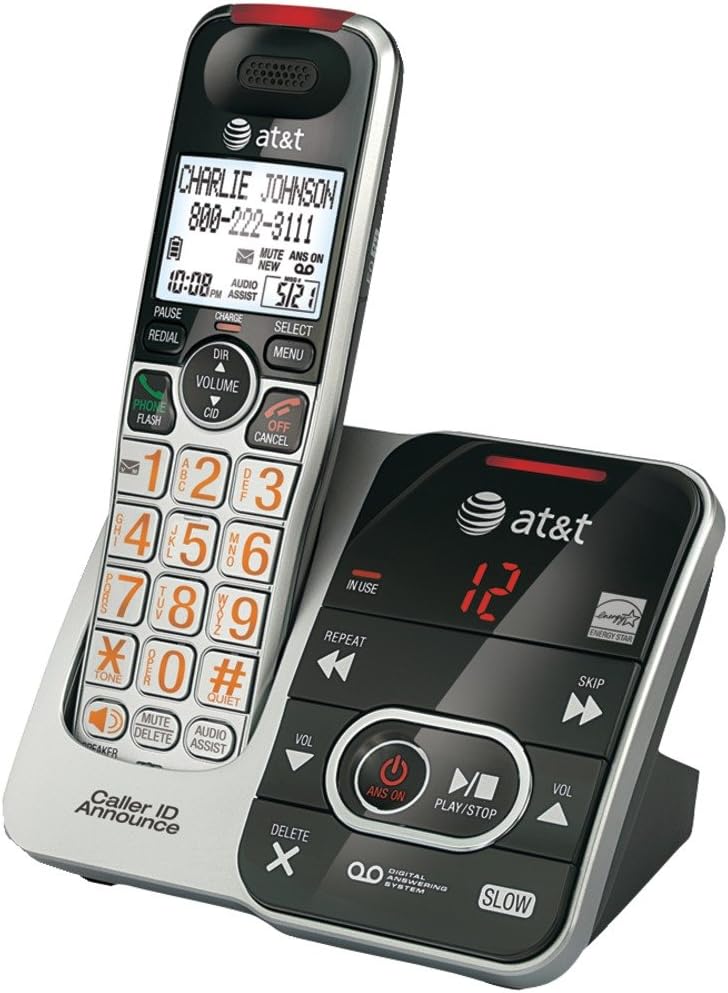
Image Description: A silver and black AT&T CRL32102 cordless phone handset is shown resting in its matching base unit. The handset features a large display, a numeric keypad with large orange characters, and various function buttons. The base unit includes controls for the digital answering system, such as play/stop, skip, repeat, and volume, along with an "IN USE" indicator and a message counter displaying "12". The AT&T logo is visible on both the handset and the base.
Пачатковая налада
Ўстаноўка акумулятара
Install the supplied battery pack into the handset battery compartment. Ensure correct polarity by aligning the connectors. Close the battery compartment cover securely.
Зарадка тэлефона
Place the handset in the telephone base or charger with the display facing up. The CHARGE light on the handset will illuminate, indicating proper placement. Allow 16 hours for the battery to fully charge before first use to ensure optimal battery performance.
Connecting the Telephone Base
Connect the small end of the power adapter to the power jack on the back of the telephone base. Plug the large end into an electrical outlet that is not controlled by a wall switch.
Connect one end of the telephone line cord to the ЛІНІЯ ТЭЛ jack on the back of the telephone base. Plug the other end into a telephone wall jack. If you have DSL internet service, a DSL filter (not included) may be required.
Кіраванне вашым тэлефонам
Тэлефанаванне
Прэса ТЕЛЕФОН / ФЛЕШ or any dial pad key. Enter the phone number using the numeric keypad. The call will connect automatically.
Адказ на званок
Калі тэлефон зазвоніць, націсніце ТЕЛЕФОН / ФЛЕШ or any dial pad key to answer the incoming call.
Завяршэнне выкліку
Прэса ВЫКЛ/АДМЕНА or place the handset in the telephone base to end an active call.
Рэгуляванне гучнасці
Падчас размовы націсніце АБ'ЁМ ▲ (стрэлка ўверх) або ▼ (down arrow) on the handset to adjust the earpiece volume to your preferred level.
Функцыя адключэння гуку
Падчас размовы націсніце МУК to mute the microphone. This allows you to speak privately without the other party hearing you. Press МУК again to unmute the microphone.
Паўторнае набранне
Прэса ПЕРАСУД каб view the last 10 dialed numbers. Use the ДЫР (directory) navigation keys to scroll through the list. Press ТЕЛЕФОН / ФЛЕШ каб набраць абраны нумар.
Аўтаадказчык
The digital answering system can record up to 15 minutes of messages, memos, and announcements.
- To turn the answering system ON/OFF, press ANS ON на тэлефоннай базе.
- Каб прайграць паведамленні, націсніце ПРАЙГРАЦЬ/СТОП на тэлефоннай базе.
- To skip a message, press ПРАПУСЦІЦЬ падчас прайгравання паведамлення.
- To repeat a message, press Паўтор during message playback. Press twice to play the previous message.
- To delete a message, press ВЫДАЛІЦЬ while the message is playing.
Тэхнічнае абслугоўванне
Уборка
Clean the telephone and base with a soft, slightly damp cloth. Do not use cleaning sprays or liquid cleaners as they may damage the finish or internal components.
Сыход за батарэяй
To maintain the life of the battery, periodically fully discharge the handset battery by leaving it off the charger until it runs out of power. Then, fully recharge it for 16 hours. This helps to recondition the battery and extend its lifespan.
Ліквідацыю непаладак
If you experience difficulty with your telephone, please try the following suggestions. For more detailed troubleshooting, refer to the full user manual or AT&T support.
Няма сігналу набору
- Ensure the telephone line cord is securely plugged into the telephone base and the wall jack.
- Check if the power adapter is properly connected to the telephone base and a working electrical outlet.
- If you have multiple phones, try unplugging others to see if the issue is with a specific phone or line.
Handset Does Not Charge
- Ensure the handset is correctly placed in the base. The CHARGE light on the handset should be on.
- Clean the charging contacts on the handset and base with a soft, dry cloth to remove any dust or debris.
- Verify that the power adapter for the base is securely plugged in.
Дрэнная якасць гуку
- Move the handset closer to the telephone base to improve signal strength.
- Avoid placing the phone near other electrical appliances, metal objects, or large electronic devices that may cause interference.
- Check for interference from other DECT 6.0 devices or Wi-Fi routers.
Тэхнічныя характарыстыкі прадукту
| Асаблівасць | Дэталь |
|---|---|
| ASIN | B00OZ55DTY |
| Марка | AT&T |
| Колер | Чорны, серабрысты |
| Тып тэлефона | Бесправадная |
| Крыніца харчавання | Правадная электрычная |
| Тып дазвону | Адзіная клавіятура |
| Тып аўтаадказчыка | Лічбавы |
| Сумяшчальныя прылады | AT&T cordless headset 2 |
| ёмістасць запісу | 15 хвілін |
| Магчымасць канферэнц-сувязі | асноўны |
| Шматлінейная аперацыя | Аперацыя з адной лініяй |
| Дата першай даступнасці | 3 мая 2016 г |
Падтрымка кліентаў
For further assistance, technical support, or warranty information, please visit the official AT&T support website or refer to the contact information provided with your product packaging. You can also find FAQs and additional resources online.
Ask a question about this manual
Ask about setup, troubleshooting, compatibility, parts, safety, or missing instructions. Manuals+ will review the question and use this page’s manual context to help answer it.