
1. Уводзіны
Дзякуй за пакупкуasing the Eonon Waterproof CMD Lens Rear View Camera and Wireless Video Transmitter Set. This system is designed to provide a clear, wide-angle view of the area behind your vehicle, enhancing safety during reversing and parking maneuvers. The wireless video transmitter eliminates the need for complex wiring, simplifying installation.
This manual provides essential information for the correct installation, operation, and maintenance of your new system. Please read it thoroughly before installation and keep it for future reference.
2. Змесціва ўпакоўкі
Калі ласка, пераканайцеся, што ўсе пералічаныя ніжэй прадметы ўваходзяць у ваш пакет:
- Eonon CMD Rear View Camera: 1 piece
- Wireless Video Transmitter: 1 piece
- Wireless Video Receiver: 1 piece
- Power Cable (1m): 1 piece
- Video Cable (6m): 1 piece
- Mounting Screws: 2 pieces
- English Instruction Manual: 1 piece

Image 2.1: Contents of the Eonon Rear View Camera and Wireless Transmitter Set.
3. Тэхнічныя характарыстыкі прадукту
3.1. Задняя View Тэхнічныя характарыстыкі камеры
| Асаблівасць | Спецыфікацыя |
|---|---|
| Колер цела | Чорны |
| Датчык выявы | OV 7959 CMD |
| Усяго пікселяў | 420,000 пікселяў |
| Гарызантальнае дазвол | 420 тэлевізійных ліній |
| Фармат відэа | NTSC |
| Шырокі кут | 170 градусаў |
| Гарызантальны Viewing кут | 120 градусаў |
| Мінімальная асветленасць | 0.2 Lux/F1.8 (0 Lux with LED) |
| Відэавыхад | 1.0Vpp/75Ω |
| Аперацыйная Voltage | 12 В пастаяннага току |
| Рэйтынг воданепранікальнасці | Падтрымліваецца |
| Guideline Display | Падтрымліваецца |
| Пачатковы стан | Mirror Image Output |
| камера Памер | 20 мм × 18 мм × 24 мм |

Image 3.1: Detailed specifications of the Eonon CMD Rear View Камера.
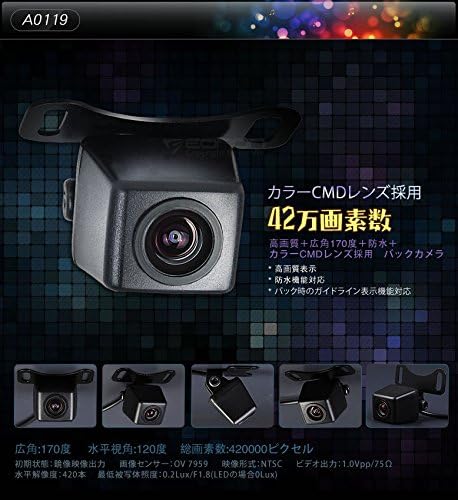
Image 3.2: Visual representation of camera features including CMD lens and 420,000 pixels.
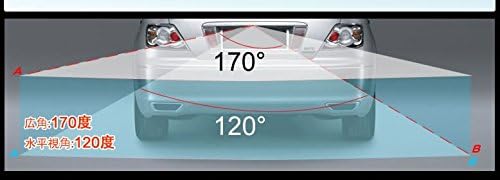
Image 3.3: Illustration of the 170-degree wide-angle and 120-degree horizontal viewныя вуглы.
3.2. Wireless Video Transmitter Specifications
| Асаблівасць | Спецыфікацыя |
|---|---|
| Аперацыйная Voltage | 12 В пастаяннага току |
| Відэа уваход / выхад | PAL/NTSC Signal |
| Адлегласць перадачы | Прыкладна 5 м |
4. Настройка і ўстаноўка
The Eonon wireless system simplifies installation by eliminating the need to run long video cables through the vehicle. Follow these steps for proper setup:
4.1. Connecting the Camera and Transmitter
- Connect the camera's video output (yellow RCA connector) to the transmitter's video input (yellow RCA connector).
- Connect the camera's power cable to the transmitter's power output. Ensure the polarity is correct (red to positive, black to negative).
- Connect the transmitter's power input to the vehicle's reverse light power source (DC 12V). This will power the camera and transmitter when the vehicle is in reverse.

Image 4.1: Connection diagram for the transmitter (top) and receiver (bottom).

Малюнак 4.2: Падрабязны view of the 2.4GHz wireless transmitter and receiver, showing power and video connections.
4.2. Connecting the Receiver to the Monitor
- Connect the receiver's video output (yellow RCA connector) to your monitor's video input.
- Connect the receiver's power cable to a DC 12V power source in your vehicle. This can be the ACC power or another switched 12V source that powers your monitor.
- If your monitor has a reverse trigger wire, connect it to the vehicle's reverse light power source. This will automatically switch your monitor to the camera view when reversing. If your monitor does not have a reverse trigger, you may need to manually switch the input.

Image 4.3: Comparison of wired vs. wireless installation and detailed connection points for the camera and monitor.
4.3. Camera Mounting and Cable Routing
- Choose a suitable location for the camera, typically above the license plate or near the trunk handle, ensuring a clear view з тылу.
- Secure the camera using the provided mounting screws.
- Route the camera's cable and the transmitter's cables discreetly through the vehicle's interior. The cable diameter is 4.8mm, allowing for easy routing through narrow spaces.
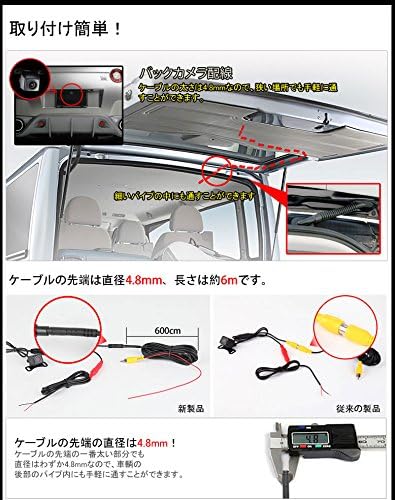
Image 4.4: Illustration of easy cable routing through the vehicle's tailgate and interior, highlighting the slim cable design.
5. Аперацыя
Once installed, the Eonon Rear View Camera system operates automatically:
- When the vehicle is shifted into reverse, the camera and transmitter will power on.
- The video signal will be wirelessly transmitted to the receiver and displayed on your connected monitor.
- The camera features a guideline display function to assist with parking.
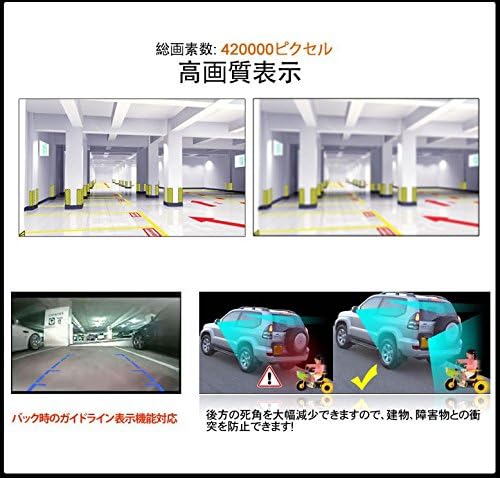
Малюнак 5.1: Прыкладamples of high-quality display and the parking guideline feature.
6. Тэхнічнае абслугоўванне
To ensure optimal performance and longevity of your Eonon camera system, follow these maintenance guidelines:
- Ачыстка аб'ектыва: Рэгулярна чысціце аб'ектыў камеры мяккай губкайamp тканінай, каб выдаліць бруд, пыл або плямы ад вады. Пазбягайце абразіўных ачышчальнікаў, якія могуць падрапаць аб'ектыў.
- Праверка злучэнняў: Periodically inspect all cable connections to ensure they are secure and free from corrosion. Loose connections can lead to signal loss or intermittent operation.
- Ўздзеянне навакольнага асяроддзя: While the camera is waterproof, extreme temperatures or prolonged exposure to harsh weather conditions can affect its performance. Ensure the camera is securely mounted to prevent damage from vibrations or impacts.
7. Выпраўленне непаладак
If you encounter issues with your Eonon camera system, refer to the following troubleshooting steps:
- Няма выявы на маніторы:
- Ensure all power connections (camera, transmitter, receiver, monitor) are secure and receiving 12V DC power.
- Verify that the video cables (RCA) are correctly connected between the camera/transmitter and receiver/monitor.
- Check if your monitor is set to the correct video input channel.
- Confirm that the vehicle is in reverse, activating the camera system.
- Poor Image Quality / Signal Noise:
- Пераканайцеся, што аб'ектыў камеры чысты і не мае перашкод.
- Check for strong electromagnetic interference sources near the transmitter or receiver.
- Verify that the transmission distance is within the specified range (approx. 5m). Obstacles between the transmitter and receiver can degrade signal quality.
- Inspect power connections for any loose wiring that might cause electrical noise.
- Incorrect Power Connector Type:
- Some camera models may have different power connector types (male/female). Ensure that the power connectors on your camera and transmitter are compatible. If they are both male or both female, an adapter or modification may be required.
- Camera Angle Adjustment Issue:
- If the camera's mounting bracket feels fragile or breaks during adjustment, handle it with care. Avoid overtightening screws.
8. Гарантыя і падтрымка
Eonon products are designed for reliability and performance. For warranty information, technical support, or service inquiries, please refer to the contact details provided with your purchase or visit the official Eonon webсайт. Захоўвайце чэк аб куплі як пацвярджэнне пакупкі для гарантыйных прэтэнзій.