
D-Link DCS-6501LH/E
D-Link DCS-6501LH/E Compact Full HD Pan & Tilt Wi-Fi Camera User Manual
Model: DCS-6501LH/E
Уводзіны
This manual provides comprehensive instructions for the setup, operation, and maintenance of your D-Link DCS-6501LH/E Compact Full HD Pan & Tilt Wi-Fi Camera. This camera is designed to monitor large areas of your home or small office with its Full HD resolution and versatile pan and tilt functionality. It features integrated night vision for monitoring in low light, two-way audio for communication, and motion/sound detection for security alerts. The camera supports local recording to an SD card and cloud storage, and can be controlled via the mydlink app or voice commands with Amazon Alexa and Google Assistant.
Змест пакета
- D-Link DCS-6501LH/E Compact Full HD Pan & Tilt Wi-Fi Camera
- Кароткае кіраўніцтва
- Крапежныя шрубы
- Адаптар харчавання Micro USB
- Tripod/Mounting Base
Настройка
1. Камера скончанаview

Фронт view of the D-Link DCS-6501LH/E camera, showing the lens, status LED, and D-Link logo.

Назад view of the D-Link DCS-6501LH/E camera, showing the speaker grille, micro USB power port, and reset button.
2. Уключэнне камеры
Connect the micro USB power adapter to the camera's power port and plug it into a wall outlet. The camera's status LED will illuminate, indicating it is powering on.
3. Installing the mydlink App
Download the official mydlink app from the Apple App Store or Google Play Store on your smartphone or tablet. Create a mydlink account or log in if you already have one.
4. Adding the Camera to mydlink
- Open the mydlink app and tap the "Add a Device" icon.
- Адсканіруйце QR-код, размешчаны на камеры або яе ўпакоўцы.
- Follow the on-screen instructions to connect the camera to your Wi-Fi network. Ensure your Wi-Fi network is 2.4 GHz for optimal compatibility.
- Once connected, the camera's status LED will turn solid green.
5. Мантаж камеры
The camera can be placed on a flat surface using its integrated base or mounted to a wall or ceiling using the provided mounting screws and tripod/mounting base. Ensure the camera is positioned to cover the desired monitoring area.
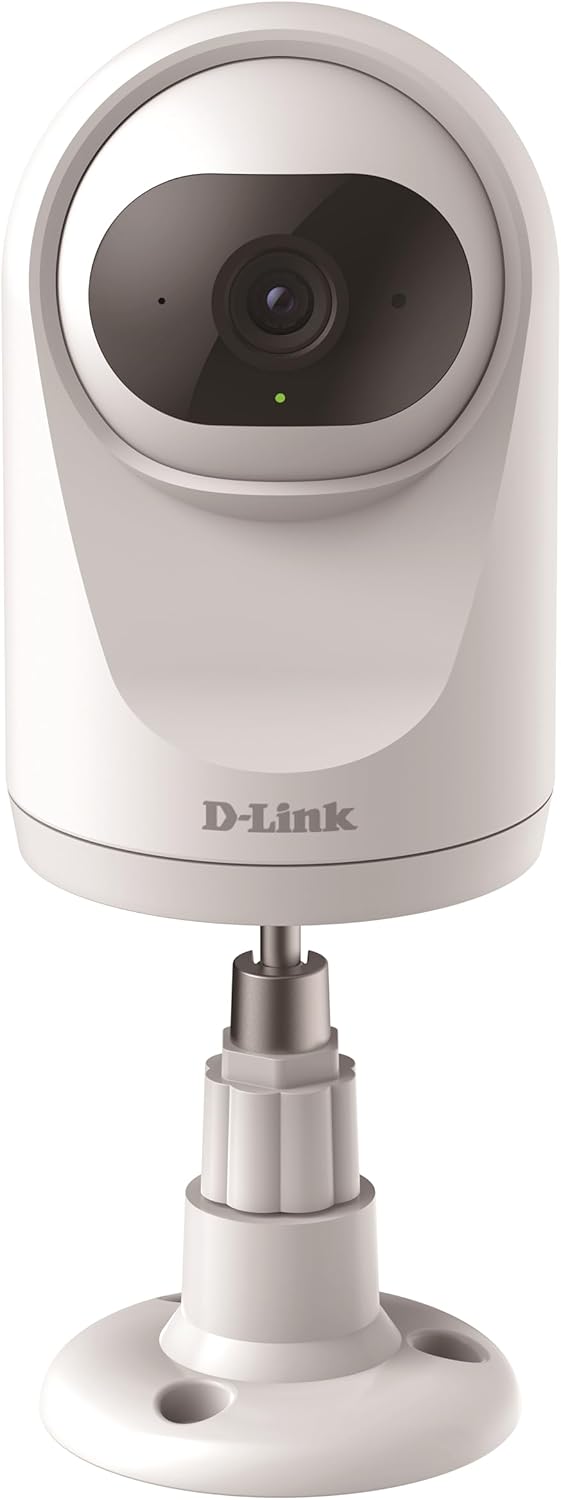
The camera can be placed on a flat surface using its included stand, providing stability and a clear view.

The camera can also be securely mounted to a wall or ceiling using the provided hardware for a fixed installation.
Кіраванне камерай
Функцыянальнасць панарамавання і нахілу
The DCS-6501LH/E features motorized pan (340°) and tilt (90°) capabilities, allowing you to remotely adjust the camera's viewing angle through the mydlink app. This enables comprehensive coverage of large areas.

The camera offers a wide 340-degree horizontal pan and 90-degree vertical tilt range for extensive area coverage.
Automatic Motion Tracking
When enabled, the camera can automatically detect and track moving objects within its field of view, ensuring that important events are captured. This feature utilizes the pan and tilt motors to follow the subject.

The camera's automatic motion tracking feature follows moving subjects, keeping them in frame.
Начное бачанне
The integrated night vision allows the camera to capture clear video footage even in complete darkness, up to a range of 5 meters. This ensures 24/7 monitoring capabilities.
Выяўленне руху і гуку
The camera is equipped with advanced motion and sound detection. When motion or sound is detected, the camera can automatically send push notifications to your mydlink app and begin recording video.
Двухбаковае аўдыё
Utilize the built-in microphone and speaker for two-way communication. You can listen to what's happening in the camera's vicinity and speak through the camera from your smartphone.

The camera supports two-way audio, allowing users to listen and speak through the device.
Запіс і захоўванне відэа
The camera supports recording video locally to a microSD card (not included) or to the mydlink cloud. A 1-year free mydlink cloud subscription is included, allowing remote storage, playback, and download of recorded videos.
Рэжым прыватнасці
For enhanced privacy, the camera features a physical privacy mode that rotates the lens to completely cover it, ensuring no video is captured when privacy is desired.

The camera's privacy mode physically covers the lens, ensuring complete privacy when needed.
Тэхнічнае абслугоўванне
- Уборка: Акуратна працярыце аб'ектыў і корпус камеры мяккай сухой тканінай. Не выкарыстоўвайце вадкія ачышчальнікі або абразіўныя матэрыялы.
- Абнаўленні прашыўкі: Regularly check for and install firmware updates through the mydlink app to ensure optimal performance, security, and access to new features.
- Карта MicroSD: If using a microSD card, periodically check its status and format it if necessary to maintain recording performance.
Ліквідацыю непаладак
Камера не падключаецца да Wi-Fi
- Пераканайцеся, што ваша сетка Wi-Fi працуе на частаце 2.4 ГГц. Камера не падтрымлівае сеткі 5 ГГц.
- Праверце правільны пароль Wi-Fi.
- Перамясціце камеру бліжэй да маршрутызатара Wi-Fi, каб палепшыць узровень сігналу.
- Перазагрузіце камеру і маршрутызатар Wi-Fi.
- Perform a factory reset on the camera (refer to the Quick Start Guide for instructions) and try the setup process again.
Дрэнная якасць відэа
- Праверце хуткасць падключэння да Інтэрнэту. Для аптымальнай трансляцыі патрабуецца стабільнае і хуткае падключэнне.
- Пераканайцеся, што аб'ектыў камеры чысты і без пылу або плям.
- Adjust the camera's position to avoid direct glare or strong backlighting.
Motion/Sound Detection Not Working
- Verify that motion and sound detection settings are enabled in the mydlink app.
- Adjust the sensitivity levels for detection in the app.
- Пераканайцеся, што няма перашкод, якія блакавалі камеру view.
Тэхнічныя характарыстыкі
| Асаблівасць | Дэталь |
|---|---|
| Нумар мадэлі | DCS-6501LH/E |
| дазвол | 1080p Full HD |
| Pan Range | 340 градусаў |
| Дыяпазон нахілу | 90 градусаў |
| Дыяпазон начнога бачання | 5 метраў |
| Сувязь | Wi-Fi (2.4 ГГц) |
| Энергаспажыванне | 4 ват |
| Памеры (Д х Ш х У) | 7.7 х 7.7 х 12.1 см |
| Вага | 190 грамаў |
| Асаблівасці | Two-Way Audio, Motion Detection, Sound Detection, Automatic Motion Tracking, Privacy Mode, SD Card/Cloud Recording |
| Выкарыстанне ў памяшканні/на вуліцы | У памяшканні |
Гарантыя і падтрымка
For warranty information and technical support, please refer to the D-Link official website or contact D-Link customer service. Keep your purchase receipt for warranty claims.
D-Link Official Webсайт: www.dlink.com