
1. Уводзіны
This manual provides comprehensive instructions for the D-Link DWR-910 4G LTE Wireless USB Router. This device is designed to provide high-speed 4G LTE mobile internet access, allowing you to share a cellular data connection via Wi-Fi with multiple devices. It features a compact design, built-in drivers for easy installation, and support for various cellular bands.
2. Змесціва ўпакоўкі
Пераканайцеся, што ваш пакет змяшчае наступныя элементы:
- D-Link DWR-910 4G LTE Wireless USB Router
3. Прадукт скончыўсяview
3.1 Характарыстыкі прылады
- USB 2.0 interface for power and data connection
- Super-fast 4G LTE connectivity with download speeds up to 150 Mbps
- Integrated 6-pin SIM card slot
- MicroSD card slot (supports up to 32 GB, card not included)
- Internal antennas for LTE and Wi-Fi
- Built-in drivers and software for plug-and-play installation (no CD-ROM required)
- Connection Manager with features like phonebook, SMS messaging, and APN management
3.2 Фізічныя кампаненты
The DWR-910 features a compact design with essential indicators and ports.
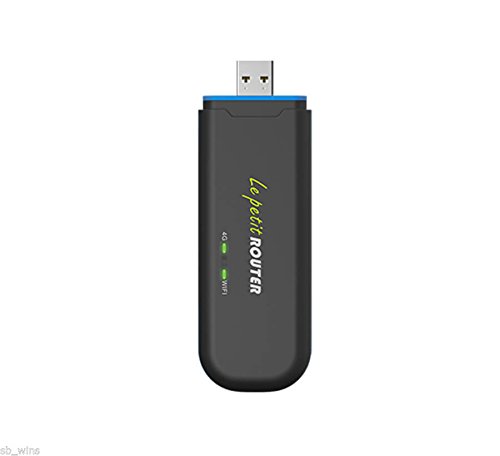
Фронт view of the D-Link DWR-910, showing the USB connector and LED indicators.
- Раз'ём USB: Used for connecting to a computer or USB power adapter.
- LTE LED Indicator: Displays the status of the cellular network connection (2G/3G/4G).
- Святлодыёдны індыкатар Wi-Fi: Shows the status of the Wi-Fi hotspot.
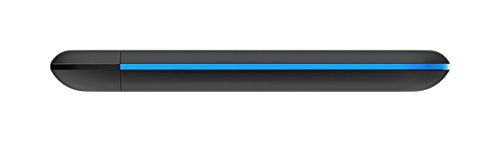
Збоку view of the D-Link DWR-910, highlighting the SIM and MicroSD card slots.
- Слот для SIM-карты: Insert your 6-pin SIM card here.
- Слот для карты MicroSD: Insert a MicroSD card for storage (up to 32 GB).
4. Настройка
4.1 Устаўка SIM-карты
- Locate the SIM card slot on the side of the DWR-910.
- Carefully insert your 6-pin SIM card into the slot. Ensure the correct orientation as indicated on the device. Push until it clicks into place.
4.2 Падключэнне да крыніцы харчавання
- Plug the DWR-910 into an available USB 2.0 port on a computer or a compatible USB power adapter (a 5V, 1A adapter is recommended for stable operation).
- The device will power on automatically, and the LED indicators will illuminate.
4.3 Driver Installation (Plug and Play)
The DWR-910 features built-in drivers and connection software. Upon first connection to a computer, the necessary drivers and software will install automatically. No external CD-ROM or manual driver installation is typically required.
5. Інструкцыя па эксплуатацыі
5.1 Connecting to the Wi-Fi Hotspot
- Once the DWR-910 is powered on and has established a connection to a cellular network (indicated by the LTE LED), it will broadcast a Wi-Fi network.
- On your Wi-Fi enabled device (e.g., laptop, smartphone, tablet), search for available Wi-Fi networks.
- Select the network name (SSID) corresponding to your DWR-910. The default SSID and Wi-Fi password are typically printed on a label on the device or its packaging.
- Увядзіце пароль Wi-Fi для падлучэння.
5.2 Доступ да Web Інтэрфейс
To manage advanced settings, send SMS messages, view the phonebook, or configure APN settings, access the device's web-based graphical user interface (GUI).
- Ensure your device is connected to the DWR-910's Wi-Fi network or via USB.
- Адкрыйце a web браўзер і ўвядзіце IP-адрас па змаўчанні (напрыклад,
192.168.0.1or192.168.1.1). Refer to the device label or documentation for the exact address. - Увядзіце імя карыстальніка і пароль па змаўчанні (напрыклад,
admin/admin).
5.3 Святлодыёдныя індыкатары
Святлодыёдныя індыкатары забяспечваюць візуальную зваротную сувязь аб стане прылады:
- LTE LED:
- Зялёны (міргае): падключэнне да сеткі LTE
- Сіні (міргае): падключэнне да сеткі 3G
- Purple (blinking): Connected to 2G network
- Red (blinking): No service or device error
- Святлодыёд Wi-Fi:
- Green (solid): Wi-Fi is active and broadcasting
6. Тэхнічнае абслугоўванне
To ensure optimal performance and longevity of your DWR-910, follow these maintenance guidelines:
- Трымайце прыладу чыстай і без пылу. Выкарыстоўвайце для чысткі мяккую сухую тканіну.
- Пазбягайце ўздзеяння на прыладу экстрэмальных тэмператур, прамых сонечных прамянёў або высокай вільготнасці.
- Do not attempt to open, disassemble, or repair the device yourself. Refer to qualified service personnel for any repairs.
- Ensure proper ventilation when the device is in use to prevent overheating.
- Regularly check for firmware updates on the D-Link support website to enhance performance and security.
7. Выпраўленне непаладак
This section addresses common issues you might encounter with your DWR-910.
7.1 Няма падключэння да Інтэрнэту
- SIM-карта: Пераканайцеся, што SIM-карта правільна ўстаўлена і актывавана з тарыфным планам перадачы дадзеных.
- LTE LED: Check the LTE LED status. If it is red, there might be no cellular service in your area or a device error.
- Налады APN: Verify that the Access Point Name (APN) settings are correct via the device's web interface. These are usually auto-detected but may require manual configuration for some carriers.
- Перазапуск: Try restarting the device by unplugging it from the USB port and plugging it back in.
7.2 Не ўдаецца падключыцца да Wi-Fi
- Святлодыёд Wi-Fi: Ensure the Wi-Fi LED is green, indicating the Wi-Fi hotspot is active.
- Пароль: Verify that you are entering the correct Wi-Fi password (WPA2-PSK key).
- дыяпазон: Ensure your client device is within the Wi-Fi range of the DWR-910. The Wi-Fi range is typically limited, suitable for a single room (approx. 10-12 feet). Walls and obstructions can significantly reduce range.
- Перазапуск: Restart both the DWR-910 and your Wi-Fi client device.
7.3 Перагрэў прылады
- Вентыляцыя: Ensure adequate airflow around the device. Avoid placing it in enclosed spaces or covering it.
- Крыніца харчавання: Use a stable 5V, 1A USB power adapter. Using underpowered USB ports can sometimes lead to instability or heat.
- Асяроддзе: Avoid prolonged use in direct sunlight or high ambient temperatures.
8. Тэхнічныя характарыстыкі
| Асаблівасць | Дэталь |
|---|---|
| мадэль | DWR-910 |
| Інтэрфейс | USB 2.0 |
| Слот SIM-карты | 6-кантактны |
| Слот для карты MicroSD | Да 32 ГБ (карта не ўваходзіць у камплект) |
| Сотавы доступ | LTE-FDD Cat.4 (Downlink: 150 Mbps, Uplink: 50 Mbps) DC-HSPA+ (Downlink: 42 Mbps, Uplink: 11 Mbps) |
| LTE Bands | B1 / B3 / B5 / B40 (2100/1900/850/2300 MHz) |
| Дыяпазоны UMTS/HSPA+ | B1 / B8 (900 / 2100 MHz) |
| GSM/GPRS/EDGE Bands | 850/900/1800/1900 Мгц |
| Стандарт Wi-Fi | 802.11n/g/b |
| Хуткасць Wi-Fi | Да 75 Мбіт/с (802.11n) |
| Бесправадная бяспека | WPA2-PSK, WPA-PSK, WEP, MAC filter |
| Max Connected Clients | Да 10 |
| Памеры (Д х Ш х Г) | 113 мм x 37 мм x 11.5 мм (4.45 x 1.46 x 0.45 цалі) |
| Вага | 40.5 грам (1.43 унцый) |
| Працоўная тэмпература | Ад 0 да 45 °C (ад 32 да 113 °F) |
| Падтрымка аперацыйнай сістэмы | Windows 8 / 7 / Vista / XP, Mac OS X 10.5 or higher, Ubuntu Linux 10.04 or higher |
9. Інфармацыя аб гарантыі
The D-Link DWR-910 4G LTE Wireless USB Router typically comes with a 1-year limited warranty from the date of purchase. This warranty covers manufacturing defects under normal use. Please retain your proof of purchase for any warranty claims. The warranty does not cover damage resulting from misuse, accidents, unauthorized modifications, or external factors such as power surges.
10. Падтрымка кліентаў
For technical assistance, product registration, or further information regarding your D-Link DWR-910, please visit the official D-Link support webсайт або звярніцеся ў службу падтрымкі кліентаў DLink.
D-Link Official Webсайт: www.dlink.com