
COTEK SP-1000-224
Кіраўніцтва карыстальніка інвертара чыстай сінусоіды Cotek SP-1000-224
Model: SP-1000-224 | Brand: COTEK
1. Уводзіны
This manual provides detailed instructions for the installation, operation, and maintenance of the Cotek SP-1000-224 Pure Sine Wave Inverter. This inverter is designed to convert 24VDC power to 230VAC, providing a stable and reliable power source for various applications.
Асноўныя характарыстыкі:
- Чысты сінусоідны выхад для адчувальнай электронікі.
- Power ON / OFF remote control capability (Green Terminal).
- Input & output fully isolated for enhanced safety.
- Temperature & load controlled cooling fan for optimal performance.
- Зручны інтэрфейс.
- Output frequency (50/60 Hz) selectable via DIP switch.
- Выхад абtage selectable via DIP switch.
- Power saving mode adjustable via variable resistor.
- 3-color LED status indicators for easy monitoring.
- Comprehensive input protection: Reverse Polarity (Fuse), Under Voltage, Над Voltage.
- Robust output protection: Short Circuit, Overload, Over Temperature.
- Type 1 Indoor Aluminum Enclosure.
- E13 / UL / CE / FCC approved.
2. Інфармацыя па бяспецы
WARNING: Please read and understand all safety instructions before installing or operating this inverter. Failure to follow these instructions may result in electric shock, fire, serious injury, or death.
- Электрычная небяспека: This unit produces high voltagе. Не адкрывайце інвертар casing. Па ўсіх пытаннях тэхнічнага абслугоўвання звяртайцеся да кваліфікаванага персаналу.
- Бяспека акумулятара: Work in a well-ventilated area. Batteries can produce explosive gases. Do not smoke or allow sparks or flames near the battery.
- Правільная вентыляцыя: Ensure adequate airflow around the inverter. Do not block ventilation openings.
- Умовы навакольнага асяроддзя: Do not expose the inverter to rain, moisture, or excessive dust. Operate in a dry, cool environment.
- Зазямленне: The inverter must be properly grounded. Follow all local and national electrical codes.
- Грузападымальнасць: Do not exceed the inverter's rated power output. Overloading can cause damage to the inverter and connected devices.
- Папярэджанне Каліфарнійскай прапановы 65: Гэты прадукт можа ўтрымліваць матэрыялы, якія перашкаджаюць Каліфарнійскай прапановай 65.
3. Прадукт скончыўсяview і кампаненты
Familiarize yourself with the various parts of your Cotek SP-1000-224 Pure Sine Wave Inverter.

Малюнак 3.1: Вуглавы view of the Cotek SP-1000-224 Pure Sine Wave Inverter, showing its blue aluminum casing and grey end caps with ventilation and connection ports.

Малюнак 3.2: Front panel of the inverter, featuring the AC output socket (Schuko type), a power switch, LED indicators, and DIP switches for configuration.

Малюнак 3.3: Rear panel of the inverter, showing the DC input terminals for battery connection, a remote control port (RJ45), and a green terminal block for remote ON/OFF control.

Малюнак 3.4: Збоку view of the inverter, highlighting its robust blue aluminum heat sink casing designed for efficient heat dissipation.
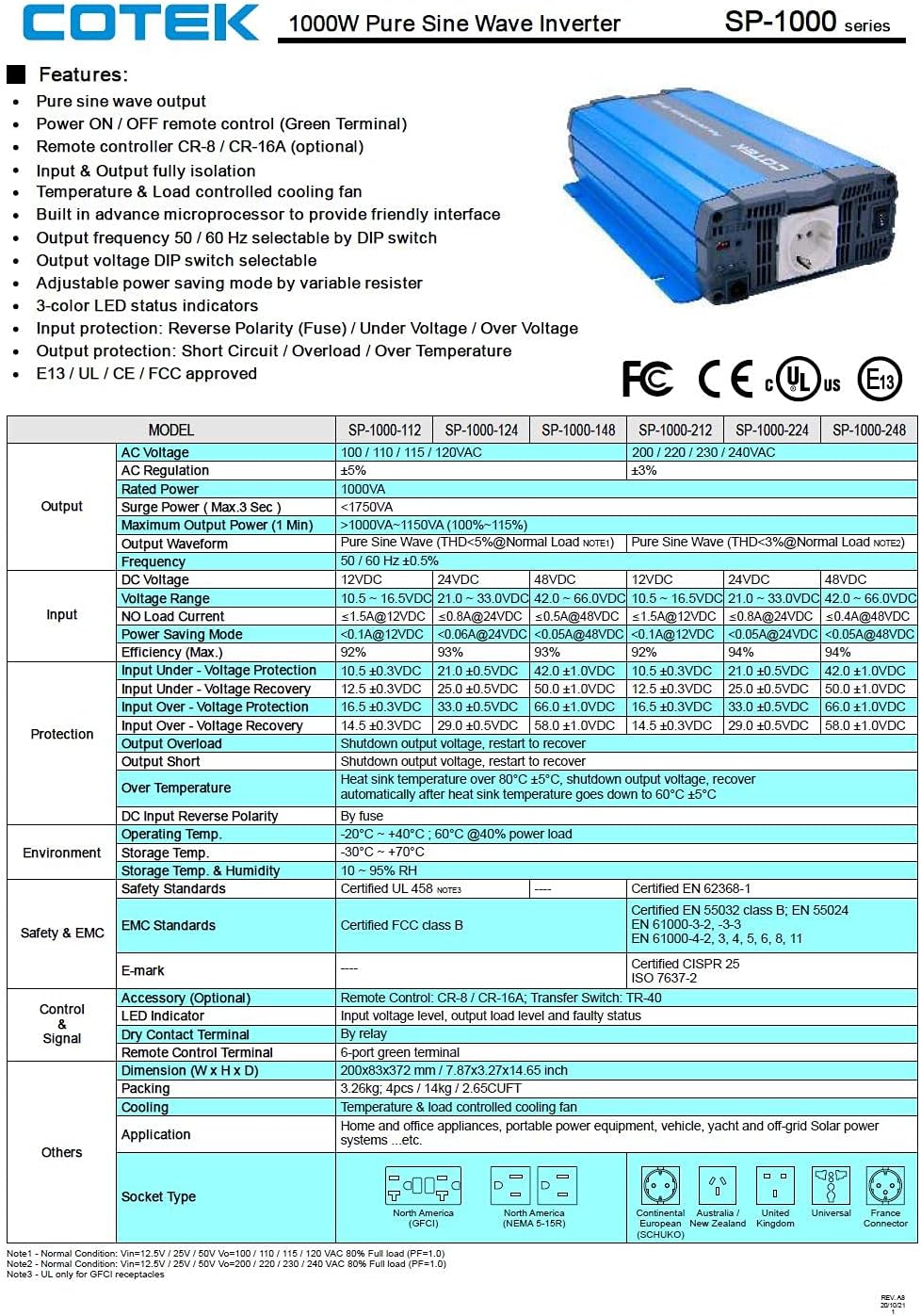
Малюнак 3.5: A detailed table outlining the features and technical specifications of the Cotek SP-1000 series inverters, including input/output parameters, protections, and certifications.

Малюнак 3.6: Mechanical drawings providing dimensions of the inverter, along with power voltage and power temperature curves illustrating performance characteristics.
4. Настройка і ўстаноўка
4.1 Choosing a Location:
- Усталюйце інвертар у сухім, прахалодным і добра вентыляваным месцы.
- Пазбягайце прамых сонечных прамянёў, крыніц цяпла і вільгаці.
- Ensure sufficient clearance around the inverter for proper airflow, especially around the cooling fan and ventilation openings.
- Mount the inverter securely on a stable, non-combustible surface.
4.2 DC Input Connection:
- Пераканайцеся, што выключальнік харчавання інвертара знаходзіцца ў становішчы ВЫКЛ.
- Connect the positive (+) terminal of the 24VDC battery bank to the positive (+) DC input terminal on the inverter.
- Connect the negative (-) terminal of the 24VDC battery bank to the negative (-) DC input terminal on the inverter.
- Use appropriately sized cables to minimize voltage drop and ensure safe operation. Refer to electrical standards for cable sizing.
- Пераканайцеся, што ўсе злучэнні шчыльныя і надзейныя.
4.3 AC Output Connection:
- Plug your AC appliances directly into the AC output socket on the inverter.
- Ensure the total power consumption of all connected appliances does not exceed the inverter's 1000W continuous output rating.
4.4 Зазямленне:
Proper grounding is essential for safety. Connect the inverter's chassis ground terminal to a reliable earth ground using a suitable grounding wire. Consult local electrical codes for specific grounding requirements.
4.5 Remote Control (Optional):
The inverter supports remote ON/OFF control via the green terminal block or an optional RJ45 remote control unit. Refer to the accessory manual for detailed instructions on connecting and using the remote control.
4.6 DIP Switch Configuration:
The inverter features DIP switches on the front panel to select output frequency (50/60 Hz) and output voltage. Refer to the table below for common settings. Ensure the inverter is OFF before changing DIP switch settings.
| Абстаноўка | Становішча DIP-пераключальніка |
|---|---|
| Выхадная частата 50 Гц | Switch 1: OFF, Switch 2: OFF (Example, refer to actual product manual/Figure 3.5) |
| Выхадная частата 60 Гц | Switch 1: ON, Switch 2: OFF (Example, refer to actual product manual/Figure 3.5) |
| Выхад Voltagе 230 В пераменнага току | Switch 3: ON, Switch 4: OFF (Example, refer to actual product manual/Figure 3.5) |
Note: The exact DIP switch configurations for specific voltage and frequency settings are detailed in the product's full technical specifications (refer to Figure 3.5). Always verify settings before operation.
5. Аперацыя
5.1 Powering On the Inverter:
- Ensure all DC and AC connections are secure and correct.
- If using the remote control, ensure it is connected and in the ON position.
- Flip the main power switch on the inverter's front panel to the "ON" position.
- Observe the 3-color LED status indicators. A green light indicates normal operation.
5.2 LED Status Indicators:
- Зялёны: Нармальная праца.
- Жоўты/бурштынавы: Warning (e.g., input voltage slightly low/high, minor overload). The inverter may continue to operate but requires attention.
- Чырвоны: Fault condition (e.g., severe overload, short circuit, over-temperature, critical input voltage). The inverter will shut down to protect itself and connected devices.
5.3 Power Saving Mode:
The inverter features a power saving mode, adjustable via a variable resistor. This mode reduces power consumption when no load or a very light load is detected. Adjust the resistor to set the sensitivity for entering/exiting power saving mode.
5.4 Powering Off the Inverter:
- Turn off all connected AC appliances.
- Flip the main power switch on the inverter's front panel to the "OFF" position.
- If using a remote control, turn it off as well.
6. Тэхнічнае абслугоўванне
Regular maintenance ensures the longevity and reliable operation of your inverter.
- Уборка: Перыядычна працірайце знешнія паверхні інвертара сухой мяккай тканінай. Не выкарыстоўвайце вадкія ачышчальнікі або растваральнікі. Пераканайцеся, што вентыляцыйныя адтуліны чыстыя ад пылу і смецця.
- Сувязі: Periodically check all DC and AC connections to ensure they are tight and free from corrosion. Loose connections can cause overheating and poor performance.
- Вентыляцыя: Ensure the cooling fan and ventilation grilles are not obstructed. The fan operates based on temperature and load, so ensure it can draw and expel air freely.
- Зарад батарэі: Monitor the health of your battery bank. A weak or failing battery can negatively impact inverter performance and lifespan.
WARNING: Do not attempt to service the inverter yourself. There are no user-serviceable parts inside. Refer all servicing to qualified personnel.
7. Выпраўленне непаладак
This section provides solutions to common issues you might encounter with your inverter. If the problem persists after following these steps, contact customer support.
| праблема | Магчымая прычына | Рашэнне |
|---|---|---|
| Inverter does not turn on (No LED indication) |
|
|
| Red LED is on, inverter shuts down |
|
|
| Yellow/Amber LED is on |
|
|
| Няма выхаду пераменнага току |
|
|
8. Тэхнічныя характарыстыкі
The following table provides detailed technical specifications for the Cotek SP-1000-224 Pure Sine Wave Inverter. For a comprehensive overview, refer to Figure 3.5.
| Параметр | Value (SP-1000-224) |
|---|---|
| мадэль | SP-1000-224 |
| Выхад пераменнага току Voltage | 230VAC (selectable) |
| Уваход пастаяннага токуtage | 24 В пастаяннага току |
| Бесперапынная магутнасць | 1000 Вт |
| Surge Power (3 sec) | 1750 ВА |
| Форма выхаднога сігналу | Чыстая сінусоіда (THD <3%) |
| Выхадная частата | 50/60 Гц (на выбар) |
| Эфектыўнасць (макс.) | 92% |
| Увод пад Voltagе Абарона | 21.0 ± 0.5 В пастаяннага току |
| Уваходны аб'ёмtagе Абарона | 33.0 ± 0.5 В пастаяннага току |
| Працоўная тэмпература | -20°C ~ +40°C (60% power load) |
| Памеры (Д х Ш х У) | 17 х 10 х 6 цалі (прыблізна) |
| Вага | 8.94 фунта |
| Сертыфікаты | Зацверджаны E13 / UL / CE / FCC |
Note: Specifications are subject to change without notice. Always refer to the product label or manufacturer's official documentation for the most accurate and up-to-date information.
9. Інфармацыя аб гарантыі
COTEK products are manufactured to high quality standards. For specific warranty terms and conditions, including duration and coverage, please refer to the warranty card included with your product or visit the official COTEK webсайт. Захоўвайце пацвярджэнне пакупкі для прэтэнзій па гарантыі.
Typical warranties cover defects in materials and workmanship under normal use. Damage caused by improper installation, misuse, abuse, or unauthorized modifications is generally not covered.
10. Падтрымка кліентаў
If you have any questions, require technical assistance, or need to report an issue with your Cotek SP-1000-224 Pure Sine Wave Inverter, please contact COTEK customer support or your authorized dealer.
Пры звароце ў службу падтрымкі падрыхтуйце наступную інфармацыю:
- Product Model: SP-1000-224
- Serial Number (if applicable, usually found on the product label)
- Дата пакупкі
- Падрабязнае апісанне праблемы, з якой вы сутыкнуліся.
For the most up-to-date contact information, please visit the official COTEK webсайт: www.cotek.com.tw (Гэта запаўняльнік URL, please verify the actual manufacturer webсайт).