
1. Уводзіны
This manual provides essential information for the safe and efficient operation of your COTEC SP2000-224 Pure Sine Wave Inverter. This advanced inverter offers high efficiency and power density, featuring selectable output voltage and frequency, all housed within a robust aluminum casing. Please read this manual thoroughly before installation and use to ensure proper function and longevity of the device.
2. Інфармацыя па бяспецы
Always observe the following safety precautions to prevent injury and damage to the inverter or connected equipment:
- Вентыляцыя: Забяспечце належную вентыляцыю вакол інвертара. Не блакуйце вентыляцыйныя адтуліны.
- Асяроддзе: Усталюйце інвертар у сухім, прахалодным і добра вентыляваным месцы, удалечыні ад прамых сонечных прамянёў, крыніц цяпла і лёгкаўзгаральных матэрыялаў.
- Зазямленне: Properly ground the inverter chassis to prevent electrical shock.
- Уваход пастаяннага току: Connect the inverter only to a 24V DC battery bank. Ensure correct polarity (positive to positive, negative to negative). Reverse polarity will damage the unit.
- Выхад пераменнага току: Do not overload the inverter. Ensure the total wattage of connected AC devices does not exceed the inverter's rated output.
- Абслугоўванне: Не спрабуйце самастойна адкрываць або абслугоўваць інвертар. Звяртайцеся па ўсё абслугоўванне да кваліфікаванага персаналу.
- Ўздзеянне вады: Keep the inverter away from water, rain, or excessive moisture.
3. Асаблівасці прадукту
The COTEC SP2000-224 Inverter incorporates several advanced features for reliable power conversion:
- Чысты сінусоідны выхад для адчувальнай электронікі.
- Power ON / OFF remote control capability via a dedicated green terminal.
- Full input and output isolation for enhanced safety.
- Temperature and load-controlled cooling fan for efficient heat dissipation.
- User-friendly interface with 3-color LED status indicators.
- Output frequency selectable between 50 Hz and 60 Hz via DIP switch.
- Выхад абtage selectable via DIP switch.
- Power saving mode adjustable via a variable resistor.
- Comprehensive input protection: Reverse Polarity (via fuse), Under Voltage, Над Voltage.
- Comprehensive output protection: Short Circuit, Overload, Over Temperature.
- Certifications: E13, UL, CE, FCC approved.
4. Настройка і ўстаноўка
Правільная ўстаноўка мае вырашальнае значэнне для прадукцыйнасці і бяспекі інвертара.
4.1 Фізічная ўстаноўка
Mount the inverter securely in a location that meets the safety requirements mentioned in Section 2. Ensure sufficient space around the unit for airflow.
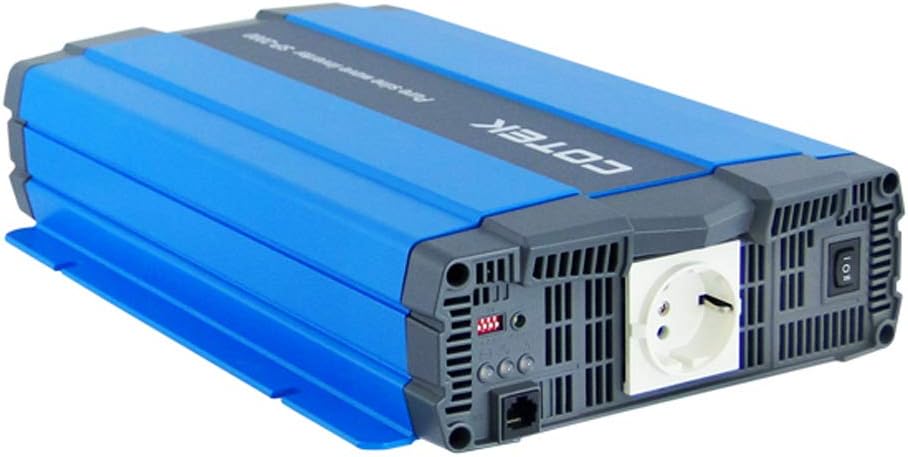
Малюнак 4.1: Вуглавы view of the COTEC SP2000-224 Pure Sine Wave Inverter, showcasing its robust blue and gray casing.
4.2 Уваходнае злучэнне пастаяннага току
Connect the inverter to a 24V DC battery bank using appropriate gauge cables. Ensure the positive (+) terminal of the inverter connects to the positive terminal of the battery, and the negative (-) terminal of the inverter connects to the negative terminal of the battery. Install an appropriate fuse or circuit breaker in the positive DC line close to the battery.

Малюнак 4.2: Тыл view of the inverter, highlighting the DC input terminals (red for positive, black for negative), the chassis ground screw, and the remote control terminal.
4.3 Chassis Ground Connection
Connect the chassis ground terminal (labeled 'CHASSIS GROUND') to a reliable earth ground point. This is a critical safety step.
4.4 AC Output and Controls
The inverter features a standard AC outlet and control switches on its front panel.

Малюнак 4.3: Фронт view of the inverter, displaying the AC output socket, the main power switch, LED indicators, and DIP switches for configuration.
4.5 Налады DIP-перамыкачоў
The inverter features DIP switches for configuring output frequency and voltage. Refer to the specifications table (Section 7) or the product label for specific settings. Ensure the inverter is powered off before adjusting DIP switches.
- Выхадная частата: Select 50 Hz or 60 Hz based on your regional requirements.
- Выхад Voltage: Выберыце патрэбны аб'ём выхаднога пераменнага токуtage (e.g., 230VAC for this model).
5. Інструкцыя па эксплуатацыі
5.1 Уключэнне/выключэнне
After all connections are secure and verified, switch the main power button on the inverter to the 'ON' position. The LED indicators will illuminate to show the inverter's status. To power off, switch the button to 'OFF'. A remote control terminal is also available for external ON/OFF control.
5.2 Святлодыёдныя індыкатары
The 3-color LED indicators provide visual feedback on the inverter's operational status and any potential faults. Consult the product documentation or the specifications table for a detailed explanation of each LED state.
5.3 Рэжым энергазберажэння
The power saving mode can be adjusted via a variable resistor. This feature helps reduce quiescent current draw when no load or a very light load is connected, conserving battery power.
5.4 Падключэнне нагрузак пераменнага току
Plug your AC appliances into the inverter's AC output socket. Ensure the total power consumption does not exceed the inverter's continuous power rating (2000W for this model). For inductive loads (e.g., motors, refrigerators), consider their surge power requirements, which can be significantly higher than their running power.
6. Тэхнічнае абслугоўванне
Рэгулярнае тэхнічнае абслугоўванне забяспечвае аптымальную прадукцыйнасць і падаўжае тэрмін службы вашага інвертара.
- Уборка: Трымайце інвертар у чысціні і без пылу. Выкарыстоўвайце сухую тканіну для праціркі вонкавых паверхняў. Не выкарыстоўвайце вадкія ачышчальнікі.
- Вентыляцыя: Periodically check that the cooling fan and ventilation openings are clear of obstructions.
- Сувязі: Inspect all DC and AC connections regularly to ensure they are tight and free from corrosion. Loose connections can cause overheating and poor performance.
- Тэхнічнае абслугоўванне батарэі: Follow the manufacturer's recommendations for your battery bank's maintenance.
7. Выпраўленне непаладак
Калі інвертар працуе няправільна, звярніцеся да наступных распаўсюджаных праблем і іх рашэнняў:
- Выходная магутнасць:
- Check DC input connections and battery voltage.
- Verify the inverter's power switch is ON.
- Check for blown DC input fuses (if applicable).
- Індыкатар перагрузкі:
- Зменшце агульную нагрузку, падлучаную да інвертара.
- Disconnect and reconnect the load to reset the inverter.
- Over Temperature Indication:
- Забяспечце дастатковую вентыляцыю вакол інвертара.
- Check if the cooling fan is operating.
- Reduce the load if operating in a hot environment.
- Нізкі ўзровень зарада батарэіtagСігналізацыя/Адключэнне:
- Recharge the battery bank.
- Check battery connections for looseness or corrosion.
For persistent issues, contact COTEC customer support.
8. Тэхнічныя характарыстыкі
The following table details the technical specifications for the COTEC SP2000 series, with specific values for the SP2000-224 model highlighted where applicable.

Малюнак 8.1: Detailed technical specifications for the COTEC SP-2000 series, including the SP2000-224 model.
| Асаблівасць | Спецыфікацыя |
|---|---|
| Марка | COTEK |
| Назва мадэлі | SP2000 (SP2000-224 variant) |
| Намінальная магутнасць | 2000 Вт |
| Surge Power (1 Sec) | 4000 Вт |
| Уваход пастаяннага токуtage | 24VDC (Operating Range: 21.0-33.0VDC) |
| Выхад пераменнага току Voltage | 230VAC (selectable) |
| Выхадная частата | 50/60 Гц (на выбар) |
| Форма выхаднога сігналу | Pure Sine Wave (THD<3% at nominal load) |
| Эфектыўнасць (макс.) | 93% |
| Астуджэнне | Temperature & load controlled fan |
| Працоўная тэмпература | -20°C да +40°C |
| Тэмпература захоўвання | -30°C да +70°C |
| Памеры (Ш х У х Г) | 17.44 х 9.76 х 3.27 цалі (443 х 248 х 83 мм) |
| Вага прадмета | 1 pounds (approximate, actual unit weight may vary) |
| Памеры ўпакоўкі | 19 х 12 х 6 цалі |
| Сертыфікаты | E13, UL, CE, FCC approved |
8.1 Механічныя чарцяжы
For detailed physical dimensions and mounting information, refer to the mechanical drawings below.
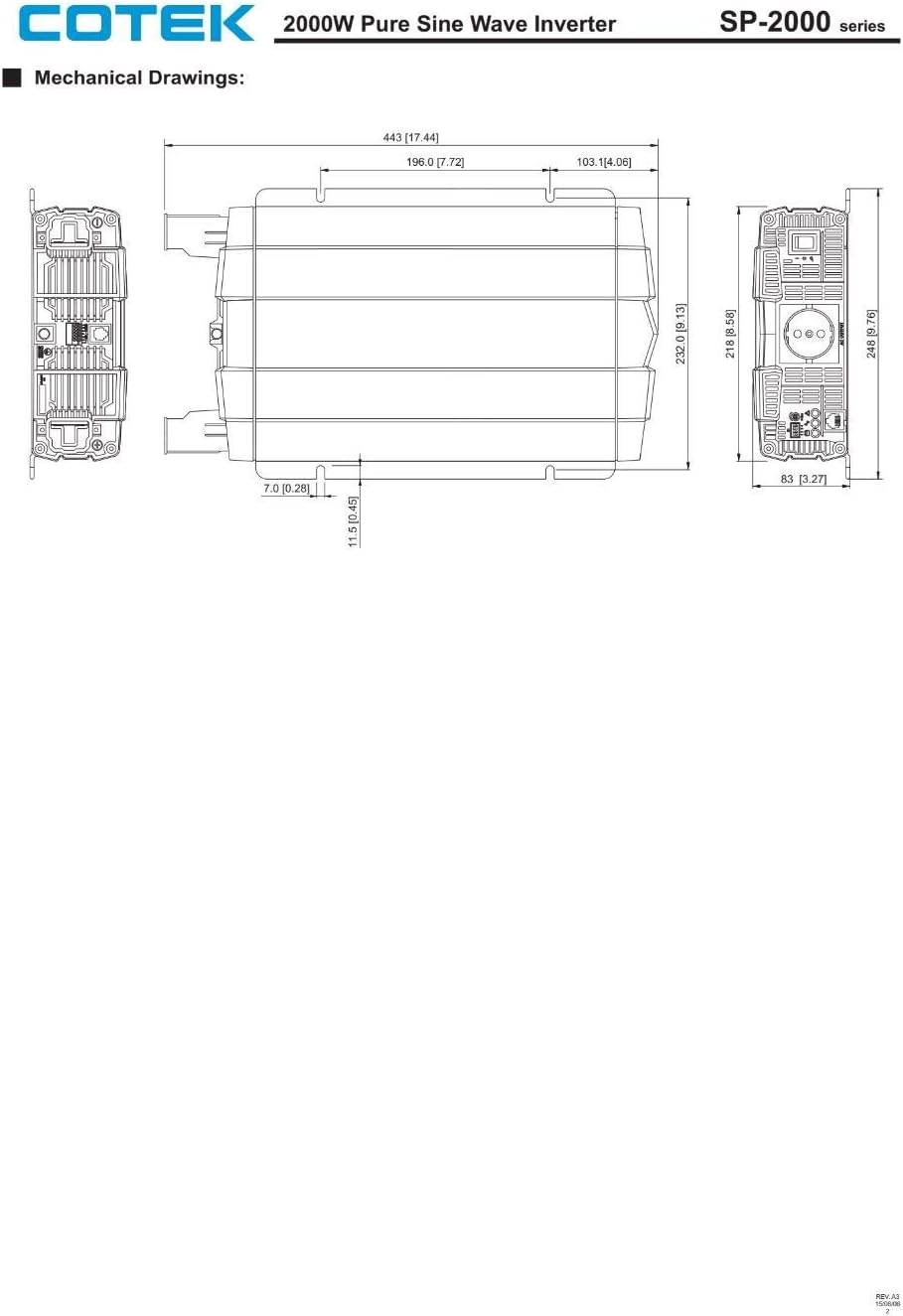
Малюнак 8.2: Mechanical drawings providing precise dimensions for installation planning.
9. Гарантыя і падтрымка
COTEC products are designed for reliability and performance. For warranty information, technical support, or service inquiries, please refer to the warranty card included with your product or visit the official COTEC webсайт. Захоўвайце чэк аб куплі як пацвярджэнне пакупкі для гарантыйных прэтэнзій.