
Уводзіны
The LotFancy Laptop Cooling Pad is designed to enhance the performance and longevity of your laptop by providing efficient cooling and ergonomic support. This manual provides essential information for the proper setup, operation, and maintenance of your cooling pad.

Малюнак 1: LotFancy Laptop Cooling Pad with active blue LED fans illustrating upward airflow for effective cooling.
Змест пакета
- 1 x LotFancy Laptop Cooling Pad (Model: 12R-2697-S)
- 1 x USB кабель харчавання
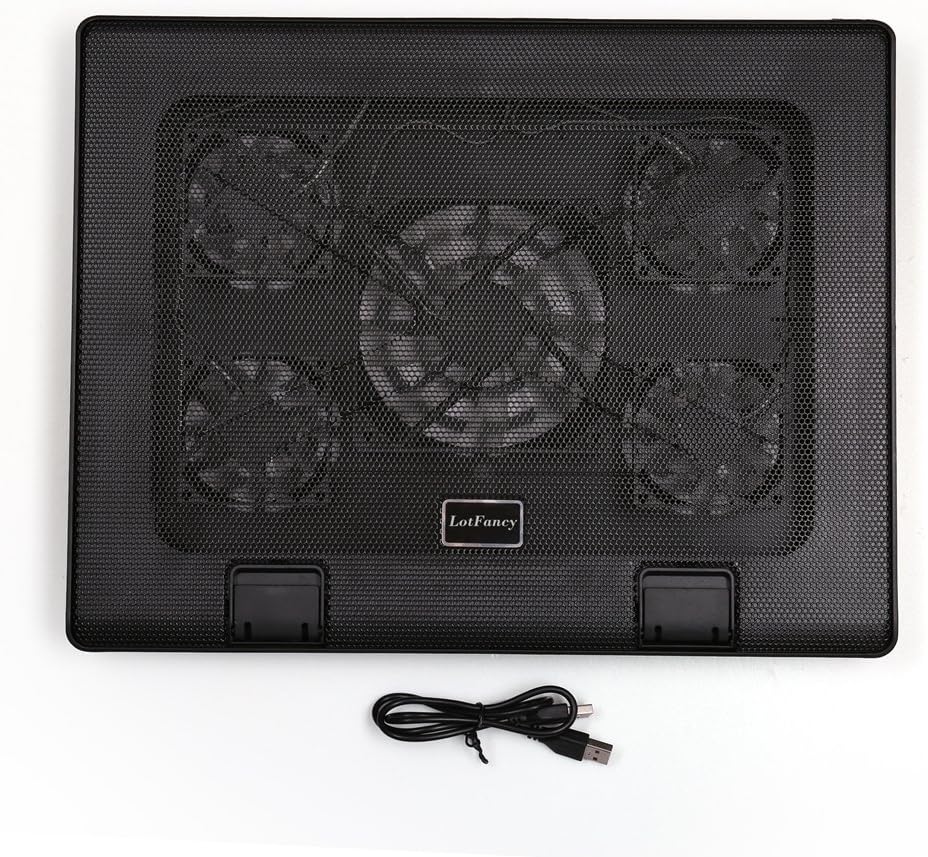
Малюнак 2: The cooling pad and its USB power cable.
Інструкцыя па наладзе
- Positioning the Cooling Pad: Пастаўце астуджальную пляцоўку на роўную ўстойлівую паверхню.
- Падключэнне магутнасці: Connect the included USB cable to one of the USB ports on the cooling pad. Plug the other end of the USB cable into an available USB port on your laptop. The cooling pad is USB powered and does not require an external power adapter.
- Placing Your Laptop: Carefully place your laptop on top of the cooling pad. Ensure it is centered and stable.
- Adjusting Height (Optional): The cooling pad features a 6-level height adjustment mechanism. Lift the rear of the cooling pad and engage the support bar into one of the six available notches to achieve your desired ergonomic angle.

Малюнак 3: The 6-level height adjustment allows for various viewвання і набору кутоў.
- Бяспека вашага ноўтбука: Utilize the anti-slip tabs located at the front of the cooling pad to prevent your laptop from sliding forward, especially when using an elevated angle.

Малюнак 4: Anti-slip tabs prevent the laptop from sliding.
Інструкцыя па эксплуатацыі
The LotFancy Laptop Cooling Pad features 5 ultra-quiet LED fans designed to provide optimal airflow and reduce laptop heat. The fans are controlled by two buttons on the front of the pad.

Малюнак 5: Control panel with fan switches and USB ports.
- Кіраванне вентылятарам:
- The левая кнопка controls the large center fan. Press once to turn it on/off.
- The правая кнопка controls the four smaller corner fans. Press once to turn them on/off.
You can choose to operate only the center fan, only the corner fans, or all five fans simultaneously, depending on your cooling needs. Green LED indicators next to the buttons should illuminate when the fans are active.
- Дадатковы порт USB: The cooling pad includes two USB ports. One is used to power the cooling pad from your laptop, leaving the second port available for connecting other USB devices.
Тэхнічнае абслугоўванне
To ensure optimal performance and longevity of your LotFancy Laptop Cooling Pad, follow these simple maintenance guidelines:
- Уборка: Regularly wipe the surface of the cooling pad with a soft, dry cloth to remove dust. For deeper cleaning, gently use a can of compressed air to clear dust from the fan grilles and blades. Ensure the device is unplugged before cleaning.
- захоўванне: Калі яна не выкарыстоўваецца, захоўвайце яе ў прахалодным сухім месцы, удалечыні ад прамых сонечных прамянёў і экстрэмальных тэмператур.
- Сыход за кабелем: Пазбягайце празмернага згінання або скручвання USB-кабеля, каб пазбегнуць пашкоджанняў.
Ліквідацыю непаладак
If you encounter issues with your cooling pad, please refer to the following common solutions:
- Вентылятары не круцяцца:
- Пераканайцеся, што USB-кабель надзейна падключаны як да астуджальнай падстаўкі, так і да спраўнага USB-порта вашага ноўтбука.
- Verify that your laptop's USB port is providing power. Try connecting another USB device to the port to test it.
- Press the fan control buttons on the cooling pad to ensure they are switched on. The green LED indicators should illuminate.
- Паменшаны паток паветра:
- Check for any obstructions (e.g., dust, debris) on the fan grilles or blades. Clean as per the Maintenance section.
- Ensure your laptop is not blocking the airflow vents on the cooling pad.
- Нестабільны ноўтбук:
- Make sure the anti-slip tabs are raised and properly supporting your laptop.
- Confirm that the height adjustment mechanism is securely locked into a notch.
Тэхнічныя характарыстыкі
| Марка | LotFancy |
| Нумар мадэлі | 12R-2697-S |
| Памеры прадукту | 380 х 300 х 35 мм (14.96 х 11.81 х 1.38 цалі) |
| Large Fan Size | 120 х 120 х 25 мм (5.9 х 5.9 х 0.98 цалі) |
| Small Fan Size (x4) | 70 х 70 х 15 мм (2.76 х 2.76 х 0.59 цалі) |
| Вага нета | 1140 g (40 oz / 2.6 pounds) |
| Хуткасць вентылятара | Approximately 1000 RPM |
| Аб'ём паветра | 74 CFM |
| Крыніца харчавання | USB Powered (5V DC) |
| Парты USB | 2 (1 for power, 1 pass-through) |
| Сумяшчальнасць | Laptops from 12 to 17 inches |

Малюнак 6: Product dimensions and compatible laptop sizes.
Гарантыя і падтрымка
For warranty information or technical support, please refer to the product packaging or contact LotFancy customer service directly. Contact details are typically available on the manufacturer's official webсайт або праз вашу платформу для пакупак.