
DigiTech TRIO
DigiTech TRIO Band Creator Pedal Instruction Manual
мадэль: TRIO | Брэнд: DigiTech
Уводзіны
The DigiTech TRIO is an innovative electric guitar multi-effect pedal designed to be your personal band. It listens to your guitar playing and automatically generates accompanying bass and drum parts. This manual provides comprehensive instructions for setting up, operating, and maintaining your TRIO pedal, ensuring you get the most out of its unique features.
Асноўныя характарыстыкі
- Seven Music Genres and Twelve Song Styles Per Genre to Choose From
- The TRIO can learn up to three different song parts that can be recalled on-the-fly
- Adjustable Tempo & Alternate Half Time/Double Time Variants Bass & Drum Level Controls
- Hands-Free Control Using a DigiTech FS3X Footswitch (optional)
- Amp & Mixer Outputs Headphone Output w/Level Control Power Supply Included
Кіраўніцтва па ўстаноўцы
Follow these steps to set up your DigiTech TRIO pedal:
- Connect the included 9V DC power supply to the УЛАДА input on the pedal and plug it into a power outlet.
- Падключыце электрагітару да ГІТАРА Ў jack using a standard 1/4-inch instrument cable.
- Падключыце AMP ВЫХОД jack to your guitar amplifier's input using another 1/4-inch instrument cable.
- For connecting to a mixer or PA system, use the МІКШЭР ВЫХОД дамкрат.
- Для прыватнай практыкі падключыце навушнікі да НАВУШНІК дамкрат.
- Optionally, connect a DigiTech FS3X Footswitch to the КАНТРОЛЬ У jack for extended hands-free control.
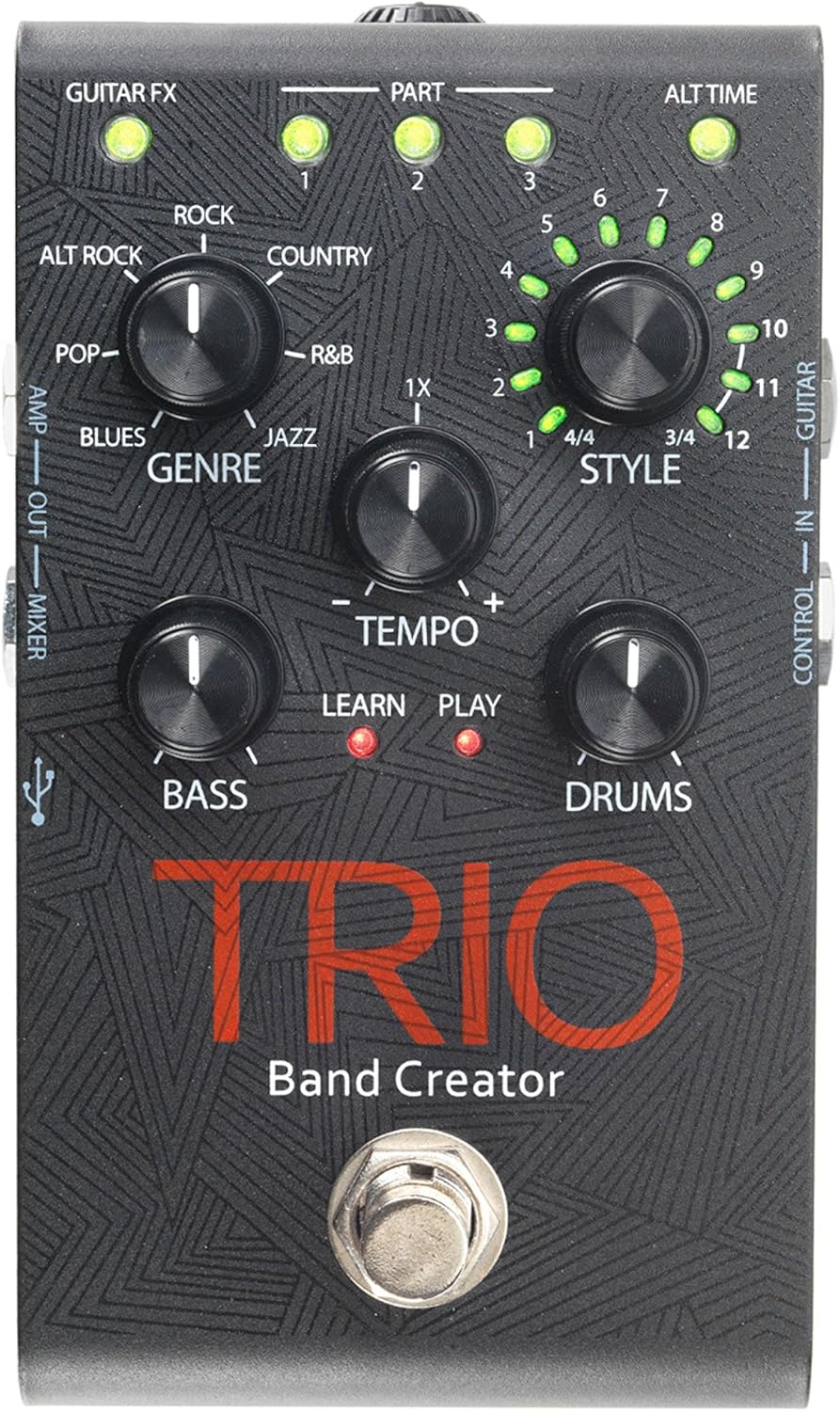
Малюнак 1: Верх view of the DigiTech TRIO pedal, showing the main controls and footswitch.
Інструкцыя па эксплуатацыі
Basic Operation: Teaching the TRIO a Song
- Націсніце ГУРТ footswitch once to enter 'Listen' mode. The ВУЧЫЦЦА Святлодыёд загарыцца.
- Play your desired chord progression and rhythm clearly. The TRIO will analyze your playing.
- Націсніце ГУРТ footswitch again to stop 'Listen' mode. The ГУЛЬНЯ LED will illuminate, and the TRIO will immediately begin playing generated bass and drum parts.
- You can now play along with your virtual band.
Genre and Style Selection
- Выкарыстоўвайце ЖАНР knob to select from Blues, Pop, Alternative Rock, Rock, Country, R&B, and Jazz. The genre affects the overall feel of the generated bass and drum parts.
- Выкарыстоўвайце СТЫЛЬ knob to choose from twelve different song styles available for each genre. This allows for further customization of the rhythm and feel.
- The ALT TIME button allows you to switch between 3/4 and 4/4 time signatures.
Looping and Song Parts
- The TRIO can learn up to 3 different song parts. To record a new part, select an empty ЧАСТКА slot (1, 2, or 3) using the corresponding buttons.
- Follow the 'Basic Operation' steps to teach the TRIO the new song part.
- During playback, you can switch between learned song parts on-the-fly by pressing the corresponding ЧАСТКА кнопка.
- The ЛУПЕР footswitch allows you to record and playback your own guitar loops. Press once to start recording, press again to stop recording and start playback, and press and hold to clear the loop.
Adjusting Levels and Tempo
- The ТЭМП knob adjusts the playback speed of the band and loops.
- The BASS knob controls the volume level of the generated bass line.
- The БАРАБАНЫ knob controls the volume level of the generated drum track.
- The ПЯТЛЯ knob controls the volume level of your recorded guitar loop.

Малюнак 2: Пад вуглом view of the DigiTech TRIO pedal, highlighting the control knobs and input/output jacks.
Элементы кіравання і сувязі
The DigiTech TRIO pedal features a user-friendly layout with clearly labeled controls and versatile connection options:
Элементы кіравання на пярэдняй панэлі:
- GUITAR FX: Activates built-in guitar effects tailored to the selected genre.
- PART 1, 2, 3: Buttons to select and recall different learned song parts.
- ALT TIME: Toggles between 3/4 and 4/4 time signatures.
- TEMPO Knob: Adjusts the overall playback speed.
- GENRE Knob: Selects the musical genre (Blues, Pop, Alt Rock, Rock, Country, R&B, Jazz).
- Ручка STYLE: Selects one of twelve styles within the chosen genre.
- LOOP Knob: Controls the volume of your recorded guitar loop.
- Ручка BASS: Controls the volume of the generated bass line.
- DRUMS Knob: Controls the volume of the generated drum track.
- LOOPER Footswitch: Records/plays/clears guitar loops.
- BAND Footswitch: Enters 'Listen' mode to learn chords/rhythm, or starts/stops band playback.
Side and Rear Panel Connections:
- ГІТАРА Ў: 1/4-inch input for your electric guitar.
- AMP ВЫХОД: 1/4-inch output to your guitar ampзадымнік.
- MIXER OUT: 1/4-inch output for connecting to a mixer or PA system.
- НАВУШНІК: 1/8-inch stereo output for headphones.
- КАНТРОЛЬ У: 1/4-inch input for optional DigiTech FS3X Footswitch.
- Магутнасць: 9V DC input for the included power supply.
- USB: Mini-USB port for firmware updates.

Малюнак 3: Задняя частка view of the DigiTech TRIO pedal, showing the power input and headphone jack.
Тэхнічныя характарыстыкі
| Асаблівасць | Дэталь |
|---|---|
| Вага прадмета | 10.6 унцый (0.3 кг) |
| Памеры прадукту | 4.63 х 3.19 х 2.13 цалі (11.76 х 8.10 х 5.41 см) |
| Нумар мадэлі тавару | TRIO |
| Батарэі | 1 9V battery required (for internal use, not primary power) |
| Абсталяванне інтэрфейсу | 1/4-цалевы аўдыё |
| Фармат сігналу | Аналаг |
| Крыніца харчавання | Corded Electric (9V DC adapter included) |
| тtage | 9 вольт |
| Ampэраж | 300 Міліamps |
Тэхнічнае абслугоўванне
- Падтрымлівайце чысціню педалі, праціраючы яе мяккай сухой тканінай. Пазбягайце выкарыстання абразіўных ачышчальнікаў або растваральнікаў.
- Захоўвайце педаль у прахалодным, сухім месцы, удалечыні ад прамых сонечных прамянёў і экстрэмальных тэмператур.
- Ensure all cables are securely connected to prevent signal loss or damage.
- Пазбягайце падзення педалі або моцных удараў.
Ліквідацыю непаладак
- Няма гуку: Праверце ўсе кабельныя злучэнні (гітара, amp, power). Ensure the pedal is powered on and the volume knobs are not set to zero.
- Дрэнная якасць гуку: Пераканайцеся, што ваш інструмент і amplifier are functioning correctly. Check for damaged cables.
- Band Not Generating Correctly: Ensure you are playing clear, distinct chords during the 'Listen' phase. Try different genres and styles to see if a different setting better interprets your playing.
- Footswitch Unresponsive: Disconnect and reconnect the power supply. If using an optional FS3X footswitch, ensure it is properly connected.
Гарантыя і падтрымка
Каб атрымаць інфармацыю пра гарантыю і тэхнічную падтрымку, звярніцеся да афіцыйнага сайта DigiTech. webсайт або звярніцеся ў службу падтрымкі кліентаў. Захоўвайце пацвярджэнне пакупкі для прэтэнзій па гарантыі.