
1. Уводзіны
This manual provides essential information for the proper installation, operation, and maintenance of your ICOM M424G 21 Fixed Mount VHF Radio with Internal GPS. Please read this manual thoroughly before using the radio to ensure safe and efficient operation.
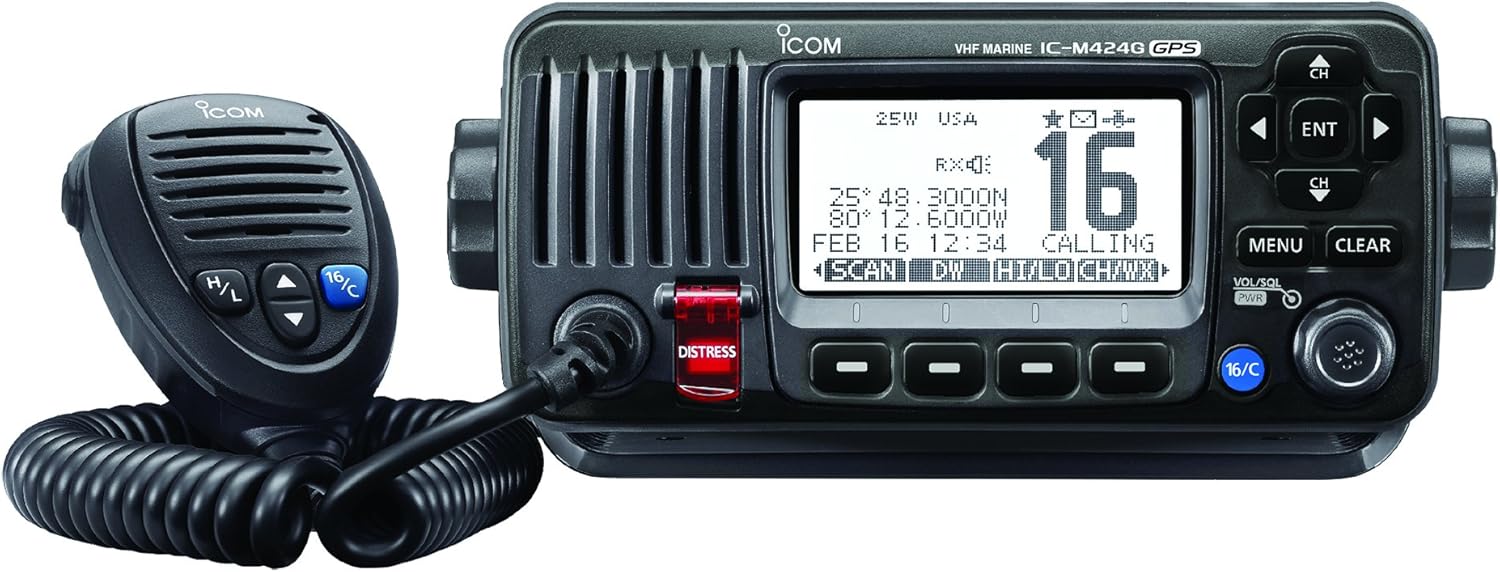
Фронт view of the ICOM M424G 21 VHF radio, showing the main unit with its display, control buttons, and rotary knobs, alongside the connected hand microphone.
2. Настройка
2.1 Распакаванне
Праверце наяўнасць усіх кампанентаў:
- ICOM M424G 21 VHF Radio Unit
- Ручны мікрафон
- Mounting Bracket (may be sold separately)
- Сілавы кабель
- Кіраўніцтва карыстальніка (гэты дакумент)
2.2 Мантаж
The ICOM M424G 21 can be flush-mounted or installed using a bracket. Ensure the mounting location provides adequate ventilation and is protected from direct exposure to extreme weather conditions, although the unit offers IPX7 submersible protection.
- Ўстаноўка ў скрыню: Requires careful cutting of the dashboard or panel. Refer to the provided template for precise dimensions.
- Мантаж кранштэйнаў: Secure the supplied or compatible mounting bracket to a stable surface. Attach the radio unit to the bracket using the provided hardware. Note that some brackets may be sold separately.
2.3 Электрычныя злучэнні
Connect the radio to a 12-volt DC power source. Ensure proper polarity (red to positive, black to negative) and use appropriate fusing. Connect the VHF antenna to the antenna connector on the rear of the unit. The internal GPS receiver does not require an external GPS antenna.
3. Інструкцыя па эксплуатацыі
3.1 Уключэнне/выключэнне харчавання і асноўныя элементы кіравання
- Магутнасць: Націсніце і ўтрымлівайце VOL/SQL PWR knob to turn the unit on or off.
- Аб'ём: Павярнуць VOL/SQL PWR knob to adjust the speaker volume.
- Шуматвор: Націсніце VOL/SQL PWR knob momentarily, then rotate to adjust the squelch level to eliminate background noise.
- Выбар канала: Выкарыстоўвайце CH Up/Down buttons or the channel selector knob to change channels.
- Channel 16/Call Channel: Націсніце спецыяльны 16/C button for instant access to Channel 16 (distress and calling) or the user-programmed call channel.
3.2 Дадатковыя магчымасці
- Dual/Tri-Watch Function: Monitor Channel 16 and/or the call channel while operating on another channel. This feature is crucial for safety and communication.
- DSC (Digital Selective Calling): The M424G 21 supports DSC for distress calls, individual calls, group calls, and all ships calls. The internal GPS provides your position for distress signals.
- Weather Channels with Alert Function: Access NOAA weather channels and receive alerts for severe weather conditions.
- Aqua Quake Draining Function: This feature emits a vibrating sound to clear water from the speaker grille, maintaining clear audio even after exposure to water.
- MA-500TR AIS Transponder Compatibility: The radio is compatible with the MA-500TR AIS Transponder for enhanced vessel tracking and collision avoidance.
- Мікрафон з шумапрыглушэннем: The included microphone is designed to reduce background noise, ensuring clear voice transmission in noisy environments.
4. Тэхнічнае абслугоўванне
4.1 Ачыстка
Regularly clean the radio unit and microphone with a soft, damp cloth. Do not use abrasive cleaners or solvents. Ensure the speaker grille is clear of debris, especially after exposure to water, and utilize the Aqua Quake function.
4.2 Ахова вады
The ICOM M424G 21 offers IPX7 submersible protection, meaning it can withstand immersion in 1 meter of water for 30 minutes. While robust, avoid unnecessary exposure to water and ensure all caps and covers are securely fastened.
5. Выпраўленне непаладак
If you experience issues with your ICOM M424G 21, consider the following basic checks:
- Няма харчавання: Праверце падключэнні кабеля харчавання, засцерагальнік і ўзровень зарадкі акумулятараtage.
- Няма гуку/дрэнны гук: Adjust volume and squelch. Ensure the microphone is properly connected. Use the Aqua Quake function if water exposure is suspected.
- No Transmission/Poor Range: Check antenna connection and condition. Ensure power output is set correctly (1W or 25W).
- GPS не вызначае месцазнаходжанне: Пераканайцеся, што прылада мае празрыстую view of the sky. Allow sufficient time for initial acquisition.
For persistent issues, consult a qualified marine electronics technician or contact ICOM customer support.
6. Тэхнічныя характарыстыкі
| Асаблівасць | Каштоўнасць |
|---|---|
| Памеры прадукту | 9 х 8 х 3 цалі |
| Вага прадмета | 1.2 фунта |
| ASIN | B00SXH8DP6 |
| Нумар мадэлі тавару | M424G 21 |
| Асаблівасці | Погружной |
| Іншыя функцыі дысплея | Бесправадная сувязь |
| Колер | Аква |
| Што ў скрынцы | Radio, User Manual |
| Вытворца | ICOM |
| Дата першай даступнасці | 28 студзеня 2015 г |
| Марка | ICOM |
| Колькасць каналаў | 21 |
| Дыяпазон частот | 156.000 МГц - 174 МГц |
| Максімальная далёкасць размовы | 5 міль |
| тtage | 12 вольт |
| Узровень воданепранікальнасці | Воданепранікальны (IPX7) |
7. Гарантыя і падтрымка
For warranty information, please refer to the documentation included with your product or visit the official ICOM website. For technical support, service, or replacement parts, please contact ICOM customer service directly.