
Logitech 920-007182
Інструкцыя карыстальніка падсветленай клавіятуры для гасцінай Logitech K830
Мадэль: 920-007182 | Брэнд: Logitech
Уводзіны
The Logitech Illuminated Living-Room Keyboard K830 is designed to enhance your home entertainment experience. This keyboard combines a full keyboard layout with a built-in touchpad, offering seamless wireless control of your connected TV or computer, even in low-light conditions, thanks to its bright backlit keys.

Figure 1: Logitech K830 Illuminated Living-Room Keyboard, top view.
Змест пакета
Пераканайцеся, што ўсе прадметы прысутнічаюць у пасылцы:
- Logitech K830 Illuminated Living-Room Keyboard
- Рэсівер Logitech Unifying
- USB кабель для падзарадкі
- USB range extender
- User information (this manual)
Настройка
1. Зарадка клавіятуры
Before first use, fully charge the keyboard. Connect the supplied USB recharge cable to the micro-USB port on the keyboard and the other end to a USB power source (e.g., computer USB port, USB wall adapter).
- The battery indicator light will glow green when charging and turn off when fully charged.
- A full charge typically provides several weeks of use.
2. Падключэнне клавіятуры
The K830 keyboard offers two connection methods: Logitech Unifying receiver or Bluetooth Smart technology.
2.1. Using the Logitech Unifying Receiver (Recommended for PCs)
- Locate the Logitech Unifying receiver in the package.
- Plug the Unifying receiver into an available USB port on your computer or smart TV. For optimal range, use the included USB range extender if the receiver is obstructed or far from the keyboard.
- Turn on the keyboard by sliding the power switch located on the top edge of the keyboard to the ON position.
- The keyboard should automatically connect to the receiver. If not, use the Logitech Unifying Software (downloadable from Logitech's webсайт) для спалучэння прылад.

Figure 2: User operating the K830 keyboard from a comfortable distance.
2.2. Using Bluetooth Smart Technology (For compatible devices)
- Ensure your device (e.g., Android TV, tablet) has Bluetooth Smart (Bluetooth Low Energy) enabled.
- Уключыце клавіятуру.
- Press and hold the Bluetooth pairing button (usually indicated by a Bluetooth icon) on the keyboard until the indicator light starts blinking rapidly, indicating it's in pairing mode.
- On your device, go to Bluetooth settings and select "Logitech K830" from the list of available devices to pair.
- Выконвайце любыя падказкі на экране, каб завяршыць працэс спалучэння.
Інструкцыя па эксплуатацыі
Раскладка і функцыі клавіятуры
The K830 features a compact layout optimized for living room use, including standard alphanumeric keys, function keys, and dedicated media controls.
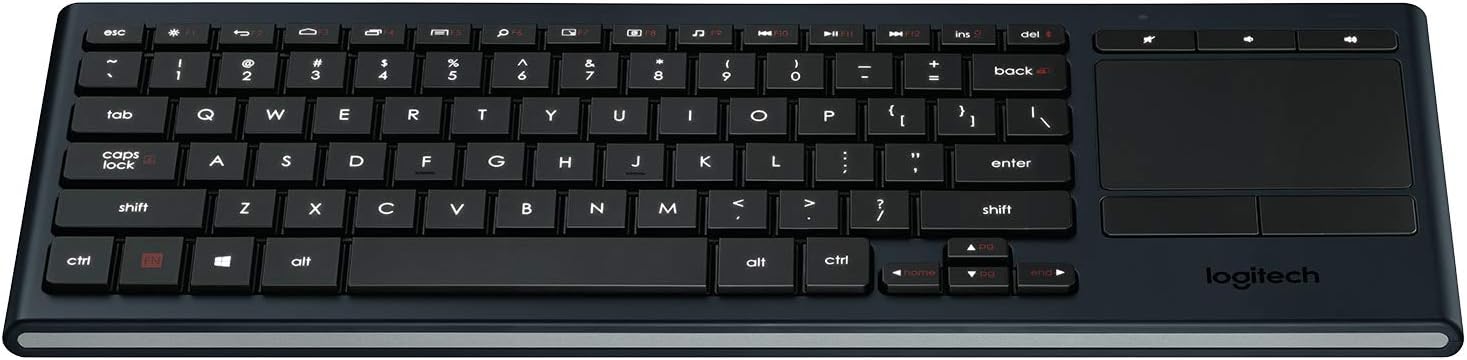
Малюнак 3: Закончанаview of the K830 keyboard layout.
Падсвятленне
The keyboard features automatic backlighting that adjusts to ambient light conditions. A sensor detects the room's light level and automatically brightens or dims the key backlights for optimal visibility. The backlighting also activates when your hands approach the keyboard and turns off when not in use to conserve battery.
Убудаваная сэнсарная панэль
The large, responsive touchpad provides precise cursor control and supports multi-touch gestures. The two physical buttons below the touchpad function as left-click and right-click.
- Націск адным пальцам: Пстрыкніце левай кнопкай мышы.
- Націсканне двума пальцамі: Пстрыкніце правай кнопкай мышы.
- Пракрутка двума пальцамі: Правядзіце двума пальцамі ўверх або ўніз, каб пракруціць па вертыкалі.
- Pinch Zoom: Звядзіце або развядзіце два пальцы, каб павялічыць.

Малюнак 4: бок view highlighting the integrated touchpad and power indicator.
Media Keys and Shortcut Keys
The top row of keys includes dedicated media controls and shortcut keys for quick access to common functions. These keys are optimized for Windows and Android operating systems.
- Рэгулятары гучнасці: Адключэнне гуку, памяншэнне гучнасці, павелічэнне гучнасці.
- Прайграванне мультымедыя: Прайграванне/Паўза, Папярэдні трэк, Наступны трэк.
- Windows/Android Shortcuts: Home, Back, Search, etc. (specific functions may vary by OS).
To use the F1-F12 functions, press the Fn адначасова з патрэбнай F-клавішай.
Тэхнічнае абслугоўванне
Чыстка клавіятуры
To clean your K830 keyboard:
- Выключыце клавіятуру перад чысткай.
- Выкарыстоўвайце мяккую безворсовую тканіну, злёгку dampзмыць вадой або мяккім мыйным растворам.
- Пазбягайце празмернай вільгаці і не распыляйце ачышчальнікі непасрэдна на клавіятуру.
- For the touchpad, use a dry, soft cloth to remove fingerprints and smudges.
Сыход за батарэяй
The K830 uses a built-in rechargeable Lithium Polymer battery. To maximize battery life:
- Charge the keyboard regularly, but avoid leaving it plugged in constantly after it's fully charged.
- If storing the keyboard for an extended period, charge it to about 50% before storage.
- Пазбягайце ўздзеяння на клавіятуру экстрэмальных тэмператур.
Ліквідацыю непаладак
| праблема | Магчымая прычына | Рашэнне |
|---|---|---|
| Клавіятура не адказвае | Low battery; Keyboard off; Receiver not plugged in; Out of range; Pairing issue. | Charge the keyboard. Ensure the keyboard is ON. Plug the Unifying receiver into a working USB port. Move closer to the receiver (within 10 meters/33 feet). Re-pair the keyboard using Logitech Unifying Software or Bluetooth pairing process. |
| Падсветка не працуе | Low battery; Ambient light too bright; Sensor obstruction. | Charge the keyboard. The backlighting automatically adjusts; it may not activate in bright environments. Ensure the light sensor (located near the top edge) is not covered. |
| Touchpad erratic or unresponsive | Dirty touchpad surface; Software issue; Interference. | Clean the touchpad surface with a dry, soft cloth. Restart your computer/device. Ensure no other wireless devices are causing interference. |
| Keys not typing correctly | Software issue; Physical obstruction under key. | Restart your computer/device. Gently check for any debris under the affected key. |
Тэхнічныя характарыстыкі
| Асаблівасць | Дэталь |
|---|---|
| Нумар мадэлі | 920-007182 |
| Сувязь | Logitech Unifying (2.4 GHz RF), Bluetooth Smart (Bluetooth Low Energy) |
| Далёкасць бесправадной сувязі | Да 10 метраў (33 футаў) |
| Тып батарэі | Акумулятарны літый-палімер |
| Падсвятленне | Automatic, single color |
| Убудаваная сэнсарная панэль | Yes, with multi-touch gesture support |
| Сумяшчальнасць аперацыйнай сістэмы | Windows 7, Windows 8, Windows 10 or later; Android 5.0 or later; Chrome OS |
| Памеры (ДхШхВ) | 15.1 х 5.59 х 1.65 цалі (38.35 х 14.2 х 4.19 см) |
| Вага | 1.09 фунта (0.49 кг) |
Гарантыя і падтрымка
Каб атрымаць інфармацыю аб гарантыі, тэхнічнай падтрымцы і дадатковыя рэсурсы, наведайце афіцыйны сайт падтрымкі Logitech. webсайт або звярніцеся да кіраўніцтва карыстальніка ў фармаце PDF:
- Служба падтрымкі Logitech Webсайт: www.logitech.com/support
- Кіраўніцтва карыстальніка (PDF): Спампаваць PDF
Калі ласка, захавайце доказы пакупкі для прэтэнзій па гарантыі.
Ask a question about this manual
Ask about setup, troubleshooting, compatibility, parts, safety, or missing instructions. Manuals+ will review the question and use this page’s manual context to help answer it.