
1. Уводзіны
This manual provides comprehensive instructions for the installation, operation, and maintenance of your Speco Technologies HT5941T Intense IR HD TVI Dome Camera. This camera is designed to deliver high-definition surveillance with advanced features such as True WDR, Intense IR, and day/night operation. Please read this manual thoroughly before installation and use to ensure proper functionality and safety.
2. Інфармацыя па бяспецы
- крыніца харчавання: Use only the specified 12VDC or 24VAC power supply. Incorrect voltage may damage the camera.
- Ўстаноўка: Ensure the camera is securely mounted to prevent accidental falls. Professional installation is recommended.
- Асяроддзе: Do not expose the camera to extreme temperatures, humidity, or corrosive environments beyond its specified operating conditions.
- Уборка: Адключыце электрычнасць перад чысткай. Выкарыстоўвайце мяккую сухую тканіну. Пазбягайце выкарыстання агрэсіўных хімічных рэчываў.
- Абслугоўванне: Do not attempt to disassemble or service the camera yourself. Refer all servicing to qualified personnel.
3. Змесціва ўпакоўкі
Праверце, ці ёсць усе прадметы ў вашай упакоўцы:
- HT5941T Dome Camera
- Chameleon Cover
- Мантажныя элементы (шрубы, анкеры)
- Кароткае кіраўніцтва па запуску (калі ёсць)
4. Настройка і ўстаноўка
4.1 Мантаж камеры
The HT5941T camera supports 3-axis adjustment for both wall and ceiling mounting. Ensure the mounting surface is strong enough to support the camera's weight.
- Выберыце падыходнае месца мацавання.
- Use the provided mounting template (if included) or the camera base to mark drilling points.
- Прасвідруйце адтуліны і пры неабходнасці ўстаўце ў сцяну анкеры.
- Замацуйце аснову камеры на мантажнай паверхні з дапамогай прадугледжаных шруб.
- Adjust the camera's angle for optimal viewінж.
4.2 Падключэнне электраправодкі і харчавання
The HT5941T is an HD-TVI output only camera, providing full HD resolution over coaxial cable.
- Connect a coaxial cable (RG59 or similar) from the camera's BNC output to your HD-TVI DVR or monitor.
- Connect the power cable to the camera's power input. The camera supports dual voltage operation (12VDC or 24VAC). Ensure the power supply matches the camera's requirements.
- Праверце, што ўсе злучэнні надзейныя, перш чым падключаць сілкаванне.
4.3 Chameleon Cover Installation
The included Chameleon Cover can be painted to match your décor.
- If desired, paint the Chameleon Cover before installation. Allow it to dry completely.
- Align the cover with the camera body and snap it into place.
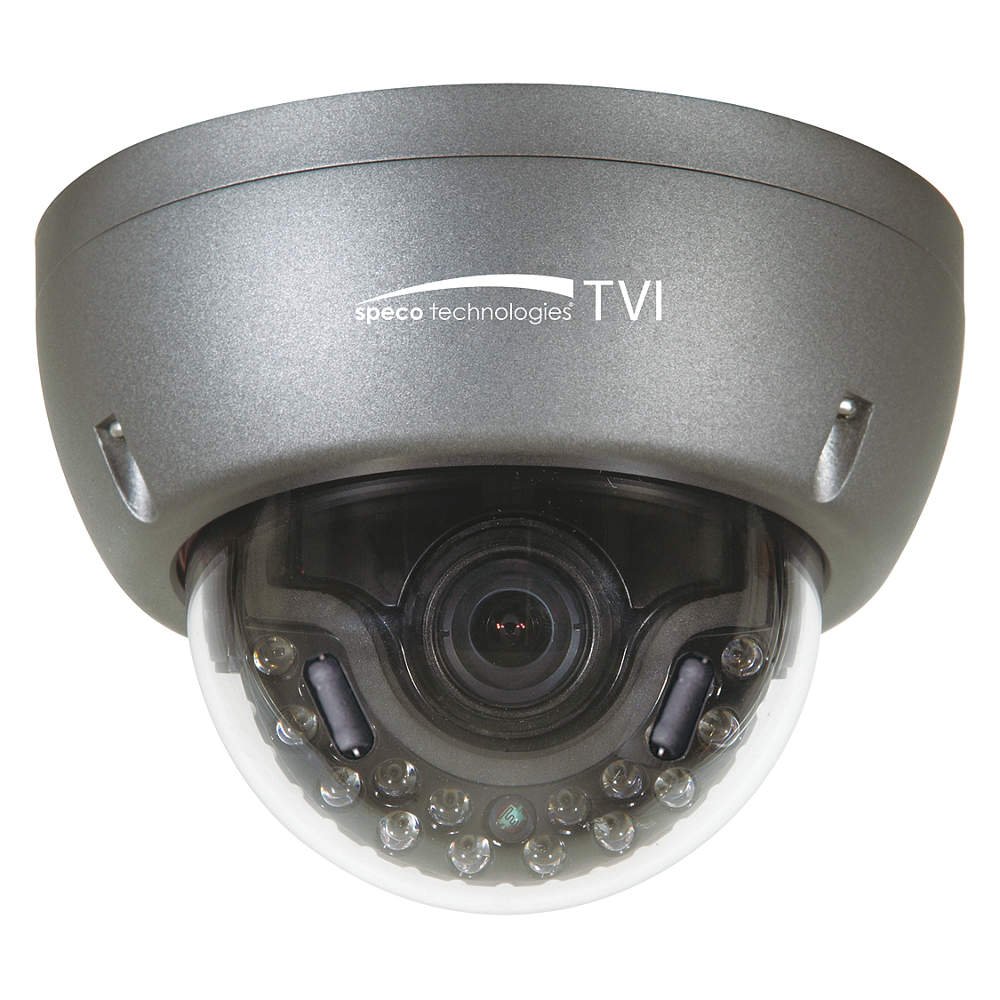
Figure 1: Speco Technologies HT5941T Dome Camera with its dark gray housing and dome design.
5. Інструкцыя па эксплуатацыі
5.1 Powering On and Initial View
Once the camera is properly wired and powered, it will automatically begin transmitting video. Connect your HD-TVI DVR or monitor to view жывы канал.
5.2 Экраннае меню (OSD).
The camera features a full OSD menu for configuration, accessible via on-board controls or UTC (Up The Coax) control from a compatible DVR.
- Доступ да экраннага меню: Use the joystick or buttons on the camera (if present) or the UTC control function on your DVR to bring up the OSD menu.
- Навігацыя: Use the directional controls to navigate through menu options. Select options to adjust settings such as exposure, white balance, and image enhancements.
- Асноўныя характарыстыкі:
- Сапраўдны WDR: Wide Dynamic Range for clear images in high-contrast lighting.
- Intense IR: Adapts IR intensity to the subject, preventing saturation and providing vivid night vision.
- Day/Night Operation: Mechanical IR cut filter automatically switches between color (day) and monochrome (night) modes for optimal image quality.
6. Тэхнічнае абслугоўванне
6.1 Ачыстка
Regular cleaning helps maintain optimal image quality.
- Gently wipe the camera lens and housing with a soft, lint-free cloth.
- Для ўстойлівага бруду злёгку ачысціцеampen the cloth with water or a mild lens cleaning solution. Avoid abrasive cleaners.
- Перад чысткай пераканайцеся, што камера выключана.
6.2 Экалагічныя меркаванні
The HT5941T features heater circuitry and anti-moisture glass to reduce fog or condensation in various weather conditions. No specific user maintenance is required for these features, but ensure the camera's power supply is stable to allow these functions to operate effectively.
7. Выпраўленне непаладак
| праблема | Магчымая прычына | Рашэнне |
|---|---|---|
| Няма відэавыхаду | No power; Loose cable connection; Incorrect video format (not HD-TVI compatible DVR) | Check power supply and connections; Ensure DVR supports HD-TVI input. |
| Дрэнная якасць выявы (размытая, скажоная) | Dirty lens; Improper focus; Cable interference; Insufficient lighting | Clean the lens; Adjust focus via OSD; Use shielded coaxial cable; Verify adequate lighting or IR function. |
| IR not working at night | Insufficient power; Day/Night setting incorrect; IR sensor blocked | Check power supply; Verify Day/Night mode in OSD; Ensure nothing obstructs the IR LEDs or sensor. |
| Экраннае меню не адлюстроўваецца | Incorrect control method; DVR not compatible with UTC | Try on-board controls if available; Consult DVR manual for UTC compatibility and operation. |
8. Тэхнічныя характарыстыкі
| Асаблівасць | Спецыфікацыя |
|---|---|
| Нумар мадэлі | HT5941T |
| Марка | Speco Technologies |
| Дазвол відэазахопу | 1080p (поўны HD) |
| Частата кадраў | 30 кадраў у секунду |
| Тэхналогія падлучэння | HD-TVI (Coaxial) |
| Крыніца харчавання | 12VDC & 24VAC Dual Voltage |
| Тып мацавання | Wall Mount (3-axis adjustment) |
| Формаў-фактар | Купал |
| Тэхналогія нізкай асветленасці | Day/Night, Intense IR |
| Асаблівасці | True WDR, Heater circuitry, Anti-moisture glass, Chameleon Cover |
| Міжнародны рэйтынг абароны | IP67 |
| Памеры (Д х Ш х У) | 5.12 х 4.84 х 3.66 цалі |
| Вага прадмета | 1.5 фунта |
| Матэрыял | Шкло (лінза) |
9. Гарантыя і падтрымка
For warranty information and technical support, please refer to the official Speco Technologies webсайт або звярніцеся ў службу падтрымкі кліентаў. Захоўвайце чэк аб куплі як пацвярджэнне пакупкі для прэтэнзій па гарантыі.
Speco Technologies Official Webсайт: www.specotech.com