
1. Уводзіны
This manual provides instructions for the LaView LV-PB932F4 IP Bullet Camera. This camera is designed for surveillance applications, offering 1080P HD resolution for both indoor and outdoor use. It features day and night vision capabilities, with infrared (IR) night vision up to 100 feet. The camera is weatherproof with an IP66 rating and operates in temperatures from -13°F to 140°F (-25°C to 60°C).

Малюнак 1.1: ЛаView LV-PB932F4 IP Bullet Camera features.
2. Змесціва ўпакоўкі
Праверце, ці ёсць усе прадметы ў вашай упакоўцы:
- 1 х ЛаView LV-PB932F4 2MP 1080P IP Bullet Camera
- (Additional accessories such as mounting screws, anchors, and Ethernet cable may vary by package and are often sold separately.)
3. Настройка і ўстаноўка
3.1 Перад устаноўкай
Ensure your Network Video Recorder (NVR) system is compatible with IP 2MP cameras. Plan the camera's placement to maximize coverage and minimize obstructions.
3.2 Фізічная ўстаноўка
The camera is designed for wall mounting. Select a suitable location that provides the desired field of view and protection from direct impact.
Крокі мантажу:
- Mark drilling points using the camera's base as a template.
- Drill pilot holes appropriate for your mounting surface.
- Secure the camera to the mounting surface using appropriate screws and anchors (not included).
- Адрэгулюйце кут камеры для аптымальнага пакрыцця.
3.3 Злучэнне
This camera utilizes Power over Ethernet (PoE) for simplified installation. A single network cable provides both power and data connection.
- Connect one end of an Ethernet cable (Cat 5e or Cat 6 recommended) to the camera's Ethernet port.
- Connect the other end of the Ethernet cable to a PoE-enabled port on your NVR or a PoE switch.
- The camera should automatically power on and attempt to connect to your NVR system.
Заўвага: For systems that do not automatically configure, refer to your NVR's manual for adding IP cameras and network configuration.
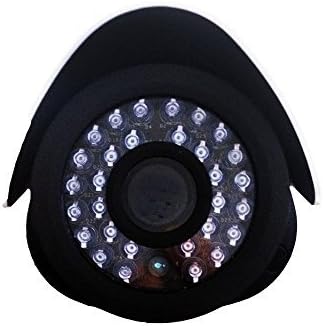
Выява 3.1: Спераду view of the camera lens and IR LEDs.
4. Аперацыя
4.1 Day/Night Vision
The camera automatically switches between day (color) and night (black and white, infrared) modes based on ambient light conditions. In night mode, the camera's infrared LEDs activate to provide visibility up to 100 feet in darkness.
4.2 Дэтэктар руху
The camera supports motion detection. Configuration of motion detection zones and sensitivity settings is typically done through your connected NVR system's interface. Refer to your NVR's manual for detailed instructions on setting up motion alerts and recording triggers.
4.3 Запіс і прайграванне відэа
Video recording and playback functions are managed by your NVR system. Consult your NVR's user manual for instructions on accessing live view, configuring recording schedules, and reviewING запісаў footage.
5. Тэхнічнае абслугоўванне
To ensure optimal performance and longevity of your camera, follow these maintenance guidelines:
- Уборка: Перыядычна чысціце аб'ектыў камеры мяккай губкайamp cloth. Avoid abrasive cleaners or solvents that could damage the lens coating.
- Праверка кабеля: Regularly inspect all cables for damage, wear, or loose connections.
- Абнаўленні прашыўкі: Check the official LaView website for any available firmware updates for your camera model. Firmware updates can improve performance, enhance security, and add new features.
- Ахова навакольнага асяроддзя: While the camera is IP66 weatherproof, extreme environmental conditions (e.g., direct lightning strikes, prolonged submersion, or corrosive environments) should be avoided.
6. Выпраўленне непаладак
6.1 No Image/Video Signal
- Праверце магутнасць: Ensure the camera is receiving power via the PoE connection. Verify the Ethernet cable is securely connected to both the camera and the PoE source (NVR/switch).
- Праверце падключэнне да сеткі: Confirm the Ethernet cable is not damaged. Try a different port on your NVR/switch.
- Сумяшчальнасць з відэарэгістратарам: Ensure your NVR system is compatible with 2MP IP cameras.
- Канфлікт IP-адрасоў: If manually configuring, check for IP address conflicts on your network.
6.2 Нізкая якасць выявы
- Чысты аб'ектыў: Clean the camera lens for any dirt, dust, or smudges.
- Умовы асвятлення: Ensure adequate lighting for optimal image quality. In low light, the camera will automatically switch to IR night vision.
- Налады дазволу: Verify the video resolution settings on your NVR are set to 1080P or higher, if supported by your NVR.
6.3 Night Vision Not Working
- ВК-святлодыёды: In dark conditions, check if the infrared LEDs are illuminating. They may emit a faint red glow.
- Перашкоды: Ensure there are no obstructions directly in front of the camera that could block the IR light.
6.4 Праблемы з выяўленнем руху
- Налады адчувальнасці: Adjust the motion detection sensitivity on your NVR. High sensitivity can lead to false alarms (e.g., from insects, moving branches).
- Зоны выяўлення: Verify that the motion detection zones are correctly configured to cover the desired areas.
7. Тэхнічныя характарыстыкі
| Асаблівасць | Спецыфікацыя |
|---|---|
| Нумар мадэлі | LV-PB932F4 |
| Дазвол відэазахопу | 1080p |
| Дазвол фотадатчыка | 2 МП |
| Эфектыўнае рашэнне | 4 МП |
| Тэхналогія падлучэння | Правадное (PoE) |
| Выкарыстанне ў памяшканні/на вуліцы | У памяшканні, на адкрытым паветры |
| Рэйтынг воданепранікальнасці | IP66 |
| Дыяпазон начнога бачання | 100 футаў |
| Асаблівасці | Датчык руху, начное бачанне |
| Працоўная тэмпература | Ад -13°F да 140°F (ад -25°C да 60°C) |
| Крыніца харчавання | Правадное электрычнае (PoE) |
| Памеры прадмета | 8.5 х 5 х 5 цалі |
| Вага прадмета | 1.35 фунта |
| Формаў-фактар | Куля |
| Тып мацавання | Насценнае мацаванне |
8. Гарантыя і падтрымка
8.1 Інфармацыя аб гарантыі
This LaView product is covered by a 2-year manufacturer's warranty. Please retain your proof of purchase for warranty claims. The warranty covers defects in materials and workmanship under normal use.
8.2 Тэхнічная падтрымка
For technical assistance or support, please visit the official LaView website or contact their customer service. Lifetime technical support is provided to assist with setup, operation, and troubleshooting.
LaView Афіцыйны Webсайт: www.laviewsecurity.com