
1. Уводзіны
The Edifier P180 is a stereo earbud headset designed for clear audio and convenient communication. Featuring an inline microphone and control, it offers a comfortable listening experience for various devices.

Figure 1: Edifier P180 Wired Earbud Headset
2. Што ў скрынцы
- Edifier P180 Earbud Headset
- Кабель
3. Асноўныя магчымасці
- Classic Comfort: Ergonomic design for comfortable wear without irritating the ear canal.
- Выдатная якасць гуку: Equipped with 16mm neodymium magnetic monomers for high-fidelity audio playback.
- Integrated Microphone and Control: 3.5mm stereo earphones with a built-in microphone and remote button for mobile phone communication.
- Функцыянальнасць: Single button control for picking up/hanging up calls and skipping songs (device dependent for iOS/Android).
- Трывалы дызайн: Constructed with quality materials for longevity.

Figure 2: Ergonomic design for comfortable fit.
4. Настройка
- Распакуйце: Carefully remove the Edifier P180 headset from its packaging.
- Агледзець: Check the earbuds and cable for any visible damage.
- Падключыць: Insert the 3.5mm audio jack into the headphone port of your compatible device (smartphone, tablet, computer, etc.). Ensure the jack is fully inserted for proper audio and microphone function.
- Пасада: Place the earbuds comfortably in your ears. The ergonomic design is intended to rest well without causing irritation.
5. Інструкцыя па эксплуатацыі
The Edifier P180 features an inline control button for easy management of calls and music playback.
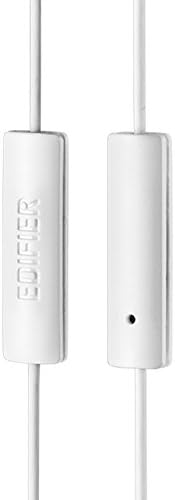
Figure 3: Inline microphone and control button.
- Адказ / завяршэнне званка: Націсніце кнопку кіравання адзін раз, каб адказаць на ўваходны званок. Націсніце яе яшчэ раз, каб завяршыць актыўны званок.
- Прайграванне/прыпыненне музыкі: Press the control button once to play or pause audio playback.
- Прапуск трэкаў: Double-press the control button to skip to the next track. Triple-press to go to the previous track (functionality may vary by device and operating system).
- Галасавы памочнік: Long-press the control button to activate your device's voice assistant (e.g., Siri, Google Assistant).
Відэа 1: Афіцыйны прадукт скончаныview of the Edifier P180 Classic Earbud Headsets, demonstrating features and usage.
6. Тэхнічнае абслугоўванне
- Уборка: Акуратна працярыце навушнікі і кабель мяккай сухой тканінай. Пазбягайце выкарыстання агрэсіўных хімічных рэчываў або абразіўных матэрыялаў.
- захоўванне: When not in use, store the headset in a clean, dry place, away from extreme temperatures and direct sunlight. Avoid tangling the cable.
- Пазбягайце вільгаці: Do not expose the headset to water or excessive moisture, as this can damage the internal components.
7. Выпраўленне непаладак
- Няма гуку:
- Пераканайцеся, што 3.5-мм раз'ём цалкам устаўлены ў аўдыёпорт вашай прылады.
- Праверце налады гучнасці вашай прылады.
- Праверце навушнікі з іншай прыладай, каб выключыць праблему, характэрную для гэтай прылады.
- Мікрафон не працуе:
- Пераканайцеся, што 3.5-мм раз'ём цалкам устаўлены.
- Праверце налады ўваходу мікрафона вашай прылады.
- Праверце мікрафон з дапамогай іншай прылады або праграмы.
- Перарывісты гук:
- Check the cable for any kinks or damage.
- Ensure the audio jack is clean and free of debris.
8. Тэхнічныя характарыстыкі
| Асаблівасць | Спецыфікацыя |
|---|---|
| Нумар мадэлі | P180 |
| АЧХ | 20 Гц - 20 000 Гц |
| Гняздо для навушнікаў | 3.5 мм Jack |
| Тэхналогія падлучэння | Правадная |
| Вага прадмета | 1.76 унцыі (50 грама) |
| Памеры прадукту | 2.01 х 5.59 х 0.91 цалі |
| Матэрыял | Неадымавы |
| Тып кіравання | Inline Control Button |
| Імпеданс | 32 Ом |
| Кантроль шуму | Гукаізаляцыя |
9. Гарантыя і падтрымка
The Edifier P180 headset is backed by a Гарантыя 1 год. For any support inquiries or warranty claims, please refer to the contact information provided with your purchase or visit the official Edifier webсайт.