
Уводзіны
Welcome to the SINGER Superb EM200 Embroidery Machine user manual. This document provides essential information for the safe and efficient operation, setup, maintenance, and troubleshooting of your embroidery machine. Please read these instructions carefully before using the machine to ensure optimal performance and longevity.

Figure 1: SINGER Superb EM200 Embroidery Machine overview.
Прадукт скончаныview
The SINGER Superb EM200 is an embroidery-only machine designed to enhance your creative projects. It features a robust set of capabilities for various embroidery tasks.
Асноўныя характарыстыкі:
- 200 Built-in Embroidery Designs: A wide selection of designs to choose from for diverse projects.
- 6 Alphabet Options: Personalize items with various lettering styles.
- Аўтаматычнае ўпраўленне ніткі ў іголку: Simplifies the threading process, guiding the thread from the spool to the needle with ease.
- Extra-Large Embroidery Area: Accommodates larger designs with a maximum area of 10.25 inches x 6 inches.
- Large LCD Touch Screen: Provides intuitive control for adjusting embroidery settings and selecting designs.
- USB Stick Embroidery Design Transfer: Allows for easy transfer and storage of custom designs.
- 700 Stitches Per Minute: Enables quick completion of embroidery projects.
- 7 7/8 Inch Work Area: Прапановы ample space for managing fabric during embroidery.
- 3 STAYBRIGHT LED Lights: Illuminates the work area for clear visibility.
- Automatic Thread Tension: Ensures consistent stitch quality across different fabrics.
- Bobbin Winding While Embroidering: Allows for continuous work without interruption.
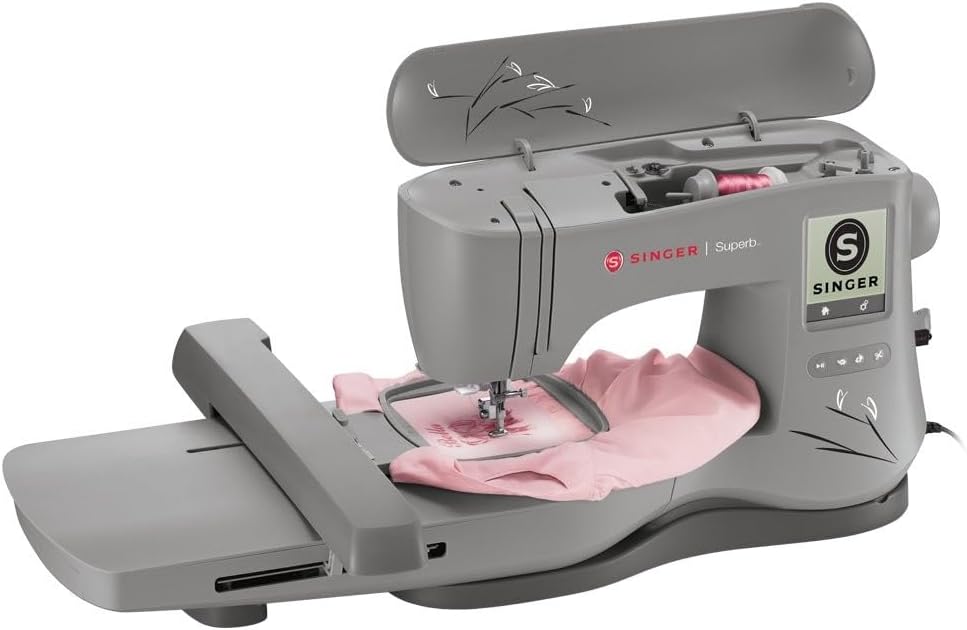
Figure 2: Embroidery in progress on the SINGER Superb EM200.

Figure 3: Interacting with the LCD touch screen.
Што ў скрынцы
Your SINGER Superb EM200 Embroidery Machine comes with the following accessories:
- Large Embroidery Hoop (10.25" x 6")
- Маленькі пяльцо для вышывання (4 см x 4 см)
- Лапка для вышывання
- Сетка для шпулькі нітак
- Фетр для шпулькі
- Адвёртка
- Адвёртка для ігольнай пласціны
- Шчотка для распарывання швоў/для ворса
- Каўпачкі для шпулек з ніткамі
- Дапаможны штыфт шпулі
- Шпулькі (клас 15 празрыстыя)
- Пачак іголак
- USB-флешка для вышывання
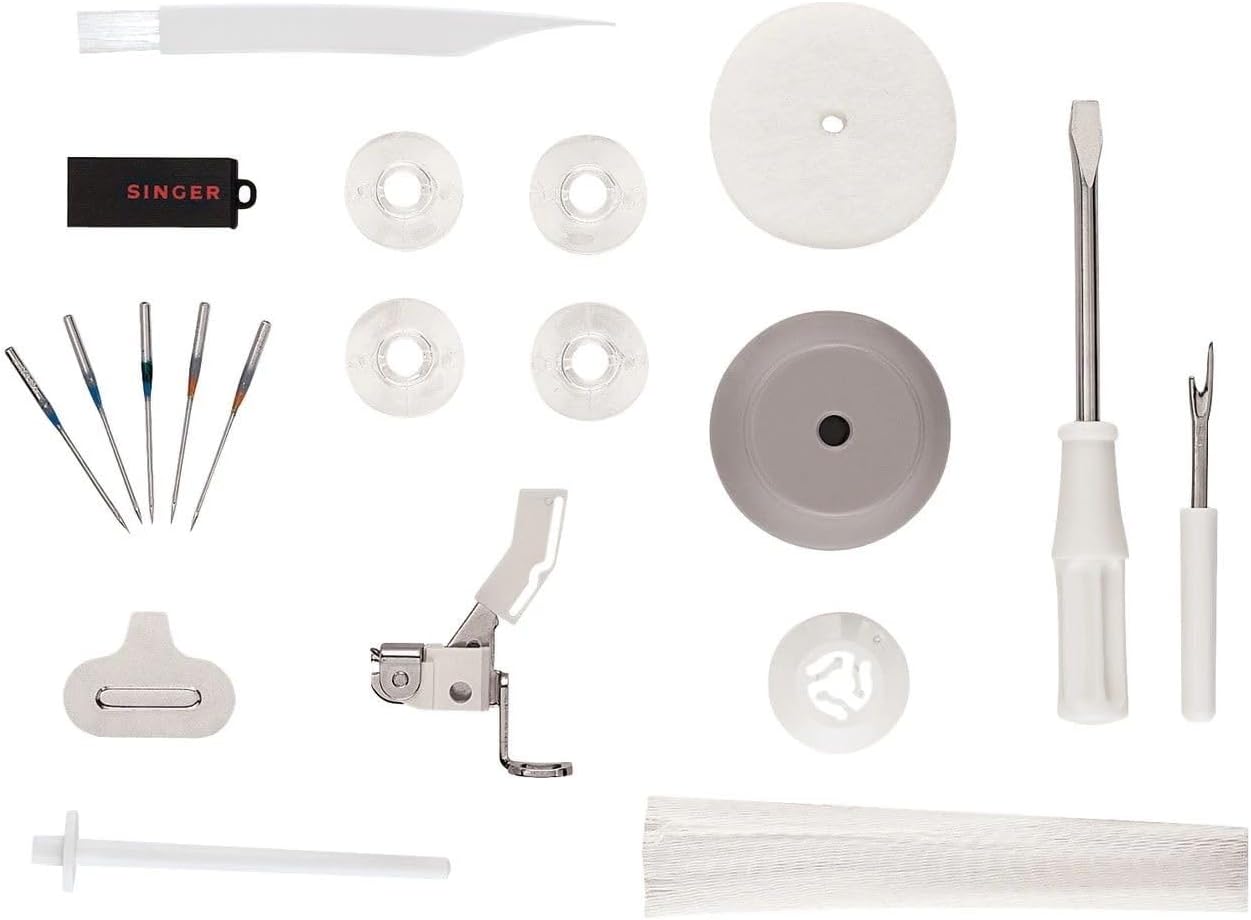
Малюнак 4: Камплектуючыя.
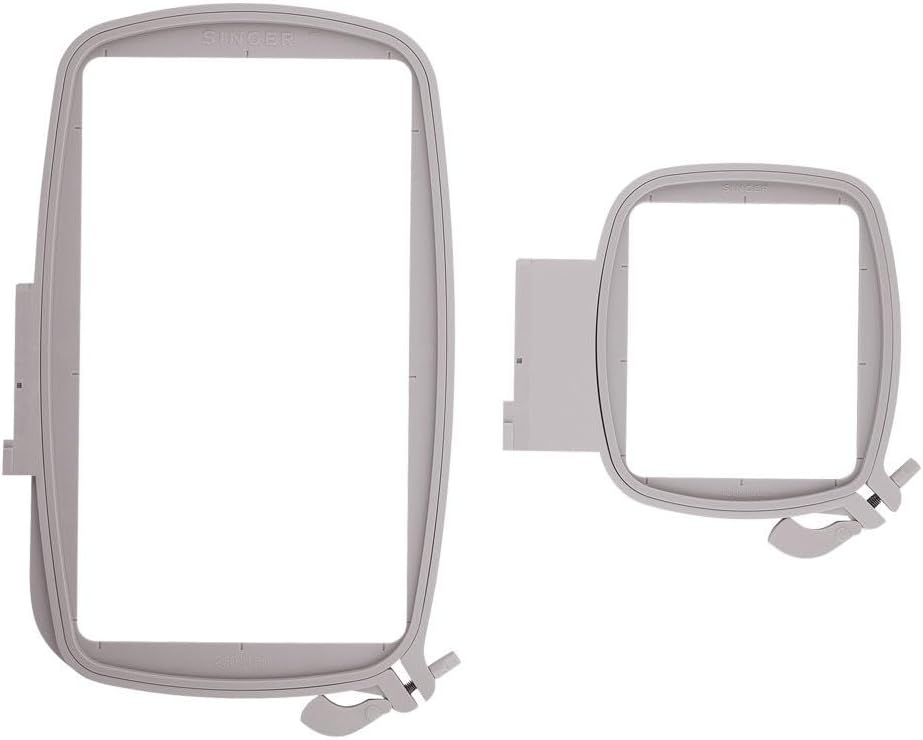
Figure 5: Large and small embroidery hoops.
Настройка
- Распакаванне: Carefully remove the machine and all accessories from the packaging. Retain the original packaging for future transport or storage.
- Размяшчэнне: Place the machine on a stable, flat surface with adequate space for embroidery projects. Ensure it is near a 110-volt power outlet (for US and Canada).
- Падключэнне сілкавання: Падключыце шнур харчавання да прылады, а затым да адпаведнай электрычнай разеткі.
- Запраўка машыны: Follow the numbered threading path indicated on the machine. Utilize the automatic needle threader for simplified needle threading.
- Winding the Bobbin: Place a bobbin on the bobbin winder spindle and follow the winding instructions in the detailed manual.
- Hooping Fabric: Select the appropriate embroidery hoop for your design. Place the fabric and stabilizer securely within the inner and outer rings of the hoop.
- Attaching the Hoop: Slide the hooped fabric onto the embroidery unit until it clicks into place.
Відэа 1: Оверview of the SINGER Superb EM200 Embroidery Machine's features and basic operation, including design transfer via USB and hooping fabric.
Інструкцыя па эксплуатацыі
- Уключэнне: Turn on the machine using the power switch. The LCD touch screen will illuminate.
- Design Selection: Use the LCD touch screen to browse and select from the 200 built-in embroidery designs or load designs from the USB embroidery stick.
- Налада дызайну: Adjust design size, rotation, and position as needed using the touch screen controls.
- Start Embroidery: Once the design is selected and the fabric is hooped and attached, press the start button to begin the embroidery process. The machine will automatically stitch the design.
- Маніторынг прагрэсу: Observe the embroidery process. The machine will alert you if the upper thread breaks or the bobbin thread runs out.
- Аздабленне: Once the embroidery is complete, the machine will stop. Remove the hoop from the embroidery unit and carefully unhoop the fabric. Trim any loose threads.
Тэхнічнае абслугоўванне
Regular maintenance ensures the smooth operation and longevity of your embroidery machine.
- Уборка: Regularly clean the bobbin area, feed dogs, and needle plate using the provided lint brush. Remove any lint or thread buildup.
- Замена іголкі: Replace the needle frequently, especially after 8-10 hours of embroidery or if it becomes bent or dull. Use only appropriate embroidery machine needles.
- Змазка: Refer to the detailed manual for specific oiling points and frequency. Use only sewing machine oil.
- захоўванне: Калі прылада не выкарыстоўваецца, накрывайце яе, каб абараніць ад пылу. Захоўвайце яе ў сухім, стабільным асяроддзі.
Ліквідацыю непаладак
If you encounter issues with your SINGER Superb EM200, consider the following common solutions:
| праблема | Магчымая прычына | Рашэнне |
|---|---|---|
| Часта ламаюцца ніткі | Incorrect threading, dull/bent needle, improper tension, poor quality thread. | Re-thread the machine, replace the needle, adjust tension, use high-quality embroidery thread. |
| Прапушчаны швы | Incorrect needle, bent needle, improper threading, fabric not hooped tightly. | Ensure correct needle type and size, replace needle, re-thread, re-hoop fabric with stabilizer. |
| Machine not embroidering | Power off, start button not pressed, hoop not correctly attached. | Check power, press start, ensure hoop is securely clicked into place. |
| Poor stitch quality (loose/tight) | Incorrect thread tension (upper or bobbin), wrong needle for fabric. | Adjust upper thread tension, check bobbin tension, ensure appropriate needle. |
For more detailed troubleshooting or issues not listed here, please consult the comprehensive manual or contact SINGER customer support.
Тэхнічныя характарыстыкі
| Асаблівасць | Дэталь |
|---|---|
| Нумар мадэлі | EM200 |
| Памеры прадукту | 29.25 х 18 х 12.25 цалі (74.3 х 45.7 х 31.1 см) |
| Вага прадмета | 23 фунта (10.43 кг) |
| Тып лямпачкі | святлодыёд |
| Built-in Stitches/Designs | 200 |
| Крыніца харчавання | Правадная электрычная |
| Матэрыял | Метал |
Гарантыя і падтрымка
This SINGER Superb EM200 Embroidery Machine is warranted for use in the US and Canada at 110 volts only. For specific warranty details, including coverage periods for parts and labor, please refer to the warranty card included with your product or visit the official SINGER webсайт.
For technical assistance, service, or to inquire about authorized service centers, please contact SINGER customer support. Contact information can typically be found in your product documentation or on the SINGER webсайт.