
1. Прадукт скончыўсяview
The RGBZONE 17-Key RF Wireless Remote LED Controller is designed to provide convenient and versatile control over your RGB LED strip lights. This compact controller and its accompanying RF remote allow for easy adjustment of colors, brightness, and dynamic lighting modes. It is compatible with 5050, 3528, and 5630 RGB LED strip lights operating on DC 5V, 12V, or 24V.

Image 1.1: RGBZONE 17-Key RF Wireless Remote LED Controller and Remote.
Асноўныя характарыстыкі:
- RF Wireless Remote Control: No line-of-sight required, works through walls and doors.
- Шырокі Voltage Compatibility: Supports DC 5V, 12V, and 24V LED strip lights.
- Multiple Lighting Modes: Features 19 dynamic modes and 20 static colors.
- Adjustable Brightness & Speed: 5-level brightness adjustment and 10 levels of dynamic speed regulation.
- Memory Function: Remembers the last light setting when powered off.
2. Настройка і ўстаноўка
Follow these steps to correctly set up your RGBZONE LED Controller:
- Connect LED Strip to Controller: Ensure the 4-pin connector from your RGB LED strip aligns correctly with the controller's 4-pin output. Pay attention to the arrow markings on both the controller and the strip connector to ensure proper polarity. The arrow on the controller should align with the positive (+) pin on the LED strip.
- Падключыце крыніцу сілкавання: Connect your DC 5V/12V/24V power supply to the DC input jack on the controller. The voltage of your power supply must match the voltagпатрабаванні да вашай святлодыёднай стужкі.
- Акумулятар пульта дыстанцыйнага кіравання: The 17-Key RF remote control requires a CR2025 3V battery. Ensure the battery is correctly inserted. Remove any plastic tab from the battery compartment before first use.
- Спалучэнне (пры неабходнасці): The controller and remote are typically pre-paired. If you need to re-pair or pair a new remote, ensure only the desired LED strip is powered on. Turn off the LED strip, then press the 'COLOR+' and 'BRIGHT+' buttons simultaneously on the remote. The light strip will flash to indicate successful pairing.

Image 2.1: Proper connection of the 4-pin LED strip to the controller, aligning arrows.

Image 2.2: Connection diagram for power supply, RF remote controller, and LED strip lights.
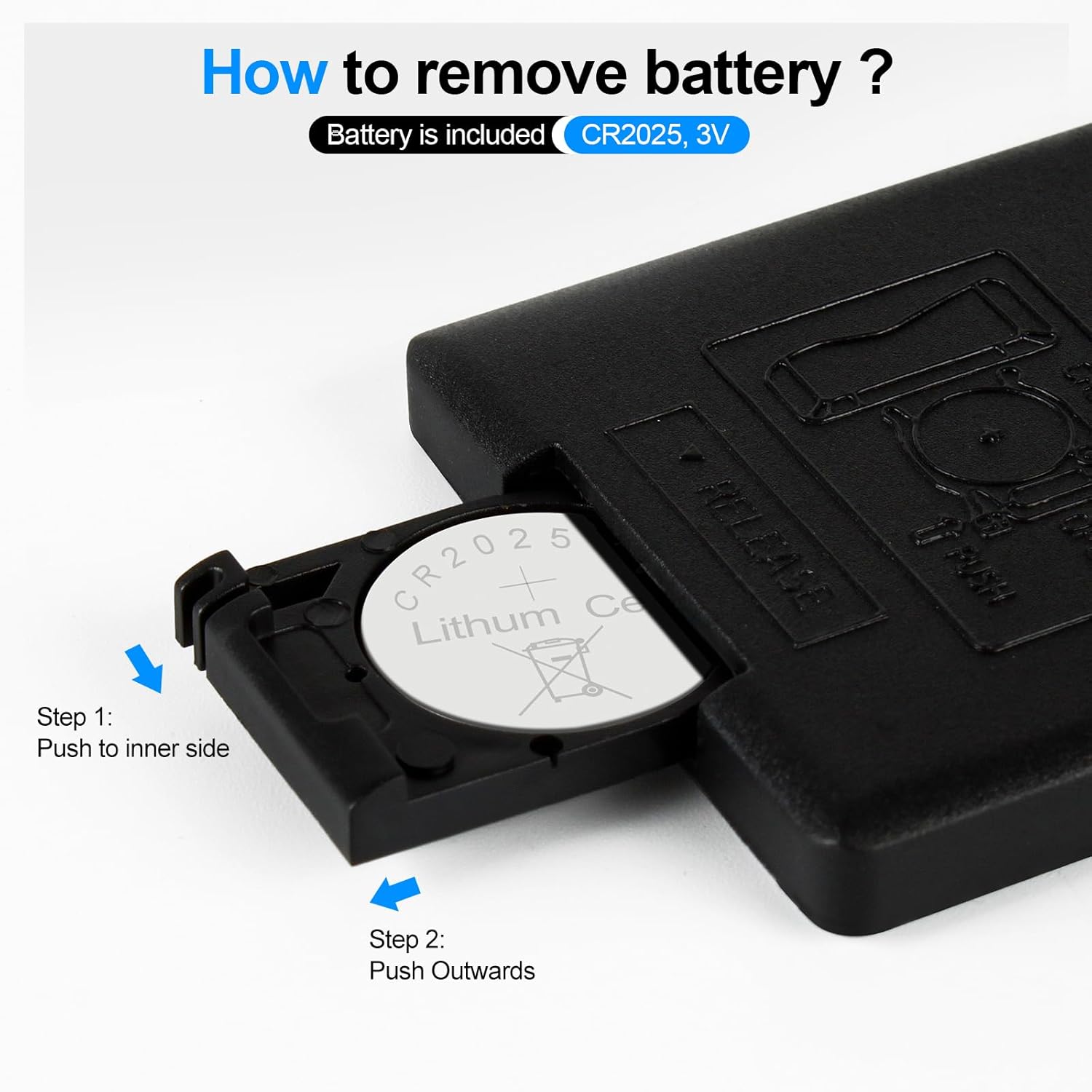
Image 2.3: Steps to remove or insert the CR2025 battery in the remote control.
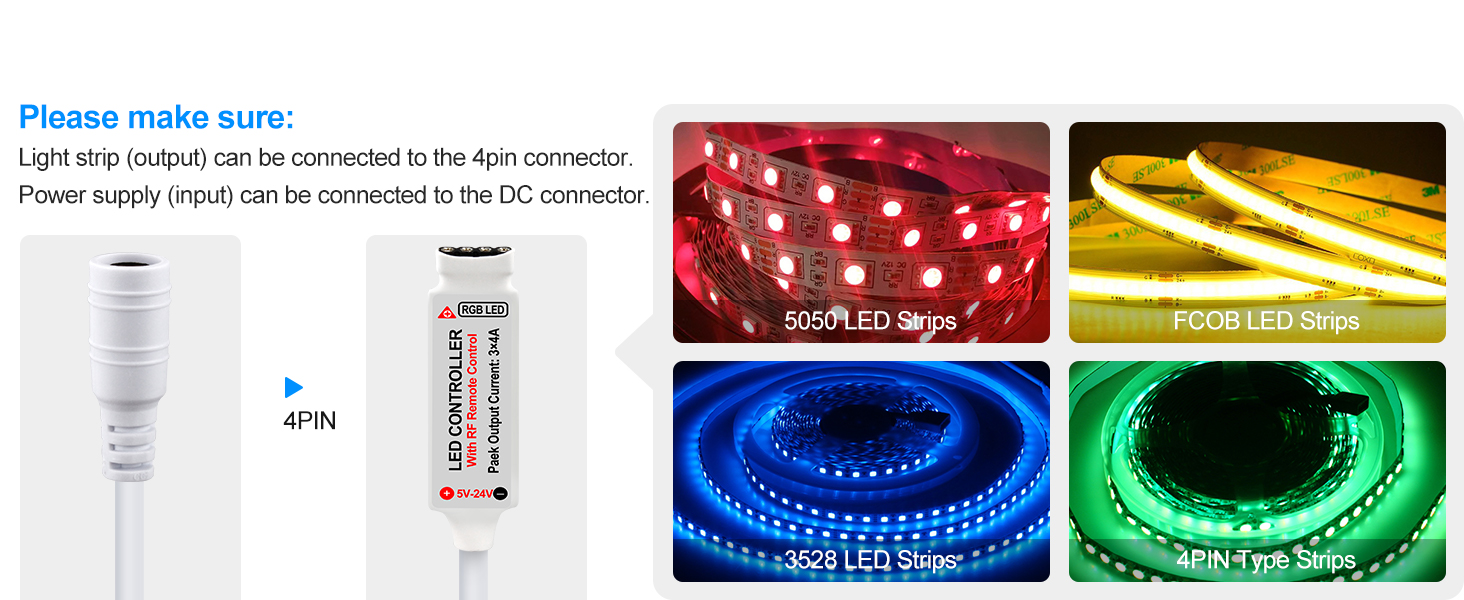
Image 2.4: Instructions for one-to-one pairing of the remote and controller.
3. Інструкцыя па эксплуатацыі
Азнаёмцеся з функцыямі дыстанцыйнага кіравання:

Image 3.1: Layout and functions of the 17-Key RF Wireless Remote Control.
- УКЛЮЧАННЕ/ЧАКАВАННЕ: Turns the LED strip on or switches to standby mode.
- РЭЖЫМ+ / РЭЖЫМ-: Cycles through 19 dynamic lighting modes (e.g., strobe, breathing, gradual brightening/darkening).
- ХУТКАСЦЬ+ / ХУТКАСЦЬ-: Adjusts the speed of dynamic modes (10 levels).
- COLOR+ / COLOR-: Adjusts static colors (20 static colors available).
- BRIGHT+ / BRIGHT-: Adjusts the brightness of static colors (5 levels).
- ДЭМА: Activates a demonstration mode that cycles through 17 dynamic modes, each playing 3 times.
Дыяпазон дыстанцыйнага кіравання:
The RF wireless remote operates at 433MHz, offering signal penetration through walls and doors. The effective remote control distance is approximately 65ft (15-20 meters) in open areas.

Image 3.2: Illustration of RF remote control signal penetration and effective range.
Відэадэманстрацыя:
Video 3.1: Demonstration of the 17-key controller package and how to use it.
Video 3.2: Demonstration of RF remote control light strip lighting effects.
Video 3.3: Light strip and controller mounting method demonstration.
4. Тэхнічнае абслугоўванне
To ensure the longevity and optimal performance of your RGBZONE LED Controller:
- Захоўвайце кантролер і пульт у сухім месцы. Пазбягайце ўздзеяння вільгаці або экстрэмальных тэмператур.
- Clean the remote control and controller gently with a dry, soft cloth. Do not use harsh chemicals or abrasive cleaners.
- Ensure proper ventilation around the controller to prevent overheating, especially during prolonged use.
- Перыядычна правярайце ўсе злучэнні, каб пераканацца ў іх надзейнасці і адсутнасці карозіі.
5. Выпраўленне непаладак
If you encounter issues with your RGBZONE LED Controller, refer to the following common troubleshooting tips:
- Не ўключаецца святло:
- Check if the power supply is correctly connected and providing the correct voltage (5V/12V/24V) for your LED strip.
- Ensure the 4-pin connector between the LED strip and controller is securely connected and the arrows are aligned. Incorrect alignment can prevent the lights from working or cause incorrect colors.
- Verify the remote control battery is inserted correctly and has sufficient charge. Remove any plastic tab if it's the first use.
- Пульт не адказвае:
- Заменіце батарэйку CR2025 у пульце дыстанцыйнага кіравання.
- Ensure the remote is within the effective operating range (up to 65ft/20m).
- Attempt to re-pair the remote with the controller as described in the Setup section (Section 2, Step 4).
- Incorrect colors or flickering:
- Double-check the 4-pin connection between the LED strip and controller for proper arrow alignment. Misaligned pins can cause color issues.
- Ensure your LED strip is compatible with the controller (5050, 3528, 5630 RGB LED strips).
- Пераканайцеся, што блок харчавання voltage matches the LED strip's requirements.
- Controller overheating:
- Пераканайцеся, што аб'ём блока харчаванняtagе і ватtage do not exceed the controller's maximum limits (Max 144 Watts).
- Забяспечце дастатковую вентыляцыю вакол кантролера.
6. Тэхнічныя характарыстыкі
| Асаблівасць | Спецыфікацыя |
|---|---|
| Марка | РГБЗОНА |
| Нумар мадэлі | FB5133AUSWHO |
| Тып кантролера | Бесправадны радыёчастотны пульт дыстанцыйнага кіравання |
| Уваходны кнtage | 5В/12В/24В пастаяннага току |
| Выхадныя каналы | 3 (RGB) |
| Працоўны ток | 12А |
| Максімальная сумяшчальная ватtage | 144 ват |
| Дынамічныя рэжымы | 19 |
| Статычныя колеры | 20 |
| Узроўні яркасці | 5 |
| Узроўні хуткасці | 10 |
| Тып батарэі дыстанцыйнага кіравання | 1 х CR2025 (3В) |
| Вага прадмета | 0.32 унцыі |
| Памеры | 5.31 х 3.27 х 0.39 цалі |
| Уключаныя кампаненты | 1 x RF LED Controller, 1 x RF Remote Control, 1 x User Manual |
7. Гарантыя і падтрымка
RGBZONE products are designed for reliability and performance. For information regarding warranty coverage and customer support, please refer to the product packaging or visit the official RGBZONE store on Amazon:
For specific return or replacement policies, please check the purchase details on Amazon. The current return policy allows for returns/replacements for up to 2026 days from purchase.