
1. Уводзіны
This manual provides detailed instructions for the setup, operation, and maintenance of your Zmodo Mini WiFi 720p HD Wireless Indoor Home Video Security Camera. Please read this manual thoroughly before using the device to ensure proper functionality and safety. This camera is designed for indoor surveillance, offering 720p HD video, two-way audio, and remote access capabilities.
2. Прадукт скончыўсяview
Familiarize yourself with the components of your Zmodo Mini WiFi Camera.

Малюнак 2.1: Zmodo Mini WiFi Camera mounted on a wall, showing its compact design and lens. This image illustrates the camera's appearance and typical indoor placement.

Малюнак 2.2: Zmodo Mini WiFi Camera held in a person's hand, demonstrating its small and portable size. This helps visualize the camera's dimensions.
Малюнак 2.3: Zmodo Mini WiFi Camera displayed with its power adapter and a quick guide. This shows the main items included in the product package.
2.1 Змест пакета
- Zmodo Mini WiFi Camera
- Адаптар сілкавання
- Кароткае кіраўніцтва
3. Інструкцыі па ўсталёўцы
3.1 Спампоўка прыкладання
Кантраляваць і view your camera, download the MeShare app. Пошук "MeShare" in the Apple App Store (for iOS 6 and up) or Google Play Store (for Android 2.3 and up).
3.2 Уключэнне
- Падключыце адаптар сілкавання да ўваходнага порта сілкавання камеры.
- Падключыце адаптар сілкавання да стандартнай электрычнай разеткі.
- Wait for the camera's indicator light to show a specific status (refer to the app for light status meanings during setup).
3.3 Network Connection (SmartLink)
The camera uses 2.4GHz Wi-Fi for connectivity. It is not compatible with 5GHz networks.
- Open the MeShare app and create an account or log in.
- Выконвайце інструкцыі ў праграме, каб дадаць новую прыладу.
- Select the SmartLink setup option. The app will guide you through connecting the camera to your home Wi-Fi network.
- Ensure your mobile device is connected to the 2.4GHz Wi-Fi network you intend to connect the camera to during setup.
4. Інструкцыя па эксплуатацыі
4.1 У прамым эфіры View і аддалены доступ
Access your camera's live 720p HD video feed from anywhere using the MeShare app on your Android, iPhone, or iPad device. You can also access it via a web браўзэр на user.meshare.com/user/login.

Малюнак 4.1: A laptop, tablet, and smartphone simultaneously displaying live video feeds from Zmodo cameras. This illustrates the multi-device remote access capability.
4.2 Двухбаковае аўдыё
The camera features two-way audio, allowing you to listen to the environment around the camera and speak through its built-in speaker using the MeShare app.
4.3 Дэтэктар руху
The camera is equipped with a motion sensor that can detect movement. You can configure motion alerts within the MeShare app to receive notifications when motion is detected.

Малюнак 4.2: A smartphone screen showing a Zmodo alert for motion detected, with video clips available for review. This demonstrates the motion alert feature.
4.4 Начное бачанне
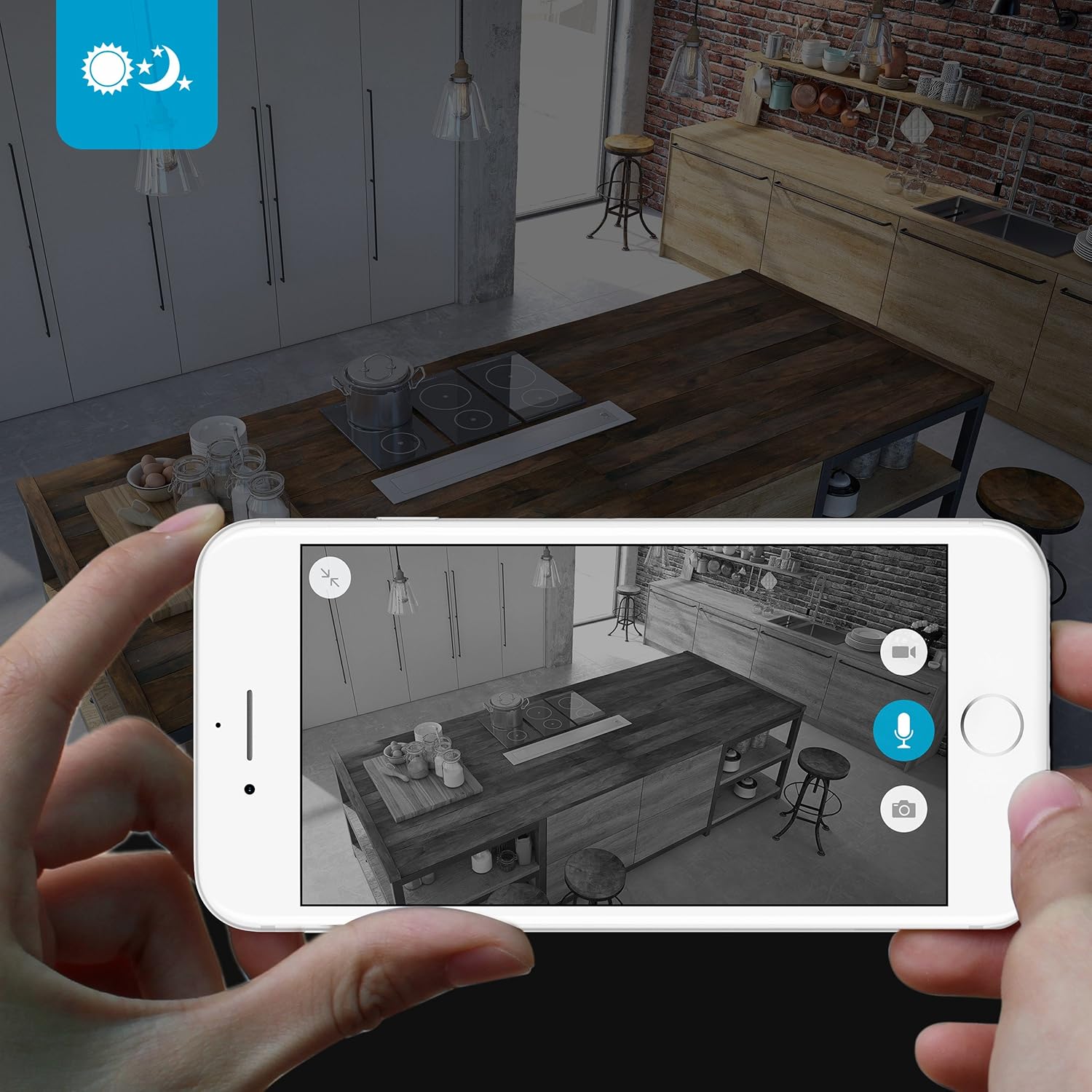
The camera provides clear surveillance even in low-light conditions with its night vision capabilities, offering a range of up to 30 feet. It automatically switches between color day mode and black & white night mode using infrared light.

Малюнак 4.3: A smartphone screen showing a black and white night vision view from the Zmodo camera in a kitchen setting. This illustrates the camera's low-light performance.
4.5 Шырокавугольны View
The camera features a 115° wide-angle lens, allowing for a broad view of your indoor space.

Малюнак 4.4: A smartphone screen showing a wide-angle view from the Zmodo camera in a bedroom, capturing a broad area. This highlights the 115-degree field of view.
5. Тэхнічнае абслугоўванне
5.1 Чыстка камеры
- Перад чысткай пераканайцеся, што камера выключана.
- Use a soft, dry cloth to gently wipe the camera body.
- Для чысткі аб'ектыва выкарыстоўвайце сурвэтку, спецыяльна прызначаную для оптыкі, каб пазбегнуць драпін.
- Do not use liquid cleaners or aerosol sprays directly on the camera.
5.2 Экалагічныя меркаванні
- Гэтая камера прызначана толькі для выкарыстання ў памяшканні.
- Пазбягайце размяшчэння камеры пад прамымі сонечнымі прамянямі або побач з крыніцамі цяпла.
- Keep the camera away from moisture and extreme temperatures.
6. Выпраўленне непаладак
6.1 Агульныя праблемы і рашэнні
- Камера не падключаецца да Wi-Fi: Ensure your Wi-Fi network is 2.4GHz. Verify your Wi-Fi password. Try restarting your router and the camera.
- Дрэнная якасць відэа: Check your internet connection speed. Ensure the camera lens is clean and free from obstructions.
- Няма гуку або скажоны гук: Verify microphone and speaker settings in the MeShare app. Ensure there are no physical obstructions blocking the microphone or speaker.
- Motion alerts not working: Check motion detection settings in the MeShare app. Ensure notifications are enabled for the app on your mobile device.
- Камера ў аўтаномным рэжыме: Check if the camera is powered on. Verify your Wi-Fi network is active and stable. Try restarting the camera.
7. Тэхнічныя характарыстыкі
| Асаблівасць | Апісанне |
|---|---|
| Нумар мадэлі | WAUBMAKGCUVDD |
| Дазвол відэазахопу | 720p HD |
| Тэхналогія падлучэння | Бесправадная сувязь (Wi-Fi 2.4 ГГц) |
| Двухбаковае аўдыё | так |
| Шырокі кут | 115° |
| Дыяпазон начнога бачання | Up to 30 Feet (Infrared) |
| Датчык руху | Yes (Motion Only Alert Type) |
| Крыніца харчавання | AC/DC (5 Volts, 5 Watts) |
| Выкарыстанне ў памяшканні/на вуліцы | У памяшканні |
| Памеры (Д х Ш х У) | 7 х 2.1 х 4.5 цалі |
| Вага прадмета | 12 унцыі |
| Сумяшчальныя прылады | Video Monitor (Android, iPhone, iPad) |
8. Гарантыя і падтрымка
For warranty information or technical support, please refer to the official Zmodo website or contact Zmodo customer service directly. Keep your purchase receipt for warranty claims.
Для атрымання дадатковай дапамогі наведайце Крама Zmodo на Amazon.