
Уводзіны
This manual provides detailed instructions for the Inateck Bluetooth 4.1 Sport Headset, Model P20 (BH1001). Please read this guide thoroughly before using the product to ensure proper operation and to maximize your listening experience. This headset is designed for active lifestyles, offering wireless audio with a secure fit and integrated microphone.
1. Настройка
1.1 Змест пакета
Праверце наяўнасць усіх прадметаў у камплекце:
- Inateck Bluetooth Sport Headset (P20 / BH1001)
- USB-кабель для зарадкі
- Multiple pairs of silicone ear tips (various sizes)
- Сумка для пераноскі
- Кіраўніцтва карыстальніка (гэты дакумент)
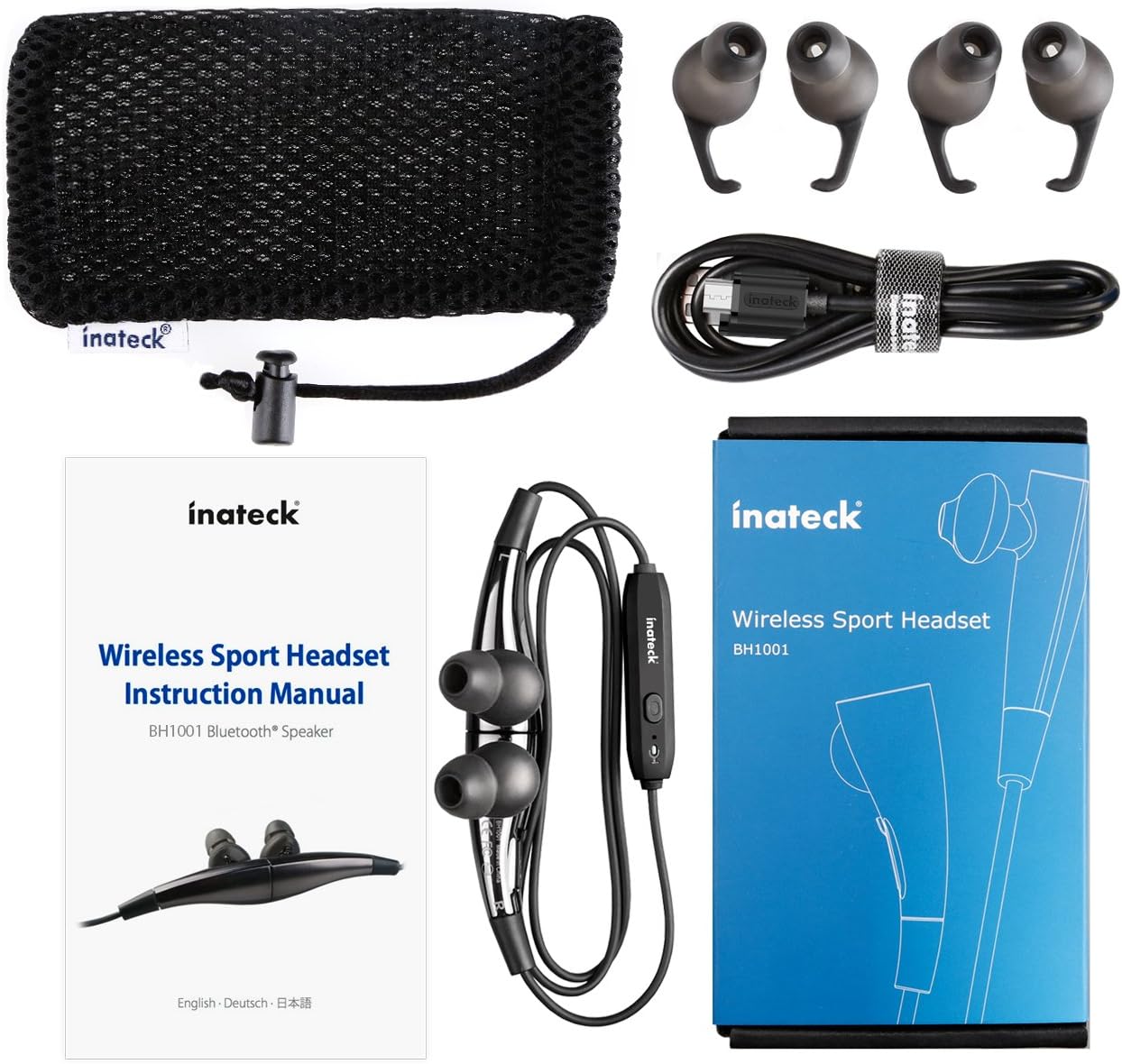
Малюнак 1.1: Contents of the Inateck Bluetooth Sport Headset package.
1.2 Зарадка гарнітуры
Before first use, fully charge the headset. A full charge takes approximately 3 hours and provides at least 8 hours of music playback.
- Locate the Micro USB charging port on the headset.
- Connect the small end of the provided USB charging cable to the headset's Micro USB port.
- Падключыце большы канец USB-кабеля да крыніцы харчавання USB (напрыклад, USB-порта кампутара, насценнага адаптара USB).
- The status indicator light will illuminate during charging. It will change color or turn off once charging is complete.

Малюнак 1.2: Charging the Inateck Bluetooth Sport Headset via Micro USB.
1.3 Спалучэнне з прыладай Bluetooth
Каб падключыць гарнітуру да смартфона або іншай прылады з падтрымкай Bluetooth:
- Пераканайцеся, што гарнітура выключана.
- Press and hold the Multifunction Key (MFB) on the inline control unit for approximately 5-7 seconds until the status indicator light flashes red and blue alternately. This indicates pairing mode.
- На прыладзе Bluetooth уключыце Bluetooth і пачніце пошук новых прылад.
- Select "Inateck BH1001" or "Inateck P20" from the list of available devices.
- Once paired, the status indicator light on the headset will flash blue slowly, and you may hear an audible confirmation.
- The headset will automatically attempt to reconnect to the last paired device when turned on.

Малюнак 1.3: Inateck Headset paired with a mobile device for music playback.
2. Інструкцыя па эксплуатацыі
2.1 Кіраванне гарнітурай
The inline control unit provides easy access to various functions:

Малюнак 2.1: Скончанаview of the Inateck Headset control unit.
- Multifunction Key (MFB):
- Press and hold (5-7s): Power On/Off, Enter Pairing Mode
- Кароткае націсканне: прайграванне/прыпыненне музыкі, адказ на выклік/завяршэнне выкліку
- Long press (during incoming call): Reject call
- Павелічэнне гучнасці (+) / Наступны трэк:
- Кароткае націсканне: павялічыць гучнасць
- Доўгі націск: пераход да наступнага трэка
- Зменшыць гучнасць (-) / Папярэдні трэк:
- Кароткае націсканне: памяншэнне гучнасці
- Long press: Go to previous track
- Порт Micro USB: Для зарадкі гарнітуры.
- Індыкатар стану: Паказвае стан харчавання, спалучэння і зарадкі.
- Мікрафон: Для гучнай сувязі.
2.2 Нашэнне гарнітуры
Select the ear tips that provide the most comfortable and secure fit for your ears. The headset is designed to be worn with the cable behind your neck, ensuring stability during physical activity.

Малюнак 2.2: Proper wearing of the Inateck Sport Headset for active use.
2.3 Магнітныя навушнікі-ўкладышы
The earbuds feature integrated magnets. When not in use, you can connect the two earbuds together, forming a necklace around your neck. This action automatically pauses music playback and prevents the headset from falling off.

Малюнак 2.3: Magnetic earbuds feature for secure wearing around the neck.

Малюнак 2.4: Headset worn as a necklace using the magnetic feature.
3. Тэхнічнае абслугоўванне
- Уборка: Wipe the headset with a soft, dry cloth. Do not use abrasive cleaners or solvents.
- Парады для вушэй: Regularly remove and clean the silicone ear tips with mild soap and water. Ensure they are completely dry before reattaching.
- захоўванне: When not in use, store the headset in the provided carrying pouch to protect it from dust and damage. Avoid extreme temperatures.
- Воданепранікальнасць: The headset is designed to be water-resistant for sports and exercise (e.g., sweat, light rain). Do not submerge it in water or expose it to heavy rain.
4. Выпраўленне непаладак
4.1 Не магу ўключыць
Ensure the headset is fully charged. Connect it to a power source using the USB cable and allow it to charge for at least 30 minutes before attempting to power on again.
4.2 Немагчыма спалучыць прыладу
- Ensure the headset is in pairing mode (status indicator flashing red and blue alternately).
- Make sure Bluetooth is enabled on your device and it is within range (typically 10 meters or 33 feet).
- Выключыце і ўключыце функцыю Bluetooth на вашай прыладзе.
- If previously paired, try "forgetting" or "unpairing" the headset from your device's Bluetooth settings and then re-pair.
- Пераканайцеся, што іншыя прылады Bluetooth не перашкаджаюць падключэнню.
4.3 Няма гуку або дрэнная якасць гуку
- Праверце ўзровень гучнасці як на гарнітуры, так і на падлучанай прыладзе.
- Пераканайцеся, што гарнітура правільна спалучана і падключана да вашай прылады.
- Move closer to your device to reduce potential interference or range issues.
- Ensure the ear tips are correctly seated in your ears for optimal sound delivery.
- Reboot both the headset and your connected device.
4.4 Перарывістае падключэнне
- Ensure there are no physical obstructions between the headset and your device.
- Avoid placing your device in areas where the signal might be blocked (e.g., deep pockets, behind thick walls).
- Мінімізуйце перашкоды ад іншых бесправадных прылад (маршрутызатараў Wi-Fi, іншых прылад Bluetooth).
- Keep the headset and your device within the recommended Bluetooth range.
5. Тэхнічныя характарыстыкі
| Марка | Інатэк |
| Назва мадэлі | P20 |
| Нумар мадэлі | BH1001 |
| Тэхналогія падлучэння | Bluetooth 4.1 |
| Формаў-фактар | Укладышы |
| Размяшчэнне вушэй | Intra-aural |
| Раз'ём для навушнікаў | USB (для зарадкі) |
| Узровень воданепранікальнасці | Waterproof (suitable for sweat/light rain) |
| Асаблівасці | Sports and exercise, integrated microphone, magnetic earbuds |
| Вага прадмета | 78 грам |
| Тып кіравання | Volume Control, Multifunction Button |
| Матэрыял | Пластыкавыя |
6. Інфармацыя аб гарантыі
Inateck products typically come with a limited warranty. For specific warranty terms and conditions applicable to your Inateck Bluetooth Sport Headset, please refer to the warranty card included in your product packaging or visit the official Inateck webсайт. Захоўвайце пацвярджэнне пакупкі для прэтэнзій па гарантыі.
7. Падтрымка кліентаў
If you encounter any issues not covered in this manual or require further assistance, please contact Inateck customer support. You can usually find contact information, FAQs, and additional resources on the official Inateck webсайт:
Webсайт: www.inateck.com
Please have your product model (P20 / BH1001) and purchase details ready when contacting support.


