
PRORECK PARTY 15
PRORECK Party 15 Portable PA Speaker System
Кіраўніцтва карыстальніка
Model: PARTY 15
Уводзіны
Дзякуй за пакупкуasing the PRORECK Party 15 Portable PA Speaker System. This system is designed to deliver powerful and clear audio for various applications, including parties, DJ events, home studios, and social gatherings. Featuring Bluetooth connectivity, USB/SD card playback, FM radio, and integrated LED lights, the Party 15 offers versatile audio solutions. Please read this manual thoroughly before operating the system to ensure proper use and to maximize its performance and longevity.
Важная інфармацыя па бяспецы
Заўсёды выконвайце асноўныя меры бяспекі пры выкарыстанні гэтага вырабу, каб знізіць рызыку пажару, паражэння электрычным токам і траўмаў.
- Не падвяргайце гэта абсталяванне ўздзеянню дажджу або вільгаці.
- Do not open the speaker enclosure. There are no user-serviceable parts inside. Refer all servicing to qualified service personnel.
- Пераканайцеся, што аб'ём блока харчаванняtagе адпавядае тtage паказана на прыладзе.
- Абараняйце сеткавы шнур ад наступання або заціскання, асабліва ў месцах вілкі, разеткі і месца выхаду з прылады.
- Адключайце гэты прыбор ад сеткі падчас навальніцы або калі ён не выкарыстоўваецца на працягу доўгага часу.
- Не блакуйце вентыляцыйныя адтуліны. Усталюйце ў адпаведнасці з інструкцыямі вытворцы.
- Выкарыстоўвайце толькі каляскі, падстаўкі, штатывы, кранштэйны або сталы, указаныя вытворцам або якія прадаюцца разам з прыладай.
Што ў скрынцы
Carefully unpack your PRORECK Party 15 system and ensure all items listed below are present and in good condition. If any items are missing or damaged, please contact your retailer immediately.

Image: Complete PRORECK Party 15 system with all included accessories.
- 1 актыўны дынамік
- 1 х пасіўны дынамік
- 2 х падстаўкі для дынамікаў
- 1 х правадной мікрафон
- 1 x Speakon Cable (for connecting active to passive speaker)
- 1 х кабель харчавання
- 1 х пульт дыстанцыйнага кіравання

Выява: Падрабязная view of the wired microphone, remote control, and various cables.
Настройка
Follow these steps to set up your PRORECK Party 15 speaker system.
1. Speaker Stand Assembly
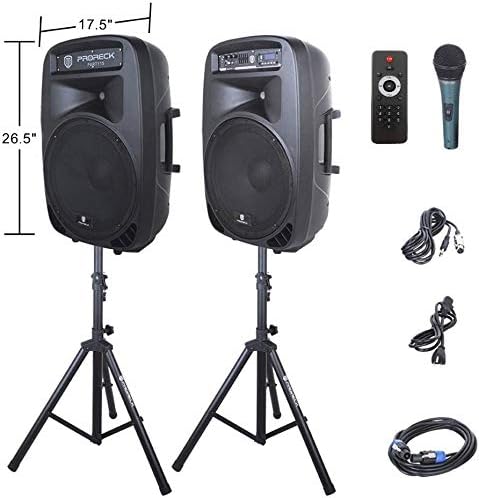
Image: The two included speaker stands.
- Unfold the tripod legs of each speaker stand until they are fully extended and stable.
- Loosen the height adjustment knob on the stand and extend the pole to your desired height. Ensure the safety pin is inserted through the appropriate hole to secure the height.
- Моцна зацягніце ручку рэгулявання вышыні.
2. Размяшчэнне дынамікаў
- Carefully lift each speaker and place it onto the top pole of a speaker stand. Ensure the speaker is securely seated.
- Position the active speaker (the one with the control panel) near a power outlet.
- Place the passive speaker within reach of the included Speakon cable from the active speaker.
Image: PRORECK Party 15 speakers set up on their stands.
3. Падключэнне дынамікаў
- Locate the Speakon output on the rear panel of the active speaker and the Speakon input on the rear panel of the passive speaker.
- Connect one end of the Speakon cable to the active speaker's Speakon output and the other end to the passive speaker's Speakon input. Ensure a secure connection.

Image: Rear panels of the active and passive speakers, highlighting the Speakon connection.
4. Падключэнне сілкавання
- Ensure the master volume knob on the active speaker is turned down to its minimum setting.
- Connect the power cable to the active speaker's power input and then plug it into a suitable electrical outlet.
Інструкцыя па эксплуатацыі
This section details how to operate your PRORECK Party 15 speaker system and utilize its various features.
Панэль кіравання скончыласяview

Выява: Падрабязная view of the active speaker's control panel.
The active speaker features a comprehensive control panel with an LCD display, various input options, volume controls, and an equalizer.
1. Уключэнне/выключэнне харчавання
- After connecting the power cable, locate the power switch on the rear panel of the active speaker.
- Flip the switch to the "ON" position to power on the system. The LCD display will illuminate.
- Каб выключыць харчаванне, пераключыце перамыкач у становішча «ВЫКЛ».
2. Выбар рэжыму
Націсніце РЭЖЫМ button on the control panel or remote control to cycle through available input modes: Bluetooth, USB, SD Card, FM Radio, and Line Input.
3. Злучэнне Bluetooth
- Select "Bluetooth" mode using the РЭЖЫМ button. The LCD display will show "BLUE".
- На прыладзе з падтрымкай Bluetooth (смартфоне, планшэце і г.д.) знайдзіце даступныя прылады Bluetooth.
- Select "PRORECK PARTY 15" from the list. Once paired, the speaker will emit a confirmation sound.
- You can now play audio from your device through the speakers.
4. Прайграванне з USB/SD-карты
- Устаўце USB-назапашвальнік або SD-карту з аўдыё ў фармаце MP3 files into the respective slot on the control panel.
- The system will automatically switch to USB or SD mode and begin playing the first compatible audio file. If not, press the РЭЖЫМ кнопку, каб выбраць правільны ўваход.
- Выкарыстоўвайце ПРАЙГРАЦЬ/Паўза, ПАПЕРАДНІ, і ДАЛЕЙ buttons on the control panel or remote to manage playback.
5. FM-радыё
- Select "FM Radio" mode using the РЭЖЫМ кнопка.
- Націсніце ПРАЙГРАЦЬ/Паўза button to initiate an automatic scan for available FM stations. The system will save detected stations.
- Выкарыстоўвайце ПАПЕРАДНІ і ДАЛЕЙ кнопкі для навігацыі па захаваных станцыях.
6. Выкарыстанне мікрафона
- Connect the wired microphone to the 1/4'' MIC input on the control panel.
- Adjust the "MIC VOL" knob to control the microphone's volume level.
- Ensure the main volume is set appropriately to avoid feedback.
7. Функцыі дыстанцыйнага кіравання
Image: The included remote control.
The remote control allows for convenient operation from a distance (up to 20 feet). Functions include:
- Рэжым: Switch between input modes.
- ПРАЙГРАЦЬ/Паўза: Прайграць або прыпыніць прайграванне аўдыё.
- ПАПЕРАДНІ/НАСТУПНЫ: Skip tracks or navigate FM stations.
- ГУЧНОСТЬ+/ГУЧНОСТЬ-: Адрэгулюйце асноўную гучнасць.
- EQ: Пераключэнне прэсетаў эквалайзера.
- Numeric buttons for direct track selection (in USB/SD mode).
8. Рэгуляванне эквалайзера
The control panel features a 5-band graphic equalizer. Adjust the sliders to fine-tune the audio output to your preference. Experiment with different settings to achieve the desired sound for various music genres or vocal performances.
9. Святлодыёдныя лямпы

Image: PRORECK Party 15 speakers demonstrating various LED light colors.
The PRORECK Party 15 speakers are equipped with built-in LED lights that activate with sound. These lights enhance the party atmosphere. There is a dedicated switch on the rear of the active speaker to turn the LED lights on or off.
Тэхнічнае абслугоўванне
Proper maintenance ensures the longevity and optimal performance of your speaker system.
- Уборка: Use a soft, dry cloth to clean the exterior of the speakers. Do not use abrasive cleaners, waxes, or solvents.
- захоўванне: Калі дынамікі не выкарыстоўваюцца працяглы час, захоўвайце іх у прахалодным, сухім месцы, удалечыні ад прамых сонечных прамянёў і экстрэмальных тэмператур.
- Вентыляцыя: Пераканайцеся, што вентыляцыйныя адтуліны чыстыя ад пылу і смецця, каб прадухіліць перагрэў.
- Кабелі: Regularly check all cables for signs of wear or damage. Replace any damaged cables immediately.
Ліквідацыю непаладак
If you encounter issues with your PRORECK Party 15 system, refer to the following common problems and solutions.
| праблема | Магчымая прычына | Рашэнне |
|---|---|---|
| Няма ўлады | Сеткавы кабель не падключаны; выключаны выключальнік харчавання; няспраўнасць разеткі. | Ensure power cable is securely connected and plugged into a working outlet. Check power switch on rear panel. |
| З дынамікаў няма гуку | Volume too low; Incorrect input mode; Speakon cable loose/damaged; Audio source issue. | Increase master volume. Select correct input mode. Check Speakon cable connection between active and passive speakers. Verify audio source is playing. |
| Bluetooth не спалучаецца | Speaker not in Bluetooth mode; Device too far; Device already paired to another speaker. | Ensure speaker is in Bluetooth mode ("BLUE" on display). Move device closer to speaker. Disconnect device from other Bluetooth connections. |
| Не працуе мікрафон | Mic volume too low; Microphone not connected properly; Microphone faulty. | Increase "MIC VOL" knob. Ensure microphone is fully inserted into the 1/4'' input. Test with another microphone if available. |
| Скажоны гук | Volume too high; Input signal too strong; Equalizer settings. | Reduce master volume or input source volume. Adjust equalizer settings. |
| Святлодыёдныя ліхтары не працуюць | LED switch off; Volume too low for activation. | Ensure the LED switch on the rear panel is in the "ON" position. Increase volume to activate sound-reactive lights. |
Тэхнічныя характарыстыкі
| Назва мадэлі | Вячорка 15 |
| Тып дынаміка | НЧ-дынамік |
| Памер дынаміка | 15 цалі |
| Максімальная выхадная магутнасць дынаміка | 2000 Watts P.M.P.O (Peak Music Power Output) |
| Тэхналогія падлучэння | Правадны, бесправадны (Bluetooth) |
| Тэхналогія бесправадной сувязі | Bluetooth |
| Дыяпазон Bluetooth | 10 метраў (прыблізна 33 футаў) |
| Асаблівасці | LED Light, FM Radio, USB Port, SD Card Reader, Digital LCD Display |
| Уваходы | 1/4'' Mic, RCA Line Inputs, USB, SD Card |
| Выхады | Speakon Output (for passive speaker), RCA Line Output |
| Матэрыял | Акрыланітрылбутадыенстырол (АБС) |
| Памеры прадукту (кожны дынамік) | 19"D x 30"W x 29"H (approximate, likely including handles/feet) |
| Вага прадмета (агульная) | 81.6 фунта |
| Крыніца харчавання | Правадная электрычная |
Гарантыя і падтрымка
PRORECK products come with a limited warranty. For specific warranty terms and conditions, please refer to the warranty card included with your product or visit the official PRORECK website. For technical support, troubleshooting assistance, or parts inquiries, please contact PRORECK customer service through their official channels.
Manufacturer: PRORECK AUDIO