
esinkin W29
esinkin Bluetooth Audio Adapter User Manual
Мадэль: W29
Марка: esinkin
Уводзіны
The esinkin Bluetooth Audio Adapter is designed to bring wireless music streaming capabilities to your existing sound systems. Connect it to computer speakers, home stereo systems, or other speaker systems via 3.5mm or RCA cables, and then pair it with your Bluetooth-enabled devices like smartphones or tablets to stream audio wirelessly. This adapter acts as a Bluetooth receiver, enabling your non-Bluetooth audio equipment to receive wireless signals.
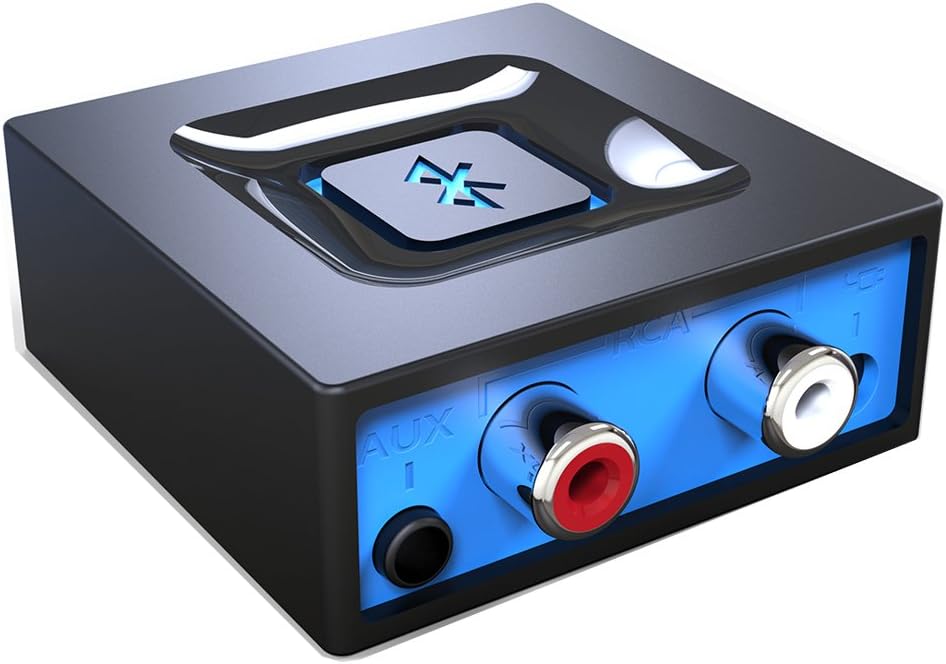
Выява: спераду view of the esinkin Bluetooth Audio Adapter, showing the AUX and RCA input ports.
Што ў скрынцы
Пасля адкрыцця ўпакоўкі пераканайцеся, што ўсе наступныя рэчы наяўныя:
- 1 х Bluetooth прыёмнік
- 1 x AC to DC Power adapter
- 1 x 3.5mm to RCA Audio cable
- 1 х USB кабель харчавання
- 1 х кіраўніцтва карыстальніка
 Image: All included accessories for the esinkin Bluetooth Audio Adapter.
Настройка
Follow these steps to set up your esinkin Bluetooth Audio Adapter:
- Падключэнне да сілкавання: Connect the Bluetooth adapter to a power source using either the provided AC to DC power adapter or the USB cable. Note that this adapter does not have a built-in battery and requires continuous power.
- Падключэнне да аўдыёсістэмы: Connect the adapter to your computer speakers, home stereo system, or other speaker system using either the 3.5mm audio cable or the RCA cable. Ensure the connection is secure.
- Уключэнне: The device will power on when connected to power.
- Рэжым спалучэння: Press and hold the large Bluetooth symbol button in the middle of the adapter for approximately 3 seconds until the blue light starts blinking. This indicates the adapter is in pairing mode.
- Спалучэнне з вашай прыладай: On your Bluetooth-enabled device (smartphone, tablet, computer), go to the Bluetooth settings and search for available devices. Select the esinkin Bluetooth Audio Adapter from the list to pair. Once paired, the blue light on the adapter will become solid.

Image: Connection diagram for the esinkin Bluetooth Audio Adapter.

Image: Illustrates the function of the main Bluetooth button for power and playback control.
Інструкцыя па эксплуатацыі
Once successfully set up and paired, operating the esinkin Bluetooth Audio Adapter is straightforward:
- Паток музыкі: After pairing, music played on your Bluetooth-enabled device will stream wirelessly to the connected audio system.
- Кіраванне прайграваннем:
- Click the Bluetooth symbol button once to Пуск/Паўза прайграванне музыкі.
- Hold the Bluetooth symbol button for 3 seconds to turn the device ВКЛ/ВЫКЛ.
- Automatic Reconnect: The adapter is designed to automatically reconnect with the last paired device when both are within range and Bluetooth is enabled.
- Бесправадны дыяпазон: The effective wireless range indoors (without significant obstacles) is approximately 30-40 feet (10-12 meters).

Image: Demonstrates wireless music streaming from mobile devices to a home stereo via the adapter.
Тэхнічнае абслугоўванне
To ensure the longevity and optimal performance of your esinkin Bluetooth Audio Adapter, please observe the following maintenance guidelines:
- Уборка: Use a soft, dry cloth to clean the surface of the adapter. Avoid using liquid cleaners or abrasive materials.
- Абарона харчавання: To protect the adapter from potential damage due to power surges or brown-outs, especially during electrical supply issues or storms, it is recommended to unplug the unit from the wall outlet.
- захоўванне: Калі адаптар не выкарыстоўваецца працяглы час, захоўвайце яго ў прахалодным, сухім месцы, удалечыні ад прамых сонечных прамянёў і экстрэмальных тэмператур.
- Бесперапынная праца: The adapter is designed to remain powered when connected to a power source. To completely turn it off, disconnect it from the power outlet.
Ліквідацыю непаладак
If you encounter issues with your esinkin Bluetooth Audio Adapter, please refer to the following common solutions:
| праблема | Магчымая прычына / рашэнне |
|---|---|
| Няма гуку або нізкі гук: |
|
| Немагчыма спалучыць прыладу з: |
|
| Intermittent connection or poor range: |
|
| Adapter is always on: |
|
Тэхнічныя характарыстыкі
| Асаблівасць | Дэталь |
|---|---|
| Марка | есінкін |
| Нумар мадэлі | W29 |
| Бесправадны тып | Bluetooth |
| Вага прадмета | 3.52 унцыі |
| Памеры прадукту (ДxШxВ) | 1.97 х 1.97 х 0.94 цалі |
| Колер | Чорны |
| Сумяшчальныя прылады | Smartphone, Tablet, Home Stereo System |
| Тып раздыма | RCA, Auxiliary (3.5mm) |
| Увод магутнасці | 5 В === 150 мА |
Гарантыя і падтрымка
For warranty information or technical support, please refer to the documentation included with your purchase or visit the official esinkin webсайт. Кантактная інфармацыя службы падтрымкі кліентаў звычайна даступная на ўпакоўцы прадукту або на старонцы падтрымкі брэнда ў Інтэрнэце.
Каб атрымаць дадатковыя рэсурсы і інфармацыю пра прадукт, вы можаце наведаць esinkin Store on Amazon.
Звязаныя дакументы - W29
 |
Інфармацыя аб наладзе і адпаведнасці Bluetooth-аўдыёпрыёмніку esinkin Даведайцеся, як наладзіць і падключыць аўдыёпрыёмнік esinkin Bluetooth. Гэты дакумент таксама змяшчае важныя заявы аб адпаведнасці FCC і IC адносна працы прылады і перашкод. |
 |
Хуткае кіраўніцтва па выкарыстанні Bluetooth-аўдыёпрыёмніка esinkin Даведайцеся, як наладзіць і падключыць аўдыёпрыёмнік esinkin Bluetooth. У гэтым кіраўніцтве апісваецца спалучэнне Bluetooth, падключэнні аўдыё RCA і AUX, а таксама важная нарматыўная інфармацыя FCC і IC для бесправадной струменевай перадачы аўдыё. |
 |
Bluetooth-прыёмнік Esinkin A201: кіраўніцтва па падключэнні і выкарыстанні Даведайцеся, як падключыць і выкарыстоўваць Bluetooth-прыёмнік Esinkin A201 для бесправадной перадачы аўдыё. Уключае інструкцыі па наладзе, кіраўніцтва па спалучэнні і інфармацыю аб адпаведнасці нарматыўным патрабаванням. |
 |
Аўдыёпрыёмнік Bluetooth esinkin W29: падрабязнасці пра маркіроўку і месцазнаходжанне Падрабязная інфармацыя аб нарматыўнай этыкетцы і яе размяшчэнні на аўдыёпрыёмніку esinkin W29 Bluetooth, уключаючы брэнд, мадэль, ідэнтыфікатар FCC і нумары IC. |