
Уводзіны
Welcome to the ZOTAC ZBOX CI323 Nano Mini PC user manual. This guide provides essential information for setting up, operating, and maintaining your fanless mini PC. The ZBOX CI323 Nano is designed for quiet and efficient computing, featuring an Intel N3150 quad-core processor, Intel HD Graphics with 4K support, dual Gigabit LAN, 802.11ac Wi-Fi, and Bluetooth connectivity. Please read this manual thoroughly before using your device.
Змест пакета
Verify that all the following items are included in your ZBOX CI323 Nano package:
- ZBOX-CI323NANO-U Unit
- Адаптар пераменнага току
- Шнур харчавання
- Антэна Wi-Fi
- Драйвер DVD
- User Manual & Warranty Card (This document serves as the user manual)
- Кароткае кіраўніцтва
- VESA Monitor Mount (with 4 screws)
- Mini-Optical S/PDIF Adapter
Прадукт скончаныview і Асаблівасці
The ZOTAC ZBOX CI323 Nano is a compact, fanless mini PC engineered for silent operation and versatile performance. Its design allows for various placement options, making it suitable for diverse computing environments.
Відэа: Надview of the ZOTAC ZBOX CI323 Nano Mini PC, highlighting its fanless design, triple display support, compact form factor, and various connectivity options.
Функцыі пярэдняй панэлі
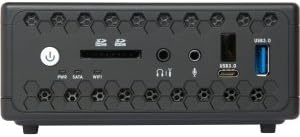
выява: Front panel of the ZBOX CI323 Nano, highlighting the power button, SD card reader, headphone and microphone jacks, a USB 3.0 port, and a USB Type-C port.
- Кнопка харчавання: Press to power on or off the system.
- SD/SDHC/SDXC Card Reader: Для зручнай перадачы дадзеных з карт памяці.
- Выхад для навушнікаў: 3.5-мм раз'ём для аўдыёвыхаду.
- Мікрафонны ўваход: 3.5mm jack for audio input.
- Порт USB 3.0 (тып A): Высокахуткасная перадача дадзеных для сумяшчальных прылад.
- USB 3.0 Port (Type-C): Рэверсіўны раз'ём для сучасных прылад USB-C.
Асаблівасці задняй панэлі
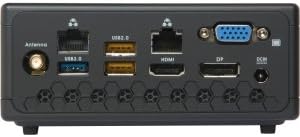
выява: Rear panel of the ZBOX CI323 Nano, featuring the Wi-Fi antenna connector, USB 3.0, USB 2.0, dual Gigabit Ethernet, HDMI, DisplayPort, VGA, and DC-in power input.
- Раз'ём антэны Wi-Fi: Attach the included Wi-Fi antenna for wireless connectivity.
- Порт USB 3.0 (тып A): Additional high-speed USB port.
- Парты USB 2.0 (x2): Для падлучэння стандартных USB-прылад.
- Два гігабітныя Ethernet-порты: Provides robust wired network connectivity.
- Порт HDMI 2.0: Connect to a display for high-definition video and audio, supporting 4K resolution.
- DisplayPort: Another digital video output, also supporting 4K resolution.
- Порт VGA: Для падлучэння да старых манітораў або праектараў.
- Уваход пастаяннага току: Уваход сілкавання для адаптара пераменнага току.
Іншыя асаблівасці
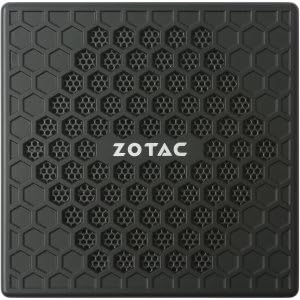
выява: Топ view of the ZBOX CI323 Nano, showcasing its fanless honeycomb design for passive cooling.
- Безвентылятарны дызайн: Passive cooling ensures silent operation and reduces dust accumulation.
- Кампактны форм-фактар: Small footprint allows for flexible placement, including VESA mounting.
- Intel N3150 Quad-Core Processor: Efficient performance for daily computing tasks.
- Intel HD Graphics: Integrated graphics with native 4K support.
- 802.11ac Wi-Fi & Bluetooth 4.0: Fast wireless networking and peripheral connectivity.
- 2.5-inch SATA Drive Support: Accommodates SSD or HDD for storage (barebones system requires user installation).
- Dual Channel DDR3L-1600 SODIMM Slots: Supports up to 8GB of RAM (barebones system requires user installation).
Кіраўніцтва па ўстаноўцы
1. Installing Memory (RAM) and Storage (HDD/SSD)
The ZBOX CI323 Nano is a barebones system, meaning memory and storage are not pre-installed. Follow these steps to install them:
- Power off the device and disconnect the AC adapter.
- Carefully remove the bottom cover of the ZBOX. Refer to the Quick Start Guide for detailed instructions on opening the chassis.
- Locate the two 204-pin DDR3L-1600 SODIMM slots. Insert the RAM modules firmly until they click into place.
- Locate the 2.5-inch SATA drive bay. Connect your SSD or HDD to the SATA data and power connectors, then secure it in the bay.
- Replace the bottom cover, ensuring it is securely fastened.
2. Падключэнне перыферыйных прылад
Connect your essential peripherals to the ZBOX:
- Дысплей: Connect your monitor(s) using the HDMI, DisplayPort, or VGA outputs. The system supports up to three displays simultaneously.
- Клавіятура і мыш: Connect your USB keyboard and mouse to any available USB 2.0 or USB 3.0 ports.
- Сетка: For wired internet, connect an Ethernet cable to one of the Gigabit LAN ports. For wireless, screw the included Wi-Fi antenna onto its connector on the rear panel.
- Аўдыё: Connect headphones or speakers to the 3.5mm headphone jack on the front panel. If using the Mini-Optical S/PDIF Adapter, connect it to the headphone jack for digital audio output.
3. Уключэнне
Пасля падключэння ўсіх перыферыйных прылад:
- Connect the AC adapter to the DC-in port on the rear panel, then plug the power cord into an electrical outlet.
- Націсніце кнопку харчавання на пярэдняй панэлі. Загарыцца індыкатар харчавання.
- The system will boot up. If no operating system is installed, you will need to proceed with OS installation.
4. Усталёўка аперацыйнай сістэмы
As a barebones system, an operating system is not included. You will need to install your preferred OS (e.g., Windows 10, Linux). Refer to the operating system's installation guide for specific steps. Ensure you have the necessary drivers, which can be found on the included Driver DVD or downloaded from the ZOTAC webсайт.
Інструкцыя па эксплуатацыі
- Ціхая праца: Due to its fanless design, the ZBOX CI323 Nano operates silently. It is normal for the chassis to feel warm to the touch during operation, as this is how heat is dissipated.
- 4K Video Playback: Utilize the HDMI 2.0 or DisplayPort outputs for native 4K resolution support. Ensure your display and cables are 4K compatible.
- Мацаванне VESA: Use the included VESA mount to attach the ZBOX to the back of a compatible monitor or to a wall, saving desk space.
- Абнаўленне BIOS: Updating the BIOS from the ZOTAC website may be beneficial for optimal performance and compatibility. Follow ZOTAC's official instructions carefully when performing BIOS updates.
Ліквідацыю непаладак
Агульныя праблемы і рашэнні
- Няма вываду на дысплей:
- Ensure the monitor is powered on and correctly connected to the ZBOX.
- Пераканайцеся, што на вашым маніторы выбрана правільная крыніца ўваходнага сігналу.
- Паспрабуйце падключыцца да іншага дысплейнага порта або выкарыстаць іншы кабель.
- Сістэма не ўключаецца:
- Check that the AC adapter is securely connected to both the ZBOX and a working power outlet.
- Пераканайцеся, што кнопка сілкавання моцна націснута.
- Operating System Installation Issues (e.g., USB drivers):
- For Windows 7 installation, specific USB 3.0 drivers may be required during the setup process. ZOTAC provides tools or instructions for creating bootable media with integrated drivers. Refer to ZOTAC's support webсайт для падрабязных інструкцый.
- Ensure your installation media is not corrupted.
- No Wi-Fi or Bluetooth Connectivity:
- Пераканайцеся, што антэна Wi-Fi надзейна падключана.
- Check device manager in your operating system to confirm drivers are installed correctly.
- Verify Wi-Fi and Bluetooth are enabled in your OS settings.
- Праблемы перагрэву:
- While fanless, ensure the ZBOX is placed in a well-ventilated area, not enclosed, to allow for proper heat dissipation. Avoid blocking the ventilation grilles.
Тэхнічныя характарыстыкі
| Кампанент | Спецыфікацыя |
|---|---|
| Працэсар | Intel N3150 Quad-Core (1.6GHz, up to 2.08GHz with TurboBoost) |
| Графіка | Intel HD Graphics (Native 4K Support) |
| Памяць | 2x 204-pin DDR3L-1600 SODIMM Slots, Max 8GB (User-installed) |
| Захоўванне | Supports 2.5-inch SATA3 HDD/SSD (User-installed) |
| Сетка | Dual Gigabit Ethernet, 802.11ac Wi-Fi, Bluetooth 4.0 |
| Пярэднія парты | 1x USB 3.0 Type-A, 1x USB 3.0 Type-C, SD/SDHC/SDXC Card Reader, Headphone Output, Microphone Input, Power Button |
| Заднія парты | 1x USB 3.0 Type-A, 2x USB 2.0, 2x RJ45 (Gigabit LAN), 1x HDMI 2.0, 1x DisplayPort, 1x VGA, Wi-Fi Antenna Connector, DC-in |
| Астуджэнне | Пасіўнае астуджэнне без вентылятара |
| Памеры | Прыблізна 127 мм х 127 мм х 57 мм (5.0 х 5.0 х 2.2 цалі) |
| Аперацыйная сістэма | Barebones (No OS included, supports Windows 7/8/10 64-bit) |
Інфармацыя па бяспецы
- Always disconnect the power adapter before cleaning or performing any maintenance.
- Не падвяргайце прыладу ўздзеянню вільгаці, экстрэмальных тэмператур або прамых сонечных прамянёў.
- Ensure proper ventilation around the device, even with its fanless design, to prevent heat buildup.
- Use only the provided AC adapter and power cord.
- Не спрабуйце самастойна адкрываць або рамантаваць прыладу, бо гэта можа ануляваць гарантыю і стварыць пагрозу бяспецы.
Гарантыя і падтрымка
Your ZOTAC ZBOX CI323 Nano Mini PC comes with a limited warranty. Please refer to the included Warranty Card for specific terms and conditions. For technical support, driver downloads, and further assistance, visit the official ZOTAC webсайт на www.zotac.com.