
Zmodo ZM-W0002-4
Zmodo Outdoor Security Camera System (Model ZM-W0002-4) Instruction Manual
Падрабязнае кіраўніцтва па ўсталёўцы, эксплуатацыі і абслугоўванні.
1. Уводзіны
This manual provides detailed instructions for the installation, operation, and maintenance of your Zmodo Outdoor Security Camera System, Model ZM-W0002-4. This system offers 1080p Full HD surveillance for your property, featuring night vision, motion detection, and weatherproof construction.
2. Змесціва ўпакоўкі
Праверце, ці ёсць усе прадметы ў вашай упакоўцы:
- 4 x Zmodo Outdoor Security Cameras
- 4 блока харчавання
- 1 х Кароткае кіраўніцтва
3. Настройка і ўстаноўка
Выканайце наступныя дзеянні, каб наладзіць камеры бяспекі Zmodo:
3.1. Размяшчэнне камеры
Select optimal locations for your cameras. Consider areas that provide a clear view of entry points or critical zones. Ensure the chosen location is within range of your Wi-Fi network and has access to a power outlet.

Image: Zmodo outdoor security camera mounted on a wall, illustrating its weatherproof design and typical installation scenario.
3.2. Падключэнне сілкавання
Connect each camera to its respective power supply and plug it into a standard electrical outlet. The camera will power on automatically.
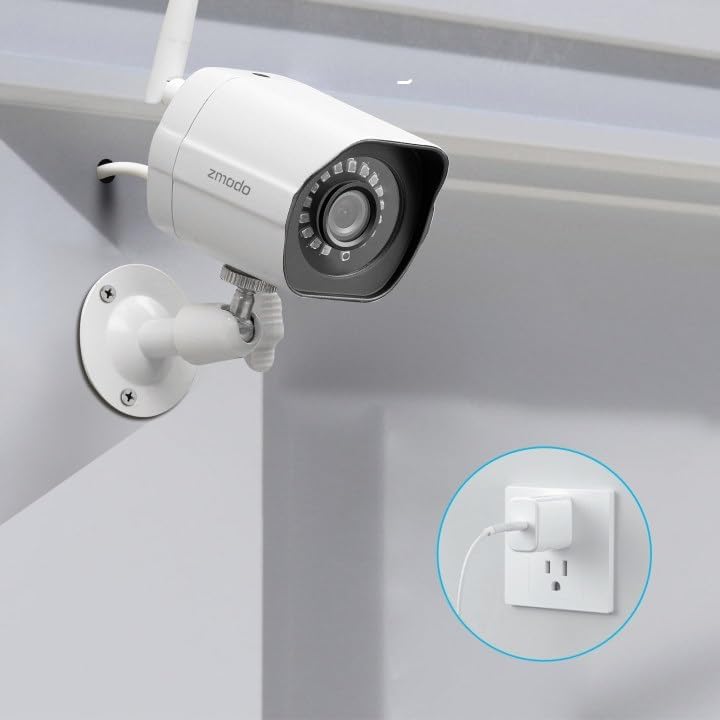
Image: A Zmodo outdoor security camera with its power cable plugged into a wall outlet, demonstrating the power connection process.
3.3. Загрузка праграмы і стварэнне ўліковага запісу
Download the Zmodo app from your smartphone's app store (iOS or Android). Create a new account or log in if you already have one.
3.4. Спалучэнне камеры
Follow the in-app instructions to add your cameras. Zmodo cameras typically use QR code pairing technology for straightforward setup. Ensure your smartphone is connected to the 2.4GHz Wi-Fi network that the cameras will use.

Image: A set of four Zmodo outdoor security cameras, illustrating the product's appearance and external antenna design for enhanced Wi-Fi signal.
4. Аперацыя
Once your cameras are set up, you can access and manage them through the Zmodo app.
4.1. Жыць View
Open the Zmodo app to view live 1080p Full HD video streams from your cameras. You can monitor up to four camera feeds simultaneously on one screen.

Image: A smartphone screen showing a four-panel live video feed from multiple Zmodo cameras, demonstrating the multi-camera viewасаблівасць.
4.2. Выяўленне руху і абвесткі
The cameras are equipped with motion detection. When motion is detected, you will receive instant alerts on your smartphone. Review recorded clips via the app.

Image: A smartphone displaying a push notification for motion detected by a Zmodo camera, indicating the alert system.

Image: A Zmodo camera with an illustration of AI-powered motion detection, highlighting its ability to accurately detect and identify humans, pets, and vehicles.
4.3. Начное бачанне
The cameras feature adjustable night vision with built-in IR lights, providing clear images up to 65 feet in low-light conditions.
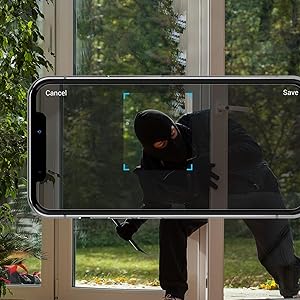
Image: A Zmodo camera mounted outdoors at night, with its red IR lights active, demonstrating its night vision capability.
4.4. Воблачнае сховішча
Zmodo offers a cloud service for secure storage of your video footage. A subscription plan is required for this feature. This ensures continuous recording and access to past events.
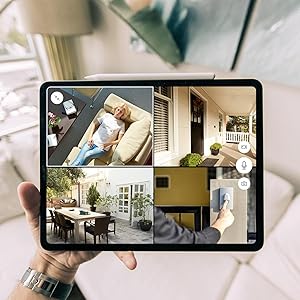
Image: An abstract graphic depicting a secure cloud with a padlock icon, symbolizing the bank-level encryption used for Zmodo's cloud storage service.
4.5. Інтэграцыя з Alexa
The cameras are compatible with Amazon Alexa. Use voice commands like "Alexa, show me the front door" to view live streams on compatible Alexa-enabled devices.

Image: An Amazon Echo Show device displaying a live feed from a Zmodo camera, illustrating the Alexa integration feature.
5. Тэхнічнае абслугоўванне
Рэгулярнае тэхнічнае абслугоўванне дапамагае забяспечыць аптымальную прадукцыйнасць і даўгавечнасць вашых камер.
- Ачыстка аб'ектыва: Перыядычна чысціце аб'ектыў камеры мяккай губкайamp тканінай, каб выдаліць пыл, бруд або плямы ад вады, якія могуць паўплываць на выразнасць выявы. Пазбягайце абразіўных ачышчальнікаў.
- Праверка падключэння сілкавання: Ensure power cables are securely connected and free from damage.
- Ўстойлівасць мантажу: Verify that the cameras remain securely mounted to prevent accidental dislodgement.
- Абнаўленні праграмнага забеспячэння: Keep the Zmodo app updated to the latest version for new features and security enhancements.
6. Выпраўленне непаладак
Калі ў вас узніклі праблемы з камерамі Zmodo, звярніцеся да наступных распаўсюджаных рашэнняў:
- Камера ў аўтаномным рэжыме:
- Check the power connection to ensure the camera is receiving power.
- Verify your Wi-Fi network is operational and the camera is within range.
- Restart the camera by unplugging and replugging its power supply.
- Ensure your router's 2.4GHz Wi-Fi band is enabled and the camera is connected to it.
- Дрэнная якасць выявы:
- Ачысціце аб'ектыў камеры.
- Пераканайцеся, што ў полі зроку камеры няма перашкод view.
- Check your Wi-Fi signal strength; a weak signal can affect video streaming quality.
- Выяўленне руху не працуе:
- Verify motion detection settings are enabled in the Zmodo app.
- Adjust motion sensitivity settings if necessary.
- Пераканайцеся, што камера view не перашкаджае.
- Абвестак не атрымана:
- Check your smartphone's notification settings for the Zmodo app.
- Пераканайцеся, што ваш тэлефон мае актыўнае падключэнне да Інтэрнэту.
7. Тэхнічныя характарыстыкі
Key technical specifications for the Zmodo Outdoor Security Camera System (Model ZM-W0002-4):
| Асаблівасць | Дэталь |
|---|---|
| Назва мадэлі | ZM-W0002-4 |
| Дазвол відэазахопу | 1080p Full HD |
| Выкарыстанне ў памяшканні/на вуліцы | На адкрытым паветры |
| Тэхналогія падлучэння | Wi-Fi (2.4 ГГц) |
| Дыяпазон начнога бачання | Да 65 футаў |
| Ўстойлівасць да надвор'я | IP66 (атмасфератрывалы) |
| Дэтэктар руху | Yes (Motion Only, AI-powered) |
| Сумяшчальныя прылады | Смартфон, Amazon Alexa, Google Assistant |
| Крыніца харчавання | Электрычны шнур (12 вольт, 5 ваты) |
| Памеры (Д х Ш х У) | 2.2 х 2.1 х 3.4 цалі |
| Вага прадмета | 3.04 фунта (на адну камеру) |
| Частата кадраў | 25 кадраў у секунду |
| Матэрыял | Пластыкавыя |
8. Інфармацыя аб гарантыі
For specific warranty details regarding your Zmodo Outdoor Security Camera System, please refer to the warranty card included in your product packaging or visit the official Zmodo webсайт. Таксама могуць быць даступныя планы абароны для пашыранага пакрыцця.
9. Падтрымка кліентаў
If you require further assistance or have questions not covered in this manual, please contact Zmodo customer support through their official website or the Zmodo app. Support resources, including FAQs and troubleshooting guides, are often available online.
Zmodo Official Webсайт: www.zmodo.com