
1. Уводзіны
This manual provides detailed instructions for the setup, operation, and maintenance of your Excelvan AOK-5019TC Wireless Weather Station. Please read this manual thoroughly before using the device to ensure proper function and longevity.
Змест пакета
- 1 x Excelvan AOK-5019TC Weather Station Main Unit
- 1 x Wireless Remote Sensor (433MHz)
- 1 х Кіраўніцтва карыстальніка (гэты дакумент)

Image 1.1: Contents of the Excelvan AOK-5019TC package, showing the main weather station unit, the wireless remote sensor, and the instruction manual.
2. Асноўныя магчымасці
- Вялікі святлодыёдны дысплей: Easy-to-read display for all weather data.
- Radio-Controlled Clock (DCF77): Automatic time synchronization for precise timekeeping, including automatic Summer/Winter time adjustment.
- Дысплей часу: 12/24 hour format with adjustable 24 time zones (+/-12).
- Каляндар: Displays Day, Month, and Weekday (up to 2099). Weekday display in 7 languages: German, English, Italian, French, Dutch, Spanish, and Danish.
- Dual Alarm with Snooze: Two independent alarms with a 5-minute snooze function.
- Прагноз надвор'я: 5 weather forecast icons (sunny, partially sunny, cloudy, rainy, stormy) with customizable symbols.
- Гісторыя бараметрычнага ціску: Displays 12-hour history of atmospheric pressure in hPa/inHg. Altitude setting for accurate pressure calculation.
- Тэмпература і вільготнасць у памяшканні/на вуліцы: Displays current, maximum, and minimum values with trend indicators.
- Дыяпазон тэмператур: Indoor: 0℃ to +50℃ (32℉ to 122℉); Outdoor: -20℃ to +60℃ (-4℉ to 140℉). Switchable between ℃ and ℉.
- Абвестка аб тэмпературы: Programmable alerts for temperature thresholds.
- Фаза Месяца: Паказвае бягучую фазу месяца.
- Sunrise/Sunset & Moonrise/Moonset: Provides times for 150 pre-programmed cities.
- Індыкатар разраду батарэі: Папярэджвае, калі батарэйкі патрабуюць замены.
- Blue LED Backlight: For improved visibility in low light conditions.
- Некалькі датчыкаў: Supports up to 3 outdoor sensors (one included).
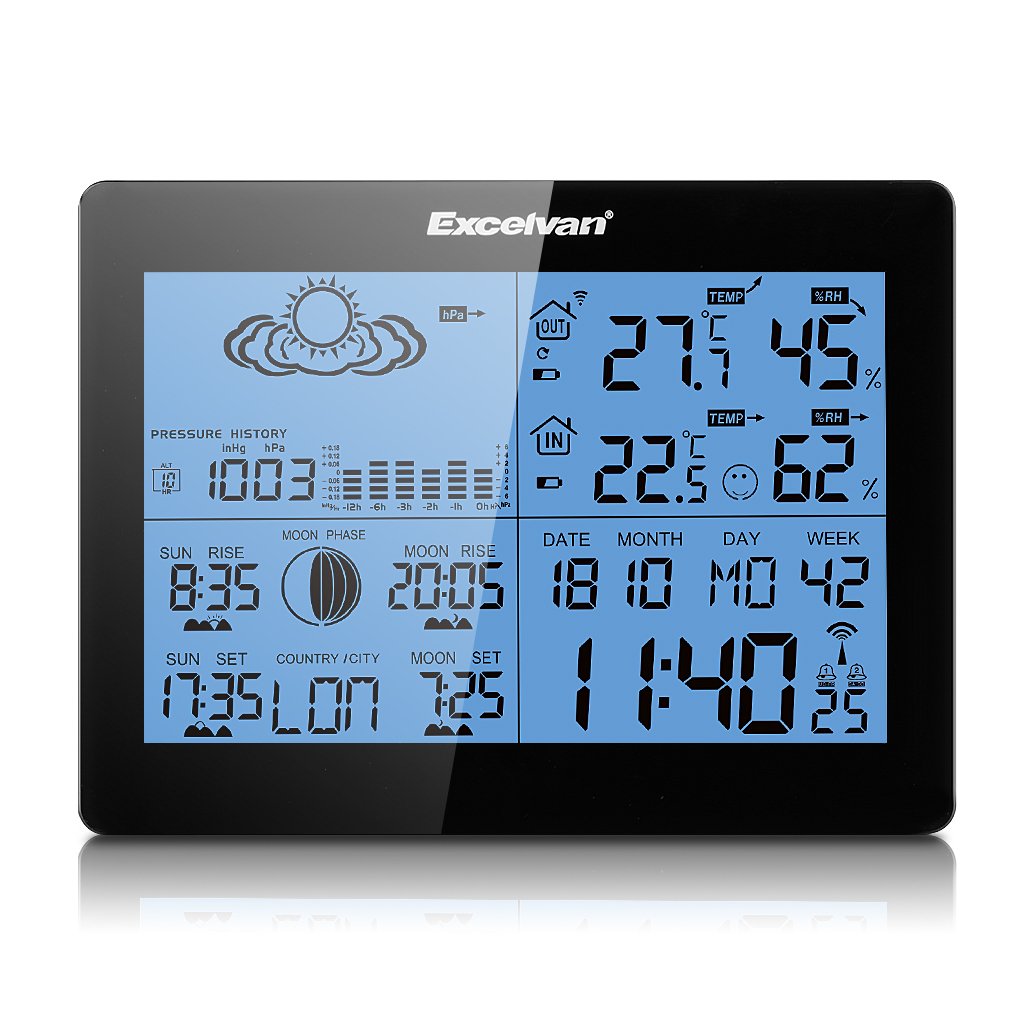
Image 2.1: The Excelvan AOK-5019TC Weather Station main unit displaying various weather parameters and time, alongside its wireless remote sensor.
3. Настройка
3.1 Устаноўка батарэі
- Асноўны блок: Open the battery compartment cover on the back of the main unit. Insert 2 x AA 1.5V batteries (not included), ensuring correct polarity (+/-). Close the cover.
- Дыстанцыйны датчык: Open the battery compartment cover on the back of the remote sensor. Insert 2 x AAA 1.5V batteries (not included), ensuring correct polarity (+/-). Close the cover.

Малюнак 3.1: ззаду view of the weather station main unit with the battery compartment open, showing where to insert 2 x AA batteries.
3.2 Размяшчэнне датчыка
Place the wireless remote sensor outdoors in a shaded, dry location, protected from direct sunlight and rain. Ensure it is within 50 meters (164 feet) of the main unit for optimal signal reception. Avoid placing it near large metal objects or electrical appliances that may interfere with the signal.
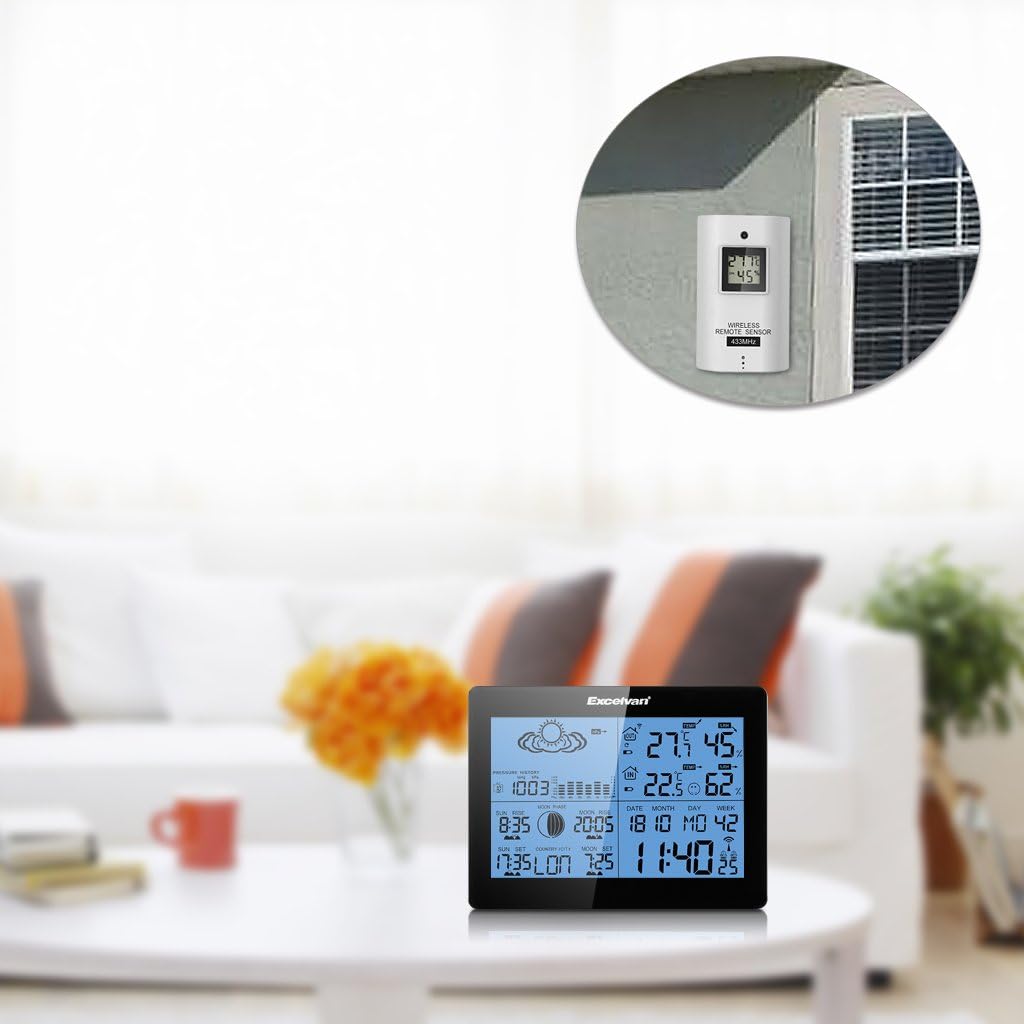
Image 3.2: The weather station main unit displayed indoors, with the remote sensor shown mounted on an exterior wall, illustrating typical placement.
3.3 Пачатковая сінхранізацыя
After inserting batteries, the main unit will automatically search for the remote sensor signal and the DCF77 radio signal for time synchronization. This process may take several minutes. Ensure both units are close to each other during initial setup. Once connected, the outdoor temperature and humidity will appear on the main unit, and the time will be set automatically.

Image 3.3: The wireless remote sensor, which transmits outdoor temperature and humidity data to the main weather station unit.
4. Інструкцыя па эксплуатацыі
4.1 Функцыі кнопак
The main unit features six control buttons on the back and one on the top:
- Рэжым: Press to cycle through display modes (e.g., time, alarm). Press and hold to enter setting mode.
- +: In setting mode, increases values. In normal mode, switches between ℃/℉ or 12/24 hour format.
- -: In setting mode, decreases values. In normal mode, views min/max temperature/humidity.
- ГІСТОРЫЯ: Displays the 12-hour barometric pressure history.
- КАНАЛ: Switches between outdoor sensor channels (if multiple sensors are used).
- АДРЫМКА/СВЯТЛО: On the top of the unit. Press to activate backlight. When alarm sounds, press to activate snooze function.

Image 4.1: The back of the weather station, highlighting the MODE, +, -, HISTORY, and CHANNEL buttons.

Image 4.2: A close-up of the weather station's top, showing the SNOOZE/LIGHT button.
4.2 Налады часу і даты
The weather station automatically synchronizes time via the DCF77 radio signal. If manual adjustment is needed:
- Націсніце і ўтрымлівайце РЭЖЫМ кнопку, пакуль не пачне міргаць дысплей часу.
- Выкарыстоўвайце + or - кнопкі, каб наладзіць гадзіну, затым націсніце РЭЖЫМ каб пацвердзіць і перайсці да хвілін.
- Repeat for minutes, year, month, day, and language for the weekday display.
- Прэса РЭЖЫМ каб выйсці з рэжыму налад.
4.3 Налады будзільніка
- Націсніце РЭЖЫМ button repeatedly until "AL1" or "AL2" is displayed.
- Націсніце і ўтрымлівайце РЭЖЫМ кнопку, пакуль не пачне міргаць гадзіна будзільніка.
- Выкарыстоўвайце + or - buttons to set the desired alarm hour, then press РЭЖЫМ.
- Паўтарайце на працягу некалькіх хвілін.
- Прэса РЭЖЫМ каб уключыць/выключыць будзільнік і выйсці з рэжыму наладкі.
4.4 Weather Forecast Interpretation
The weather station provides a forecast based on barometric pressure changes. The icons represent:
- Сонечна
- Partially Sunny
- Воблачна
- Дажджлівы
- Бурны
Note that weather forecasts are predictions and may not always be 100% accurate, especially for localized conditions.

Малюнак 4.3: Падрабязны view of the weather station's display, showing weather forecast icons, indoor/outdoor temperature and humidity, time, date, and moon phase.
5. Тэхнічнае абслугоўванне
5.1 Замена батарэі
When the low battery indicator appears on the display, replace the batteries in the main unit or remote sensor as soon as possible. Always replace all batteries in a unit at the same time with new ones of the same type. Do not mix old and new batteries.
5.2 Ачыстка
Працярыце метэастанцыю і датчык мяккай губкайamp тканінай. Не выкарыстоўвайце абразіўныя ачышчальнікі або растваральнікі, бо яны могуць пашкодзіць дысплей абоasing. Ensure no moisture enters the battery compartments or other openings.
5.3 Экалагічныя меркаванні
For optimal performance and longevity, avoid exposing the main unit to extreme temperatures, direct sunlight, or high humidity. The remote sensor is designed for outdoor use but should be protected from direct rain and snow to prevent water ingress and damage.
6. Выпраўленне непаладак
| праблема | Магчымая прычына | Рашэнне |
|---|---|---|
| Няма паказанняў тэмпературы/вільготнасці на вуліцы | Sensor out of range, low sensor battery, interference. | Move sensor closer to main unit. Replace sensor batteries. Avoid placing near electronic devices. Press CHANNEL button to re-sync. |
| Incorrect time display / Time not synchronizing | Weak DCF77 signal, interference, incorrect time zone setting. | Move main unit to a location with better signal reception (e.g., near a window). Ensure correct time zone is set manually. Allow up to 24 hours for initial synchronization. |
| Недакладны прагноз надвор'я | Forecasts are based on barometric pressure trends, which can be localized and not always precise. Altitude setting may be incorrect. | Understand that forecasts are indicative. Ensure the altitude setting is correct for your location to improve barometric pressure accuracy. |
| Дысплей цьмяны або пусты | Нізкі ўзровень зарада батарэі асноўнага блока. | Заменіце батарэйкі асноўнага блока. |
| Кнопкі не рэагуюць | Часовы збой праграмнага забеспячэння. | Remove and reinsert batteries to reset the unit. |
7. Тэхнічныя характарыстыкі
- Марка: EXCELVAN
- мадэль: AOK-5019TC
- Крыніца харчавання (асноўны блок): 2 х АА 1.5 В батарэі (не ўключаны)
- Крыніца харчавання (датчык): 2 батарэйкі тыпу AAA 1.5 В (не ўключаны)
- Тэмпературны дыяпазон у памяшканні: 0℃ to +50℃ (32℉ to 122℉)
- Дыяпазон вонкавай тэмпературы: -20℉ да +60℃ (-4℉ да 140℉)
- Дыяпазон вільготнасці: Ад 20% да 95% адноснай вільготнасці
- Бесправадная частата: 433 МГц
- Бесправадны дыяпазон: Да 50 метраў (164 футаў) на адкрытым паветры
- Тып дысплея: LCD, LED backlight
- Вага: 291 Grams (main unit)
- колер: Чорны
- GTIN: 723120327726
- ASIN: B017YWQ8FC
8. Гарантыя і падтрымка
For warranty information or technical support, please refer to the documentation provided at the time of purchase or contact your retailer. Keep your purchase receipt as proof of purchase.