
Уводзіны
Thank you for choosing the Baseus Encok W02 True Wireless Bluetooth Earbuds. This manual provides essential information for the proper setup, operation, and maintenance of your new earbuds. Please read it thoroughly before use to ensure optimal performance and longevity of the product.
Прадукт скончаныview
The Baseus Encok W02 earbuds offer a true wireless audio experience with advanced features designed for comfort and superior sound quality. They are equipped with touch controls and noise cancellation technology.
Асноўныя характарыстыкі:
- Сапраўднае бесправадное стэрэа (TWS): Enjoy a completely wireless audio experience with independent left and right earbuds.
- Зручная пасадка: Designed with three silicone ear tips for a secure and comfortable in-ear fit, reducing strain during extended use.
- Найвышэйшая якасць гуку: Multi-channel components and precise technology deliver excellent audio performance.
- Сэнсарнае кіраванне: Intuitive touch-sensitive surfaces for managing music playback and calls.
- Падаўленне шуму: Integrated noise cancellation feature for an immersive listening experience.
- Гнуткае выкарыстанне: Use both earbuds for stereo sound or a single earbud independently.
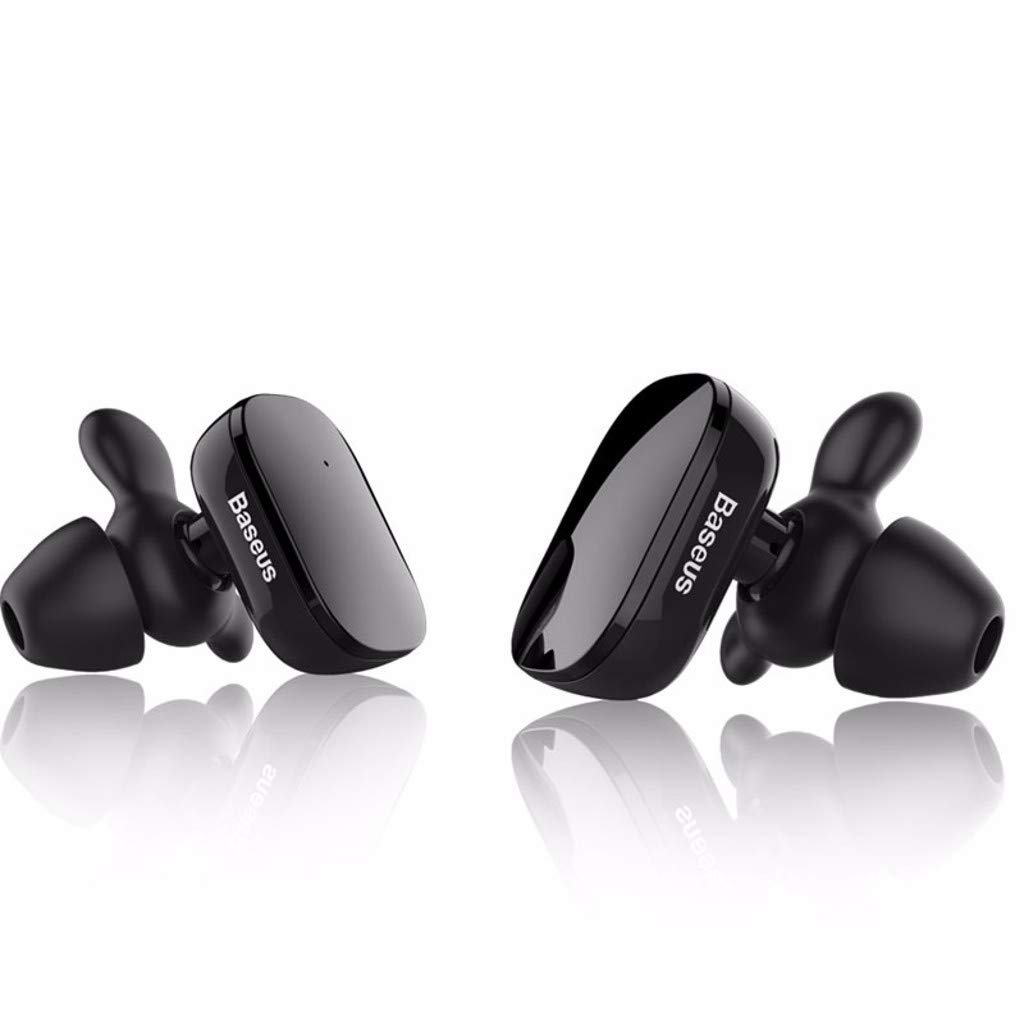
Image: The Baseus Encok W02 True Wireless Bluetooth Earbuds in white, showcasing their ergonomic design and compact form factor.

Выява: Выбухнула view illustrating the internal multi-channel components of the Baseus Encok W02 earbud, contributing to its sound quality.
Настройка
1. Распакаванне і першапачатковы агляд
Пасля адкрыцця ўпакоўкі пераканайцеся ў наяўнасці ўсіх кампанентаў:
- Baseus Encok W02 True Wireless Bluetooth Earbuds (Left and Right)
- Чахол для зарадкі
- USB-кабель для зарадкі
- Розныя памеры сіліконавых амбушюраў
- Кіраўніцтва карыстальніка (гэты дакумент)
2. Зарадка навушнікаў
Перад першым выкарыстаннем цалкам зарадзіце навушнікі і зарадны футляр.
- Змесціце навушнікі ў зарадны футляр. Пераканайцеся, што яны правільна ўсталяваныя.
- Падключыце зарадны футляр да крыніцы харчавання з дапамогай USB-кабеля, які ўваходзіць у камплект.
- The indicator lights on the case and/or earbuds will show the charging status. Refer to the LED indicator section for details.
- Поўная зарадка займае прыкладна 1.5 гадзіны.

Image: Black Baseus Encok W02 earbuds placed within their compact charging case, ready for charging or storage.
3. Спалучэнне з прыладай Bluetooth
Follow these steps to pair your earbuds with your smartphone or other Bluetooth-enabled device:
- Пераканайцеся, што навушнікі зараджаныя і вынятыя з зараднага футляра. Яны аўтаматычна пяройдуць у рэжым спалучэння.
- На прыладзе перайдзіце ў налады Bluetooth і ўключыце Bluetooth.
- Пошук available devices. You should see "Baseus Encok W02" or a similar name appear in the list.
- Select the earbuds from the list to connect. Once connected, a voice prompt will confirm successful pairing.
- Калі спалучэнне не атрымалася, выключыце навушнікі, адключыце Bluetooth на прыладзе і паўтарыце дзеянні.
The earbuds support simultaneous connection to one mobile phone, and each earbud can also be used independently.
Інструкцыя па эксплуатацыі
The Baseus Encok W02 earbuds feature intuitive touch controls for easy management of audio and calls.
Уключэнне/выключэнне харчавання
- Уключэнне: Remove the earbuds from the charging case. They will automatically power on. Alternatively, press and hold the touch area on both earbuds for approximately 3 seconds.
- Выключэнне: Place the earbuds back into the charging case. They will automatically power off. Alternatively, press and hold the touch area on both earbuds for approximately 5 seconds.
Прайграванне музыкі
- Прайграванне/Паўза: Адзін раз націсніце на сэнсарную вобласць любога навушніка.
- Наступны трэк: Двойчы націсніце на сэнсарную вобласць на правым навушніку-ўкладышы.
- Папярэдні трэк: Двойчы націсніце на сэнсарную вобласць левага навушніка.
Кіраванне званкамі
- Адказ/завяршэнне выкліку: Адзін раз націсніце на сэнсарную вобласць любога навушніка.
- Адхіліць выклік: Press and hold the touch area on either earbud for approximately 2 seconds.
Галасавы памочнік
- Актываваць галасавы памочнік: Тройчы націсніце на сэнсарную вобласць на любым навушніку-ўкладышы.
Выкарыстанне аднаго навушніка
Either earbud can be used independently. Simply remove one earbud from the charging case, and it will automatically connect to the last paired device. The other earbud can remain in the case or be powered off.
Тэхнічнае абслугоўванне
Proper maintenance ensures the longevity and optimal performance of your Baseus Encok W02 earbuds.
Уборка
- Рэгулярна працірайце навушнікі, асабліва амбушуры і зарадныя кантакты, мяккай, сухой тканінай без ворса.
- Не выкарыстоўвайце абразіўныя ачышчальнікі, спірт або хімічныя растваральнікі.
- Зніміце вушныя насадкі і пры неабходнасці памыйце іх асобна мяккім мылам і вадой, пераканаўшыся, што яны цалкам сухія, перш чым прымацаваць іх назад.
Захоўванне
- Калі навушнікі не выкарыстоўваюцца, заўсёды захоўвайце іх у зарадным футляры, каб абараніць ад пылу, бруду і фізічных пашкоджанняў.
- Store the charging case and earbuds in a cool, dry place, away from direct sunlight and extreme temperatures.
Сыход за батарэяй
- Avoid fully discharging the battery frequently. Charge the earbuds when the battery is low.
- If storing for an extended period, charge the earbuds and case to about 50% every few months to prevent deep discharge.
Ліквідацыю непаладак
If you encounter issues with your Baseus Encok W02 earbuds, refer to the following common solutions:
| праблема | Магчымая прычына | Рашэнне |
|---|---|---|
| Навушнікі не спалучаюцца з прыладай. | Bluetooth выключаны; навушнікі знаходзяцца па-за зонай дзеяння; навушнікі не ў рэжыме спалучэння; перашкоды. | Ensure Bluetooth is enabled on your device. Place earbuds closer to the device (within 10m). Power cycle earbuds and device. Forget the device in Bluetooth settings and re-pair. |
| Няма гуку з аднаго або абодвух навушнікаў. | Earbuds not connected; low battery; volume too low; earbud blocked. | Check Bluetooth connection. Charge earbuds. Increase device volume. Clean earbud mesh. Try re-pairing both earbuds. |
| Навушнікі не зараджаюцца. | Poor contact with charging pins; faulty cable/charger; charging case low on battery. | Ensure earbuds are correctly seated in the case. Clean charging contacts on earbuds and case. Try a different USB cable or power adapter. Charge the charging case. |
| Сэнсарныя элементы кіравання не рэагуюць. | Earbuds are wet; software glitch; dirty touch surface. | Ensure earbuds are dry. Power cycle the earbuds. Clean the touch surface. |
Factory Reset (if applicable)
If issues persist, a factory reset may resolve them. (Note: Specific reset instructions are not provided in the product data. Typically, this involves holding a button on the case or earbuds for an extended period while they are in the case. Refer to the manufacturer's official support for precise steps if needed.)
Тэхнічныя характарыстыкі
Detailed technical specifications for the Baseus Encok W02 True Wireless Bluetooth Earbuds:
| Асаблівасць | Спецыфікацыя |
|---|---|
| Марка | Басейс |
| мадэль | Encok W02 (NGW02-01) |
| Параметры колеру | Чорны, Белы |
| Тып нашэння | In-ear (Bud) |
| Матэрыял | Silicone, ABS+, TPE+ |
| Сувязь | Бесправадная сувязь (Bluetooth) |
| Версія Bluetooth | 4.2 |
| Адлегласць перадачы | Да 10 метраў |
| Мікрафон | так |
| Кантроль шуму | Актыўнае падаўленне шуму |
| Тып кіравання | Сэнсарнае кіраванне, галасавое кіраванне |
| Правадное кіраванне | Не падтрымліваецца |
| Адчувальнасць | 105 ± 5 дБ |
| АЧХ | 20 - 20,000 Hz (20 - 20 kHz) |
| Ёмістасць батарэі | 2 x 60 mAh, 3.7V (Earbuds) |
| Час зарадкі | Прыбл. 1.5 гадзіны |
| Час размовы | Прыбл. 5 гадзіны |
| Час прайгравання | Прыбл. 3 гадзіны |
| Час чакання | Прыбл. 120 гадзіны |
| Воданепранікальнасць | Не воданепранікальны |
| Сумяшчальныя прылады | Мабільныя тэлефоны |
Гарантыя і падтрымка
Baseus products are designed and manufactured to the highest quality standards. For information regarding warranty coverage, terms, and conditions, please refer to the warranty card included with your product or visit the official Baseus webсайт.
For technical support, troubleshooting assistance beyond this manual, or to inquire about replacement parts, please contact Baseus customer service through their official channels. Keep your purchase receipt as proof of purchase for warranty claims.