
1. Уводзіны
The Aduro Amplify LED Wireless Speaker, model BSP15, is a portable audio device designed for wireless music playback and hands-free calling. It features integrated LED lighting with multiple settings to enhance the audio experience. This manual provides instructions for the proper setup, operation, and maintenance of your speaker.
Што ў скрынцы:
- Адуро Amplify LED Wireless Speaker (BSP15)
- Зарадны кабель
2. Інфармацыя па бяспецы
- Do not expose the speaker to water or moisture. This product is not water-resistant.
- Avoid extreme temperatures. Do not place near heat sources or in direct sunlight for extended periods.
- Не спрабуйце разбіраць або мадыфікаваць дынамік. Гэта можа ануляваць гарантыю і прывесці да пашкоджанняў.
- Выкарыстоўвайце толькі зарадны кабель, які ўваходзіць у камплект, або яго сертыфікаваны эквівалент.
- Захоўваць у месцах, недаступных дзецям.
3. Асаблівасці прадукту
- Бесправаднае падключэнне: Connects to smartphones, tablets, and other Bluetooth-enabled devices.
- Easy-Touch Pairing: Simplifies the process of connecting to your device.
- Убудаваны мікрафон: Allows for hands-free phone calls.
- Высокая якасць гуку: Delivers clear and loud audio.
- Multiple LED Settings: Offers various light modes to complement your audio experience.
4. Элементы кіраванняview
The Aduro Amplify speaker features intuitive controls located on the top panel for easy access to functions.
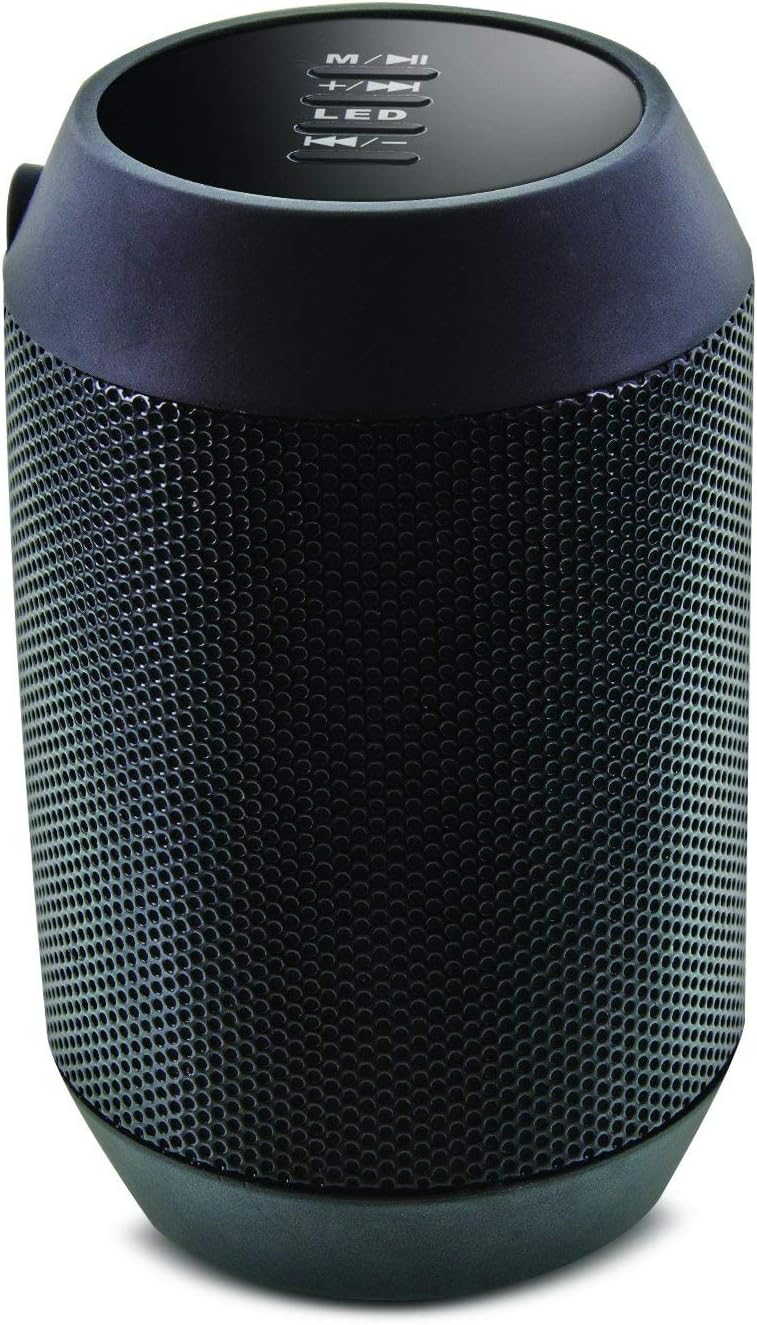
Выява: Уверсе view of the Aduro Amplify speaker, highlighting the control panel. From top to bottom, buttons include: M/▶█ (Mode/Play/Pause), +/▶▶ (Volume Up/Next Track), LED (LED Mode Control), ◀◀/- (Volume Down/Previous Track).
- M/▶█ Button: Press to switch between modes (e.g., Bluetooth, AUX). Press and hold to power on/off. Short press to Play/Pause music.
- +/▶▶ Button: Short press to increase volume. Press and hold to skip to the next track.
- Святлодыёдная кнопка: Націсніце, каб пераключацца паміж рознымі рэжымамі святлодыёднага падсвятлення.
- ◀◀/- Button: Short press to decrease volume. Press and hold to go to the previous track.
5. Інструкцыі па ўсталёўцы
5.1 Зарадка дынаміка
Before first use, fully charge the speaker. Connect the provided charging cable to the speaker's charging port and the other end to a USB power source (e.g., computer USB port, USB wall adapter). The LED indicator will show charging status and turn off or change color when fully charged.
5.2 Уключэнне/выключэнне
- Каб уключыць: Націсніце і ўтрымлівайце M/▶█ button for approximately 3 seconds until you hear an audible prompt or see the LED indicator light up.
- Каб выключыць: Націсніце і ўтрымлівайце M/▶█ button for approximately 3 seconds until you hear an audible prompt or the LED indicator turns off.
5.3 Спалучэнне па Bluetooth
Каб падключыць дынамік да прылады з падтрымкай Bluetooth:
- Ensure the speaker is powered on and in Bluetooth pairing mode. The LED indicator will typically flash rapidly, indicating it is ready to pair.
- On your smartphone, tablet, or other device, navigate to the Bluetooth settings.
- Уключыце Bluetooth і знайдзіце даступныя прылады.
- Select "Aduro BSP15" (or similar name) from the list of found devices.
- Once paired, the speaker will emit an audible confirmation, and the LED indicator will typically stop flashing and remain solid.
- Пры ўключэнні дынамік аўтаматычна паспрабуе падключыцца да апошняй спалучанай прылады.
5.4 Правадное падключэнне (AUX)
For devices without Bluetooth, you can use a 3.5mm audio cable (not included) to connect to the speaker's AUX input port. Once connected, the speaker should automatically switch to AUX mode. If not, press the M/▶█ button to cycle to AUX mode.
6. Інструкцыя па эксплуатацыі
6.1 Прайграванне аўдыя
- Прайграванне/Паўза: Кароткае націсканне M/▶█ кнопка.
- Павялічыць гучнасць: Кароткае націсканне +/▶▶ кнопка.
- Паменшыць гучнасць: Кароткае націсканне ◀◀/- кнопка.
- Наступны трэк: Націсніце і ўтрымлівайце +/▶▶ кнопка.
- Папярэдні трэк: Націсніце і ўтрымлівайце ◀◀/- кнопка.
6.2 Званкі ў рэжыме гучнай сувязі
When connected via Bluetooth, the speaker's built-in microphone allows for hands-free calling.
- Адказаць на званок: Кароткае націсканне M/▶█ кнопку, калі паступае ўваходны званок.
- Завяршыць выклік: Кароткае націсканне M/▶█ кнопку падчас размовы.
- Адхіліць выклік: Націсніце і ўтрымлівайце M/▶█ кнопку, калі паступае ўваходны званок.
6.3 LED Light Settings
Націсніце святлодыёд button to cycle through the available light modes. The speaker offers various visual effects, including pulsating lights that react to music.
7. Тэхнічнае абслугоўванне
7.1 Ачыстка
Працірайце дынамік мяккай сухой тканінай. Не выкарыстоўвайце абразіўныя ачышчальнікі, спірт або іншыя хімічныя растваральнікі, бо яны могуць пашкодзіць паверхню.
7.2 Захоўванне
When not in use for extended periods, store the speaker in a cool, dry place away from direct sunlight and extreme temperatures. It is recommended to charge the battery periodically to maintain its lifespan.
8. Выпраўленне непаладак
- Дынамік не ўключаецца:
Пераканайцеся, што акумулятар зараджаны. Падключыце зарадны кабель і паспрабуйце зноў праз некалькі хвілін. - Немагчыма спалучыць прыладу з Bluetooth:
Ensure the speaker is in pairing mode (LED flashing). Make sure Bluetooth is enabled on your device and it is within range (typically 10 meters/30 feet). Turn both devices off and on again, then try pairing. Ensure no other devices are currently connected to the speaker. - Няма гуку або нізкі гук:
Check the volume levels on both the speaker and your connected device. Ensure the speaker is correctly paired or the AUX cable is fully inserted. If using AUX, ensure the correct mode is selected. - Не працуюць святлодыёдныя лямпы:
Press the LED button to cycle through modes. If still unresponsive, power cycle the speaker.
9. Тэхнічныя характарыстыкі

Выява: Збоку view of the Aduro Amplify LED Wireless Speaker, showing its cylindrical design and speaker grille.
| Назва мадэлі | BSP15 |
| Нумар мадэлі тавару | LU4-01-BSP15 |
| Марка | Адуро |
| Матэрыял | Пластыкавыя |
| Тып дынаміка | Сабвуфер |
| Асаблівасці | Built-in Microphone, Portable |
| Тэхналогія падлучэння | Бесправадная сувязь (Bluetooth) |
| Бесправадная сувязь | Bluetooth |
| Рэжым выхаду гуку | Стэрэа |
| Максімальная выхадная магутнасць дынаміка | 5 ват |
| Метад кантролю | Дакранацца |
| Памеры прадукту | 6" Г x 3.8" Ш x 3.5" У |
| Вага прадмета | 6.7 унцый |
| Узровень воданепранікальнасці | Не воданепранікальны |
| Крыніца харчавання | Электрычны шнур (для зарадкі) |
10. Гарантыя і падтрымка
10.1 Абмежаваная гарантыя
This Aduro product is covered by a limited warranty against defects in materials and workmanship under normal use. The duration and terms of the warranty may vary. Please refer to the warranty card included with your purchase or contact Aduro customer support for specific details.
10.2 Падтрымка кліентаў
For technical assistance, warranty claims, or product inquiries, please contact Aduro customer support. Contact information can typically be found on the manufacturer's official webсайце або на ўпакоўцы прадукту.
Manufacturer: Aduro