
RIGEXPERT AA-230
RIGEXPERT AA-230 ZOOM Antenna Analyzer
Кіраўніцтва карыстальніка
Model: AA-230 | Brand: RIGEXPERT
Уводзіны
The RIGEXPERT AA-230 ZOOM is a powerful antenna analyzer designed for testing, checking, tuning, and repairing antennas and antenna feedlines. It operates within a frequency range of 0.1 to 230 MHz, making it suitable for a wide array of amateur radio and professional applications. This manual provides essential information for the proper setup, operation, and maintenance of your device.
Please read this manual thoroughly before using the AA-230 ZOOM to ensure safe and efficient operation.
Package Contents and Setup
Before beginning, ensure all components are present and undamaged. Carefully unpack the device and its accessories.

Figure 1: The AA-230 ZOOM antenna analyzer as it appears in its retail packaging, ready for unboxing.

Figure 2: The AA-230 ZOOM device alongside its essential accessories, including the USB cable, N-UHF adapter, and four AAA alkaline batteries.
Уключаныя кампаненты:
- RIGEXPERT AA-230 ZOOM Antenna Analyzer Unit
- 4 шчолачныя батарэйкі тыпу AAA 1.5 В
- Кабель USB
- N-UHF Adapter
- Strap Cover
- Кіраўніцтва карыстальніка (гэты дакумент)
Ўстаноўка батарэі:
- Locate the battery compartment on the rear of the AA-230 ZOOM unit.
- Адкрыйце крышку батарэйнага адсека.
- Insert four (4) 1.5V AAA alkaline batteries, ensuring correct polarity (+/-) as indicated inside the compartment.
- Надзейна зачыніце крышку батарэйнага адсека.
Заўвага: The device can operate for up to 4 hours of continuous measurement or up to 2 days in standby mode on a full charge of alkaline batteries. Always use fresh alkaline batteries for optimal performance.
Падключэнне да кампутара:
The AA-230 ZOOM features a USB port for connection to a computer, enabling data transfer and potential firmware updates. Use the provided USB cable for this connection.

Figure 3: The bottom of the AA-230 ZOOM, highlighting the USB port for computer connectivity and power input.
Інструкцыя па эксплуатацыі
This section details the basic operation of your RIGEXPERT AA-230 ZOOM antenna analyzer.
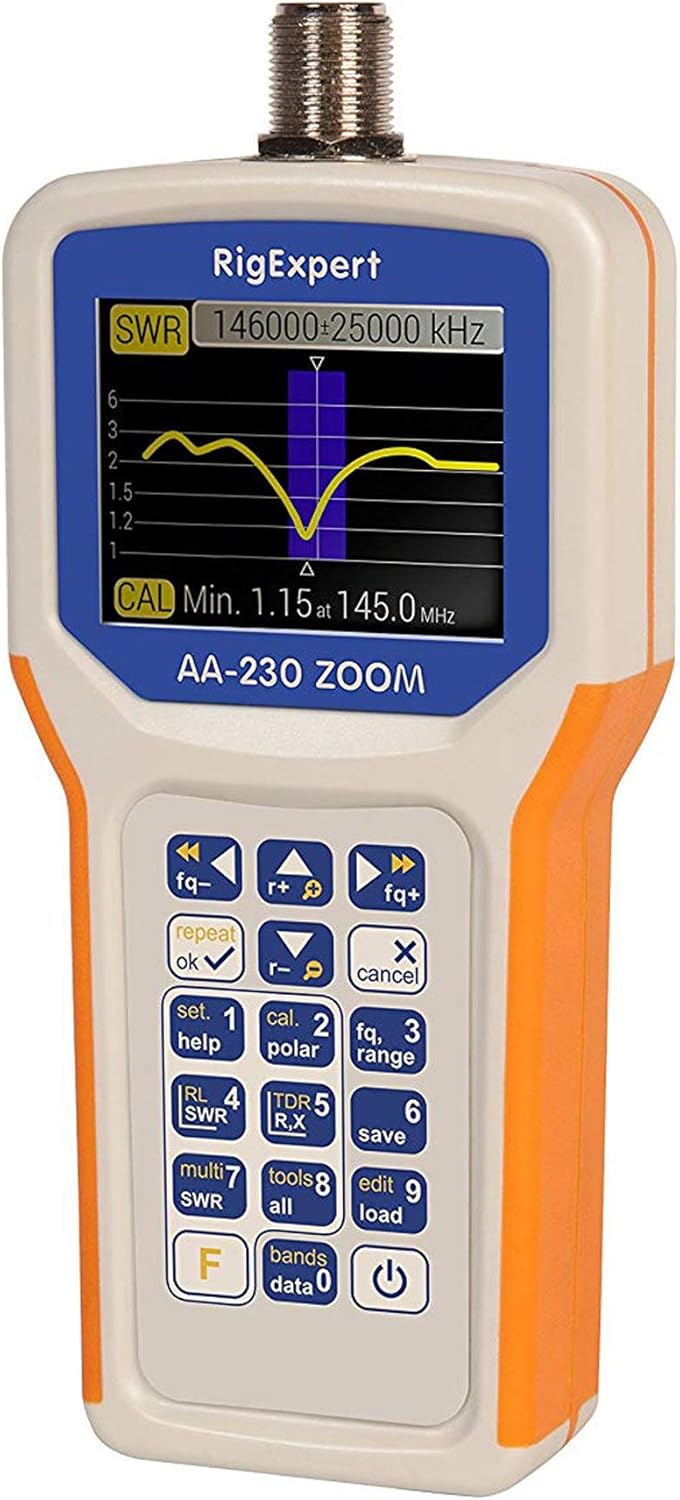
Figure 4: The main display of the AA-230 ZOOM showing an SWR sweep, along with the keypad for navigation and function selection.

Малюнак 5: Падрабязны view of the AA-230 ZOOM's screen, displaying a numerical SWR reading of 2.3 and corresponding return loss in dB.
Уключэнне/выключэнне:
- Каб уключыць прыладу, націсніце і ўтрымлівайце Магутнасць button (usually located at the bottom right of the keypad) until the screen illuminates.
- Каб выключыць харчаванне, націсніце і ўтрымлівайце Магутнасць зноў націскайце кнопку, пакуль экран не выключыцца.
Функцыі клавіятуры:
The AA-230 ZOOM features a tactile keypad for navigating menus and selecting functions. Key functions include:
- Кантроль частоты: Выкарыстоўвайце fq- і fq+ buttons to adjust the operating frequency.
- OK/Repeat: Confirms selections or repeats the last measurement.
- Cancel/X: Cancels an operation or exits a menu.
- Set/Help (1): Accesses settings or displays help information.
- Cal/Polar (2): Initiates calibration or changes polarization.
- Fq/Range (3): Adjusts frequency range for sweeps.
- RL/SWR (4): Displays Return Loss or SWR.
- TDR/R,X (5): Activates Time Domain Reflectometer mode or displays Resistance and Reactance.
- Save (6): Захоўвае бягучыя дадзеныя вымярэнняў.
- Multi SWR (7): For multi-frequency SWR measurements.
- Tools/All (8): Accesses additional tools or displays all parameters.
- Edit/Load (9): Edits saved data or loads configurations.
- Bands/Data (0): Selects frequency bands or accesses stored data.
- F (Функцыя): Доступ да дадатковых функцый клавіш.
Performing SWR Measurements:
- Connect the antenna or load to be tested to the N-type connector on the top of the AA-230 ZOOM. Use the N-UHF adapter if necessary.
- Уключыце прыладу.
- Navigate to the SWR measurement mode using the keypad (e.g., press RL/SWR (4)).
- Adjust the frequency using fq- і fq+ buttons to the desired test frequency.
- The display will show the SWR value numerically and/or graphically.
- For a frequency sweep, use the Fq/Range (3) button to set the start and end frequencies.
Тэхнічнае абслугоўванне
Proper maintenance ensures the longevity and accuracy of your AA-230 ZOOM.
Уборка:
- Працярыце прыладу мяккай сухой тканінай.
- Для ўстойлівых забруджванняў выкарыстоўвайце злёгку damp тканінай з мяккім мылам, а затым адразу ж вытрыце насуха.
- Не выкарыстоўвайце абразіўныя ачышчальнікі, растваральнікі або агрэсіўныя хімікаты, бо яны могуць пашкодзіцьasinг або экран.
Сыход за батарэяй:
- Выміце батарэйкі, калі прылада не будзе выкарыстоўвацца працяглы час, каб прадухіліць іх уцечку.
- Утылізуйце выкарыстаныя батарэі ў адпаведнасці з мясцовымі правіламі.
захоўванне:
- Захоўвайце прыладу ў прахалодным, сухім месцы, удалечыні ад прамых сонечных прамянёў і экстрэмальных тэмператур.
- Use the provided strap cover for protection during storage and transport.

Figure 6: The AA-230 ZOOM with its protective strap cover, which helps shield the device from dust and minor impacts during storage or transport.
Ліквідацыю непаладак
If you encounter issues with your AA-230 ZOOM, refer to the following common problems and solutions:
| праблема | Магчымая прычына | Рашэнне |
|---|---|---|
| Прылада не ўключаецца. | Разраджаныя або няправільна ўсталяваныя батарэйкі. | Check battery polarity. Replace with fresh AAA alkaline batteries. |
| Inaccurate SWR readings. | Improper calibration; faulty cable/connector; external interference. | Perform a calibration. Check all cable connections. Ensure no strong RF sources are nearby. |
| Экран пусты або завіс. | Праграмны збой; нізкі зарад батарэі. | Remove and reinsert batteries to perform a hard reset. Ensure batteries are charged. |
| Немагчыма падключыцца да ПК праз USB. | Faulty USB cable; driver issue; incorrect port. | Try a different USB port or cable. Install necessary drivers from the RIGEXPERT website if prompted by your PC. |
Тэхнічныя характарыстыкі
Detailed technical specifications for the RIGEXPERT AA-230 ZOOM Antenna Analyzer.
| Дыяпазон частот | Ад 0.1 да 230 МГц |
| Frequency Step Resolution | 1 кГц |
| Impedance Compatibility | 25, 50, 75, and 100 Ohm systems |
| SWR Measurement Range | 1-100 (numerical mode) / 1-10 (graphical mode) |
| R and X Range | 0-10000, -10000-10000 (numerical) / 0-1000, -1000-1000 (graphical) |
| ВЧ-выходны раздым | N-тып |
| Signal Output Form | Квадратная хваля |
| Выходная магутнасць | -10 дБм (пры нагрузцы 50 Ом) |
| Электразабеспячэнне | 4 шчолачныя батарэйкі тыпу AAA 1.5 В |
| Тэрмін службы батарэі | Up to 4 hours continuous measurement / Up to 2 days standby |
| Дысплей | Color TFT, 290 x 220 pixels |
| Клавіятура | Воданепранікальны |
| Інтэрфейс ПК | Порт USB |
| Памеры (В х Ш х Г) | 182 х 82 х 32 мм (7.17 х 3.23 х 1.26 цалі) |
| Вага | 236 г (0.52 фунта) |
| Працоўная тэмпература | Ад 0°C да +40°C (32°F да +104°F) |
| Нумар мадэлі | АА-230 |
| UPC | 644730932592 |
Гарантыя і падтрымка
For detailed warranty information, please refer to the warranty card included with your product or visit the official RIGEXPERT webсайт. Умовы гарантыі могуць адрознівацца ў залежнасці ад рэгіёна і прадаўца.
For technical support, software updates, or additional resources, please visit the official RIGEXPERT support page or contact their customer service directly. Always provide your product model (AA-230) and serial number (if applicable) when seeking support.
Official RIGEXPERT Webсайт: www.rigexpert.com