
1. Уводзіны
The Muse M-192 CR is a versatile clock radio designed to provide reliable timekeeping, alarm functions, and FM radio reception. It features a large, easy-to-read digital display, dual alarms, and convenient functions such as snooze, sleep, and NAP. This manual provides detailed instructions for the proper setup, operation, and maintenance of your device.
2. Інструкцыі па тэхніцы бяспекі
- Перад эксплуатацыяй прылады ўважліва прачытайце ўсе інструкцыі.
- Трымайце прыладу далей ад вады або вільгаці.
- Не блакуйце вентыляцыйныя адтуліны. Забяспечце дастатковую прастору вакол прылады для належнай цыркуляцыі паветра.
- Use only the AC adapter supplied with the unit.
- Пазбягайце ўздзеяння на прыладу экстрэмальных тэмператур, прамых сонечных прамянёў або высокай вільготнасці.
- Не спрабуйце разбіраць або мадыфікаваць прыладу. Звяртайцеся да кваліфікаванага персаналу па любыя паслугі па абслугоўванні.
3. Змесціва ўпакоўкі
Калі ласка, праверце ўпакоўку на наяўнасць наступных прадметаў:
- 1 x Muse M-192 CR Clock Radio
- 1 х адаптар пераменнага току
- 1 х Інструкцыя па эксплуатацыі (гэты дакумент)
4. Прадукт скончыўсяview
Familiarize yourself with the various parts and controls of your Muse M-192 CR Clock Radio.

Малюнак 1: Пярэдні кут view of the Muse M-192 CR Clock Radio, showcasing its large digital display and control buttons.
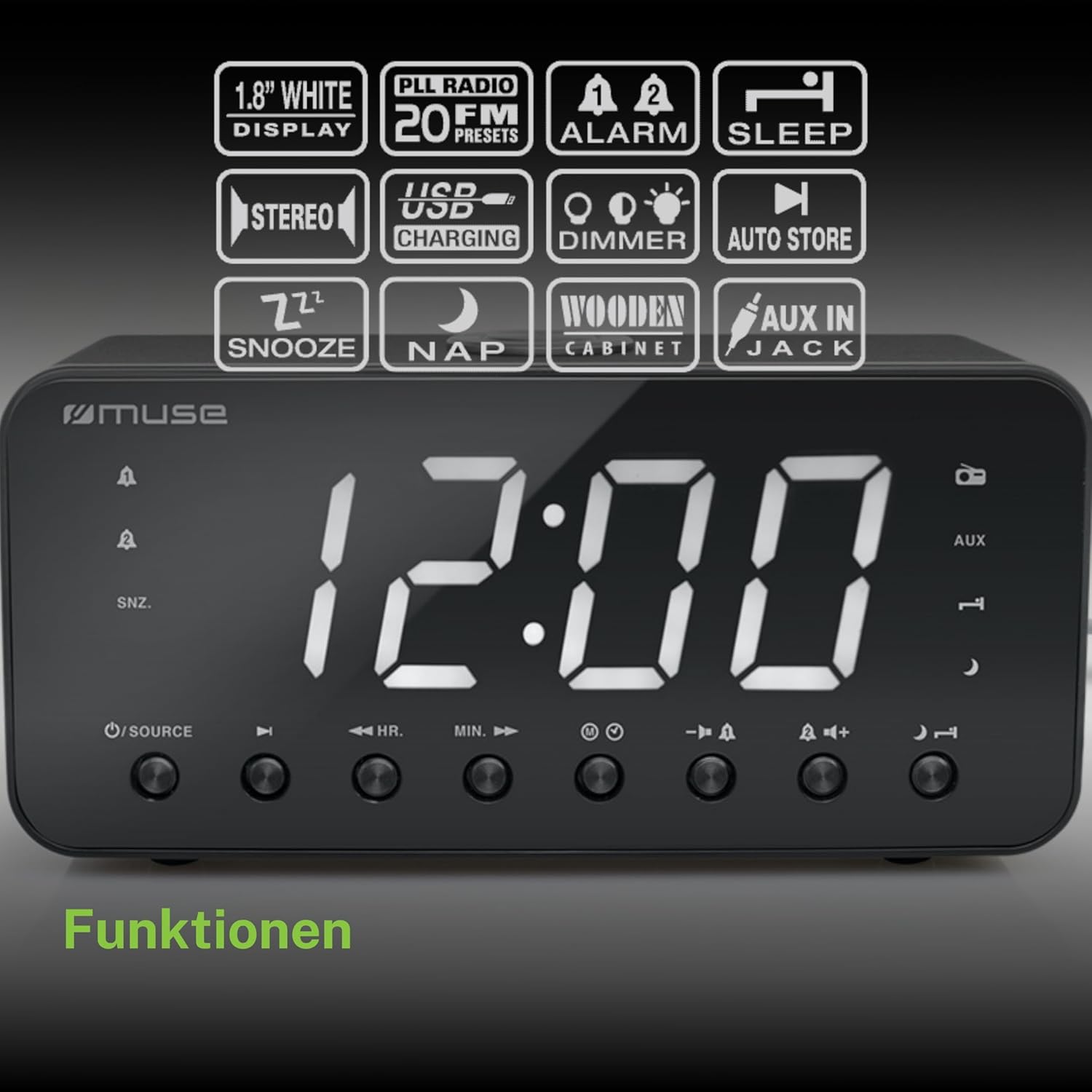
Figure 2: Diagram illustrating the key features and control buttons on the Muse M-192 CR Clock Radio, including the 1.8-inch white display, PLL FM radio with 20 presets, dual alarms, sleep, snooze, NAP functions, USB charging, dimmer, auto store, and AUX input jack.
Элементы кіравання на пярэдняй панэлі:
- Дысплей: Large 1.8-inch white LED display for time and status.
- Кнопка SOURCE: Selects between FM radio and AUX input.
- HR (Hour) Button: Adjusts hour for time and alarm settings.
- MIN (Minute) Button: Adjusts minute for time and alarm settings.
- ALARM 1 Button: Sets and activates/deactivates Alarm 1.
- ALARM 2 Button: Sets and activates/deactivates Alarm 2.
- Кнопка SNOOZE/DIMMER: Activates snooze during an alarm; adjusts display brightness (High/Low/Off) when not alarming.
- Кнопка СОН: Sets the sleep timer for radio playback.
- Кнопка дзённага сну: Sets a short nap alarm.
- Кнопкі павелічэння / памяншэння гучнасці: Рэгулюе гучнасць гуку.
Злучэнне задняй панэлі:
- Раз'ём AUX IN: Падключае знешнія гукавыя прылады.
- Порт для зарадкі USB: Provides power to charge compatible devices.
- Раз'ём DC IN: Connects the AC adapter for power.
- Батарэйны адсек: Holds backup batteries.
5. Настройка
5.1 Падключэнне харчавання
- Insert the small plug of the supplied AC adapter into the DC IN jack on the rear of the clock radio.
- Plug the AC adapter into a standard wall outlet. The display will light up.
5.2 Усталёўка рэзервовага акумулятара
The clock radio requires 2 x 1.5V AAA batteries (not included) for backup power. These batteries maintain the time and alarm settings during a power outage.
- Адкрыйце вечка батарэйнага адсека на ніжняй панэлі прылады.
- Устаўце дзве батарэйкі тыпу ААА, выконваючы правільную палярнасць (+ і -), як паказана ўнутры адсека.
- Надзейна зачыніце крышку батарэйнага адсека.
Note: Battery backup only preserves settings; the display will not illuminate and alarms will not sound during a power outage if only running on battery backup.
6. Інструкцыя па эксплуатацыі
6.1 Настройка часу
- In standby mode (when the radio is off), press and hold the УСТАНОВА ЧАСУ button (if available, otherwise use HR/MIN directly or a dedicated time set button not explicitly listed but implied by HR/MIN). If no dedicated button, proceed to step 2.
- Націсніце HR кнопку, каб наладзіць гадзіну.
- Націсніце МІН кнопку для налады хвілін.
- Release the buttons to confirm the time. The time will automatically set after a few seconds of inactivity.
6.2 Налада сігналаў трывогі (сігнал трывогі 1 і сігнал трывогі 2)
The Muse M-192 CR features two independent alarms.
- Націсніце і ўтрымлівайце ТРЫВОГА 1 кнопку, пакуль на дысплеі не пачне міргаць час будзільніка.
- Выкарыстоўвайце HR і МІН кнопкі, каб усталяваць патрэбны час будзільніка.
- Націсніце ТРЫВОГА 1 зноў націсніце кнопку, каб выбраць крыніцу сігналу трывогі: Гукавы сігнал or радыё.
- Націсніце ТРЫВОГА 1 button a third time to confirm and activate Alarm 1. An alarm icon will appear on the display.
- Repeat the process for ТРЫВОГА 2 выкарыстоўваючы ТРЫВОГА 2 кнопка.
Каб адключыць будзільнік, націсніце адпаведную ТРЫВОГА button until its icon disappears from the display.
6.3 Функцыя паўтору
Калі гучыць будзільнік, націсніце кнопку СНАОЗ / ДЫМЕР кнопку, каб часова адключыць сігнал трывогі. Сігнал зноў спрацуе прыблізна праз 9 хвілін.
6.4 Функцыя сну
Функцыя сну дазваляе засыпаць пад радыё, якое аўтаматычна выключаецца праз пэўны час.
- Пакуль гучыць радыё, націсніце кнопку СПАЦЬ button repeatedly to cycle through available sleep times (e.g., 90, 60, 30, 15 minutes, or OFF).
- Радыё будзе прайгравацца на працягу выбранага часу, а затым аўтаматычна выключыцца.
6.5 NAP Function
The NAP function sets a short alarm for a specified duration.
- Націсніце НАП button repeatedly to select a nap duration (e.g., 10, 20, 30, 60, 90, 120 minutes, or OFF).
- The alarm will sound after the selected duration.
6.6 Radio Operation (FM)
- Націсніце КРЫНІЦА кнопку, каб выбраць рэжым FM-радыё.
- Націсніце і ўтрымлівайце HR or МІН button to automatically scan for the next available station. Briefly press to manually tune.
- Адрэгулюйце гучнасць, выкарыстоўваючы Павялічыць/паменшыць гучнасць кнопкі.
Налада радыёстанцый:
The unit supports up to 20 FM radio presets.
- Tune to your desired FM station.
- Націсніце і ўтрымлівайце ПРАДУСТАЎКА button (often combined with a number or memory button, if not explicitly labeled, refer to the full manual for specific button). If no dedicated PRESET button, the HR/MIN buttons might serve this function in radio mode.
- Выкарыстоўвайце HR or МІН buttons to select a preset number (P01-P20).
- Націсніце ПРАДУСТАЎКА зноў націсніце кнопку, каб захаваць станцыю.
- Каб выклікаць папярэднюю наладу, коратка націсніце кнопку ПРАДУСТАЎКА кнопку, а затым выкарыстоўваць HR or МІН каб выбраць патрэбны нумар прадусталяванай налады.
6.7 AUX ўваход
Connect an external audio device (e.g., MP3 player, smartphone) to the AUX IN jack on the rear of the unit using a 3.5mm audio cable (not included).
- Connect one end of the audio cable to your external device's headphone jack.
- Connect the other end to the AUX IN jack on the clock radio.
- Націсніце КРЫНІЦА button to select AUX mode. The display will show "AUX".
- Play audio from your external device. Adjust volume using the clock radio's Павялічыць/паменшыць гучнасць buttons and your external device's volume control.
6.8 Зарадка USB
The USB port on the rear of the unit can be used to charge compatible devices.

Figure 3: The Muse M-192 CR Clock Radio highlighting its jumbo white display and the USB charging port located on the rear of the unit.
- Connect your device's USB charging cable to the USB charging port on the clock radio.
- Ensure the clock radio is powered on.
- Ваша прылада павінна пачаць зараджацца.
Note: The USB port is for charging only and does not support data transfer or audio playback.
6.9 Рэгулятар яркасці дысплея
Adjust the brightness of the display to suit your preference.
- У рэжыме чакання націсніце СНАОЗ / ДЫМЕР кнопку паўторна.
- Cycle through the brightness levels: High, Low, and Off.
7. Тэхнічнае абслугоўванне
- Уборка: Працірайце прыладу мяккай сухой тканінай. Не выкарыстоўвайце абразіўныя ачышчальнікі, воск або растваральнікі.
- Вентыляцыя: Трымайце вентыляцыйныя адтуліны чыстымі ад пылу і смецця.
- захоўванне: If storing the unit for an extended period, disconnect it from the power outlet and remove the backup batteries.
8. Выпраўленне непаладак
| праблема | Магчымая прычына | Рашэнне |
|---|---|---|
| Няма харчавання / дысплей выключаны | Адаптар пераменнага току не падключаны або няспраўны. | Пераканайцеся, што адаптар пераменнага току надзейна падключаны да прылады і да спраўнай разеткі. |
| Будзільнік не гучыць | Сігналізацыя не ўключана або настроена няправільна. | Verify alarm time and source are set correctly and the alarm icon is visible on the display. |
| Дрэнны прыём FM-радыё | Антэна не выцягнутая або мае перашкоды. | Extend the FM wire antenna fully. Reposition the unit to improve reception. |
| Дысплей занадта яркі/цьмяны | Патрабуецца адрэгуляванне налад рэгулятара яркасці. | Націсніце СНАОЗ / ДЫМЕР кнопка для пераключэння ўзроўняў яркасці. |
9. Тэхнічныя характарыстыкі

Figure 4: Technical drawing illustrating the dimensions of the Muse M-192 CR Clock Radio (226mm length, 86mm width, 108mm height).
- мадэль: М-192 КР
- Дысплей: 1.8-inch White Digital LED
- радыё: FM PLL Radio with 20 Presets
- Функцыі сігналізацыі: Dual Alarm, Snooze, Sleep, NAP
- Крыніца сігналізацыі: Radio or Buzzer
- Падключэнне: AUX-in, USB Charging Port
- Магутнасць: AC Power (Adapter Included), Battery Backup (2 x 1.5V AAA batteries, not included)
- Выходная магутнасць: 2 ват
- Памеры (Д х Ш х У): 22.6 х 8.6 х 10.8 см
- Вага: 800 г
10. Гарантыя і падтрымка
For detailed warranty information and technical support, please refer to the documentation provided with your purchase or contact your retailer. Keep your proof of purchase for any warranty claims.