
Уводзіны
This manual provides detailed instructions for the setup, operation, and maintenance of your A4tech Bloody Light Strike B314 Gaming Keyboard. Please read this manual thoroughly before using the product to ensure optimal performance and longevity.
Асноўныя характарыстыкі
- Bloody 4 Light Strike Mechanical Switches: Experience ultra-fast response times of 0.2ms with infrared optic switches, providing a competitive edge in gaming.
- Палепшаная трываласць: Designed for intensive use, featuring A,S,D,W silicon keys with a convex shape for improved control and longevity.
- Neon Glare System LED Backlighting: Customize your gaming environment with vibrant LED backlighting, making keys easy to locate in low-light conditions.
- 9 праграмуемых клавіш: Personalize your gaming experience by assigning custom functions to 9 individually programmable keys.
- Double Secure Water-Resistance: The keyboard is electronically sealed with a water drain hole, protecting it from accidental spills and extending its lifespan.
Змест пакета
Праверце наяўнасць усіх прадметаў у камплекце:
- Bloody Light Strike B314 Gaming Keyboard
- Кіраўніцтва карыстальніка (гэты дакумент)

Image: The retail packaging for the Bloody Light Strike B314 Gaming Keyboard, showing the keyboard with LED backlighting and key features highlighted.
Кіраўніцтва па ўстаноўцы
- Падключэнне клавіятуры: Падключыце раз'ём USB клавіятуры да вольнага порта USB на вашым кампутары.
- Ўстаноўка драйвера: The keyboard is typically plug-and-play. Your operating system should automatically detect and install the necessary drivers. If prompted, follow the on-screen instructions.
- Ўстаноўка праграмнага забеспячэння (неабавязкова): For advanced customization, including programming keys and managing backlighting, download and install the official Bloody software from the A4tech webсайт.
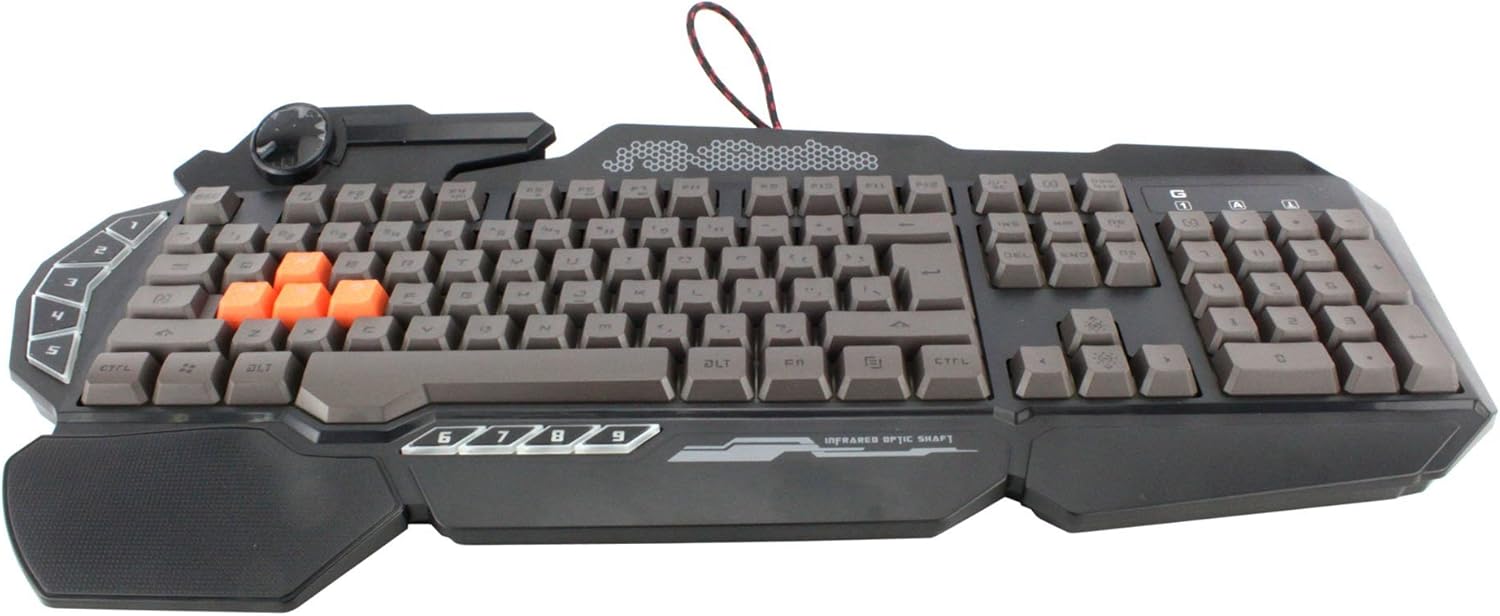
Выява: зверху ўніз view of the Bloody Light Strike B314 Gaming Keyboard, showcasing the full QWERTY layout with orange WASD keys and dedicated macro keys on the left.
Інструкцыя па эксплуатацыі
Базавае выкарыстанне
The Bloody B314 functions as a standard QWERTY keyboard for everyday typing and gaming. Its infrared mechanical switches provide a fast and responsive typing experience.
Праграмуемыя ключы
The keyboard features 9 programmable keys, typically located on the left side. To customize these keys:
- Install the official Bloody software from the A4tech webсайт.
- Launch the software and navigate to the key customization section.
- Select the desired programmable key (e.g., G1-G9 or similar).
- Assign macros, key functions, or multimedia controls as needed.
- Save your profile каб прымяніць змены.
LED Backlighting Control
The Neon Glare System LED backlighting can be adjusted using function key combinations:
- Fn+F12: Cycle through different backlighting modes (e.g., static, breathing, off).
- Fn + стрэлка ўверх/уніз: Адрэгулюйце яркасць падсвятлення.
- Fn + стрэлка ўлева/ўправа: Adjust backlight speed or direction (if applicable to the mode).
Рэжым гульні
Activate Game Mode to disable the Windows key and prevent accidental interruptions during gameplay.
- Fn+F8: Уключыце/выключыце гульнявы рэжым.

Выява: Пад вуглом view of the Bloody Light Strike B314 Gaming Keyboard, highlighting the ergonomic wrist rest and the distinct orange WASD keys.
Тэхнічнае абслугоўванне
Уборка
- Адключыце клавіятуру ад кампутара перад чысткай.
- Выкарыстоўвайце мяккі, damp cloth to wipe the surface of the keyboard. Avoid harsh chemicals or abrasive materials.
- Для выдалення пылу і смецця паміж клавішамі выкарыстоўвайце сціснутае паветра.
- The water-resistant design helps protect against spills, but it is still recommended to clean up liquids promptly.
Захоўванне
Захоўвайце клавіятуру ў прахалодным, сухім месцы, удалечыні ад прамых сонечных прамянёў і экстрэмальных тэмператур, калі яна не выкарыстоўваецца працяглы час.
Ліквідацыю непаладак
Клавіятура не адказвае
- Пераканайцеся, што USB-кабель надзейна падключаны як да клавіятуры, так і да кампутара.
- Паспрабуйце падключыць клавіятуру да іншага USB-порта.
- Перазагрузіце кампутар.
- Праверце, ці распазнаецца клавіятура ў дыспетчары прылад (Windows) або ў раздзеле «Інфармацыя пра сістэму» (macOS) вашага камп'ютара.
Падсветка не працуе
- Ensure the backlighting is not turned off using the Fn + F12 combination.
- Adjust brightness using Fn + Up Arrow.
- Калі выкарыстоўваецца карыстальніцкі прафесіяналfiles, ensure the backlighting settings are correctly configured in the Bloody software.
Праграмуемыя клавішы не працуюць
- Verify that the Bloody software is installed and running.
- Ensure your custom profiles are loaded and active within the software.
- Check for any software updates for the Bloody keyboard utility.
Тэхнічныя характарыстыкі
| Асаблівасць | Дэталь |
|---|---|
| Марка | A4tech |
| Нумар мадэлі | A4TKLA45173 |
| Тэхналогія падлучэння | Інфрачырвоны |
| Апісанне клавіятуры | Механічны |
| Тып перамыкача | Mechanical (Light Strike Optic) |
| Асаблівасць | Backlit, Programmable Keys, Water Resistant |
| Колер | Чорны |
| Падтрымка колеру падсвятлення клавіятуры | RGB (Neon Glare System) |
| Колькасць ключоў | 104 |
| Праграмуемыя кнопкі | 9 |
| Узровень воданепранікальнасці | Водатрывалы |
| Вага прадмета | 2.9 фунта |
Гарантыя і падтрымка
For warranty information and technical support, please refer to the official A4tech webсайт або звярніцеся непасрэдна ў службу падтрымкі кліентаў. Захоўвайце чэк аб куплі як пацвярджэнне пакупкі для гарантыйных прэтэнзій.
Official A4tech Webсайт: www.a4tech.com