
Naztech N750
Naztech N750 Emerge Wireless Bluetooth Headset User Manual
Мадэль: N750
Уводзіны
Thank you for choosing the Naztech N750 Emerge Wireless Bluetooth Headset. This manual provides detailed instructions on how to set up, operate, and maintain your headset to ensure optimal performance and longevity. The N750 Emerge is designed for clear communication and media playback, featuring advanced noise cancellation and versatile connectivity.
Змест пакета

Image: Contents of the Naztech N750 Emerge package.
- Naztech N750 Emerge Wireless Headset
- Аўтамабільная зарадная прылада
- Ear Gels (S/M/L)
- Кіраўніцтва карыстальніка
- Flat Micro USB Cable
Прадукт скончаныview
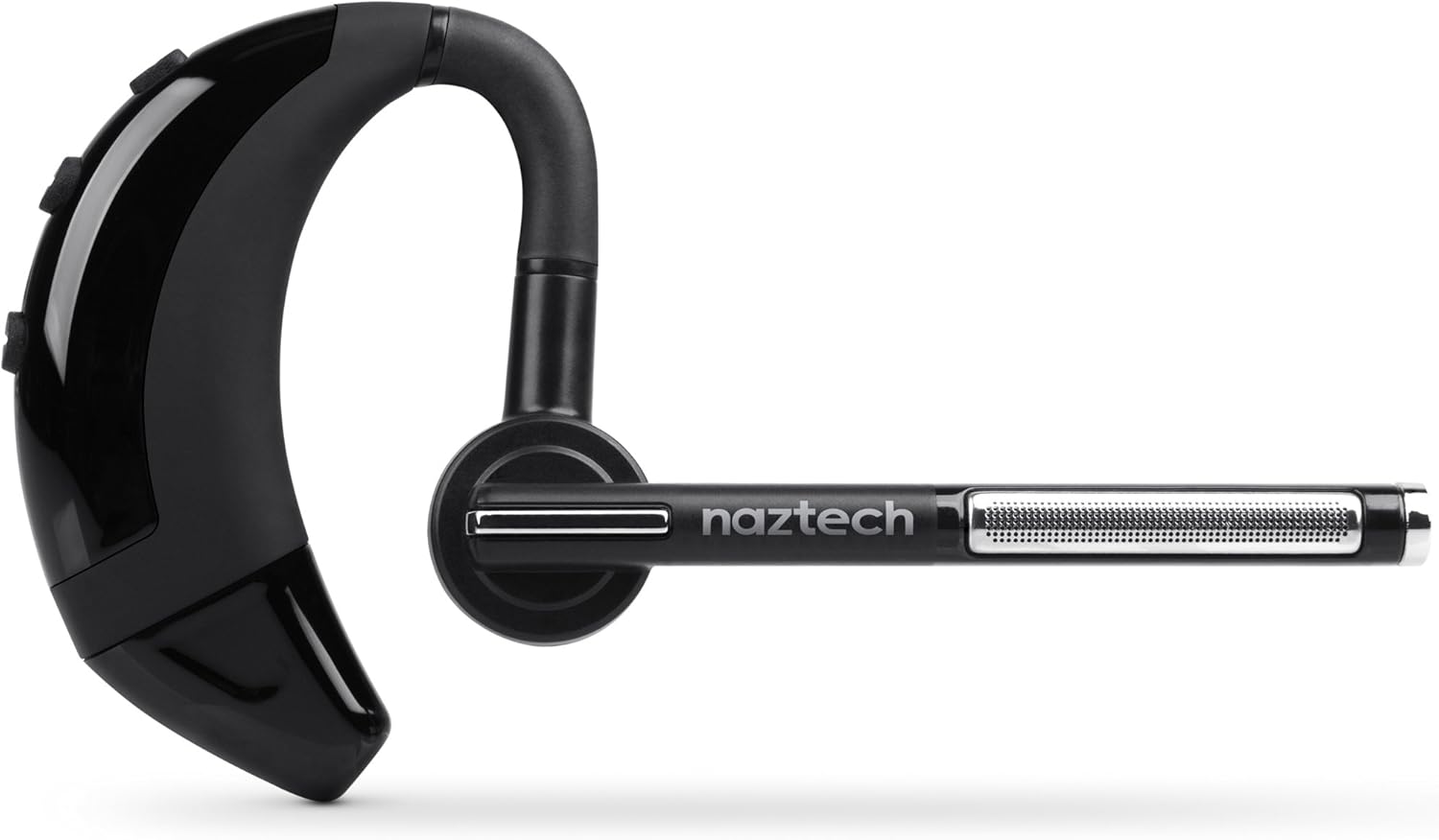
Image: The Naztech N750 Emerge Wireless Bluetooth Headset.
The Naztech N750 Emerge features an ergonomic design for comfortable wear and intuitive controls for easy operation. Key components include the ear hook, main body with control buttons, microphone boom, and ear tip.
Настройка
1. Зарадка гарнітуры
Before first use, fully charge the N750 Emerge headset. Connect the provided Micro USB cable to the charging port on the headset and the other end to a USB power source (e.g., the included car charger, a computer USB port, or a wall adapter). The LED indicator will show charging status and turn off or change color when fully charged.
2. Спалучэнне з прыладай Bluetooth
- Пераканайцеся, што гарнітура выключана.
- Press and hold the Multi-function Button (MFB) on the headset until the LED indicator flashes blue and red alternately, indicating pairing mode.
- On your smartphone or Bluetooth-enabled device, go to the Bluetooth settings and enable Bluetooth.
- Пошук available devices. Select "Naztech N750" from the list.
- Калі будзе запытаны пароль, увядзіце «0000» (чатыры нулі).
- Пасля паспяховага спалучэння святлодыёдны індыкатар будзе павольна міргаць сінім колерам, і вы можаце пачуць гук пацверджання.
3. Нашэнне гарнітуры

Image: The Naztech N750 Emerge headset demonstrating its 180-degree swivel for left or right ear use.
The N750 Emerge is designed for comfortable wear on either the left or right ear. The ear hook swivels 180 degrees to accommodate your preference. Adjust the ear hook and select the appropriate ear gel size (S/M/L) for a secure and comfortable fit. The microphone boom should be positioned towards your mouth for optimal voice pickup.
Інструкцыя па эксплуатацыі
Уключэнне/выключэнне харчавання
- Уключэнне: Press and hold the MFB for approximately 3 seconds until the LED flashes blue.
- Выключэнне: Press and hold the MFB for approximately 5 seconds until the LED flashes red and then turns off.
Кіраванне званкамі

Image: The headset's advanced call technology automatically pauses music and routes incoming calls.
- Адказаць на званок: Націсніце шматфункцыянальную кнопку адзін раз, калі паступае званок.
- Завяршыць выклік: Націсніце MFB адзін раз падчас размовы.
- Адхіліць выклік: Press and hold the MFB for approximately 2 seconds when a call comes in.
- Паўторны набор апошняга нумара: Double-press the MFB when the headset is idle.
- Галасавы набор: Press the MFB once when the headset is idle to activate your phone's voice assistant (if supported).
Рэгулятар гучнасці
Выкарыстоўвайце кнопкі павелічэння гучнасці (+) і памяншэння гучнасці (-) на гарнітуры, каб адрэгуляваць гучнасць выкліку або мультымедыя.
GPS & Voice Prompt / Caller ID Announcement

Image: The headset provides GPS voice prompts and announces caller ID for incoming calls.
The N750 Emerge supports voice prompts for GPS navigation and announces the caller ID for incoming calls, allowing for hands-free information and call management.
Прайграванне музыкі
When connected to a device, the headset can play audio. Use your device's controls for play/pause, skip track, etc. Incoming calls will automatically pause music playback.
Шматкропкавая тэхналогія

Image: The headset supports Multipoint Technology for connecting to two devices simultaneously.
The N750 Emerge supports multipoint technology, allowing it to be connected to two Bluetooth devices simultaneously. This enables seamless switching between calls or audio from two different paired devices.
Шумапрыглушэнне

Image: The headset utilizes Noisehush Technology for crystal clear conversations with noise cancellation.
The integrated Noisehush® Technology provides ultimate HD clarity and noise cancellation, ensuring crystal clear conversations for both you and your callers by reducing distracting ambient sound.
Тэхнічнае абслугоўванне
- Clean the headset regularly with a soft, dry cloth. Do not use harsh chemicals or abrasive cleaners.
- Пазбягайце ўздзеяння на гарнітуру экстрэмальных тэмператур, вільгаці або прамых сонечных прамянёў.
- Захоўвайце гарнітуру ў прахалодным, сухім месцы, калі яна не выкарыстоўваецца.
- Не спрабуйце разбіраць або мадыфікаваць гарнітуру, бо гэта прывядзе да анулявання гарантыі і можа прывесці да пашкоджанняў.
Ліквідацыю непаладак
| праблема | Магчымая прычына | Рашэнне |
|---|---|---|
| Гарнітура не ўключаецца. | Батарэя разраджаная або разраджаная. | Цалкам зарадзіце гарнітуру. |
| Немагчыма спалучыць прыладу. | Гарнітура не ў рэжыме спалучэння; Bluetooth на прыладзе выключаны; прылада знаходзіцца занадта далёка. | Ensure headset is in pairing mode (flashing blue/red). Turn on Bluetooth on your device. Move headset closer to device (within 10 meters). |
| Няма гуку або нізкі ўзровень гучнасці. | Занадта нізкі гук; гарнітура не падключана; выбраны няправільны аўдыёвыхад. | Increase volume on headset and device. Reconnect headset. Ensure audio is routed to the headset on your device. |
| Poor call quality / Noise. | Weak signal; environmental interference; microphone not positioned correctly. | Move closer to the paired device. Avoid strong electromagnetic interference. Adjust microphone boom towards your mouth. |
Тэхнічныя характарыстыкі
- мадэль: N750 Emerge
- Версія Bluetooth: v4.1
- Тэхналогіі бесправадной сувязі: Bluetooth
- Тэхналогія падключэння: Бесправадная сувязь
- Падаўленне шуму: Noisehush® Technology
- Шматкропкавая тэхналогія: так
- iOS Battery Tracker: так
- Час размовы: Да 8 гадзін
- Час чакання: Да 140 гадзін
- акумулятар: Патрабуецца 1 літый-іённы акумулятар
- Памеры прадукту: 10.16 х 10.16 х 2.54 см
- Вага прадмета: 22.7 г
- колер: Чорны
Гарантыя і падтрымка
Naztech products are designed and manufactured to the highest quality standards. For warranty information and technical support, please refer to the warranty card included with your product or visit the official Naztech webсайт. Захоўвайце чэк аб куплі як пацвярджэнне пакупкі для гарантыйных прэтэнзій.
Ask a question about this manual
Ask about setup, troubleshooting, compatibility, parts, safety, or missing instructions. Manuals+ will review the question and use this page’s manual context to help answer it.