
1. Уводзіны
The AVerMedia AW330 Wireless Voice Amplifier is a portable audio system designed to enhance vocal clarity and projection in various settings such as classrooms, training sessions, meetings, and public speaking events. Its lightweight design, wireless microphone, and powerful speaker ensure your voice is heard clearly and effortlessly.
Асноўныя характарыстыкі:
- Партатыўны дызайн: Lightweight and compact for easy transport and use.
- Бесправадны мікрафон: 2.4 GHz wireless lavalier microphone for stable 360° transmission.
- Магутны гук: Built-in 20W speaker delivers loud, clear audio.
- Доўгі тэрмін службы батарэі: Rechargeable lithium polymer battery provides 4 to 5 hours of use, or up to 8 hours of continuous use (depending on volume and usage).
- Мультымедыйнае падключэнне: Audio input port for connecting smartphones, tablets, or laptops.
- Quick Smart Pairing: Automatic microphone-to-speaker pairing for simple setup.
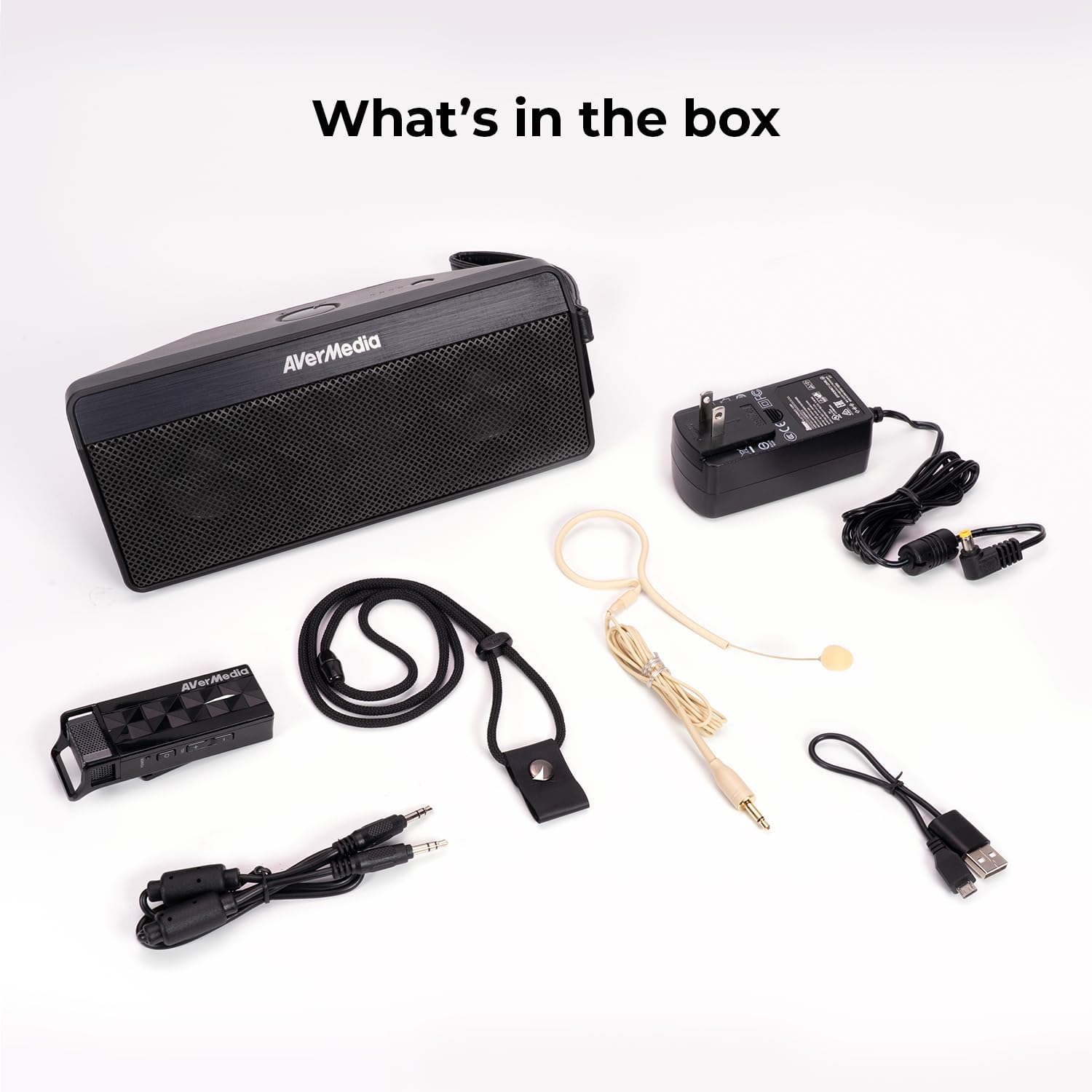
2. Што ў скрынцы
- Microphone & Headset Mic
- Дакладчык
- AC Power Adapter & USB Power Cable
- 3.5 мм аўдыякабель
- Lanyard & Buckle
3. Прадукт скончыўсяview
Дынамік

The main speaker unit features a power button, volume controls, and an audio input port for connecting external devices. It also includes a clip for attaching to clothing or a strap.
Бесправадны мікрафон
The wireless microphone includes a flexible gooseneck boom with a windscreen, volume controls, and a power button. It can be worn as a headset or clipped onto clothing.

4. Настройка
- Зараджайце прылады: Before first use, fully charge both the speaker unit and the wireless microphone using the provided AC power adapter and USB power cable. The microphone uses a USB-C connection.
- Падключэнне мікрафона: Plug the headset microphone into the wireless microphone unit.
- Уключэнне: Turn on the speaker unit by pressing its power button. Turn on the wireless microphone unit by pressing its power button.
- Спалучэнне: The speaker microphone system features automatic microphone-to-speaker pairing for hassle-free setup. They should pair automatically upon powering on.
- Наладзіць гучнасць: Adjust the volume on both the speaker and the microphone to your desired level.
5. Інструкцыя па эксплуатацыі
- Голас Ampвызваленне: Пасля спалучэння гаварыце ў мікрафон. Ваш голас будзе amplified through the speaker. Adjust volume as needed.
- Знешні аўдыёўваход: To play multimedia audio alongside your voice, connect your smartphone, tablet, or laptop to the speaker unit's Audio In port using the 3.5 mm audio cable.
- Варыянты нашэння: Utilize the clip on the speaker to attach it to your clothing, or use the lanyard and buckle for hands-free operation. The microphone can be worn as a headset or clipped directly.
- Энергазберажэнне: If the microphone is turned off, the speaker will automatically turn off after five minutes to conserve battery.

6. Тэхнічнае абслугоўванне
- Уборка: Use a soft, dry cloth to clean the surfaces of the speaker and microphone. Do not use liquid cleaners or aerosols.
- захоўванне: Захоўвайце прыладу ў прахалодным, сухім месцы, удалечыні ад прамых сонечных прамянёў і экстрэмальных тэмператур.
- Сыход за батарэяй: Каб падоўжыць тэрмін службы батарэі, пазбягайце частай поўнай разрадкі батарэі. Рэгулярна зараджайце прыладу, нават калі яна не выкарыстоўваецца працяглы час.
- Пазбягайце вады: The device is not waterproof. Keep it away from water and moisture.
7. Выпраўленне непаладак
- Няма гуку:
- Ensure both the speaker and microphone are powered on and fully charged.
- Check that the microphone and speaker are successfully paired.
- Increase the volume on both the speaker and the microphone.
- Feedback/Squealing Sound:
- Reduce the volume on the speaker or microphone.
- Павялічце адлегласць паміж мікрафонам і дынамікам.
- Ensure the microphone is not pointing directly at the speaker.
- Дрэнная якасць гуку:
- Check for obstructions between the microphone and speaker.
- Пераканайцеся, што мікрафон размешчаны правільна каля вашага рота.
- Verify that the microphone windscreen is properly attached.
- Прылада не зараджаецца:
- Ensure the charging cables are securely connected to both the device and the power source.
- Try a different power outlet or USB port.
8. Тэхнічныя характарыстыкі
| Асаблівасць | Спецыфікацыя |
|---|---|
| Марка | AVerMedia |
| Нумар мадэлі | AW330 |
| Максімальная выхадная магутнасць дынаміка | 20 ват |
| Тэхналогія падлучэння | Bluetooth, WiFi |
| Рэжым выхаду гуку | Мона |
| Тып мацавання | Настольнае мацаванне |
| Дадатковыя магчымасці | Рэгулятар гучнасці |
| Тып кантролера | Харчаванне ад батарэі |
| Сярэдні тэрмін службы батарэі | 4 Hours (up to 8 hours continuous use) |
| Максімальны дыяпазон | 60 футаў |
| Метад кантролю | Дакранацца |
| Вага прадмета | 2.6 фунта |
| Канкрэтнае выкарыстанне прадукту | Educational/Classroom |
9. Гарантыя і падтрымка
The AVerMedia AW330 Wireless Voice Amplifier пастаўляецца з a 3-гадовая гарантыя вытворцы. For technical support, troubleshooting, or warranty claims, please contact AVerMedia customer service.
10. Відэа пра прадукты
Бесправадная аўдыясістэма для класа AVerMedia AW330
Video: An official product video from AVerMedia showcasing the AW330 Wireless Classroom Audio System. It highlights its features and benefits in a classroom environment, demonstrating how teachers can use it to project their voice clearly and effectively to students.