
Прадукт скончаныview
The Plugable USB 3.0 to HDMI Video Graphics Adapter (Model: UGA-2KHDMI) allows you to connect an additional HDMI display to your computer via a USB 3.0 port. This adapter utilizes DisplayLink technology to provide high-resolution video output, supporting resolutions up to 2560x1440. It is designed to enhance productivity by enabling multi-monitor setups for various tasks, from professional work to educational use. Its compact and portable design ensures convenience for users on the go.

Figure 1: The Plugable USB 3.0 to HDMI Video Graphics Adapter, showing its HDMI output and USB 3.0 input. It is a compact black device.
Што ў скрынцы
- 1x Plugable USB 3.0 to HDMI Video Graphics Adapter (UGA-2KHDMI)
- Кароткае кіраўніцтва карыстальніка (не ўваходзіць у гэты лічбавы дапаможнік)

Figure 2: The Plugable UGA-2KHDMI adapter shown within its retail packaging, indicating the product and its basic information.
Інструкцыя па наладзе
- Ўстаноўка драйвера: Before connecting the adapter, ensure the necessary DisplayLink drivers are installed on your computer. For Windows and macOS 10.14+, drivers can typically be downloaded from the official DisplayLink website or Plugable support page.
- Падключыцеся да кампутара: Plug the USB 3.0 connector of the UGA-2KHDMI adapter into an available USB 3.0 port on your laptop, desktop, or tablet.
- Падключэнне да дысплея: Connect an HDMI cable from your external monitor to the HDMI port on the UGA-2KHDMI adapter.
- Уключэнне: Power on your external monitor. Your computer should detect the new display.
- Наладзьце параметры дысплея: Access your operating system's display settings to configure the new monitor (e.g., extend display, duplicate display, resolution).
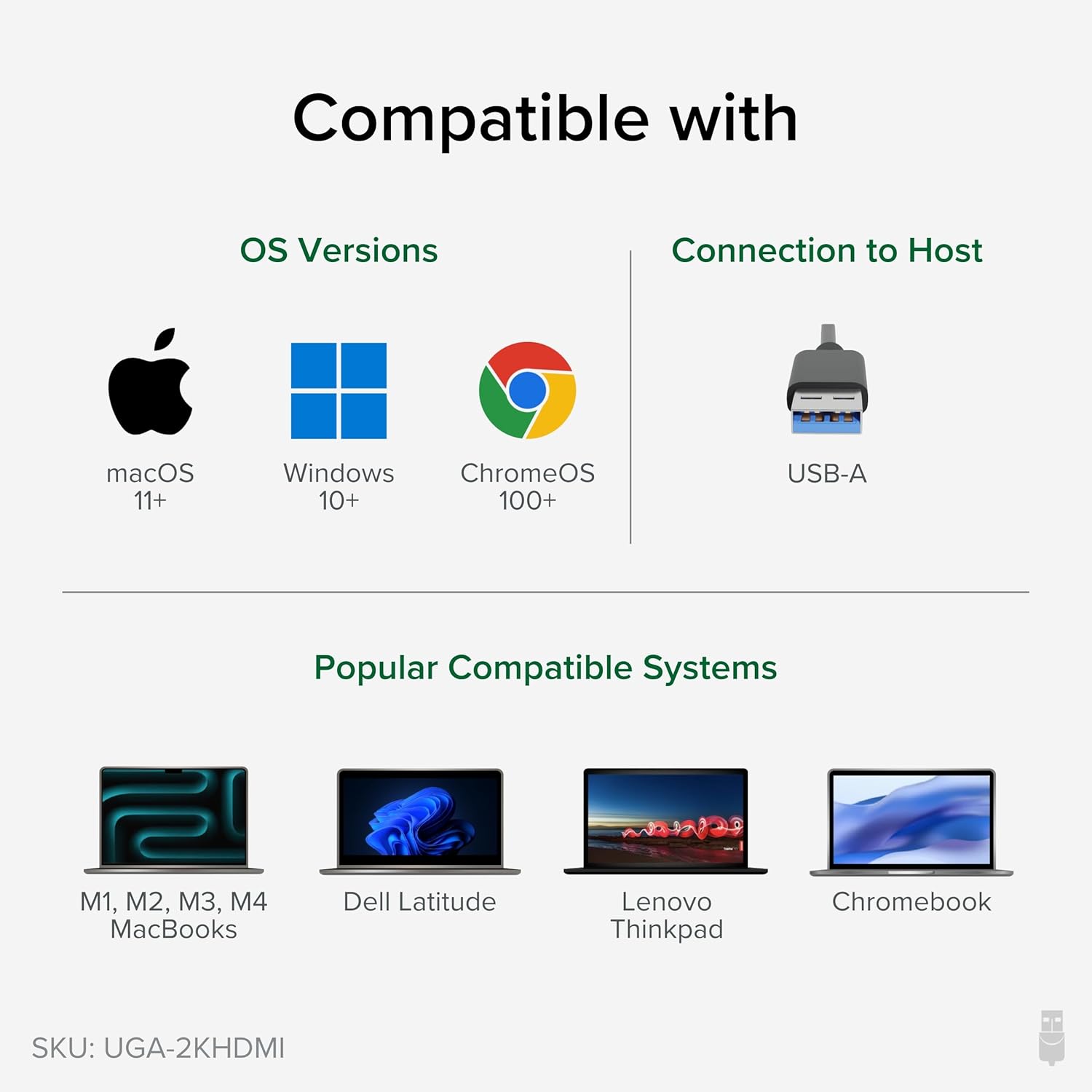
Figure 3: Illustrates the connection process of the adapter, showing the USB end plugged into a laptop and the HDMI end connected to an external monitor.
Video 1: Official Plugable video demonstrating the setup and functionality of the USB 3.0 to 2K HDMI Video Graphics Adapter, showing how to connect it and expand your screen space.
Інструкцыя па эксплуатацыі
Once the adapter is connected and drivers are installed, your operating system will recognize the new display. You can then configure it to suit your needs:
- Пашырыць дысплей: This mode allows you to have a larger desktop area, spreading your applications across multiple screens. This is ideal for multitasking and increasinг прадукцыйнасць.
- Duplicate Display (Mirror): This mode shows the same content on both your primary and external displays. Useful for presentations or sharing content.
- Асноўны дысплей: You can set the external monitor as your primary display, with your laptop screen acting as an extended or secondary display.
The adapter supports resolutions up to 2560x1440. For optimal performance, ensure your monitor and computer graphics card support the desired resolution.

Figure 4: An illustration demonstrating how multiple adapters can be used to create an extensive multi-monitor setup on Windows and ChromeOS, and up to 4 displays on macOS.
Сумяшчальнасць
The UGA-2KHDMI adapter offers broad compatibility:
- Аперацыйныя сістэмы:
- Windows: Compatible with modern Windows laptops, desktops, or tablets, including Windows 11, 10, 7, and XP.
- macOS: Supports M1/M2/M3/M4 Macs on macOS 10.14+ with driver installation.
- Linux: Compatible with Linux (driver installation may be required).
- Тып злучэння: USB 3.0 (USB-A) to HDMI.

Figure 5: Visual representation of the adapter's compatibility with macOS, Windows, and ChromeOS, and various laptop models.
Тэхнічныя характарыстыкі
| Асаблівасць | Дэталь |
|---|---|
| Марка | Раз'ёмны |
| Нумар мадэлі | UGA-2KHDMI |
| Тып раздыма | USB 3.0 (USB-A) to HDMI |
| Максімальная дазвол | 2560x1440 |
| Сумяшчальнасць аперацыйнай сістэмы | Windows (11, 10, 7, XP), macOS (10.14+), Linux |
| Вага прадмета | 3.53 унцыі |
| Памеры прадукту (ДxШxВ) | 8.74 х 5.12 х 1.42 цалі |
| Колер | Чорны |
Ліквідацыю непаладак
- Няма дысплея/чорны экран:
- Пераканайцеся, што драйверы DisplayLink правільна ўсталяваныя і абноўленыя.
- Праверце, ці ўсе кабелі (USB і HDMI) надзейна падключаны.
- Паспрабуйце іншы порт USB на вашым кампутары.
- Test with a different HDMI cable or monitor if available.
- Restart your computer after driver installation or connection changes.
- Incorrect Resolution/Display Mode:
- Adjust display settings in your operating system (e.g., Windows Display Settings, macOS System Preferences > Displays).
- Ensure your monitor supports the selected resolution.
- Performance Issues (Lag/Choppy Video):
- Ensure the adapter is connected to a USB 3.0 port for optimal bandwidth.
- Зачыніце непатрэбныя праграмы, каб вызваліць сістэмныя рэсурсы.
- Абнавіце графічныя драйверы вашага кампутара.
Тэхнічнае абслугоўванне
To ensure the longevity and optimal performance of your Plugable USB 3.0 to HDMI Video Graphics Adapter, follow these maintenance guidelines:
- Уборка: Use a soft, dry cloth to clean the adapter. Avoid liquid cleaners or abrasive materials.
- захоўванне: Захоўвайце адаптар у прахалодным, сухім месцы, удалечыні ад прамых сонечных прамянёў і экстрэмальных тэмператур, калі ён не выкарыстоўваецца.
- Апрацоўка: Avoid dropping the adapter or subjecting it to strong impacts. Do not bend or twist the attached USB cable excessively.
- Вентыляцыя: Ensure the adapter is not covered or placed in an enclosed space that could restrict airflow, as proper ventilation helps prevent overheating.
Гарантыя і падтрымка
Plugable products are backed by a 2-year coverage. For technical assistance or warranty claims, please contact Plugable support. North American Lifetime Support is available from the engineers who built the product.
For more information and support resources, visit the official Plugable webсайт.