
ICOM IC-7300
ICOM IC-7300 Direct SampКіраўніцтва карыстальніка кароткахвалевай радыёстанцыі Ling
Мадэль: IC-7300
Уводзіны
This manual provides essential instructions for the safe and efficient operation of your ICOM IC-7300 Direct Sampling Shortwave Radio. Please read this manual thoroughly before using the transceiver to ensure proper functionality and to prevent damage.
The ICOM IC-7300 is a high-performance HF/50MHz transceiver featuring RF direct sampling technology. It includes a 4.3-inch color touchscreen LCD, a real-time spectrum scope, and a built-in automatic antenna tuner. It supports various modes including SSB, CW, RTTY, AM, and FM, with a maximum output power of 100 Watts.
Інфармацыя па бяспецы
- Do not operate the transceiver in explosive atmospheres.
- Забяспечце належнае зазямленне, каб прадухіліць паражэнне электрычным токам.
- Avoid exposing the unit to direct sunlight, rain, or extreme temperatures.
- Выкарыстоўвайце толькі пазначаную крыніцу сілкавання (13.8 В пастаяннага току).
- Do not open the transceiver casinг; звярніцеся па абслугоўванне да кваліфікаванага персаналу.
Змест пакета
Праверце наяўнасць усіх прадметаў у камплекце:
- ICOM IC-7300 Radio Unit
- HM-219 Hand Microphone
- Кабель харчавання пастаяннага току
- Мантажнае абсталяванне
- Кіраўніцтва карыстальніка (гэты дакумент)
Настройка
1. Падключэнне крыніцы сілкавання
Connect the supplied DC power cable to the transceiver's DC IN connector and to a stable 13.8V DC power source. Ensure correct polarity (red to positive, black to negative) to prevent damage.
2. Падключэнне антэны
Connect a suitable HF/50MHz antenna to the ANT connector on the rear panel. For optimal performance and to protect the transceiver, use an antenna designed for the operating frequencies and ensure it is properly matched.
3. Падключэнне мікрафона
Plug the HM-219 hand microphone into the MIC connector on the front panel.
4. Пачатковае ўключэнне
Націсніце УЛАДА button to turn on the transceiver. The ICOM logo will appear on the display, followed by the operating screen.

Image: Front panel of the ICOM IC-7300, displaying the main operating screen with frequency, mode, and spectrum scope.
Інструкцыя па эксплуатацыі
Базавая аперацыя
- Выбар частаты: Выкарыстоўвайце вялікі ШМАТ dial to change the operating frequency. You can also directly input frequencies using the touchscreen keypad.
- Выбар рэжыму: Tap the mode indicator on the touchscreen (e.g., USB, LSB) to cycle through available modes (SSB, CW, RTTY, AM, FM).
- Рэгуляванне гучнасці: Выкарыстоўвайце AF/RF/SQL ручку для рэгулявання ўзроўню гукавога выхаду.
- Перадача: Націсніце ПЕРАМОГА button or the PTT button on the microphone to transmit. Ensure your antenna is tuned before transmitting.
Выкарыстанне сэнсарнага дысплея
The 4.3-inch color touchscreen provides intuitive access to various functions and settings.
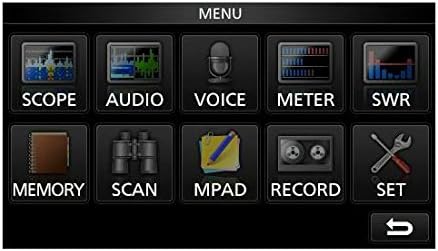
Image: The main menu screen of the IC-7300, accessible via the touchscreen, showing various function icons.
- Spectrum Scope: Націсніце ВЫХОД каб view the real-time spectrum scope, which displays signal activity across a selected frequency range.
- Дысплей лічыльніка: Націсніце МЕТР каб view various operational parameters such as output power, ALC, SWR, and voltage.
- Налады: Націсніце НАБОР to access detailed configuration options for the transceiver.
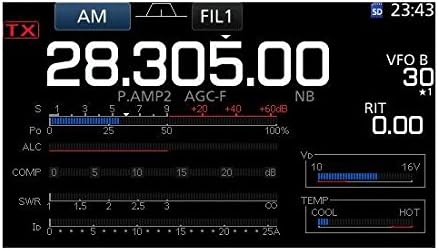
Выява: Падрабязны view of the IC-7300's display in AM mode, showing frequency, filter settings, and various operational meters.
Built-in Auto Tuner
The IC-7300 includes an internal automatic antenna tuner. To activate, press the АЎТАНАСТРОЙКА button. The tuner will automatically adjust to achieve the lowest possible SWR for your connected antenna. This function is effective for SWR values up to approximately 3:1.
Тэхнічнае абслугоўванне
- Уборка: Use a soft, dry cloth to clean the exterior of the transceiver. Do not use abrasive cleaners or solvents.
- Вентыляцыя: Ensure the ventilation holes on the top and sides of the unit are not obstructed to prevent overheating.
- захоўванне: When not in use for extended periods, store the transceiver in a dry, dust-free environment.
Ліквідацыю непаладак
| праблема | Магчымая прычына | Рашэнне |
|---|---|---|
| Няма ўлады | Power cable disconnected; incorrect voltage; blown fuse. | Check power cable connections; verify 13.8V DC supply; inspect and replace fuse if necessary. |
| Няма аўдыявыхаду | Volume too low; speaker/headphone disconnected; squelch set too high. | Adjust AF/RF/SQL knob; check speaker/headphone connection; reduce squelch level. |
| Немагчыма перадаць | Antenna not connected; high SWR; PTT button not pressed. | Connect antenna; use auto tuner or external tuner to reduce SWR; ensure PTT is engaged. |
| Дрэнны прыём | Antenna issue; incorrect mode/frequency; high noise level. | Check antenna connection and type; verify operating mode and frequency; adjust noise reduction (NB, NR) settings. |
Тэхнічныя характарыстыкі
| Асаблівасць | Дэталь |
|---|---|
| Нумар мадэлі | IC-7300 |
| Дыяпазон частот (RX) | 0.030 - 74.800 МГц |
| Выходная магутнасць | 100 W (SSB, CW, RTTY, FM); 25 W (AM) |
| Тып прыёмніка | Прамы Сampлінг |
| Колькасць каналаў | 101 |
| Блок харчавання Выпtage | 13.8 В пастаяннага току (±15%) |
| Памеры (Ш×В×Г) | 9.4 х 3.7 х 9.4 цалі (240 × 94 × 238 мм) |
| Вага | 8.4 фунта (3.8 кг) |
| Асаблівасці | 4.3-inch Color Touchscreen LCD, Real-time Spectrum Scope, Built-in Auto Tuner |
Гарантыя і падтрымка
For warranty information and technical support, please refer to the official ICOM website or contact your authorized ICOM dealer. Keep your purchase receipt as proof of purchase for warranty claims.
Online resources and additional support may be available at the ICOM America Store on Amazon.
Інфармацыя аб адпаведнасці
Гэта прылада адпавядае частцы 15 правілаў FCC. Эксплуатацыя залежыць ад наступных дзвюх умоў: (1) гэта прылада не можа выклікаць шкодных перашкод і (2) гэта прылада павінна прымаць любыя перашкоды, у тым ліку перашкоды, якія могуць выклікаць непажаданую працу.