
Уводзіны
This manual provides detailed instructions for the installation, operation, and maintenance of your new Igloo Replacement Spigot. Designed for Igloo 2, 3, 5, and 10 Gallon Beverage Coolers, this spigot features an easy-install design with front access and a button-style mechanism for efficient liquid dispensing. Please read this manual thoroughly before installation and use to ensure proper function and longevity of the product.
Інфармацыя па бяспецы
Always handle the spigot and cooler with care. Ensure the cooler is empty and clean before attempting to replace the spigot. Do not use excessive force during installation, as this may damage the spigot or the cooler. Keep small parts away from children to prevent choking hazards.
Спіс запчастак
У вашай пасылцы павінен быць наступны прадмет:
- One (1) Igloo Replacement Spigot (White)
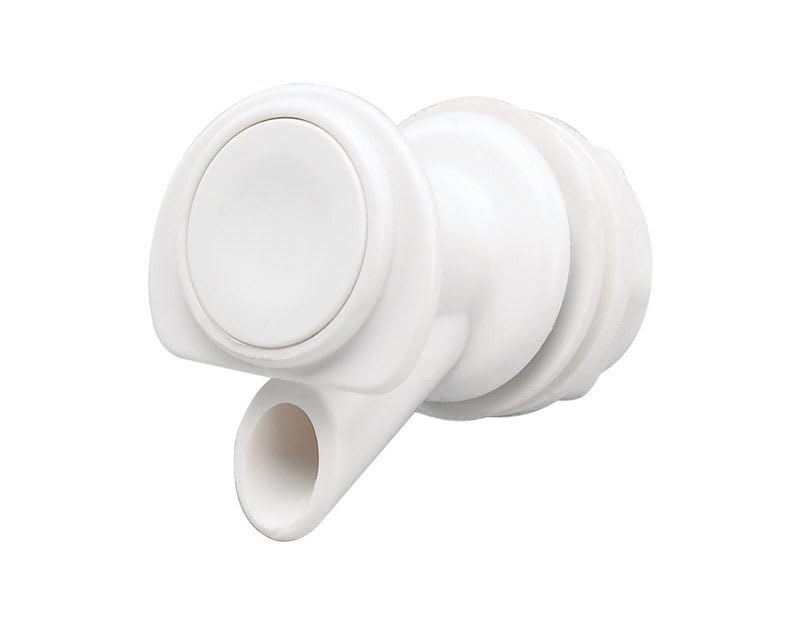
Image: The Igloo Replacement Spigot, white in color, featuring a button-style dispenser and threaded base for installation.
Інструкцыя па наладзе
- Падрыхтуйце халадзільнік: Ensure your Igloo beverage cooler is empty and clean. If replacing an old spigot, remove it by unscrewing the nut from the inside of the cooler and pulling the spigot out from the front.
- Insert New Spigot: From the outside of the cooler, insert the new Igloo Replacement Spigot through the spigot hole. Ensure the button mechanism is facing upwards.
- Secure the Spigot: From the inside of the cooler, place the washer (if applicable, typically included with the cooler or old spigot) onto the threaded part of the spigot. Then, screw the retaining nut onto the threaded part of the spigot.
- Зацягнуць: Hand-tighten the retaining nut until the spigot is snug and secure. Do not overtighten, as this may damage the cooler or spigot.
- Тэст на ўцечкі: Fill the cooler with water and check for any leaks around the spigot. If leaks occur, tighten the nut slightly more until the leak stops.
Інструкцыя па эксплуатацыі
To dispense liquid from your cooler using the Igloo Replacement Spigot:
- Кантайнэр пазіцыі: Place your cup or container directly under the spigot's nozzle.
- Націсніце кнопку: Firmly press the button on the front of the spigot. Liquid will begin to flow.
- Кнопка адпускання: Release the button to stop the flow of liquid. The drip-resistant valve is designed to minimize post-dispensing drips.
Тэхнічнае абслугоўванне
Regular cleaning of your Igloo Replacement Spigot will ensure hygienic use and prolong its lifespan.
- Штодзённая ўборка: After each use, rinse the spigot thoroughly with warm water.
- Глыбокая ачыстка: Periodically, remove the spigot from the cooler and wash it with mild soap and water. Use a small brush if necessary to clean inside the nozzle and around the button mechanism.
- Сушка: Allow the spigot to air dry completely before re-installing or storing.
- захоўванне: Store the spigot in a clean, dry place when not in use.
Ліквідацыю непаладак
| праблема | Магчымая прычына | Рашэнне |
|---|---|---|
| Spigot leaks | Nut not tightened sufficiently; damaged washer; improper installation. | Ensure the retaining nut is hand-tightened securely. Check the washer for damage and replace if necessary. Re-install the spigot following the setup instructions carefully. |
| Liquid flow is slow or blocked | Debris or residue inside the spigot; airlock in cooler. | Remove and thoroughly clean the spigot. Ensure the cooler's vent (if applicable) is open. |
| Button is stiff or stuck | Residue buildup; internal mechanism issue. | Remove and clean the spigot, paying attention to the button area. If the issue persists, the spigot may need replacement. |
Тэхнічныя характарыстыкі
- Нумар мадэлі: 24009
- колер: Белы
- матэрыял: Пластыкавыя
- Compatible Cooler Capacity: 2, 3, 5, 10 Gallons
- Месца доступу: Фронт
- Вага прадмета: 1.6 унцыі
- Product Dimensions (approximate, packaging): 25 х 3.5 х 5.75 цалі
Гарантыя і падтрымка
For information regarding product warranty or if you require further assistance, please contact Igloo customer support directly. Refer to the official Igloo webна сайце або ўпакоўцы прадукту, каб атрымаць найноўшую кантактную інфармацыю і ўмовы гарантыі.