
Уводзіны
This manual provides detailed instructions for the installation, operation, and maintenance of your INIM Alien/SN Touchscreen User Interface. Please read this manual thoroughly before using the device to ensure proper functionality and to prevent damage. Keep this manual for future reference.
Прадукт скончаныview
The INIM Alien/SN is a 4.3-inch touchscreen user interface designed for i-bus systems. It integrates several features for enhanced control and monitoring within your environment.
Асноўныя характарыстыкі:
- 4.3-inch Touchscreen Display
- Датчык набліжэння
- Датчык тэмпературы навакольнага асяроддзя
- Integrated Microphone and Speaker
- Інтэрфейс USB
- Слот для SD-карты
- Designed for i-bus systems
Кампаненты:
- INIM Alien/SN Touchscreen User Interface
- SD Card (included)
- Mounting hardware (not specified, typically included with wall-mount devices)
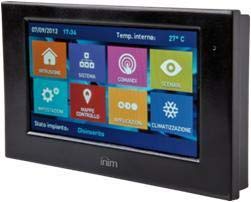
На гэтым малюнку паказаны пярэдні бок view of the INIM Alien/SN Touchscreen User Interface, featuring its sleek black design and the 4.3-inch display.
Настройка
Follow these steps for the initial setup of your INIM Alien/SN Touchscreen User Interface.
1. Мантаж прылады:
- Выберыце месцазнаходжанне: Choose a suitable wall location, ensuring it is within reach of the necessary electrical cabling and i-bus connection.
- Падрыхтуйце праводку: Ensure all power and i-bus wiring is safely routed to the mounting location.
- Бяспечнае мацаванне: Use appropriate wall-mounting hardware to securely attach the device's backplate or mounting bracket to the wall.
- Падключэнне правадоў: Connect the electrical power cable and i-bus communication cables to the designated terminals on the device. Refer to the wiring diagram provided with your i-bus system documentation for specific connections.
- Далучыць прыладу: Carefully attach the touchscreen unit to the mounted backplate, ensuring it clicks securely into place.
2. Initial Power-Up:
- Once mounted and wired, apply power to the device. The touchscreen should illuminate.
- Follow any on-screen prompts for initial configuration, such as language selection or network settings.
3. SD Card and USB:
- The included SD card is typically used for firmware updates, configuration backups, or data logging. Insert it into the designated slot if not already pre-installed.
- The USB interface can be used for direct connection to a computer for advanced configuration or diagnostics using INIM software.
Інструкцыя па эксплуатацыі
The INIM Alien/SN features an intuitive touchscreen interface for easy navigation and control.
1. Touchscreen Navigation:
- Націсніце: Lightly touch the screen to select icons, buttons, or menu items.
- Правядзіце пальцам: Drag your finger across the screen to scroll through lists or switch between screens.
- Датчык набліжэння: The screen may automatically activate or adjust brightness when you approach it.
2. Кантроль сістэмы:
- Access various functions of your i-bus system, such as arming/disarming security zones, viewing system status, or controlling connected devices.
- Specific menu structures and options will depend on your i-bus system configuration.
3. Audio Functions:
- The integrated microphone and speaker allow for two-way audio communication, typically used for intercom functions or alarm verification within the i-bus system.
- Adjust volume settings through the on-screen menu.
4. Маніторынг тэмпературы:
- The ambient temperature sensor displays the current room temperature.
- If configured as a thermostat, you can view and adjust temperature setpoints for HVAC systems directly from the interface.
Тэхнічнае абслугоўванне
Regular maintenance ensures the longevity and optimal performance of your touchscreen user interface.
Уборка:
- экран: Выкарыстоўвайце мяккую безворсовую тканіну, злёгку dampвадой або неабразіўным ачышчальнікам для экранаў. Не распыляйце ачышчальнік непасрэдна на экран.
- Casing: Працярыце пластыкавую крышкуasing with a soft, dry cloth. Avoid harsh chemicals or abrasive materials.
Абнаўленні праграмнага забеспячэння:
- Periodically check the INIM Electronics website or consult your system installer for available firmware updates.
- Updates can be applied via the USB interface or by loading files onto the SD card, as per specific instructions provided with the update.
Ліквідацыю непаладак
If you encounter issues with your INIM Alien/SN, refer to the following common problems and solutions.
Прылада не ўключаецца:
- Праверце падключэнне сілкавання: Ensure the electrical cable is securely connected and receiving power.
- Verify i-bus Connection: Confirm the i-bus communication cable is properly connected, as some systems draw power through this connection.
- Выключальнік: Check your building's circuit breaker for any tripped circuits.
Сэнсарны экран не рэагуе:
- Перазагрузка прылады: If possible, power cycle the device by temporarily disconnecting and reconnecting its power source.
- Чысты экран: Ensure the screen is clean and free of dirt or moisture that might interfere with touch detection.
No Audio from Speaker/Microphone:
- Налады гучнасці: Check the on-screen volume settings to ensure they are not muted or set too low.
- Канфігурацыя сістэмы: Verify that audio functions are enabled and correctly configured within your i-bus system settings.
For persistent issues, contact your system installer or INIM Electronics technical support.
Тэхнічныя характарыстыкі
| Асаблівасць | Спецыфікацыя |
|---|---|
| Вытворца | INIM Electronics |
| Нумар мадэлі | 8050617014619 |
| Тып дысплея | 4.3-цалевы сэнсарны экран |
| Колер | Чорны |
| Матэрыял | Пластыкавыя |
| Крыніца харчавання | Электрычны кабель |
| Сувязь | USB |
| Асаблівасці | Integrated Microphone, Ambient Temperature Sensor, Proximity Sensor |
| Уключаныя кампаненты | SD-карта |
| Тып мацавання | Насценнае мацаванне |
| Памеры прадукту | 15 х 10 х 3 см |
| Вага прадукту | 250 грамаў |
Гарантыя і падтрымка
For warranty information, please refer to the documentation provided by your retailer or visit the official INIM Electronics webсайт. Умовы гарантыі могуць адрознівацца ў залежнасці ад рэгіёна і месца пакупкі.
For technical support, assistance with installation, or troubleshooting beyond the scope of this manual, please contact your authorized INIM Electronics dealer or system installer. You may also find additional resources and contact information on the official INIM Electronics webсайт.
Webсайт: www.inim.biz (Please note: This is a generic placeholder for the manufacturer's website. Verify the correct URL if available.)