
Vivolink VL120007
Кіраўніцтва карыстальніка камплекта падаўжальніка Vivolink HDBaseT VL120007 70 м 4K HDMI
Мадэль: VL120007
1. Уводзіны
This user manual provides detailed instructions for the installation, operation, and maintenance of the Vivolink HDBaseT VL120007 70m 4K HDMI Extender Kit. This kit is designed to extend 4K HDMI signals up to 70 meters over a single Cat5e/6 cable, supporting bi-directional IR and CEC.
The Vivolink VL120007 is a premium quality product, ensuring reliable and high-performance signal transmission for various professional and home theater applications.
2. Прадукт скончыўсяview
The Vivolink VL120007 kit consists of a Transmitter unit and a Receiver unit. Both units are compact and designed for easy integration into existing setups.
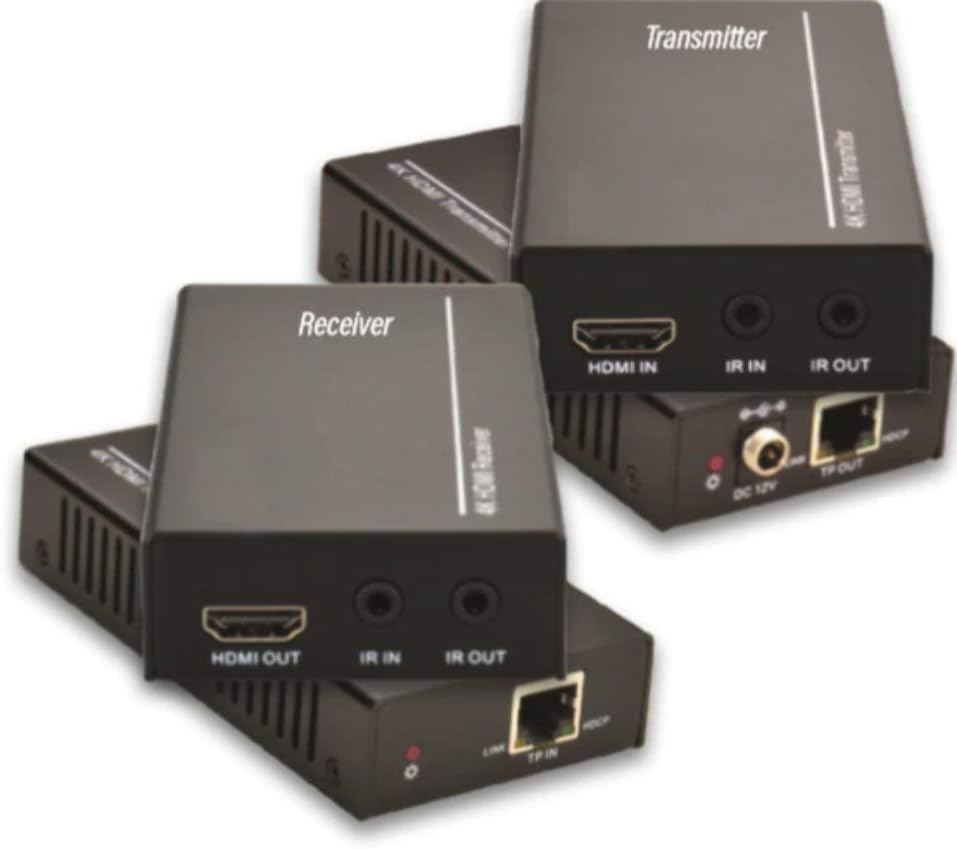
Figure 2.1: Vivolink HDBaseT VL120007 Transmitter (top) and Receiver (bottom) units. The Transmitter unit features HDMI IN, IR IN, IR OUT, DC 12V power input, and TP-OUT (HDBaseT) ports. The Receiver unit features HDMI OUT, IR IN, IR OUT, and TP-IN (HDBaseT) ports.
2.1. Асноўныя магчымасці
- Extends 4K HDMI signals up to 70 meters (230 feet) over a single Cat5e/6 cable.
- Supports HDMI 1.4 and HDCP 2.2 compliant.
- Bi-directional IR pass-through for controlling source or display devices.
- Supports CEC (Consumer Electronics Control) functionality.
- Кампактны дызайн для лёгкай усталёўкі.
- Includes one Power Supply Unit (PSU).
3. Змесціва ўпакоўкі
Please verify that all items are present and in good condition upon opening the package. If any items are missing or damaged, please contact your vendor.
- 1x Vivolink HDBaseT Transmitter Unit (VL120007-TX)
- 1x Vivolink HDBaseT Receiver Unit (VL120007-RX)
- 1x 12V DC Power Supply Unit
- 1x ВК-кабель Blaster
- 1x кабель ВК-прыёмніка
- 1x Кіраўніцтва карыстальніка (гэты дакумент)
4. Настройка і ўстаноўка
Before beginning installation, ensure all devices are powered off and disconnected from their power sources.
4.1. Схема падлучэння
The following diagram illustrates a typical connection setup for the Vivolink VL120007 extender kit.
(A detailed connection diagram would typically be placed here. For illustration, imagine a diagram showing Source -> Transmitter -> Cat Cable -> Receiver -> Display.)
4.2. Этапы ўстаноўкі
- Connect an HDMI cable from your source device (e.g., Blu-ray player, media streamer) to the УХОД HDMI порт на ст Перадатчык адзінка.
- Connect a single Cat5e/6 cable (recommended Cat6 for optimal performance) from the TP-OUT порт на ст Перадатчык адзінка да ст TP-IN порт на ст Прыёмнік unit. Ensure the cable is properly terminated with RJ45 connectors following TIA/EIA-568B wiring standards.
- Падключыце кабель HDMI ад ВЫХАД HDMI порт на ст Прыёмнік unit to your display device (e.g., TV, projector).
- For IR control, connect the IR Blaster cable to the ІЧ-ВЫХОД port on the unit that will send the IR signal (e.g., Transmitter for controlling source, Receiver for controlling display). Position the IR emitter head directly over the IR sensor of the device to be controlled.
- Connect the IR Receiver cable to the ІЧ уваход port on the unit that will receive the IR signal. Position the IR receiver head in a location where it can receive signals from your remote control.
- Connect the included 12V DC Power Supply Unit to the 12 В пастаяннага току port on either the Transmitter or Receiver unit. The system supports Power over Cable (PoC), meaning only one power supply is needed for both units.
- Power on all connected devices (source, display, and extender units).
5. Інструкцыя па эксплуатацыі
Once all connections are made and power is supplied, the Vivolink VL120007 extender kit should automatically establish a connection and transmit the HDMI signal.
5.1. Святлодыёдныя індыкатары
Both the Transmitter and Receiver units feature LED indicators to show their status:
- Святлодыёд харчавання: Illuminates when the unit is receiving power.
- Святлодыёд спасылкі: Illuminates when a stable HDBaseT link is established between the Transmitter and Receiver units.
- Індикатор дадзеных: May flash to indicate active HDMI data transmission.
5.2. ІЧ кантроль
The bi-directional IR pass-through allows you to control your source device from the display location or your display device from the source location. Ensure the IR Blaster and IR Receiver cables are correctly positioned.
5.3. CEC Functionality
The extender kit supports CEC (Consumer Electronics Control), allowing compatible devices to communicate and control each other over the HDMI connection. This feature typically works automatically if supported by your source and display devices.
6. Тэхнічнае абслугоўванне
The Vivolink VL120007 extender kit requires minimal maintenance.
- Keep the units in a cool, dry place, away from direct sunlight, heat sources, and excessive moisture.
- Clean the units with a soft, dry cloth. Do not use liquid or aerosol cleaners.
- Забяспечце належную вентыляцыю вакол прылад, каб прадухіліць перагрэў.
- Рэгулярна правярайце кабельныя злучэнні, каб пераканацца ў іх надзейнасці.
7. Выпраўленне непаладак
If you encounter issues with your Vivolink VL120007 extender kit, please refer to the following common troubleshooting steps:
| праблема | Магчымая прычына | Рашэнне |
|---|---|---|
| Няма відэа/аўдыёвыхаду. |
|
|
| IR control not working. |
|
|
| Перарывісты сігнал або мігценне. |
|
|
If the problem persists after trying these steps, please contact Vivolink customer support for further assistance.
8. Тэхнічныя характарыстыкі
| Асаблівасць | Дэталь |
|---|---|
| Нумар мадэлі | VL120007 |
| Марка | Vivolink |
| Сумяшчальнасць з HDMI | HDMI 1.4 |
| Адпаведнасць HDCP | HDCP 2.2 |
| Падтрымка максімальнага дазволу | 4K (UHD) |
| Адлегласць перадачы | Up to 70 meters (230 feet) for 4K over Cat5e/6 |
| Патрабаванні да кабеля | Single Cat5e/6/7 cable |
| ІЧ-праход | Двунакіраваны |
| Падтрымка ЦВК | так |
| Электразабеспячэнне | 12V DC (PoC supported) |
| Вага прадмета | 1.21 кілаграма (прыблізна 2.67 фунта) |
| Вытворца | Vivolink |
9. Інфармацыя аб гарантыі
Specific warranty details are not provided in the product information. Please refer to the warranty card included with your product or contact your point of purchase for detailed warranty terms and conditions.
10. Падтрымка кліентаў
For technical support, troubleshooting assistance beyond this manual, or warranty inquiries, please contact Vivolink customer support or your authorized dealer.
Please have your model number (VL120007) and purchase information ready when contacting support.
Ask a question about this manual
Ask about setup, troubleshooting, compatibility, parts, safety, or missing instructions. Manuals+ will review the question and use this page’s manual context to help answer it.