
1. Уводзіны
The StarTech.com USB-C Multiport Adapter DKT30CHV is designed to expand the connectivity of your USB-C enabled laptop, tablet, or smartphone. This portable travel dock allows you to connect to a 4K HDMI or 1080p VGA display, a Gigabit Ethernet network, and a 5Gbps USB-A 3.0 peripheral, all through a single USB-C port on your host device. It is bus-powered, eliminating the need for an external power adapter, making it ideal for mobile use.
Асноўныя характарыстыкі:
- 4-in-1 Portable Dock: Provides 4K 30Hz HDMI or 1080p VGA video output, one USB-A (USB 3.1 Gen 1 5Gbps) port, and Gigabit Ethernet.
- Шырокая сумяшчальнасць прылад: Compatible with USB-C and Thunderbolt 3 (TB3) devices from various brands including HP, Dell, Lenovo, Apple MacBook Pro/Air, and Chromebooks.
- Wide Operating System Compatibility: Supports Windows, macOS, Ubuntu, and Chrome OS.
- Compact & Light Design: Easily fits into a laptop bag or pocket for travel.

Image 1: The StarTech.com USB-C Multiport Adapter DKT30CHV, a compact black device with various ports.
2. Змесціва ўпакоўкі
- 1x USB-C Multiport Adapter (DKT30CHV)
- 1x Інструкцыя па эксплуатацыі
3. Настройка
Follow these steps to set up your StarTech.com USB-C Multiport Adapter:
- Падключэнне да хост-прылады: Plug the integrated USB-C cable from the adapter into an available USB-C or Thunderbolt 3 port on your laptop, tablet, or smartphone. Ensure your host device's USB-C port supports video (DisplayPort Alternate Mode) for video output functionality.
- Падключэнне дысплея: Connect an HDMI cable from your monitor to the adapter's HDMI port for up to 4K 30Hz resolution, or connect a VGA cable to the adapter's VGA port for up to 1080p resolution. The adapter supports one video output at a time.
- Падключэнне да сеткі: Connect an Ethernet cable from your network router or switch to the adapter's Gigabit Ethernet port for a wired network connection.
- Падключэнне перыферыйных прылад USB: Plug your USB-A devices (e.g., mouse, keyboard, external hard drive) into the adapter's USB 3.0 (USB 3.1 Gen 1) port.

Малюнак 2: Крупны план view of the adapter's ports, including Gigabit Ethernet, USB-A 3.0, VGA, and HDMI.
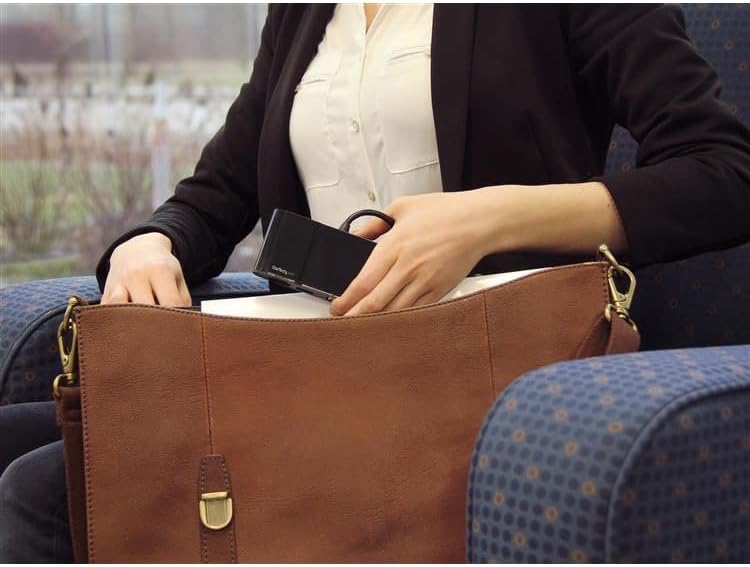
Image 3: The compact USB-C Multiport Adapter being stored in a bag, highlighting its portability.
4. Інструкцыя па эксплуатацыі
Once connected, the adapter functions as an extension of your host device's capabilities. Most operating systems provide native support, meaning drivers are often not required for basic functionality. However, for optimal performance, especially with the Gigabit Ethernet port, it is recommended to check the StarTech.com support webсайт for the latest drivers specific to your operating system.
Вывад дысплея:
The adapter supports either HDMI or VGA output, but not simultaneously. Your operating system should automatically detect the connected display. You can configure display settings (e.g., extended desktop, duplicate display) through your computer's display preferences.
Порт USB 3.0:
The USB 3.0 port provides 5Gbps data transfer speeds for connecting peripherals. It is backward compatible with USB 2.0 devices.
Гігабітны Ethernet:
The Gigabit Ethernet port provides a stable and fast wired network connection. Ensure the Ethernet cable is securely connected to both the adapter and your network device.
Video 1: An official StarTech.com video demonstrating the general benefits and ease of use of their docking stations and adapters for various professional scenarios.
5. Тэхнічнае абслугоўванне
To ensure the longevity and optimal performance of your StarTech.com USB-C Multiport Adapter, follow these maintenance guidelines:
- Уборка: Use a soft, dry cloth to clean the adapter. Avoid using harsh chemicals or abrasive cleaners.
- захоўванне: Захоўвайце адаптар у прахалодным, сухім месцы, удалечыні ад прамых сонечных прамянёў і экстрэмальных тэмператур.
- Апрацоўка: Handle the adapter with care. Avoid dropping it or subjecting it to strong impacts. Do not pull on the integrated cable forcefully.
6. Выпраўленне непаладак
If you encounter issues with your USB-C Multiport Adapter, refer to the following common troubleshooting steps:
- Няма вываду на дысплей:
- Ensure your host laptop's USB-C port supports video (DisplayPort Alternate Mode). Not all USB-C ports have this capability.
- Verify that the video cable (HDMI or VGA) is securely connected to both the adapter and the display.
- Try connecting the display directly to your laptop (if possible) to rule out display or cable issues.
- Перазагрузіце хост-прыладу.
- No Network Connection (Gigabit Ethernet):
- Ensure the Ethernet cable is securely connected to both the adapter and your network device.
- Check your host device's network settings to ensure the Ethernet adapter is recognized and enabled.
- Наведайце ст StarTech.com support webсайт to download and install the latest Ethernet drivers for your operating system, if necessary.
- USB Peripherals Not Recognized:
- Ensure the USB peripheral is properly connected to the adapter's USB 3.0 port.
- Try connecting the USB peripheral directly to your host device (if possible) to confirm it is functional.
- If connecting a high-power USB device, ensure your host device can provide sufficient power through its USB-C port. The DKT30CHV is bus-powered and does not support USB Power Delivery to charge other devices.
- Intermittent Connections or Performance Issues:
- Ensure all cables are firmly seated and not loose.
- Avoid excessive bending or strain on the integrated USB-C cable.
- Reduce the number of simultaneously active high-bandwidth devices if experiencing slowdowns, as all ports share the USB 3.0 bandwidth.
7. Тэхнічныя характарыстыкі

Image 4: Diagram showing the dimensions of the StarTech.com USB-C Multiport Adapter: 4.5 inches (11.4 cm) length, 2.1 inches (5.4 cm) width, and 0.7 inches (1.7 cm) height.
| Асаблівасць | Спецыфікацыя |
|---|---|
| Марка | StarTech.com |
| Нумар мадэлі | DKT30CHV |
| Колер | Чорны |
| Абсталяванне інтэрфейсу | Thunderbolt, USB, USB 2.0, USB 3.0, USB 3.1 Type C, USB Type C |
| Асаблівасць | Партатыўны |
| Сумяшчальныя прылады | Audio/Video Device, Chromebook, Docking Station, Monitors, Network Device, Notebook, Projectors, Workstation |
| Усяго партоў USB | 1 (USB-A 3.0) |
| Хуткасць перадачы даных | 5 гігабіт у секунду |
| Колькасць партоў | 4 (HDMI, VGA, USB-A 3.0, Gigabit Ethernet) |
| Аперацыйная сістэма | Chrome OS, Linux, macOS, Windows |
| Матэрыял корпуса | Метал |
| Памеры прадмета (Д х Ш х У) | 4.5"Д х 2.1"Ш х 0.7"В (11.4 см х 5.4 см х 1.7 см) |
| Вага прадмета | 0.16 фунта (72.57 г) |
| UPC | 662919087369, 065030864695 |
8. Гарантыя і падтрымка
The StarTech.com USB-C Multiport Adapter DKT30CHV is backed by a Гарантыя 3 год. StarTech.com also offers free lifetime technical support to assist you with any questions or issues you may encounter.
For technical assistance, product information, or to download drivers, please visit the official StarTech.com support webсайт: www.startech.com/support