
1. Уводзіны
This manual provides essential instructions for the safe and efficient operation of your Hytera PD365LF Digital Portable Radio. Please read this manual thoroughly before using the product to ensure proper functionality and to prevent damage.
2. Змесціва ўпакоўкі
Upon unpacking, please verify that all items listed below are present and in good condition. If any item is missing or damaged, contact your dealer immediately.
- Hytera PD365LF Digital Portable Radio
- Літый-іённы акумулятар
- Адаптар сілкавання
- Заціск для рамяня
- Папружка
- Кіраўніцтва карыстальніка (гэты дакумент)
3. Прадукт скончыўсяview
The Hytera PD365LF is a compact and robust digital portable radio designed for reliable communication. Familiarize yourself with the radio's components.
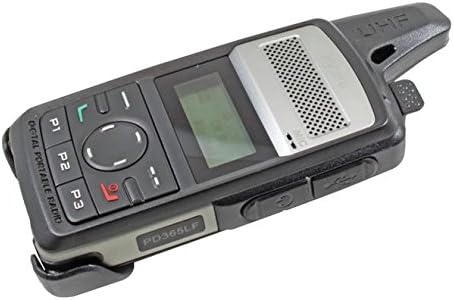
Figure 1: Hytera PD365LF Digital Portable Radio. This image displays the radio from an angled perspective, highlighting its compact form factor. Visible features include the speaker grille, LCD screen, navigation buttons (P1, P2, P3, and a central directional pad), and the UHF antenna. The model number "PD365LF" is clearly visible on the front casing.
Ключавыя кампаненты:
- Антэна: Для перадачы і прыёму сігналаў.
- Дакладчык: Выводзіць аўдыё.
- Мікрафон: Inputs audio.
- ВК-дысплей: Shows channel information, battery status, and menu options.
- Navigation Buttons (P1, P2, P3, Directional Pad): For menu navigation and quick access functions.
- Кнопка «Націсні і размаўляй» (PTT): Актывуе перадачу.
- Ручка харчавання/гучнасці: Уключае/выключае радыё і рэгулюе гучнасць.
- Порт аксесуараў: For connecting audio accessories or programming cable.
4. Настройка
4.1 Устаноўка батарэі
- Пераканайцеся, што радыё выключана.
- Сумясціце батарэйку з батарэйным адсекам на задняй панэлі радыёпрыёмніка.
- Акуратна ўстаўце батарэйку на месца, пакуль яна надзейна не зашчоўкне.
- To remove, slide the battery release latch and lift the battery out.
4.2 Зарадка акумулятара
Before initial use, fully charge the battery. A fully discharged battery typically takes approximately 3-4 hours to charge.
- Падключыце адаптар сілкавання да адпаведнай разеткі.
- Connect the charging cable to the radio's accessory port.
- The charging indicator on the radio will illuminate (e.g., red for charging, green for fully charged).
- Пасля поўнай зарадкі адключыце зарадная прылада.
5. Інструкцыя па эксплуатацыі
5.1 Уключэнне/выключэнне
- Каб уключыць: Паварочвайце ручку харчавання/гучнасці па гадзіннікавай стрэлцы, пакуль не пачуеце пстрычку і не падсвяціцца дысплей.
- Каб выключыць: Паварочвайце ручку харчавання/гучнасці супраць гадзіннікавай стрэлкі, пакуль не пачуеце пстрычку і дысплей не выключыцца.
5.2 Рэгуляванне гучнасці
After powering on, rotate the Power/Volume knob clockwise to increase volume or counter-clockwise to decrease volume.
5.3 Выбар канала
Use the navigation buttons (e.g., up/down arrows on the directional pad) to scroll through available channels. The selected channel will be displayed on the LCD screen.
5.4 Перадача і прыём
- Для перадачы: Press and hold the Push-to-Talk (PTT) button. Speak clearly into the microphone. Release the PTT button to stop transmitting.
- Каб атрымаць: Пераканайцеся, што кнопка PTT не націснутая. Радыёстанцыя будзе аўтаматычна прымаць сігналы на выбраным канале.
5.5 Programmable Buttons (P1, P2, P3)
The P1, P2, and P3 buttons can be programmed for various functions (e.g., zone switch, scan, emergency call) by your dealer or through programming software. Refer to your dealer for specific configurations.
6. Тэхнічнае абслугоўванне
6.1 Агульны догляд
- Трымайце радыёпрыёмнік сухім. Пазбягайце ўздзеяння дажджу, вільгаці або вадкасцей.
- Не падвяргайце радыё ўздзеяння экстрэмальных тэмператур.
- Handle the radio with care. Avoid dropping or subjecting it to strong impacts.
6.2 Ачыстка
Ачысціце паверхню радыёпрыёмніка мяккай губкайamp cloth. Do not use harsh chemicals, cleaning solvents, or strong detergents, as these may damage the casinг або ўнутраныя кампаненты.
7. Выпраўленне непаладак
| праблема | Магчымая прычына | Рашэнне |
|---|---|---|
| Радыё не ўключаецца. | Battery is discharged or improperly installed. | Зарадзіце акумулятар або ўсталюйце яго правільна. |
| Нельга перадаваць або прымаць. | Incorrect channel selected; out of range; antenna not properly attached. | Verify channel; move closer to other radios; ensure antenna is secure. |
| Дрэнная якасць гуку. | Low battery; obstruction between radios; volume too low/high. | Charge battery; clear obstructions; adjust volume. |
If the problem persists after attempting these solutions, please contact your authorized Hytera dealer for assistance.
8. Тэхнічныя характарыстыкі
The following are general specifications for the Hytera PD365LF. Specific performance may vary based on environmental conditions and configuration.
- мадэль: PD365LF
- Марка: Гетэра
- Памеры: Approximately 19 x 13.2 x 6.8 cm (Packaging)
- Вага: Approximately 439.99 grams (Packaging)
- Тып батарэі: Літый-іённы акумулятар (патрабуецца 1 акумулятар, у камплекце)
- Колькасць каналаў: 32
- Воданепранікальнасць: Водатрывалы
9. Гарантыя і падтрымка
Your Hytera PD365LF radio is covered by a limited warranty. For detailed warranty terms and conditions, please refer to the warranty card included with your product or contact your authorized Hytera dealer. For technical support, service, or spare parts, please contact your point of purchase or visit the official Hytera webсайт.
Заўвага: Несанкцыянаваны рамонт або мадыфікацыя прывядуць да анулявання гарантыі на прадукт.