
1. Уводзіны
Дзякуй за пакупкуasing the Forever BS600 Bluetooth Speaker. This portable wireless speaker combines powerful audio with versatile playback options, including Bluetooth, FM radio, USB, and SD card support. It also features a built-in microphone for hands-free calling. Please read this manual carefully to ensure proper use and maintenance of your device.
Уключаныя кампаненты:
- Forever BS600 Bluetooth Speaker
- Кабель 3.5 мм
- USB-кабель для зарадкі
- Lithium Battery (pre-installed)

Image 1.1: Forever BS600 speaker with its accompanying 3.5mm audio cable and USB charging cable.
2. Інфармацыя па бяспецы
To ensure safe and optimal operation, please observe the following precautions:
- Не падвяргайце прыладу ўздзеянню экстрэмальных тэмператур, прамых сонечных прамянёў або высокай вільготнасці.
- Пазбягайце падзення дынаміка і не падвяргайце яго моцным ударам.
- Не разбірайце, не рамантуйце і не мадыфікуйце прыладу самастойна. Звяртайцеся да кваліфікаванага персаналу па любыя паслугі па абслугоўванні.
- Трымайце дынамік далей ад вады і іншых вадкасцей. Ён не воданепранікальны.
- Выкарыстоўвайце толькі прадастаўленыя або зацверджаныя зарадныя кабелі.
- Dispose of batteries according to local regulations. Do not expose batteries to excessive heat.
3. Прадукт скончыўсяview
Азнаёмцеся з элементамі кіравання і партамі дынаміка:
Кнопкі кіравання:
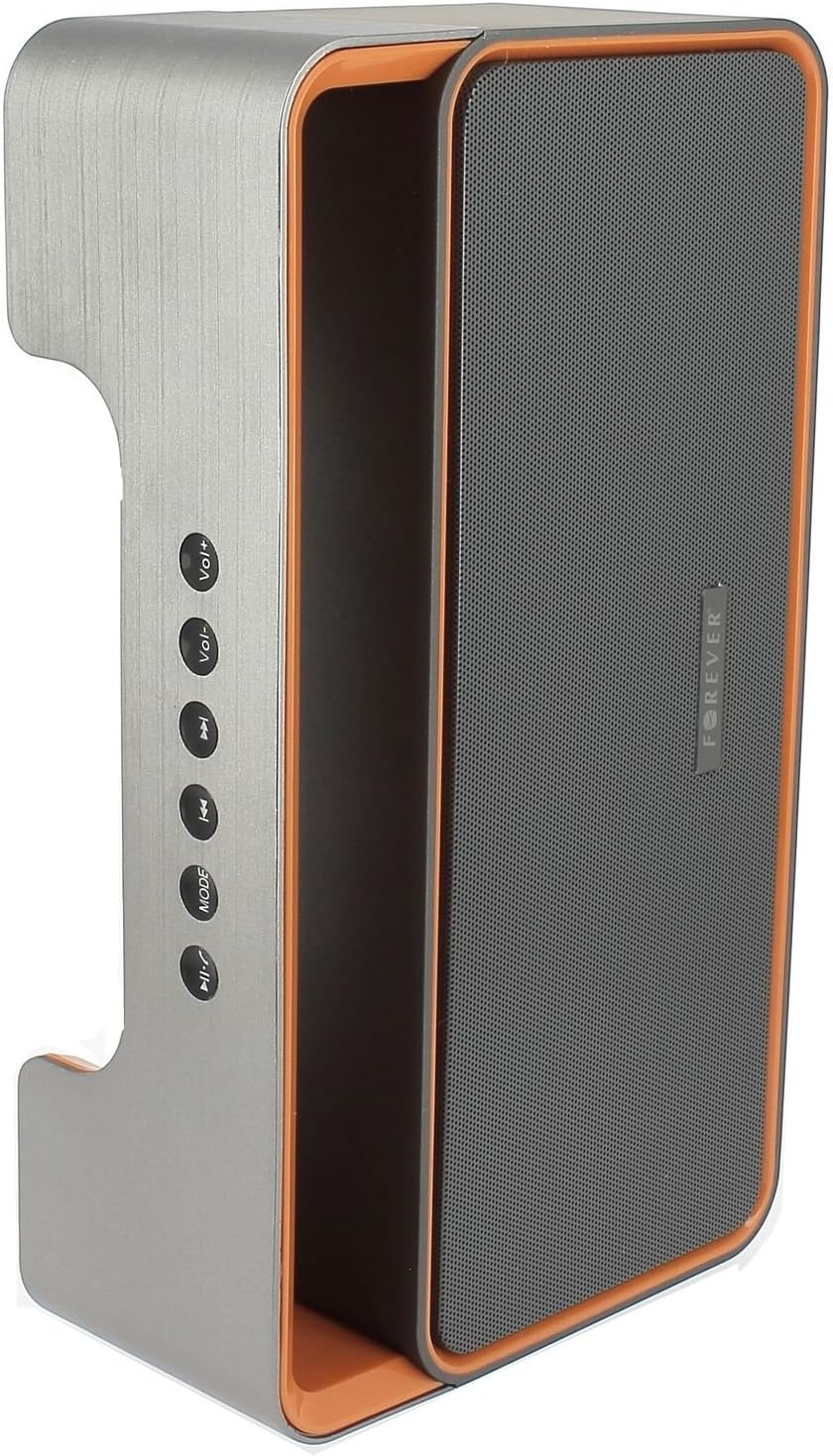
Image 3.1: Side panel with control buttons.
- Vol+ / Vol-: Наладзіць гучнасць.
- Папярэдні трэк / Наступны трэк: Navigate between tracks in playback modes or stations in FM mode.
- РЭЖЫМ: Switch between Bluetooth, FM Radio, USB, SD Card, and AUX modes.
- Прайграванне/Паўза: Play or pause audio. Answer or end calls.
Парты і раздымы:

Image 3.2: Rear panel with ports and power switch.
- AUX ўваходДля падлучэння знешніх аўдыёпрылад праз кабель 3.5 мм.
- Слот для карты Micro SD: For playing music from a Micro SD card.
- Порт USB: For playing music from a USB flash drive.
- Порт для зарадкі Micro USB: Для зарадкі ўбудаванай батарэі дынаміка.
- Пераключальнік ON/OFF: To power the speaker on or off.
4. Настройка
4.1 Зарадка дынаміка
- Connect the small end of the USB charging cable to the Micro USB port on the back of the speaker.
- Падключыце большы канец USB-кабеля да адаптара харчавання USB (не ўваходзіць у камплект) або да USB-порта кампутара.
- The charging indicator light will illuminate (color may vary) to show that the speaker is charging.
- Пасля поўнай зарадкі індыкатар зменіць колер або выключыцца. Адключыце зарадны кабель.
Note: For first-time use, fully charge the speaker for approximately 3-4 hours.
4.2 Уключэнне/выключэнне
- To power on, slide the ON/OFF switch on the rear panel to the 'ON' position. You will hear an audible prompt.
- Каб выключыць харчаванне, перасуньце перамыкач ON/OFF у становішча «OFF».
5. Інструкцыя па эксплуатацыі
5.1 Выбар рэжыму
Націсніце РЭЖЫМ button repeatedly to cycle through the available modes: Bluetooth, FM Radio, USB, SD Card, and AUX.
5.2 Спалучэнне па Bluetooth
- Уключыце дынамік. Ён аўтаматычна пяройдзе ў рэжым спалучэння Bluetooth, пра што будзе сведчыць мігценне святлодыёда і гукавое паведамленне.
- Уключыце Bluetooth на мабільнай прыладзе (смартфоне, планшэце, камп'ютары).
- Пошук available Bluetooth devices. You should find "BS600" in the list.
- Select "BS600" to connect. Once paired, the LED light will stop flashing, and you will hear a confirmation sound.
- Цяпер вы можаце прайграваць аўдыё з прылады праз дынамік.
5.3 Рэжым FM-радыё
- Switch the speaker to FM Radio mode using the РЭЖЫМ кнопка.
- Націсніце і ўтрымлівайце Прайграванне/Паўза button to initiate an automatic scan for FM stations. The speaker will save all found stations.
- Выкарыстоўвайце Папярэдні трэк і Наступны трэк кнопкі для навігацыі паміж захаванымі станцыямі.
5.4 Прайграванне з USB/SD-карты
- Insert a USB flash drive or a Micro SD card (with MP3 audio files) into the corresponding port on the rear panel.
- The speaker will automatically switch to USB or SD card mode and begin playing music. If not, press the РЭЖЫМ кнопку, каб выбраць патрэбны рэжым.
- Выкарыстоўвайце Папярэдні трэк, Наступны трэк, і Прайграванне/Паўза кнопкі для кіравання прайграваннем.
5.5 Рэжым AUX
- Connect one end of the 3.5mm audio cable to the AUX input port on the speaker.
- Connect the other end of the cable to the headphone jack of your external audio device.
- Пераключыце дынамік у рэжым AUX з дапамогай РЭЖЫМ кнопка.
- Кіруйце прайграваннем з знешняй аўдыёпрылады.
5.6 Call Handling (Bluetooth Mode)
- Адказаць на званок: When a call comes in during Bluetooth mode, press the Прайграванне/Паўза адзін раз, каб адказаць.
- Завяршыць выклік: During a call, press the Прайграванне/Паўза адзін раз націсніце кнопку, каб завяршыць выклік.
- Адхіліць выклік: When a call comes in, press and hold the Прайграванне/Паўза кнопку, каб адхіліць выклік.
5.7 Рэгулятар гучнасці
Націсніце Vol+ кнопка для павелічэння гучнасці і аб'ём- кнопка для памяншэння гучнасці.
6. Тэхнічнае абслугоўванне
6.1 Ачыстка
- Перад чысткай пераканайцеся, што дынамік выключаны і адключаны ад любой крыніцы сілкавання.
- Use a soft, dry, lint-free cloth to wipe the exterior surfaces of the speaker.
- Не выкарыстоўвайце абразіўныя ачышчальнікі, растваральнікі або хімічныя спрэі, бо яны могуць пашкодзіць пакрыццё або ўнутраныя кампаненты.
6.2 Захоўванне
- Калі дынамік не выкарыстоўваецца працяглы час, захоўвайце яго ў прахалодным, сухім месцы, удалечыні ад прамых сонечных прамянёў і экстрэмальных тэмператур.
- It is recommended to charge the battery at least once every three months to maintain its lifespan.
7. Выпраўленне непаладак
| праблема | Магчымая прычына | Рашэнне |
|---|---|---|
| Дынамік не ўключаецца. | Акумулятар разраджаны. | Зарадзіце дынамік з дапамогай USB-кабеля. |
| Няма гуку. | Volume is too low; incorrect mode selected; device not connected. | Increase volume; press MODE button to select correct source; ensure Bluetooth/AUX connection is active. |
| Збой спалучэння Bluetooth. | Speaker not in pairing mode; device too far; Bluetooth not enabled on source. | Ensure speaker is in Bluetooth mode and flashing; move device closer; enable Bluetooth on your device. |
| Слабы прыём FM-радыё. | Слабы сігнал; перашкоды ад навакольнага асяроддзя. | Перанясіце дынамік у месца з лепшым прыёмам. |
| USB/SD card not playing. | Няправільна file format; card/drive not inserted correctly; corrupted media. | Забяспечыць files are MP3 format; reinsert media; try a different USB drive/SD card. |
8. Тэхнічныя характарыстыкі
| Назва мадэлі | BS600 |
| Марка | Назаўжды |
| Тэхналогія падлучэння | Bluetooth, дапаможны, USB |
| Тып дынаміка | Партатыўная калонка Bluetooth |
| Асаблівасці | FM Radio, USB Reader, SD Card Reader |
| Максімальная выхадная магутнасць | 10 Вт (2 х 5 Вт) |
| Рэжым выхаду гуку | Мона |
| Крыніца харчавання | Працуе ад батарэі (літый-іённая) |
| Метад кантролю | Тактыльныя кнопкі |
| Памеры (прыбл.) | Height: 13 cm, Width: 24 cm |
| Колер | Grey / Orange |
| Воданепранікальны | няма |
9. Інфармацыя аб гарантыі
The Forever BS600 Bluetooth Speaker comes with a limited warranty. Please refer to the warranty card included with your purchase or contact your retailer for specific terms and conditions. This warranty typically covers manufacturing defects but does not cover damage caused by misuse, accidents, unauthorized modifications, or normal wear and tear.
10. Падтрымка
If you encounter any issues not covered in the troubleshooting section or require further assistance, please contact the retailer where you purchased the product or visit the official Forever website for support resources. Please have your product model (BS600) and purchase details ready when seeking support.